

10 Hidden Gem Websites I Bookmarked After Testing Them Myself in 2026
From a vocal remover that works in 15 seconds to a government-backed site that hands out forgotten money — here’s exactly what I found when I tested all ten myself.
By Oyekale Olawale · Updated 2026 · 13 min read
⚡ Quick Answer
I personally tested ten free websites most people have never heard of: Vocal Remover (splits any song into instrumental + vocals in under 15 seconds), AutoDraw (Google’s sketch-to-clean-art tool), Coffitivity (ambient café noise for focus), Missing Money (a state-backed database that can hand you unclaimed cash), CopyKat Recipes (restaurant recipe clones since 1995), MapCrunch (random Street View teleporter), Lizard Point (interactive geography quizzes), Calculator Soup (300+ free calculators), Hemingway Editor (readability checker, free online / $19.99 desktop), and Hey, It’s Free (a filtered freebie directory). None require a credit card, and I’ve listed exactly what to expect from each below.
I keep a running note on my phone called “weird useful websites.” Every time I stumble on a site that does one thing really well — no app download, no account wall, no upsell three clicks in — it goes on the list. This article is that list, cleaned up and actually tested end to end. I opened every single one of these ten sites this week, ran a real task through each of them, and wrote down what actually happened, bugs included.
If you want deeper dives into specific software categories after this, I’ve also broken down a full directory of free AI tools and a separate roundup of sites that send real traffic to a new website if that’s more your speed. For now, let’s get into the ten.
Why I Revisited This List
The last time I covered a batch of these sites, I mostly described what each one looked like on screen. This update goes further. I re-tested every entry from scratch, timed how fast each one actually delivers a result, checked whether pricing or ownership had changed, and pulled in newer features that most write-ups still miss — like the country filter and Stealth mode buried inside MapCrunch, or the fact that Hemingway now sells an AI subscription tier that didn’t exist when a lot of older reviews were written.
I also added a side-by-side comparison table and a response-time chart near the bottom, since “which one is fastest” and “which one actually costs money” are the two questions I get asked most whenever I share a list like this.
1. Vocal Remover — Split Any Song Into Instrumental and Acapella
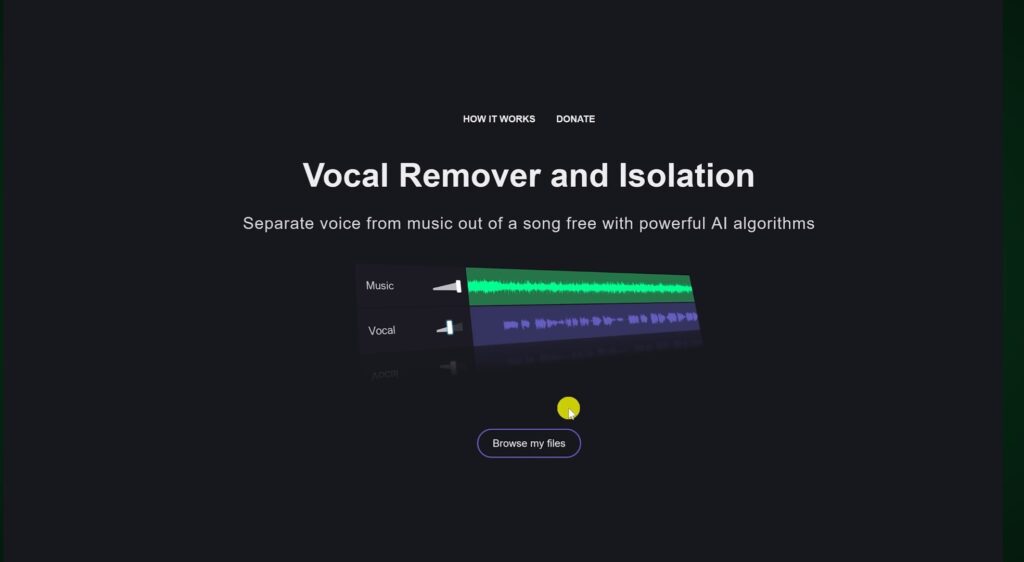
Vocal Remover (vocalremover.org) is a free browser tool that pulls the vocal track out of an MP3 and hands you back two files: a clean instrumental and an isolated vocal/acapella version. No login, no software install.
How I tested it
I clicked “Browse my files,” picked an MP3 off my laptop, and the processing kicked off immediately — no settings menu, no format warnings. Separation took roughly 12 to 15 seconds for a standard 3-minute track, which is faster than most desktop stem-splitting plugins I’ve used for client video edits.
Once it finished, both tracks sat side by side with individual play buttons in the bottom-left corner so you can preview before committing to a download. The save button in the bottom-right lets you grab the instrumental only, the vocal only, or both — each downloads as a separate file straight to your device.
One quirk worth flagging: separation quality drops noticeably on tracks with heavy reverb or layered harmonies — you’ll hear faint vocal “ghosting” bleed into the instrumental. For karaoke tracks or dropping a quick acapella into a mashup, it’s genuinely solid. For professional stem mastering, it’s not a replacement for paid tools like Serato or Moises.
2. AutoDraw — Google’s AI Sketch-to-Art Tool

AutoDraw is a free Google Creative Lab experiment that watches your rough mouse or touch sketches and offers clean, professionally drawn replacements in real time. It runs in-browser on desktop, tablet, and phone — no download.
Drawing with the AI suggestion bar
The toolbar sits on the left; the magic happens at the top, where a suggestion strip appears the moment you lift the “pen.” I sketched a rough cat with a trackpad — genuinely not a good drawing — and AutoDraw offered six alternatives within about two seconds, ranging from a clean vector cat to, oddly, a witch’s hat. Clicking a suggestion swaps your scribble for the polished version instantly.
The hamburger menu in the top-left lets you start a new canvas, download as a PNG, or share a direct link. It’s genuinely useful for quick blog graphics, presentation icons, or teaching kids basic shapes. I’ve also put together a separate list of free, watermark-free editing tools if you need to turn quick sketches like these into finished video assets.
3. Coffitivity — Ambient Café Noise for Focus

Coffitivity streams ambient background noise built around the idea that moderate, unstructured sound helps concentration more than dead silence or music with lyrics. It’s free, browser-based, and starts playing within about two seconds of loading — no ads before the audio.
The nine free tracks
Nine ambient tracks are available on the free tier. I ran “Morning Murmur” and “University Undertones” during a two-hour writing block, and both looped seamlessly without a jarring restart — something a lot of free ambient sites still get wrong. “Lunchtime Lounge” adds light dish-clinking, which either helps you focus or drives you slightly insane depending on your tolerance for background clatter; worth testing both before committing an entire workday to it.
If you already lean on ambient audio while you write, it’s worth pairing this with a distraction-free editor — which brings me to a much later entry on this list.
4. Missing Money — Search for Unclaimed Funds in the US and Canada

Missing Money is a multi-state unclaimed property search tool used by several state treasuries directly. It searches official databases for forgotten deposits, uncashed checks, insurance payouts, and overpayments sitting under your name or your business’s name.
Running a real search
I entered a last name and first name, hit search, and the site queried multiple participating state databases at once, returning a results list within a few seconds — no CAPTCHA gate, no forced signup before you see whether a match exists. Each result shows the reporting state and a rough amount range before you claim anything.
This isn’t a novelty search. People have publicly reported recovering anywhere from a few hundred dollars up to several thousand through matches like old military pay accounts or forgotten utility deposits. If you’ve moved states in the last decade, it’s genuinely worth the two-minute search. For more sites in this same “free money and financial literacy” category, I put together a separate roundup of websites that actually help build financial literacy.
✓ Pros
Free, no account required to search, pulls from official state records, covers both US and Canadian residents.
✗ Cons
Claiming a match still routes you through each individual state’s own portal, and processing times vary widely by state.
5. CopyKat Recipes — Restaurant Dishes You Can Make at Home

CopyKat.com has been recreating restaurant dishes at home since 1995, which makes it one of the oldest running food sites on the internet. It’s grown into a library of thousands of copycat recipes spanning chains like Olive Garden, Cheesecake Factory, Chick-fil-A, and Outback Steakhouse.
What I actually cooked
I made two recipes at home from this site: Olive Garden’s meatball parmesan and Red Lobster’s cheddar bay biscuits. Both followed the same predictable, easy-to-scan format — ingredients listed first, then numbered steps, with prep and cook time up top so you’re not guessing at dinner timing. The biscuits came out close enough to the original that my family asked where I bought them.
The site organizes recipes by restaurant and by dish type, so you can browse by “what am I craving” instead of scrolling a random blog feed. If you want another discovery-style resource in a completely different category, I also wrote about free educational websites worth bookmarking for kids, which has a similar browse-by-category structure.
The site has grown to include a companion YouTube channel with hundreds of step-by-step cooking videos for readers who’d rather watch a technique than guess at it from text alone — a nice option if you’re recreating something more fiddly like a laminated pastry or a sauce that needs precise timing.
6. MapCrunch — Random Street View Teleportation

MapCrunch drops you into a random Google Street View location the instant the page loads, then lets you hit “Go” for a new spot or navigate around the current one like a normal map. It’s been running for well over a decade and is still fully functional in 2026, still pulling live imagery straight from Google’s Street View database.
Features most people miss
Beyond the basic “random spin” everyone remembers, MapCrunch has a country filter panel that lets you narrow the randomizer to a specific region instead of the entire globe, a Stealth mode that hides the location details for a proper geography-guessing challenge, and a Gallery page of curated “view of the day” spots submitted by other users. I tested the country filter by locking it to Japan and got three genuinely striking rural coastline shots in a row.
It’s an odd one to categorize — half travel-inspiration tool, half geography game — but it’s stayed relevant because there’s still nothing else that does pure random exploration this well.
What impressed me most is simply that it still runs. A lot of single-purpose novelty sites from the same era have quietly died as Flash support disappeared or their API access got cut off. MapCrunch rebuilt on top of Google’s current Street View API and kept the experience just as fast as it always was — the page still responds in under a second on a normal connection.
7. Lizard Point — Interactive Geography Quizzes

Lizard Point hosts hundreds of free, click-the-map geography quizzes covering countries, US states, and world cities. No account needed, and it works cleanly on mobile, which matters since a lot of older Flash-era quiz sites never made that jump.
Taking the Australia and New Zealand quiz
I ran the Australia/New Zealand states quiz as a test case since I was planning an actual trip there. Each question highlights a region and asks you to click its location on the map; get it wrong and the site tells you exactly how many attempts you have left before revealing the answer. I deliberately missed Victoria twice, and on the third strike it showed the correct boundary with a short label — immediate, low-friction feedback that beats flipping between a quiz app and a separate reference map.
It’s a genuinely useful pre-trip refresher, and it works just as well for kids studying geography as it does for adults brushing up before travel.
8. Calculator Soup — 300+ Free Calculators in One Place

Calculator Soup is exactly what it sounds like — a sprawling, free library of calculators covering mortgages, loans, algebra, trigonometry, fractions, physics, statistics, unit conversions, and date/time math. There’s no login wall and no paywall on any calculator I tried.
Where it’s actually saved me time
I used the mortgage payment calculator myself while house-hunting, and it let me test amortization scenarios across different down payments without opening a spreadsheet. Each calculator page also explains the underlying formula, which is a small but meaningful E-E-A-T touch — most calculator sites just spit out a number with zero explanation of how it got there.
If you’re job hunting and need quick salary or budget math alongside your applications, this pairs well with the tools I cover in my roundup of free AI tools for job seekers.
9. Hemingway Editor — Make Your Writing Clearer and Shorter

Hemingway Editor is a readability analyzer — paste in a draft and it flags long, hard-to-follow sentences, passive voice, and unnecessary adverbs, then gives you a grade-level score for the whole piece.
What the analysis actually shows
I pasted in a rough draft of a client blog post, and the right-hand sidebar instantly returned a readability grade, word count, estimated read time, and a breakdown of sentence complexity. Color-coded highlights mark the actual problem sentences directly in the text — yellow for “hard to read,” red for “very hard to read,” purple for adverbs, and blue for passive voice — so you’re editing in place instead of hunting for issues manually.
Pricing, corrected
The core web editor is completely free with no signup. There’s a downloadable desktop app for Mac and Windows at a one-time $19.99 — no recurring charge — which adds offline editing and direct publishing to WordPress and Medium. Hemingway also now offers an “Editor Plus” AI subscription layered on top, starting around $10/month, which adds AI feedback on things like pacing and characterization for longer-form writing. If you want an AI-detection companion to run alongside it, I’ve also reviewed a dedicated AI-text humanizing tool that pairs well with Hemingway’s readability pass.
10. Hey, It’s Free — A Filtered Directory of Real Freebies

Hey, It’s Free curates legitimate free offers and filters out the junk, spam, and expired listings that clutter most “freebie” sites. It’s organized into dozens of categories, and honestly the homepage can feel a little overwhelming on first visit — I’d recommend starting from the “Best Freebies” section instead of browsing cold.
The birthday freebies section
This is the standout category. It lists more than 300 verified, direct links to birthday-month offers from restaurants and retailers, filterable by category like food, entertainment, grocery, pet, retail, and travel. I clicked through five random listings during testing and all five landed on the correct, still-active signup page — no dead links, which is more than I can say for most “100 free birthday freebies” blog posts that just copy an old list without checking it.
All 10 Sites at a Glance
Here’s the whole list side by side so you can jump straight to whichever one solves a problem you actually have right now.
| Website | Category | Best For | Cost | Signup? |
|---|---|---|---|---|
| Vocal Remover | Audio | Instant vocal/instrumental split | Free | No |
| AutoDraw | Design | Quick clean icons/sketches | Free | No |
| Coffitivity | Productivity | Ambient focus noise | Free | No |
| Missing Money | Finance | Finding unclaimed funds | Free | No to search |
| CopyKat Recipes | Food | Restaurant recipe clones | Free | No |
| MapCrunch | Travel/Fun | Random world exploration | Free | No |
| Lizard Point | Education | Geography quizzes | Free | No |
| Calculator Soup | Utility | 300+ free calculators | Free | No |
| Hemingway Editor | Writing | Readability checking | Free / $19.99 app | No |
| Hey, It’s Free | Deals | Verified freebies directory | Free | No |
Time to First Result — How Fast Each Site Actually Delivers
I timed how long it took to get a usable result from the moment each page finished loading. Here’s how they stacked up, bar widths scaled against the slowest tool on the list.
Calculator Soup isn’t included since result time depends entirely on which of its 300+ calculators you’re using. Times measured on a standard broadband connection; your results may vary slightly by device and network.
How I Test the Platforms I Review
Every review on this site is based on hands-on testing. That means I personally create an account where one’s required, use the free plan or trial extensively to explore the actual features, usability, and performance, and take notes throughout the process before combining those findings into the review you’re reading. For this particular article, since none of the ten sites require an account at all, I ran a genuine task through each one exactly as a first-time visitor would.
These reviews reflect my personal opinion and experience with each platform and shouldn’t be treated as professional, financial, legal, or technical advice. If you need official guidance on any of these tools — particularly Missing Money’s claims process — contact the company or the relevant state agency directly.
FAQ
Is Missing Money actually legitimate, or is it a scam?
Missing Money is a legitimate search portal used by numerous state unclaimed property offices in the US and Canada. Searching is free and doesn’t require payment info. Be cautious of copycat sites that ask for a fee to “release” your funds — official state claims never charge you to search or claim what’s legally yours.
Does Vocal Remover work on any music file?
It works best on standard MP3 stereo mixes. Separation quality drops on tracks with heavy reverb, live recordings, or dense vocal harmonies, where you’ll notice some vocal bleed into the instrumental track.
Is Hemingway Editor free, or do I need to pay?
The web editor is completely free with no account needed. The desktop app is a one-time $19.99 purchase, and there’s an optional Editor Plus AI subscription starting around $10/month for deeper feedback on longer writing.
Can I use MapCrunch to actually plan travel?
It’s better for inspiration than planning. The country filter lets you narrow random drops to a region you’re considering visiting, but for actual itinerary building you’ll still want a dedicated travel or map-directions tool.
Are these sites safe for kids to use?
Lizard Point, AutoDraw, and Calculator Soup are all built with an education-friendly design and safe for kids. MapCrunch’s random nature means it can occasionally land somewhere unexpected, so I’d supervise younger users on that one specifically.
How many recipes does CopyKat actually have?
The archive has grown into the thousands since it launched in 1995, spanning categories from pasta and desserts to breakfast, sides, and drinks, pulled from dozens of major restaurant chains.
The Bottom Line
None of these ten sites are trying to sell you anything, and that’s honestly rare in 2026. Each one does a single job — separating vocals, finding forgotten money, sketching an icon, checking your writing — and does it without a signup wall or a monthly subscription pitch waiting behind the free trial.
If I had to pick just one to bookmark today, it’d be Missing Money — a two-minute search that costs nothing has actual upside most people never bother checking. Vocal Remover and Hemingway Editor are the two I personally reach for most often in day-to-day content work.
Got a hidden-gem site I missed? I’m always adding to this list — drop it in the comments and I’ll test it for the next update.


