

Strater AI Review 2026: I Used the Free Plan for Weeks — Here’s What Actually Happens When You Upload a Video
By Oyekale Olawale · Hands-on, first-person testing · Updated 2026
Quick Answer
Strater AI (strater.app) turns YouTube videos, PDFs, and web pages into summaries, quizzes, flashcards, mind maps, and even two-person AI podcasts. The free plan gives you 1 capsule, 1 quiz, 1 flashcard set, 1 video summary, and 1 document upload per day. Summaries and podcasts worked reliably in my testing; quiz and flashcard generation threw errors on the free tier more than once. Paid plans start at $12/month (Pro) or $15/month (Unlimited), both billed monthly, with weekly and yearly options also on the pricing page.
I’ve watched enough educational YouTube videos to know the drill: 47 minutes of content, three pages of half-finished notes, and by next week I’ve forgotten where the important part even was.
So when Strater AI landed on my radar with a tagline promising to turn “any video, PDF, or web page into your personal AI tutor,” I didn’t just read the marketing page. I signed up, stayed on the free plan on purpose, and used it daily for weeks — with real lecture videos, PDFs, and articles — to see if it holds up once the novelty wears off.
This is that review. What worked, what broke, and exactly what you get on the free plan versus what Strater wants you to pay for.
What Is Strater AI?
Strater AI is a study assistant built around one job: converting passive content into active learning material. You give it a YouTube link, a PDF, or a web page, and it hands you back a summary, a quiz, flashcards, a mind map, timestamped notes, and — if you want it — an AI-generated podcast where two hosts discuss the content out loud.
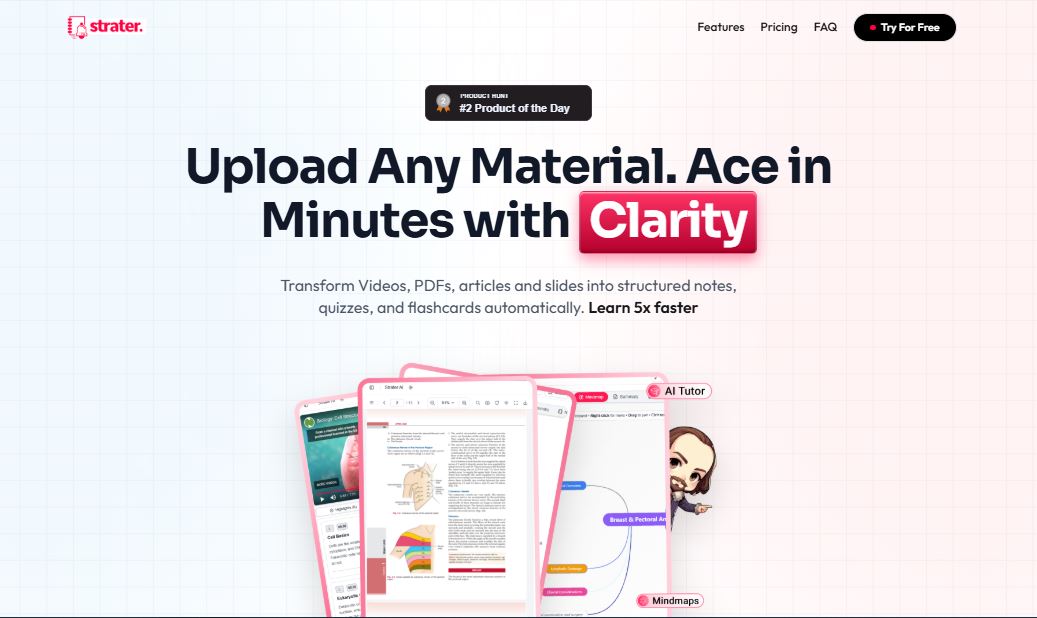
The pitch leans hard on learning science: spaced repetition for the flashcards, active recall for the quizzes, and a “Feynman-style” chat mode where you explain a concept back to the AI and it flags where your understanding breaks down. The platform’s own site claims a 1-hour video collapses into an 8-minute study guide and cites internal figures like 85% less study time and a 5x comprehension boost — numbers I couldn’t independently verify, but the compression itself is real and something I measured myself below.
One thing worth flagging up front for anyone comparing notes with older reviews: the tool has operated under both the strater.in and strater.app domains. The current live site and pricing page sit at strater.app, though some of the platform’s own metadata still references strater.in. If a link you find is dead, try swapping the domain.
How I Tested Strater AI
Signing up took under a minute. Strater lets you register with Google or GitHub, so there’s no email verification loop to sit through, and I wasn’t asked for payment details at any point during onboarding — a small thing, but it’s the difference between “try it” and “commit to it,” and Strater gets that right.
I ran every test in this review from a desktop browser across several separate sessions over a few weeks, rather than in one sitting, specifically to see whether output quality or processing speed drifted with normal day-to-day use. It didn’t. My results in week three looked the same as my results in week one, which matters more than it sounds — a lot of AI tools perform beautifully in a demo and then degrade once real usage patterns kick in.
I signed up with no credit card and stayed on the Free plan the entire time, which caps you at:
- 1 Capsule / Day
- 5 Chat Messages / Day
- 1 Quiz / Day
- 1 Flashcard Set / Day
- 1 Video Summary / Day
- 1 Document Upload / Day
- Basic Mind Maps + Basic Recommendations
I chose the free tier deliberately. Most reviews test the paid plan a company hands them for free, which tells you nothing about what an actual budget-conscious student experiences. I wanted the real, rate-limited version.

Test 1: Summarizing a YouTube Video
I copied a random YouTube link and dropped it into the app. A progress window popped up showing the video being processed in real time.


In under a minute, processing finished, and I landed on a screen with several options: chat with the content, generate a summary, listen to a podcast version, or open a quiz. That single-screen hub is genuinely one of Strater’s better UX decisions — everything the video can become lives in one place instead of being buried in separate menus.

I asked for the summary first. After answering a couple of quick setup questions about how I wanted it structured, Strater generated the summary in under 30 seconds. I’ll be honest — I liked it. It pulled out the actual structure of the argument in the video, not just a list of keywords, which is where a lot of AI summarizers fall flat.

Test 2: Quiz Generation — Where It Broke
This is the part every other Strater review glosses over. I tried generating a quiz from the same video and got an unclear error message. On my second attempt, instead of retrying the generation, Strater prompted me to upgrade to a paid plan — despite my daily quiz credit not having produced a single successful quiz yet.
That’s a real UX flaw, not a nitpick. If a generation fails on Strater’s end, charging the user’s daily credit for it and then pushing an upgrade prompt reads as a dark pattern, even if it’s unintentional. A failed output should reset the credit, not consume it.
Test 3: The AI Podcast Feature
Given the quiz hiccup, I expected the podcast generator to fail too. It didn’t. In roughly two minutes, Strater turned my ~20-minute video into a 5-minute, two-person podcast — a host and a guest discussing the material back and forth. The audio was clean and sounded professional, not robotic. I downloaded it straight to my device and listened to it on a walk, which is honestly the best use case for it: content review without a screen.

Processing time scaled with video length in my testing, which makes sense — longer source material means more script to generate and voice.
What I Measured: 20-Min Video → Output Times
Summary
~30 sec
Processing
<1 min
Podcast
~2 min
Test 4: Flashcards — Same Problem as Quizzes
My first flashcard attempt failed outright. My second attempt hit the same “upgrade to premium” wall the quiz feature did. This is the one fix I’d genuinely push Strater’s team on: give users a free retry when a generation fails server-side. Counting a failed output against a daily limit — especially on a plan that only gives you one shot per day to begin with — punishes the user for the platform’s error.
Over the following weeks I ran the same tests on blog articles and other videos, and the pattern held: summaries and podcasts were consistently solid, while quiz and flashcard generation on the free tier were the least reliable parts of the product.
Test 5: Chat With Content and Mind Maps
With five chat messages a day on the free plan, I used the “chat with content” feature sparingly, but it earned its keep. Instead of generic responses, the answers referenced specific points from the video, which tells me the AI is actually grounding its replies in the transcript rather than hallucinating a generic answer to whatever I typed. Asking it to explain a section I didn’t follow the first time worked better than rewatching that section myself.
The basic mind map generated from the same video was serviceable — it captured the main branches of the topic clearly enough to use as a quick visual recap, though it stayed fairly shallow compared to something I’d build by hand. That’s consistent with Strater gating the “advanced” mind map version behind Pro and Unlimited, so I’d treat the free version as a sketch, not a finished study asset.
Where Strater AI Still Needs to Fix Things
Beyond the quiz and flashcard credit issue, a few smaller things stood out across weeks of use. The error messaging when a generation fails is vague — it doesn’t tell you whether the problem was a server timeout, a content-parsing issue, or something about the specific source material, which makes it hard to know whether retrying later will actually help.
Source quality also matters more than the marketing suggests. Clean, well-produced lectures and clearly written articles produced summaries and quizzes I’d trust without double-checking. Rambling, poorly structured videos — background noise, long tangents, no clear thesis — sometimes came back with a summary that missed a sub-point I considered important. That’s not unique to Strater; every content-summarization AI has this weakness. But it’s worth knowing before you feed it a messy 90-minute recording and expect a perfect study guide out the other end.
Diagrams, equations, and other purely visual information don’t translate into the text-based outputs either. If a lecture leans on a whiteboard derivation or a chart, expect to still pause and look at that part yourself — Strater will tell you what was discussed around it, not what was drawn.
Pros and Cons After Weeks of Real Use
✅ What Worked
- Video summaries were accurate and well-structured
- Podcast generation never failed once
- Under a minute to process a full video
- Chat-with-content answered follow-ups well
- No credit card needed to start
❌ What Didn’t
- Quiz generation errored on the free plan
- Flashcard creation failed twice for me
- Failed outputs still consumed daily credits
- Unclear error messages, no retry option
- Free plan is genuinely 1-per-day, not “generous”
Strater AI Pricing — Free vs Pro vs Unlimited
Strater offers weekly, monthly, and yearly billing cycles. The monthly rates, confirmed directly from the pricing page, break down like this:

| Feature | Free ($0/mo) | Pro ($12/mo) | Unlimited ($15/mo) |
|---|---|---|---|
| Capsules | 1/day | 30/month | Unlimited |
| Chat Messages | 5/day | 700/month | Unlimited |
| Quizzes | 1/day | 120/month | Unlimited |
| Flashcard Sets | 1/day | 120/month | Unlimited |
| Video Summaries | 1/day | 120/month | Unlimited |
| Document Uploads | 1/day | 120/month | Unlimited |
| Mind Maps | Basic | Advanced | Advanced |
| Export to Anki/PDF | — | — | ✅ |
| Priority Support | Community only | — | ✅ |
A transparency note: Strater’s pricing page also lists weekly and yearly billing toggles, but those cycles render their exact per-period rates dynamically on the page rather than in static content, so I can’t independently confirm the weekly or yearly numbers at the time of writing. All plans, per Strater’s site, include a 14-day money-back guarantee. Check strater.app/pricing directly for the current weekly and annual rates before you commit to a cycle.
Who Should Actually Use Strater AI
If you’re a student sitting on a backlog of recorded lectures, or someone who learns primarily from YouTube and podcasts, Strater’s free plan is enough to test whether the format works for your brain — one capsule a day is a real constraint, but it’s enough to trial the summary and podcast features properly before paying anything.
If your study routine leans heavily on quizzes and flashcards specifically, I’d be cautious about relying on the free tier for those — based on my testing, that’s exactly where the reliability drops. You may need Pro just to get consistent quiz and flashcard output, not because of the daily cap, but because the free tier’s error handling around those two features needs work.
If your source material is heavy on diagrams, equations, or visual-only content, expect the AI-generated notes to miss nuance — text-based summarization tools generally struggle here, and Strater is no exception. For that kind of material, a tool built specifically around document annotation, like Anara AI, might complement Strater rather than replace it.
Strater AI vs Other AI Study Tools
What separates Strater from single-purpose tools is the breadth: summaries, quizzes, flashcards, mind maps, and podcast generation under one roof, instead of stitching together a transcription tool, a flashcard app, and a note-taker. If you’re already using a dictation or writing assistant like Wispr Flow for capturing your own thoughts, Strater fits naturally on the other end of the workflow — turning source material into study assets rather than turning your speech into text.
For a broader look at where AI-assisted learning tools are heading and how fast adoption is moving in classrooms, our breakdown of how AI usage is growing among students and teachers is worth reading alongside this review — it puts Strater’s approach in context against the wider shift toward AI-first studying.
It’s also worth being honest about what Strater isn’t. It doesn’t replace deep reading or critical thinking — you still have to sit with hard material, wrestle with it, and apply it yourself. What it replaces is the manual, mechanical part of studying: pausing a video every 30 seconds to write something down, or building flashcards one at a time by hand. If you’re weighing several AI academic tools against each other for a broader research or writing workload rather than just video study, our roundup of the best AI tools for academia and research covers where each one specializes.
FAQ
Is Strater AI free to use?
Yes. The free plan needs no credit card and includes one capsule, one quiz, one flashcard set, one video summary, and one document upload per day, plus five chat messages daily.
Does Strater AI actually work on real lectures, not just marketing demos?
In my testing across several weeks, summaries and podcast generation worked consistently on real lecture and article content. Quiz and flashcard generation were noticeably less reliable on the free plan.
How much does Strater AI Pro cost?
Pro is $12/month billed monthly, with 30 capsules, 700 chat messages, and 120 each of quizzes, flashcard sets, video summaries, and document uploads per month.
What’s the difference between Pro and Unlimited?
Unlimited ($15/month) removes all monthly caps, adds priority support, PDF/Anki export, and advanced analytics — Pro keeps generous but capped monthly limits.
Can Strater AI create a podcast from a video?
Yes, and it’s the most reliable feature I tested — a roughly 20-minute video became a 5-minute, two-host podcast in about two minutes, downloadable to your device.
Do I need a credit card to try Strater AI?
No. Sign-up is via Google or GitHub and doesn’t ask for payment details unless you actively choose to upgrade to Pro or Unlimited.
Is Strater AI the same as Strater.in?
Yes. The product has been referenced under both the strater.in and strater.app domains; strater.app is the live site and pricing page as of this review.
The Bottom Line
Strater AI’s summaries and podcast feature genuinely delivered on the “turn passive content into active learning” promise, and both were reliable across weeks of daily use on the free plan. The quiz and flashcard side of the product still has real bugs to fix — specifically around failed generations quietly eating a user’s one daily credit instead of offering a retry.
If you mainly want fast summaries, timestamped notes, and a way to review content passively while doing something else, Strater AI is worth trying today, free, no card required. If quizzes and flashcards are your main study method, go in expecting to hit friction on the free tier — and budget for Pro if the format clicks for you.
You Might Also Want to Check Out…
- Class Central Review — for finding free courses to feed into Strater
- Best AI Tools for Academia and Research
- Anara AI Review — better for diagram-heavy PDFs
- Guidde Review — turning your own work into documentation
- Wispr Flow Review
- Popular Websites for Children’s Education
- Free AI Tools Hub


