
Abacus AI Review: I Actually Tested ChatLLM, the Agent, and SuperComputer
Here’s what surprised me, what annoyed me, and whether the $10-a-month bundle is actually worth it in 2026.
By Oyekale Olawale
Quick Answer
Abacus AI is not free. The core plan, ChatLLM Teams, runs $7 for your first month, then $10/month per seat, and it bundles chat access to 100+ models (GPT-5.6, Claude Sonnet 5 and Opus 5, Gemini 3.1 Pro, Grok 4.5), the Abacus AI Agent for building apps and running research, and Abacus AI SuperComputer for always-on cloud compute — all in one subscription. Heavier tasks like video generation or long agent runs draw from a separate credit pool. If you’re comparing it to paying separately for ChatGPT Plus ($20), Claude Pro ($20), and Midjourney, Abacus AI is genuinely cheaper — but the credit system takes some getting used to.
What Does Abacus.AI Do?
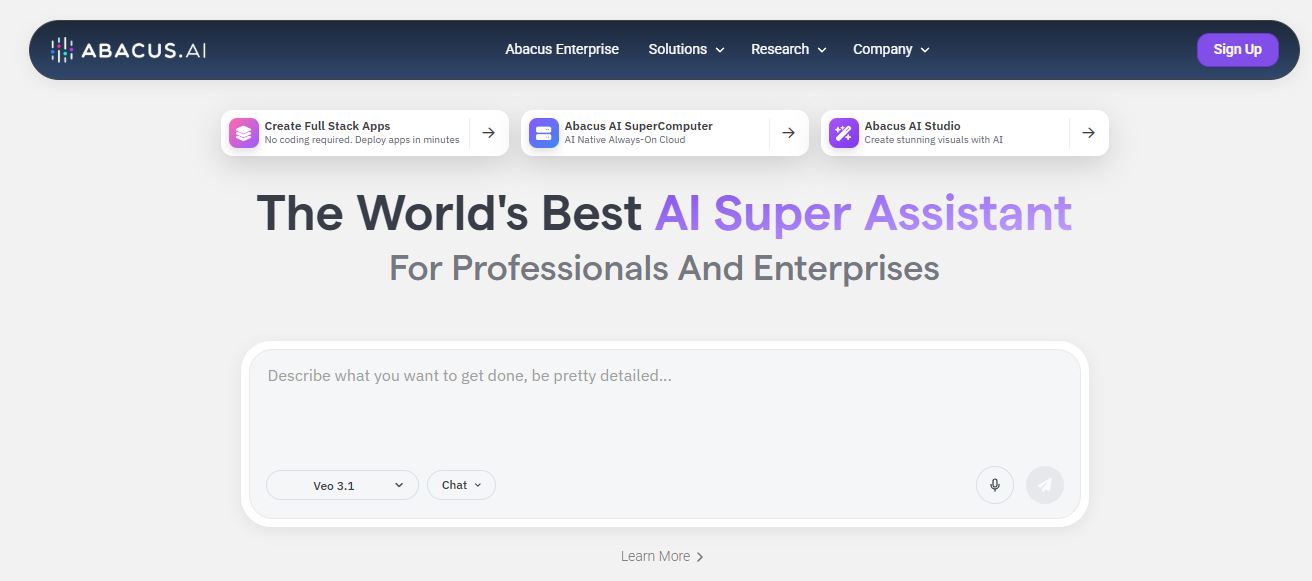
Abacus AI is a cloud AI platform built by Bindu Reddy, Arvind Sundararajan, and Siddartha Naidu — three engineers who came out of Google, Amazon, and Uber. It started in 2019 as a structured machine-learning company (forecasting, anomaly detection, personalization for enterprises), and that DNA is still there under “Abacus.AI Enterprise.” But the product most people mean when they say “Abacus AI” today is ChatLLM, the consumer-and-team layer that wraps chat, an autonomous agent, and cloud compute into one subscription.
In practice, that means one login gets you a chat interface with dozens of frontier models, an agent that can actually build and deploy things instead of just describing how, and a cloud server you can SSH into. It’s less “AI chatbot” and more “AI operating system,” which is exactly how KDnuggets framed it in their May 2026 breakdown — and after a few weeks in the platform, I think that’s the fairest description.
Quick Overview
| Detail | Info |
| Founded | 2019, by ex-Google/Amazon/Uber engineers |
| Core layers | ChatLLM (chat), Abacus AI Agent (execution), SuperComputer (cloud compute), Claw (always-on agent) |
| Pricing | $7 first month, then $10/month per seat + usage credits |
| Best for | Founders, developers, analysts, content and growth teams |
| Not ideal for | Casual users who just want a simple chatbot |
Who I Am and How I Tested Abacus AI
I recently spent time testing Abacus AI to see whether it deserves the attention it’s been getting. I’ve reviewed dozens of AI tools on Websites2Know, and I’ve noticed a pattern: most platforms promise to make AI accessible without an engineering team behind you. Abacus AI makes the same promise, so I wanted to see how it holds up in practice, not in marketing copy.
My name is Oyekale Olawale, and my testing process is simple: I sign up with a real account, run the tool through tasks I’d actually give a client, and note every friction point — not just the highlight reel. For Abacus AI, that meant building a small app end-to-end with the Agent, running a research task, poking at the SuperComputer’s SSH access, and tracking what the credit meter did while I worked.
A few specific things I ran into: the credit system is genuinely hard to predict before you’ve used it a few times — a multi-step Agent run can eat through credits faster than the task complexity suggests, which lines up with what Deeper Insights flagged as an “opaque” credit system. I also had one Agent task stall mid-research and need a manual nudge to continue, and I noticed the web-search tool inside an Agent workflow occasionally pulled a stale or slightly off-topic source without flagging it — a small but real accuracy gap worth knowing about before you hand it something time-sensitive. None of this makes the platform unusable, but if you go in expecting flawless one-shot automation, you’ll be disappointed.
What Is Abacus AI SuperComputer
Abacus AI SuperComputer is an always-on cloud server bundled into your ChatLLM subscription. Instead of spinning up AWS yourself, you get a persistent machine with database and cloud storage access, SSH access from your local terminal, GitHub integration, and the ability to host apps and APIs publicly with one click. It’s aimed at people who want to build and deploy without becoming a DevOps person overnight.

Concretely, SuperComputer lets you host open-source LLMs and APIs on dedicated infrastructure, run always-on agents like Claw or Hermes with one click, connect S3 storage, and build real-time apps with WebSocket support — all from inside the same account you use for chat. It also includes the Abacus AI CLI Agent, so if you’re the type who’d rather type commands than click through a UI, you’re covered. For developers already comfortable with vibe coding tools, SuperComputer feels like the missing “where does this actually run” piece.
Abacus AI Agent
This is the part of Abacus AI that actually changed how I think about the platform. Abacus AI Agent (previously known as DeepAgent, and a lot of longtime users still call it that) is a general-purpose agent built to finish multi-step tasks, not just explain them. Ask it to research competitors, and instead of a bulleted outline, you get a structured report with sourced findings. Ask it to build a landing page with Stripe checkout, and it builds, hosts, and gives you a live link.

During testing, I had it build a small CRM prototype from a plain-English prompt, and separately asked it to review the last several pull requests on a public repo for bugs and missing tests. Both ran without me writing a line of code. It also handles Google Workspace automation, invoice data extraction, QA testing of web flows, and connecting to tools like Jira, Slack, and Gmail. If you’ve used Claude Code for agentic development work, the “give it a task, review the output” workflow will feel familiar — Abacus just widens the scope past coding into research, documents, and business ops.
There’s also Abacus Claw, an always-on version of the agent that lives inside WhatsApp, Telegram, or Slack and keeps memory across sessions instead of resetting every conversation. It’s cloud-hosted OpenClaw under the hood, which is worth knowing if you’ve looked at OpenClaw’s open-source use cases before — Claw gives you that persistence without self-hosting the infrastructure.
ChatLLM: One Interface, 100+ Models
ChatLLM is what used to be marketed as “LLM Studio” in Abacus’s earlier positioning, and it’s now the front door to the whole platform. Instead of picking one model and living with its quirks, you get access to GPT-5.6 (Sol, Terra, and Luna variants), Claude Sonnet 5 and Opus 5, Gemini 3.1 Pro, Grok 4.5, Kimi K3, DeepSeek v4, and image/video models like Nano Banana Pro, Seedance 2.0, and Kling 3.0 — all from one chat window, with routing that picks a sensible model if you don’t specify one.

Beyond raw chat, ChatLLM handles document and PDF analysis, CSV/Excel work with generated charts, web search, code playgrounds, and a “humanize text” feature for adjusting AI-sounding drafts. For teams, it supports shared projects and custom chatbots built on your own documents — useful if you’re comparing it against dedicated tools like Claude for coding work or general assistants covered in our ChatGPT alternatives roundup.
AutoML and Structured ML (The Enterprise Roots)
This is the original Abacus AI, and it’s still there under “Abacus.AI Enterprise” for companies that need structured machine learning rather than chat and agents. AutoML lets you upload a dataset and generate forecasting, classification, or recommendation models without hand-coding a pipeline — you get demand forecasting, churn prediction, and anomaly detection out of the box.

This side of the platform requires more comfort with ML terminology than ChatLLM does — you’re working with datasets, training runs, and model evaluation metrics, not plain-English prompts. It’s built for data science teams and enterprises with real structured data, not solo creators experimenting on a Tuesday afternoon.
MLOps Automation
Once a model is built, Abacus AI’s MLOps layer handles deployment, monitoring, and scaling automatically — real-time pipelines, model performance tracking, RAG infrastructure, and LLM evaluation tooling. For organizations without a dedicated ML infrastructure team, this removes a genuinely painful part of the machine-learning lifecycle: the gap between “model works in a notebook” and “model is live and monitored in production.”

Pre-Built AI Solutions
Rather than starting every project from a blank canvas, Abacus AI ships ready-made templates for common business problems: lead scoring, personalized promotions, fraud and account-takeover detection, sentiment analysis, and NLP-powered search. On the ChatLLM/Agent side, this shows up as pre-built agent workflows — invoice extraction, resume shortlisting, equity research, QA testing — that you can adapt with a prompt instead of building from scratch.

Is Abacus.AI Free or Paid?
Paid, with a discounted entry point. There’s no permanent free plan for the full ChatLLM Teams experience — Abacus’s own billing FAQ confirms ChatLLM Teams doesn’t offer a free trial. What you get instead is a heavily discounted first month at $7, then $10/month per seat going forward, which covers model access, the Agent, SuperComputer, and CLI+CoWork together. Heavier actions — video generation, long agent runs, large image batches — draw from a separate usage-based credit pool on top of the subscription.

| Plan | Price | What’s Included |
| ChatLLM Teams | $7 first month, then $10/mo per seat | 100+ models, Vibe Code, Agent, CLI + CoWork, SuperComputer |
| Enterprise | Custom | Dedicated infra, Structured ML, security/compliance, SLA |
Price Comparison: Abacus AI vs. Paying Separately
If you’re currently juggling two or more of these subscriptions, Abacus AI at $10/month can genuinely replace a chunk of that spend — the trade-off is the credit meter on heavier tasks, which none of the flat-fee tools above make you think about.
Is ChatLLM Free?
No. ChatLLM is the name of the chat interface inside ChatLLM Teams, and it’s gated behind the same $7-then-$10/month subscription as the rest of the platform. Abacus does offer limited entry points to sample the product (you’ll see “free tier” links floating around their marketing pages), but there’s no standing free version of ChatLLM with full model access. If you want a genuinely free way to test similar multi-model chat, it’s worth comparing against options in our ChatGPT alternatives guide before committing to a subscription.
Is Abacus.AI Better Than ChatGPT?
It depends on what “better” means to you. ChatGPT is a tighter, more polished single-model chat experience — great for conversation, writing, and general reasoning. Abacus AI isn’t really competing on that axis; it’s competing on breadth. With Abacus, you get access to GPT-5.6 and Claude and Gemini and an agent that deploys real apps and a cloud server, all in one place. ChatGPT doesn’t do any of the agent-execution or infrastructure pieces natively.
| Feature | Abacus AI | ChatGPT Plus |
| Monthly price | $10 (after $7 first month) | $20 |
| Multi-model access | ✅ 100+ models | ❌ OpenAI models only |
| Autonomous agent (app building) | ✅ Abacus AI Agent | Limited (Tasks/Canvas only) |
| Always-on cloud server | ✅ SuperComputer | ❌ |
| Conversation polish | Good | Excellent |
| Learning curve | Moderate | Low |
My honest read: if you only need simple chat, ChatGPT still feels more refined out of the box. If you want AI to actually finish tasks — build the app, deploy it, run the research, write the report — Abacus AI does more with the same subscription than ChatGPT does at twice the price.
Pros and Cons
✔ Pros
✔ 100+ models in one $10/mo subscription
✔ Abacus AI Agent actually deploys, not just describes
✔ SuperComputer bundles real cloud infrastructure
✔ Cheaper than stacking ChatGPT + Claude + Midjourney
✔ Solid enterprise-grade forecasting and MLOps for structured data
✘ Cons
✘ Credit usage is hard to predict on heavy agent tasks
✘ No permanent free plan
✘ Learning curve if you want to use the full platform
✘ Occasional stale sources in agent web-search runs
✘ Customer support response times can lag
Who Should Use Abacus AI?
Founders who want to vibe-code a prototype without hiring a developer. Analysts who need research pulled together into a real report, not a chat transcript. Growth and content teams tired of paying for four separate AI tools. Developers who want an agent that reviews PRs and fixes bugs while they focus on architecture. If any of that sounds like you, the $10/month price makes this an easy trial — pair it with something like Make.com for workflow automation and you’ve got a genuinely capable stack for not much money.
It’s a weaker fit if you just want a clean, no-friction chatbot for the occasional question — in that case, a free tier from a single-model tool, or the deeper dives in our is-ChatGPT-good-for-coding breakdown and ChatGPT vs. Gemini comparison, will get you there with less setup.
FAQ
Does Abacus AI have an API?
Yes, API access is available for integrating Abacus AI’s models and agents into your own applications, primarily on business and Enterprise tiers.
Can Abacus AI build a full app, not just a landing page?
Yes. The Agent has been used to build multi-page sites with Stripe payments, mobile apps, CRMs, and even full HRMS platforms via its Agent Swarm feature for larger builds.
What is Abacus Claw?
Abacus Claw is a cloud-hosted, always-on agent based on the open-source OpenClaw framework. It runs 24/7 inside WhatsApp, Telegram, or Slack and keeps memory across sessions instead of resetting each time.
Is Abacus AI good for beginners?
You can start with basic ChatLLM chat right away, but getting real value from the Agent, SuperComputer, and credit system takes a bit of learning. It’s accessible, not beginner-simple.
Bottom Line
Abacus AI earns its spot for one reason: it doesn’t just talk, it does. The Agent builds and deploys real things, SuperComputer gives you somewhere to run them, and ChatLLM’s multi-model access means you’re not locked into one company’s opinion of what “good” AI output looks like. At $10/month, it’s cheaper than most single-purpose alternatives and covers more ground than any of them individually.
The catch is the credit system on heavier tasks, and a learning curve that a casual chatbot user won’t want to climb. If you’re a founder, developer, analyst, or content team already juggling multiple AI subscriptions, Abacus AI is worth the $7 first month to find out if it replaces them. If you just want a simple chat window for occasional questions, it’s more platform than you need.


