
AI Coding Tools · Deep Comparison · 2026
Aider vs Cursor: I Tested Both for 3 Weeks — Here’s the Real Difference
One is a free terminal agent that respects your Git history. The other is a $20/mo GUI powerhouse with autonomous cloud agents. I ran real projects through both.
By Oyekale Olawale · Updated August 2026
⚡ Quick Answer
Aider is free and open source — you only pay API token costs ($30–$60/month for average use). Cursor starts at $20/month and adds cloud agents at $60/month. Pick Aider if you live in the terminal and want full model freedom. Pick Cursor if you want AI woven into a VS Code-style GUI with real-time autocomplete. Many developers use both — Cursor for daily coding, Aider for complex multi-file refactors.
👤 Who I Am and How I Tested These Tools
I’m Oyekale Olawale, the founder of websites2know.com. I’ve been reviewing AI tools professionally since 2023, and I test everything hands-on before I write about it — no recycling press releases.
For this comparison, I ran both Aider and Cursor across three real projects over three weeks: a Python FastAPI backend refactor, a React dashboard with component-level rewrites, and a multi-file Node.js CLI tool. I tracked token costs daily in Aider, monitored RAM usage in Cursor with Activity Monitor, and deliberately triggered edge cases — including intentionally broken tests and context overflow scenarios.
This is what I actually found, not what the marketing pages say.
What Are Aider and Cursor, Really?
Both tools let you write, refactor, and debug code with the help of large language models. That’s where the surface-level similarity ends.
Aider is a command-line agent. You point it at a Git repository, tell it what to do in plain English, and it edits your files and commits every change automatically. There’s no proprietary subscription — you bring your own API key.
Cursor is a full code editor — a fork of VS Code — with AI woven into every keystroke. Tab completion, inline diffs, agentic multi-file edits, and now autonomous cloud agents that run in sandboxed VMs while you sleep.
The real question isn’t which tool is “better.” It’s which one fits how you actually work. I’ll break that down across every dimension that matters.
Aider: The Terminal Agent That Respects Your Git History
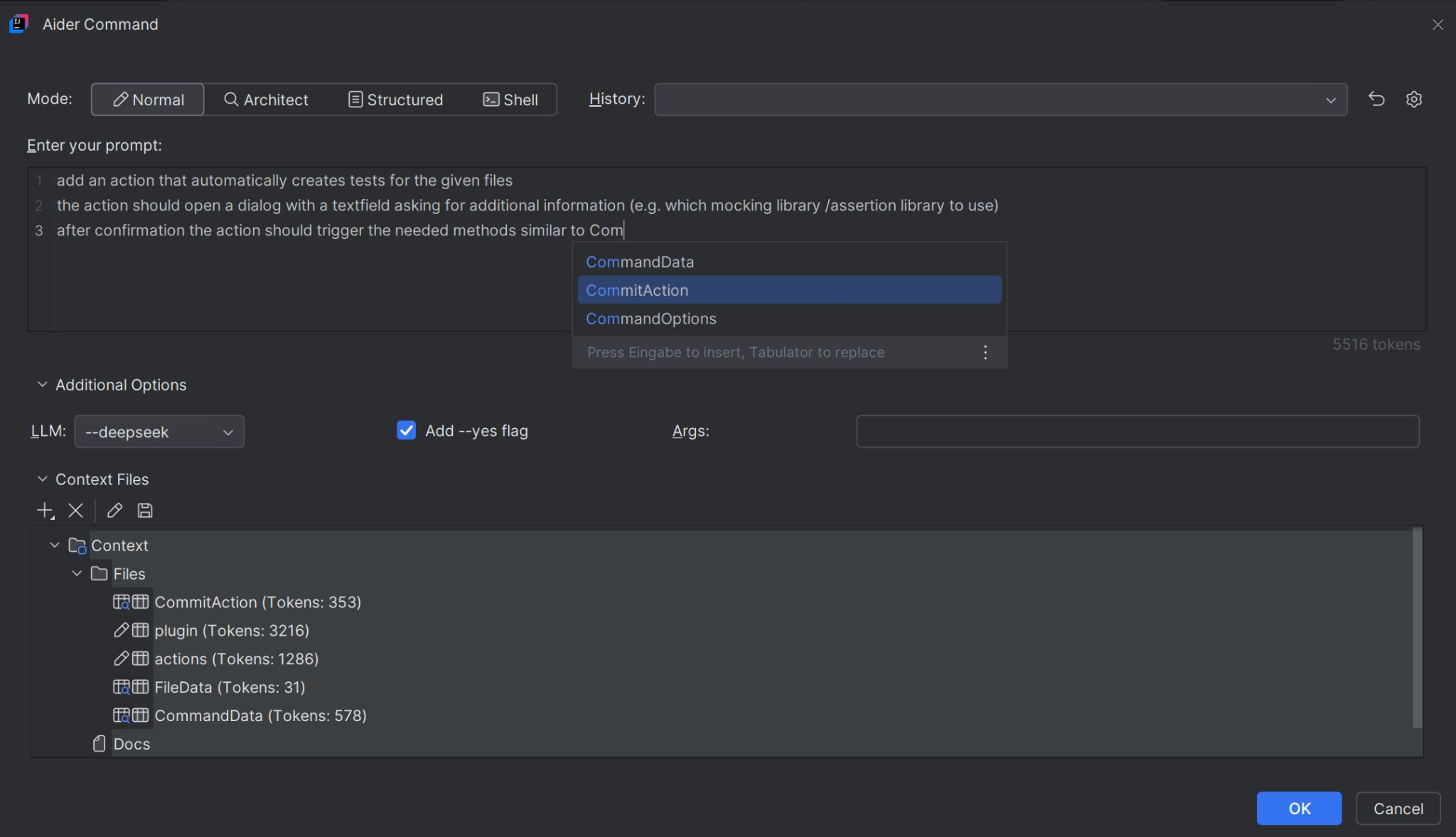
Aider has crossed 42,000 GitHub stars. That’s not hype — it reflects a real community of developers who want an AI coding tool that doesn’t lock them into a vendor or a GUI.
The defining feature is automatic Git integration. Every single edit Aider makes — whether it’s a three-line fix or a 200-line refactor — becomes its own Git commit with a descriptive message written by the model. If the change breaks something, you run git undo or revert to the previous commit. No partial states, no lost work.
During my FastAPI refactor, I had Aider restructure a service layer across 11 files. Every change was committed individually with a message like “Refactor: extract UserService.authenticate() from route handler”. Being able to cherry-pick and revert individual AI-generated commits was a genuine workflow win — not a gimmick.
Aider supports more than 20 LLM providers — OpenAI, Anthropic, Google, Mistral, Groq, DeepSeek, and any Ollama-compatible local model. You switch models with a flag. No provider lock-in, ever. This is particularly relevant if you’re monitoring costs carefully: you can drop to a cheaper model for grunt work and switch to Claude Opus 4.6 for the hard reasoning problems. If you want to understand how different AI models compare for coding tasks, my breakdown of whether ChatGPT is good for coding gives useful context.
The “repo map” is another technical differentiator. Instead of dumping your entire codebase into the context window on every request — which is expensive and slow — Aider builds a compressed structural map of the repository: file relationships, class signatures, function call graphs. You stay in control of which files are added to the chat context. Token costs stay predictable.
Aider also supports voice input (transcribed via a microphone), lint-and-test loops (it runs your test suite after each change and fixes failures automatically), and a lightweight browser GUI launched with aider --browser for those who want a chatbox without leaving the browser.
✅ Aider Strengths
- Completely free and open source (Apache 2.0)
- Auto-commits every edit to Git with clear messages
- Works with 20+ LLM providers and local models
- Predictable token costs, no subscription surprises
- Voice input and lint/test loop support
- Works alongside any editor (Neovim, Emacs, JetBrains)
❌ Aider Weaknesses
- No tab autocomplete while typing
- Steep learning curve for non-terminal users
- No visual diff review panel (relies on Git diffs)
- No SOC 2 certification
- Heavy premium model use can cost $200–$500/month
- Browser GUI is functional but basic
What I Actually Found When Testing Aider
My biggest frustration was context management on very large files. When I added a 1,400-line module to the context, Aider’s repo map sometimes generated a context window that exceeded the model’s quota limit — throwing a ContextWindowExceededError. I had to manually trim the context by removing files with the /drop command. Not a dealbreaker, but it does require awareness.
The lint-and-test loop was a genuine standout. On my Node.js CLI project, I told Aider to “add argument validation and write unit tests.” It wrote the validation, wrote the tests, ran them, found two failures related to missing edge cases, fixed them on its own, and committed a clean green build. That entire loop took about 90 seconds and zero intervention from me.
Cursor: AI Built Into Every Layer of Your Editor

Cursor crossed $2 billion in annualized revenue in March 2026 and now has over a million daily active developers. Companies including Stripe, Figma, and Adobe use it as their primary coding environment. That adoption rate is not accidental.
The core strength is the AI that lives inside your editor. Cursor’s Tab completion doesn’t just predict the next word — it predicts your next edit, accounting for what you’ve already changed elsewhere in the file. It learns the idioms of your codebase. After a few days of use, it started auto-completing patterns specific to my project’s naming conventions in ways that felt almost psychic.
Agent Mode is Cursor’s most powerful feature. You describe a task in natural language — “implement JWT authentication with refresh token rotation and add middleware to all protected routes” — and Cursor plans the changes, writes across multiple files, checks for errors, and iterates. It’ll surface a file-by-file plan before touching anything if you want oversight, or just run autonomously if you trust it.
Cloud Agents (available on Pro+ at $60/month) go further. They run in isolated VMs. You describe a task, they write code, execute tests, and deliver a merge-ready pull request. This is genuinely useful if you have autonomous tasks you want running while you focus on something else. For teams dealing with Verdent alternatives or other AI code tools, Cursor’s cloud agents are a meaningful differentiator.
The visual diff review is the best in the AI coding tool space. When Cursor proposes changes, you see a side-by-side comparison. You can accept or reject individual lines or entire blocks. This granular control makes it much safer to use AI for production code than tools that just rewrite files and hope for the best.
Cursor also launched BugBot in 2026 — an automated PR review agent that scans pull requests for bugs and security issues. Over 35% of its fixes reportedly merge without any human modification. I didn’t have a long enough timeline to verify that stat personally, but the basic PR scanning during my React dashboard project flagged a missing null check I’d missed. That was a fair catch.
JetBrains support arrived in March 2026 via the Agent Client Protocol. IntelliJ IDEA, PyCharm, and WebStorm are all supported. Vim and Emacs remain unsupported — those users should stay with Aider or GitHub Copilot. If you’re also curious how Cursor handles the context window ceiling, I’ve covered the Cursor AI context limit issue and how to fix it in a separate guide.
✅ Cursor Strengths
- Real-time multi-line tab autocomplete
- Best-in-class visual diff review UI
- Cloud agents that ship PRs autonomously (Pro+)
- SOC 2 certified with Privacy Mode
- Full VS Code extension compatibility
- BugBot for automated PR scanning
- JetBrains support added March 2026
❌ Cursor Weaknesses
- 7–15 GB RAM usage (heavy on older machines)
- Credit-based model causes unexpected overages
- No voice input support
- No Vim or Emacs support
- Model choice limited to Cursor’s available providers
- Auto mode uses credits fast with premium models
What I Actually Found When Testing Cursor
The RAM usage hit hard on my older MacBook Pro. Cursor consistently held 9–12 GB with two medium-sized projects open. Combined with a browser and Slack, I was pushing the machine’s limit. On a modern machine with 32 GB RAM, this wouldn’t be an issue, but it’s worth knowing before you install.
The credit system also caught me off-guard. I enabled Claude Opus 4.6 manually for a complex reasoning task and burned through my monthly credit pool faster than expected. Cursor’s Auto mode (which routes to the most appropriate model automatically) is actually quite good — switching manually to premium models for every request is where costs escalate. The surprise overage email is a real thing; teams should enable spend alerts immediately upon subscribing.
The autocomplete, though, genuinely improved my output speed on the React dashboard. On certain UI component patterns, Cursor was auto-completing 5–8 lines at once with near-perfect accuracy. I’d estimate a 30–40% reduction in time spent on boilerplate compared to coding without AI assist. For most developers, that alone justifies the $20/month.
Pricing Breakdown: What Do You Actually Pay?
This is the most misunderstood part of the Aider vs Cursor debate. “Aider is free” is technically true but requires a nuance: you pay for the API tokens you consume. Let me break both down honestly.
Monthly Cost Comparison (Typical Developer)
Based on typical developer API usage patterns. Aider costs vary significantly by model and usage intensity.
The honest summary: Cursor is cheaper for most developers when you factor in simplicity and predictability. Aider is cheaper only if you’re disciplined about model selection or use local models. Heavy Aider users who default to premium models can easily pay more than Cursor Ultra. When thinking about how AI fits into productivity and cost, the same dynamics appear in tools like AI tools for freelancers — the free tier often isn’t as free as advertised when you factor in usage at scale.
Head-to-Head Feature Matrix
How Each Tool Understands Your Codebase
This is where the architectural philosophies diverge most clearly — and where your choice will feel most real day-to-day.
Context Architecture: Aider vs Cursor
Aider
Structure + signatures only
You control context
Cursor
Entire codebase indexed
AI finds relevant files
Aider’s repo map approach keeps token costs controllable. You explicitly add files to the conversation context. This means you’re thinking about what the AI should know, which forces cleaner prompting. The downside: if you forget to include a relevant file, the AI might produce code that doesn’t align with your existing patterns.
Cursor’s full codebase index is more autonomous. It surfaces relevant files from your codebase without you needing to specify them. On large codebases, this is genuinely valuable — it found cross-module dependencies in my React project that I didn’t think to include. The tradeoff is less control over what gets sent to the model, and higher resource consumption on your local machine.
If you want to understand how AI handles code generation more broadly, my article on generating code with generative AI models covers the underlying mechanics well.
Aider vs Cursor vs Claude Code: Three-Way Comparison
Most developers comparing Aider and Cursor are also looking at Claude Code — Anthropic’s terminal agent. Here’s how all three line up:
Claude Code scored 80.9% on SWE-bench Verified with Claude Opus 4.5 — the highest of any terminal agent at the time of writing. If you’re exclusively on Anthropic’s models and want maximum agentic quality, Claude Code is worth looking at. But it gives up model flexibility entirely. I’ve also written separately about how different Claude versions compare to GPT-4 for more context on Anthropic’s model improvements over time.
Which Tool Should You Actually Use?
🎯 Decision Matrix
Choose Aider if…
- You’re comfortable in the terminal
- You want to switch LLMs freely
- You use Neovim, Emacs, or Vim
- You want full Git history transparency
- You want zero subscription costs
- Data privacy is your top concern
- You want a lint-and-test loop built in
Choose Cursor if…
- You want AI autocomplete as you type
- You prefer inline diffs and visual review
- Your team needs SOC 2 compliance
- You want autonomous cloud agents
- You already use VS Code or JetBrains
- You want predictable flat monthly pricing
- You need BugBot for PR scanning
The smartest answer in 2026 is often: both. A common workflow I’ve seen — and adopted myself — is using Cursor as the daily driver for active coding and autocomplete, then switching to Aider in the terminal for large-scale refactors where model choice and granular Git commits matter more than a pretty UI.
They don’t conflict. Aider edits files directly in the same repo; Cursor sees those changes immediately in its index. This dual-tool setup is becoming the standard among serious developers in 2026, much like how developers once ran ESLint alongside Prettier — separate tools, each excellent at its specific job. When evaluating any AI developer tool, it’s also worth checking where the underlying models like Grok-4 and GPT-5 stand relative to each other for coding benchmarks.
For individual developers building side projects or solo consulting work, Aider’s cost transparency wins. For teams that need consistent AI-assisted workflows, onboarding non-terminal-native developers, or SOC 2 compliance for enterprise clients, Cursor is the more practical choice. This tradeoff mirrors what you see across AI tool comparisons more broadly — my look at Lovable vs Base44 shows how similar “power user vs accessible GUI” dynamics play out in app builders too.
If you’re evaluating both tools for a team context, it also helps to look at how AI tools perform for different roles. My guide on the best AI website builders for fast web design illustrates how different AI-enhanced tools serve different developer personas — Cursor and Aider follow the same pattern.
Ready to Pick Your AI Coding Co-Pilot?
Start with whichever fits your workflow. You can always add the other tool later.
What About GitHub Copilot, Windsurf, and Others?
The AI coding tool market expanded significantly in 2025 and 2026. Knowing your alternatives makes the Aider vs Cursor choice clearer.
GitHub Copilot remains the most widely adopted tool with over 15 million users. Pro is $10/month. The newer Pro+ at $39/month adds Claude Opus access and Copilot’s own Coding Agent, which can now create autonomous PRs. For pure autocomplete inside your existing editor (VS Code, JetBrains, Vim, Emacs), Copilot’s editor breadth is still unmatched. The downside: its agentic capabilities lag behind Cursor’s and Aider’s on complex multi-file tasks.
Windsurf (formerly Codeium) is a $15/month Cursor alternative. Its Cascade agentic AI ranked first in the LogRocket AI Dev Tool Power Rankings in February 2026. If Cursor’s $20/month or RAM footprint is a concern, Windsurf is worth evaluating. It supports VS Code and JetBrains, and has Privacy Mode as well.
OpenAI Codex is a terminal-based agent powered by GPT-5, included with ChatGPT Pro and Plus subscriptions. It supports multi-agent workflows and is rapidly gaining adoption for those already in the OpenAI ecosystem.
If you’re not sure which model powers your preferred tool, it’s worth understanding that both Aider and Cursor can use the same underlying models. My breakdown of Claude AI for coding and the difference between AI and human output quality both give useful context for understanding where AI coding tools still have gaps.
FAQ: Aider vs Cursor
Is Aider completely free?
Yes. Aider itself is free and open source under the Apache 2.0 license. The only costs come from the API provider you choose. Using local models via Ollama means zero API costs at all. A typical developer using Claude Sonnet 4.6 through Aider spends roughly $30–$60 per month. Heavy users relying on Claude Opus 4.6 daily can spend $200–$500 per month.
How much does Cursor actually cost?
Cursor offers a free Hobby plan with limited requests. Pro is $20/month ($16/month when billed annually). Pro+ with cloud agents is $60/month. Ultra is $200/month. Teams pay $40 per user per month. Using premium models manually on any plan draws from a credit pool — once credits are exhausted, you can enable pay-as-you-go overages or wait for the next billing cycle.
Can Aider use local LLMs like Ollama?
Yes. Aider supports any Ollama-compatible local model and any OpenAI-compatible API endpoint. If you run a capable enough local model — llama 3, Qwen 2.5 Coder, DeepSeek Coder — your API costs drop to exactly zero. The quality of responses depends on your local model and hardware.
Does Cursor support JetBrains IDEs?
Yes, since March 2026. Cursor added JetBrains support via the Agent Client Protocol, covering IntelliJ IDEA, PyCharm, and WebStorm. Vim and Emacs remain unsupported. Aider — which is editor-agnostic by design — still has the broader editor compatibility.
Which tool produces better code quality?
Both can access the same underlying models — Claude Sonnet 4.6, GPT-5, Gemini — so raw code generation quality is similar. The workflow difference is more meaningful: Aider auto-commits every change to Git, giving you a clean revert path. Cursor gives you visual diffs before you accept any change. Code quality comes down to the model, not the tool wrapper.
Is Aider worth it in 2026?
For terminal-native developers: absolutely yes. Aider is one of the best-value AI coding tools available in 2026. The automatic Git commit discipline, model flexibility, and zero subscription cost are genuinely valuable. The main trade-off is no autocomplete and a steeper setup curve compared to Cursor. If those tradeoffs work for your workflow, Aider is hard to beat.
Can I use Aider and Cursor together?
Yes — and many experienced developers do exactly this. Use Cursor as your daily IDE for autocomplete, inline AI chat, and quick edits. Use Aider in the terminal for large refactors, test-loop driven development, or when you need a specific model that Cursor doesn’t offer. The two tools work on the same files without any conflicts.
Bottom Line: My Honest Verdict
After three weeks with both tools, my honest take is this: Cursor is the better product for most developers. The autocomplete alone pays back the $20/month for anyone who codes daily. The visual diff review is genuinely safer than reviewing Git patches. The Cloud Agents are legitimately useful for autonomous background tasks.
But Aider earns its place for specific scenarios. If you need to switch between Claude, GPT, Gemini, and a local Ollama model within the same week — Aider is the only tool that makes that easy. If you want zero vendor lock-in and a complete Git audit trail of every AI action, Aider delivers that in a way Cursor simply cannot.
My recommendation: Start with Cursor’s free Hobby plan to feel the autocomplete. Install Aider alongside it for your first large refactor. Within two weeks, you’ll know which one deserves your regular workflow — and there’s a good chance the answer is both.


