
BananaPrompts Review
BananaPrompts.xyz Review: Is It Worth Using?
I logged in, topped up nothing, browsed the gallery, and hit the credit wall myself. Here’s exactly what happened, what it costs, and who it actually makes sense for.
By Oyekale Olawale
Quick answer: BananaPrompts.xyz is free to browse — every prompt on the site is copyable at no cost. Generating your own images or videos, though, requires credits, starting at $9.99/month for 50 images. Prompts are genuinely detailed and worth studying even if you never generate a single image here. Whether it’s “worth it” comes down to one question: do you want to generate inside their Studio, or just mine the gallery for prompt ideas and paste them into a tool you already pay for?
What Is BananaPrompts.xyz?
BananaPrompts.xyz started life as an open prompt gallery — a place where AI artists posted their images and videos alongside the exact prompt that made them. That part hasn’t changed. What has changed since I last looked at this site is that it now has its own generation Studio bolted on. You’re no longer limited to copying a prompt and pasting it into Midjourney or Sora. You can generate directly inside BananaPrompts, provided you’ve bought credits first.
That’s the detail a lot of older reviews miss, because it’s a recent addition. The gallery is still community-driven, still free to browse, and creators are still credited on every post. But the platform has grown a commercial layer on top: a Studio tab, an Images and Videos section, and a pricing page that didn’t exist when this was purely a prompt-sharing community.
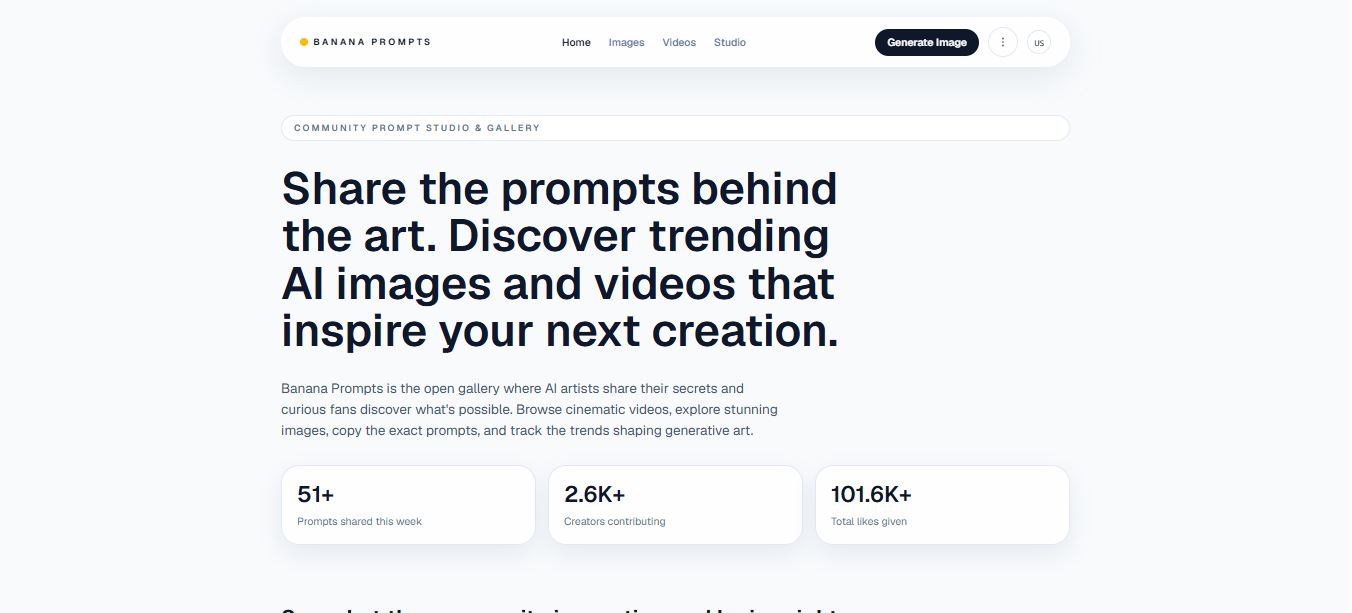
On the homepage, you’ll see live counters — prompts shared this week, creators contributing, total likes. It’s clearly built to feel active rather than like a static archive. Scroll down and you land straight into a grid of trending images and videos, each one tagged with a “Copy” button next to the prompt text. Some entries are marked “Premium,” which means they were authored by the BananaPrompts team rather than the community, and those are gated behind a paid plan.
Signing In and Getting to the Dashboard
Getting started is genuinely fast. There’s no lengthy signup form — I logged in with my Google account, and within a couple of seconds I was on my dashboard with a box waiting for a prompt. No email verification loop, no “check your inbox” delay. That’s one of the few parts of the onboarding I have zero complaints about.

The dashboard itself is simple by design: a text field for your prompt, format options for the output, and a generate button. It doesn’t try to overwhelm you with sliders and parameter menus the way some Studio interfaces do. That’s fine if you want something quick, less fine if you’re used to fine-tuning aspect ratio, seed values, or negative prompts elsewhere.
Here’s where I hit the wall that every new user will hit: I typed a prompt, hit generate, and got redirected straight to a credit top-up prompt. No trial images, no small free allowance to test output quality first. You need to buy credits before the Studio will render anything for you, image or video. I didn’t pay this time around, so I can’t personally vouch for the output quality of their generation engine compared to what I’ve tested on tools like Kling AI or RunwayML. That’s an honest gap in this review, and I’d rather flag it than pretend otherwise.
Pricing & Credits: What You’re Actually Paying For
The pricing structure is simple once you understand the split: browsing, copying, and sharing prompts costs nothing. Credits are used only when you generate an image or video inside the Studio. Banana Seed, their entry tier, starts at $9.99 for 50 images. Some plans also unlock the admin-curated Premium prompts, which are locked out for free accounts.

| Plan | Price | Images | Video Credits | Best For |
|---|---|---|---|---|
| Starter Pack | $9.99/mo | 50 | None — image only | Casual creators testing the waters |
| Creator Pack (Most Popular) | $24.99/mo | 150 | 100 | Weekly publishers, ~17% cheaper per image |
| Pro Pack (Best Value) | $100.00/mo | 400 | 600 | Teams iterating daily, ~25% cheaper per image |
Do the math on cost-per-image and the tiers make sense: Starter works out to roughly 20 cents per image, Creator drops to about 17 cents, and Pro lands near 25 cents once you weigh in the video credits bundled with it. All three plans include no watermarks on the output and monthly credit refreshes rather than one-time top-ups. There’s also a custom bundle option for studios that need shared team balances and invoicing, though you’ll need to contact their team directly for that.
One thing worth noting: none of the plans list a rollover policy for unused credits. If a “monthly refresh” means unused credits reset to zero rather than accumulating, that’s worth confirming with support before you commit to a higher tier expecting to bank credits for a slow month.
Browsing the Gallery: Where BananaPrompts Actually Shines
This is the part I keep coming back to, credit wall or not. The image gallery is genuinely well done. Every entry shows the finished visual next to its full prompt, and copying it is one click. I found prompts detailed enough to include lighting direction, lens style, and mood descriptors that most people wouldn’t think to write themselves.

Prompts stay free to copy and share regardless of whether you’re on a paid plan — that part hasn’t changed from the platform’s original open-gallery roots. What’s new is the Premium tier of prompts, authored directly by BananaPrompts rather than the community, which only unlocks with certain paid packs. I compared a handful of free community prompts against the premium-tagged ones, and the premium set tends to be noticeably more structured, with clearer scene composition and lighting cues written in.
What I can’t confirm firsthand is whether images generated through BananaPrompts’ own Studio actually come out at the same quality shown in the gallery previews, since I didn’t purchase credits to test generation myself. The gallery images look sharp, but a gallery preview and a fresh generation from a text prompt are two different things, and model consistency is something every AI image tool struggles with to some degree.
How I Test Tools
Before I hand down a verdict on any AI tool, I go through the actual signup flow myself, not a demo account or a press kit. For BananaPrompts, that meant logging in with Google, navigating the dashboard, attempting a real generation, and documenting exactly where I hit friction — in this case, the credit paywall before any image could render. I also cross-check pricing pages directly rather than relying on third-party summaries, since credit-based pricing tends to change without much notice. Where I couldn’t complete a step, like paid generation, I say so explicitly rather than guessing at the result.
Pros and Cons
✅ Pros
- Fast Google sign-in, no waiting on email verification
- Prompts remain 100% free to browse and copy
- Prompt detail quality is genuinely above average
- No watermarks on any paid-tier output
- Monthly credit refresh instead of one-time expiry
- Transparent per-image cost breakdown across tiers
❌ Cons
- No free trial images — credits required before any generation
- Premium prompts locked behind paid plans only
- Generation quality vs. other tools remains unverified without paying
- No stated rollover policy for unused monthly credits
- Pro Pack is a steep jump in price from Creator
Who Should Actually Use BananaPrompts.xyz?
If you’re a working creator, marketer, or freelancer who already generates AI visuals regularly, the Creator or Pro packs make sense financially once you factor in the discount per image. Professionals who need consistent, watermark-free output at volume are the clearest fit here.
If you’re newer to prompt engineering, you don’t need to spend a cent to get value. Browse the free gallery, copy the community prompts, and use them as practice material in whatever generator you already have access to. That’s genuinely one of the best free learning resources I’ve come across for understanding how experienced prompt writers structure lighting, composition, and mood language.
Estimated Cost Per Image by Plan
Starter
~$0.20
Creator
~$0.17
Pro
~$0.15*
*Pro Pack figure blends image and video credit value; actual per-image cost varies with usage mix.
How It Stacks Up Against Alternatives
BananaPrompts isn’t trying to out-render dedicated video generators like Kling AI or RunwayML, and it shouldn’t be judged against them purely on output quality since I haven’t tested its Studio output myself. Where it competes is on prompt transparency, something tools like Vheer AI don’t emphasize nearly as much. If you’re weighing credit-based pricing generally, it’s worth comparing against how other platforms structure theirs; I broke down a similar shift toward usage-based credits in my GitHub Copilot credits policy piece, and the same “buy credits, spend them on generation” logic applies here.
For creators specifically hunting free alternatives before committing to a paid credit system, I’ve also covered free InVideo AI alternatives and tools like imgAK AI and Magic Hour AI, which take different approaches to pricing and generation. Worth a look if you want to compare before spending anything on credits.
Frequently Asked Questions
Is BananaPrompts.xyz free to use?
Browsing, copying, and sharing prompts is completely free. Generating images or videos in the Studio requires credits starting at $9.99/month.
Do I need to pay before generating anything?
Yes. There’s no free trial generation. You’ll need to top up credits before the Studio renders your first image or video.
What’s the cheapest plan?
The Starter Pack is $9.99/month for 50 images, image generation only, with no video credits included.
Are the Premium prompts worth paying for?
In my comparison, the Premium prompts authored by BananaPrompts were noticeably more structured than the average community submission, but they’re only accessible on certain paid plans.
Can beginners use BananaPrompts without paying?
Yes. Beginners can copy free community prompts and use them as practice material in any generator, without ever buying credits.
The Bottom Line
BananaPrompts.xyz is worth using if you fall into one of two camps: professionals who want a credit-based generation Studio with transparent per-image pricing and no watermarks, or beginners who want a genuinely useful, free library of detailed prompts to learn from. What it isn’t, at least based on what I could test without paying, is a proven contender against dedicated generators on raw output quality — that verdict will have to wait until credits get spent and results get compared side by side. For now, the prompt gallery alone justifies a visit, paid plan or not.