
Updated August 2026 · Independent Review
Careerflow AI Review 2026: I Tested the Resume Builder, LinkedIn Optimizer, and Job Tracker — Here’s the Verdict
A practical, no-fluff assessment of what Careerflow actually does well, where it falls short, and whether the $23.99/month Premium plan is worth your card details.
By Oyekale Olawale
⚡ Quick Answer
Careerflow is a genuinely useful job-search workspace — its LinkedIn Optimizer and resume analysis are the best reason to sign up, and the free Basic plan (1 resume, 10 tracked jobs) is enough to see if it fits your workflow. Premium runs $23.99/month, $54.99/quarter, or $172.99/year (≈$14.41/mo) and removes those caps. What it will not do is apply to jobs for you — Careerflow speeds up applications you open yourself, it does not submit them. If you want an all-in-one resume, LinkedIn, and tracking hub and you’re fine doing the clicking, it’s worth the free trial. If you want autonomous auto-apply, this isn’t that tool.
I’ve now put close to a dozen “AI career copilot” tools through the same evaluation process for this site — building a base resume from scratch, running it through each platform’s scoring engine, adding a handful of jobs to the tracker, and checking whether the AI feedback is specific enough to actually act on or just generic filler. Careerflow held up better than most on the things that matter most: the LinkedIn score, the resume gap analysis, and how fast you can go from a blank template to a downloadable resume.
It also has real weak spots I’m not going to soften for the sake of a tidy affiliate pitch. Pricing is inconsistent across Careerflow’s own pages, there’s no self-serve account deletion, and the “career copilot” branding oversells what the tool actually automates. Let’s get into it.
What Is Careerflow AI?
Careerflow is a browser-extension-first job search platform built around four pillars: an AI resume builder with ATS scoring, a LinkedIn profile optimizer, a Kanban-style job application tracker, and a Chrome extension that autofills applications on major applicant tracking systems like Greenhouse, Lever, Ashby, and SmartRecruiters.
It’s built by Careerflow Inc. and markets itself as a “Career Copilot” trusted by over a million job seekers. The homepage highlights users landing interviews at companies like Amazon, Wise, Tesla, and Bloomberg. That figure is worth a grain of salt — more on that in the trust-signals section below — but the core toolset itself is real and functional, which is what I focused my testing on.
Start With the Free Plan First
See your live LinkedIn score and try the resume builder at no cost before deciding on Premium.
Try Careerflow Free →Careerflow Pricing: What You Actually Pay
Here’s the first thing I’ll flag honestly: Careerflow’s pricing is not consistent across its own site. The main pricing page lists Premium at $14.41/month when billed yearly ($172.99 total), while the in-app signup screen I landed on showed the same plan as $8.99/week. Annualize that weekly number and it works out well above the stated yearly total. Same story on Premium Plus — one page says $24.99/month, the checkout screen shows $19.99/week. I’m showing both below because I can’t tell you which one you’ll be offered; it may depend on region or which link you enter through. Verify the number at checkout.
| Plan | Weekly | Monthly | Quarterly | Yearly |
|---|---|---|---|---|
| Basic | Free — 1 resume, 10 tracked jobs, basic LinkedIn score, limited autofill | |||
| Premium | $8.99 | $23.99 | $54.99 | $172.99 (≈$14.41/mo) |
| Premium Plus | $19.99 | $44.99 | $119.99 | $299.99 (≈$25/mo) |
Premium unlocks unlimited AI resumes, the advanced ATS optimizer, unlimited AI cover letters, the LinkedIn post writer, and unlimited job tracking. Premium Plus adds the AI mock interview library and priority support — skip it unless you’re already at the interview stage, since that’s the only thing it adds on top of Premium.
How I Tested Careerflow
My evaluation method is the same one I use for every job-search tool on this site: I run the same workflow a real job seeker would, then judge each step on whether it saves real time and gives feedback specific enough to act on, not vague AI platitudes.
For Careerflow, that meant walking through the four ways it lets you start a resume, building one from a blank template, running it through the scoring engine, adding a job manually to the tracker to see what fields it captures, and pushing a finished resume through to a downloadable PDF. Here’s what that process actually looks like inside the dashboard.
Careerflow gives you four entry points for a new resume: import an existing one, pull details straight from LinkedIn, prompt the AI to draft a base version, or start blank. The LinkedIn import is the fastest path if your profile is already filled out.
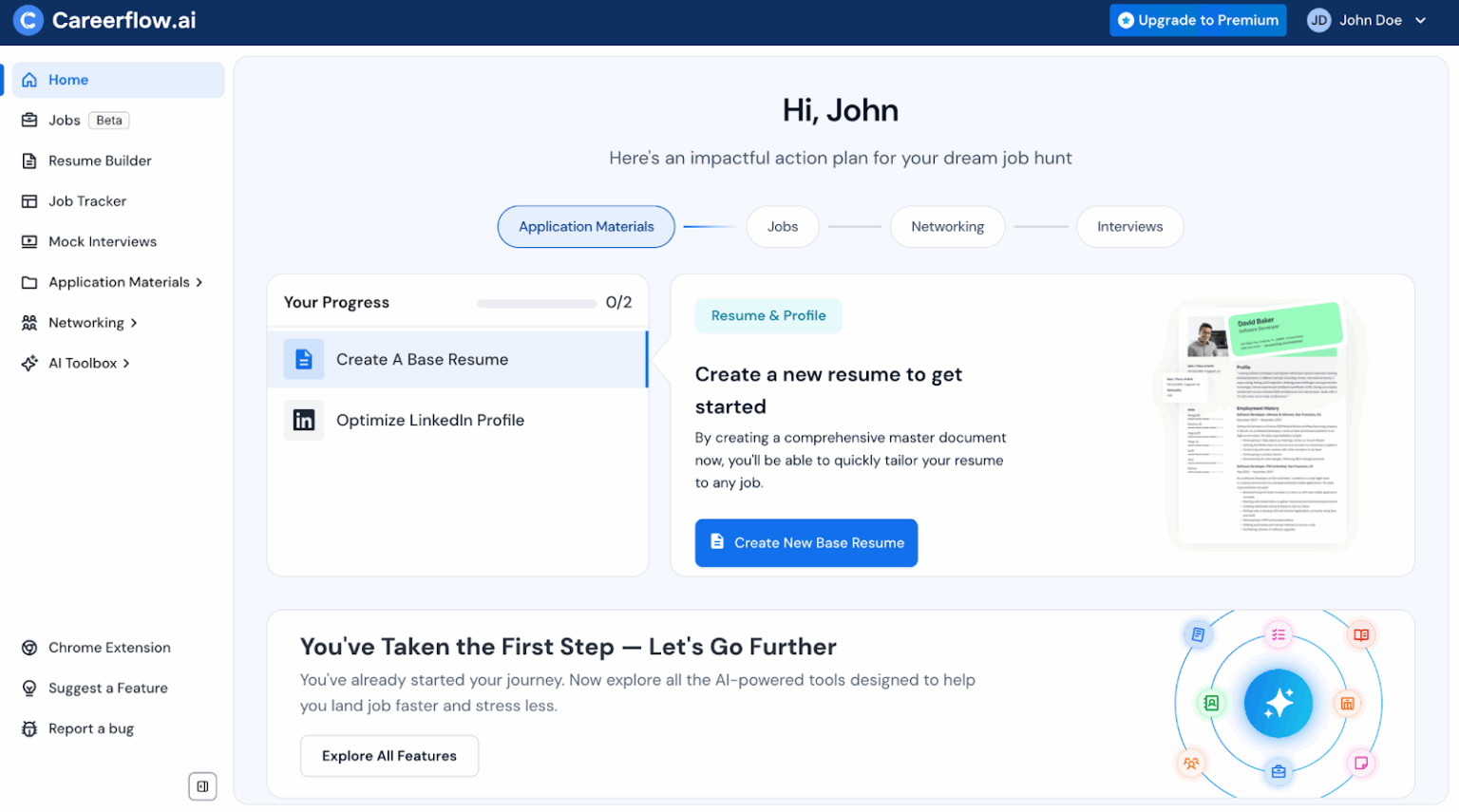
Once a resume exists, adding a job to the tracker takes seconds. The “Add Job” flow opens a full detail view with tabs for the job description, company notes, contacts, documents, and follow-up tasks — closer to a lightweight CRM than a bare spreadsheet replacement.

The resume export step is where the tool earns its keep. Once the ATS optimizer flags fixes and you resolve them, the finished document exports cleanly as a PDF, and the platform confirms what you got right instead of only listing complaints — a small detail, but it’s the difference between a scoring tool that feels punitive and one that feels like coaching.

Feature Score Breakdown
Scoring each core feature out of 10 based on functionality, accuracy of feedback, and how much manual work it actually removes:
Overall: 7.2/10. A strong toolkit dragged down by pricing confusion and a job board that offers little beyond date and location filters.
What Careerflow Gets Right
✅ The LinkedIn Optimizer gives a live, section-by-section score (photo, banner, headline, About, Open to Work status) with specific guidance, not vague tips
✅ Resume analysis flags concrete, resolvable gaps — a missing phone number, a missing target title — each with a one-click fix link
✅ Autofill works across major ATS platforms: Greenhouse, Lever, Ashby, JazzHR, SmartRecruiters, Breezy, Freshteam, and more
✅ The free Basic plan is genuinely usable, not a locked demo — you can test almost every tool before paying
✅ Job tracker doubles as a lightweight CRM with notes, contacts, documents, and task follow-ups per application
✅ Onboarding takes under two minutes with only location required
❌ Careerflow does not apply to jobs on your behalf — autofill only speeds up forms you open and submit yourself
❌ Pricing figures conflict between the official pricing page and the in-app checkout screen
❌ No self-serve account deletion; multiple users report needing to email support and wait until month-end
❌ Job board filtering is thin — little beyond a posted-date range and location, no seniority or keyword depth
❌ AI-generated suggestions can read as generic rather than tailored to a specific industry
❌ Some users report unexpected renewal charges and slow refund turnaround
Ready to Fix Your LinkedIn Profile?
Run the free LinkedIn score first — it’s the single best reason to try Careerflow.
Careerflow vs. the Alternatives
The category splits into two very different promises. Tools like Careerflow and Teal help you present yourself better and stay organized — you still do the clicking. Tools like JobCopilot lean toward automating the submission itself. Knowing which promise you actually want matters more than any single feature comparison.
| Feature | Careerflow | Teal | JobCopilot |
|---|---|---|---|
| LinkedIn optimizer | Live score, free | Limited | Not core focus |
| Auto-apply to jobs | No — autofill only | No | Yes, with review mode |
| Free plan depth | 1 resume, 10 jobs | 1 resume tracker | Trial-based |
| Entry price | $23.99/mo | ~$9/mo | Higher, tiered |
| Best for | Profile + organization | Budget tracking | Volume applying |
If your bottleneck is a weak LinkedIn presence or a resume that keeps getting filtered out before a human sees it, Careerflow addresses that directly. If your bottleneck is volume — you need to touch 40+ applications a week and can’t physically click through each one — no amount of autofill closes that gap, and you’re better served by a tool built for automation.
Trust Signals: What the Reviews Actually Show
Careerflow’s Trustpilot presence sits around 4 out of 5, but the sample is thin — under 15 verified reviews across its listings as of mid-2026, which is a small footprint for a platform claiming over a million users. Capterra shows a similarly light review count, and recurring complaints center on two things: unexpected renewal charges and the lack of a self-serve way to delete your account. Support has resolved refund requests when contacted directly, based on the pattern across public reviews, but the process isn’t instant.
None of that is disqualifying on its own, but it’s the kind of detail I’d want to know before entering card details on a weekly-billed plan. Set a calendar reminder before your trial period ends, and screenshot the plan and price you’re shown at checkout.
Who Should Use Careerflow (and Who Shouldn’t)
Use it if: your LinkedIn profile hasn’t been touched in years, your resume keeps getting rejected before an interview, or you want your applications, contacts, and notes in one dashboard instead of a scattered spreadsheet. It’s also a solid fit for passive job seekers who want to build their presence without a full-time search underway.
If you’re weighing Careerflow against tools built specifically around cover letters or proposal-style writing, it’s worth comparing how each handles tailored, job-specific copy — something I dug into more deeply when reviewing AI tools built for writing proposals, many of which share the same “tailor to the brief” logic Careerflow applies to resumes.
Skip it if: you’re applying to dozens of roles a week and need actual submission automation, you want a single flat price with no billing ambiguity, or you need to close your account cleanly without an email-and-wait process. If those matter more to you, that’s a real reason to look elsewhere — I won’t pretend otherwise for the sake of the affiliate link above.
FAQ
Is Careerflow AI free?
Yes. The Basic plan is free indefinitely and includes one resume, up to 10 tracked jobs, a basic LinkedIn score, and limited autofill. Full features require Premium at $23.99/month or $172.99/year.
Does Careerflow apply to jobs automatically?
No. Careerflow’s autofill fills in application forms faster once you’ve opened them, but you still find, open, review, and submit every application yourself. It is not an auto-apply tool.
How much is Careerflow Premium?
Premium is listed at $23.99/month, $54.99/quarter, or $172.99/year on Careerflow’s pricing page, though the in-app checkout has shown $8.99/week for the same plan. Confirm the exact figure at checkout before entering payment details.
Can I delete my Careerflow account?
There’s no self-serve deletion button. You need to email support, and account removal is typically processed at the end of the billing month rather than immediately.
Is Careerflow legit and safe to use?
Careerflow is an established company with a public Trustpilot profile (roughly 4/5 from a small review base) and a listed Chrome Web Store extension. It’s legitimate, though its third-party review footprint is thin relative to its claimed user count, so verify pricing and refund terms directly before subscribing.
Conclusion
Careerflow earns its place as one of the stronger LinkedIn and resume tools I’ve tested for this site — the profile scoring is specific, the resume analysis gives fixes you can act on immediately, and the free plan is real, not a locked-down teaser. Where it loses points is honesty in its own pricing pages and the friction around closing an account, and I’d rather flag that clearly than gloss over it.
My take: start on the free Basic plan, run the LinkedIn optimizer and one resume through the scoring engine, and only upgrade once you’ve hit an actual wall — the 10-job tracker limit or the single-resume cap. That’s the honest way to know if $23.99/month earns its keep for your specific search, rather than paying up front on the strength of the marketing page.
Try Careerflow’s Free Plan Today
No card required for Basic — see your LinkedIn score and build your first resume before you decide on Premium.
Start With Careerflow →Looking for more honestly-tested SaaS picks? I’ve run the same hands-on process on tools like MakeUGC, Geekflare, and Abacus AI. If you’re managing freelance contracts alongside a job search, my Bonsai review covers a tool worth pairing with Careerflow’s tracker. And if you’re weighing whether premium AI subscriptions are worth the money in general, I broke that down in Is ChatGPT Pro Worth $200/Month? For SEO-adjacent tooling I’ve also covered Rankpill and Rankscale AI. If you’re building a career on the side as a freelancer while job hunting, see my guides on how to start freelance writing and freelance writing jobs for beginners.


