

AI Tool Review · published September 2026
Explee Review 2026: I Tested the AI Search Tool for B2B Leads (Full Breakdown)
A hands-on look at Explee’s natural-language company and people search — what it gets right, where the pricing actually confused me, and whether it’s worth your first $49.
By Oyekale Olawale · 13 min read
⚡ Quick Answer
Explee is a natural-language B2B search engine — describe your ideal customer in plain English and it returns matching companies and verified contacts from a 105M-company, 536M-profile database. The search tool itself runs on monthly plans (Free, then $49/$329/$490), not the pure pay-as-you-go model some reviews describe — that pay-as-you-go, $1–$15-per-lead pricing actually belongs to Explee’s separate outbound-agent product, AutoGTM. If you just need to build targeted lead lists fast, the Free plan or the $49 Starter tier is where to start.
I’ve built enough lead lists by hand to know the drill. Filter by industry, export, verify emails, clean up job titles, repeat. Half the contacts turn out useless anyway.
The bigger issue isn’t the busywork. It’s that basic filters — company size, location, industry — don’t tell you what actually matters: is this company growing, hiring, using a specific tech stack, or building the kind of team you’d want to sell into?
That’s the gap Explee is trying to close, so I spent real time inside it to see if it holds up.
What Is Explee, Exactly?
Explee is a London-based sales intelligence platform built around one core idea: you describe your ideal customer in a sentence, and its semantic search engine returns matching companies and decision-makers instead of forcing you through a wall of dropdown filters.
As of this writing, Explee actually runs three distinct products under one roof, and confusing them is the single biggest source of bad pricing information floating around the web right now:
- AI Search — the natural-language company and people search engine. This is the product most “Explee review” articles (including this one) are actually testing.
- AutoGTM — a newer 24/7 outbound agent that finds prospects, writes personalized emails, and books demos autonomously. This is now the tool’s homepage-default product.
- Database — bulk B2B data exports by country or worldwide, aimed at teams enriching an entire total addressable market at once.
If you land on explee.com today, you’ll see AutoGTM front and center. The search engine lives at a separate URL. I mention this upfront because it matters enormously for pricing, which I’ll get into shortly.
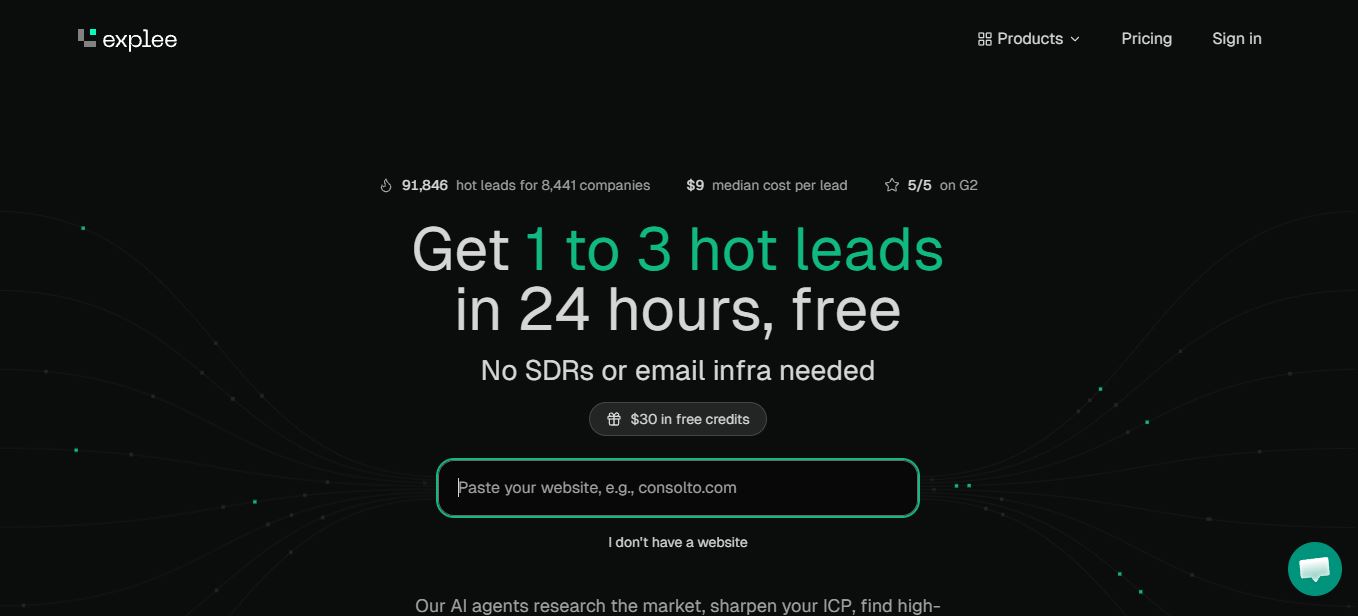
Explee’s current homepage — note that it now leads with AutoGTM, not the AI Search tool most reviews focus on.
Traditional prospecting usually means stitching together three or four tools: one database to find companies, an enrichment tool, an email verifier, and maybe an AI cleanup step for job titles. It works, but it’s slow, and every extra tool is another subscription and another export/import cycle. If you’re also managing the sending side of outreach, a dedicated cold email sending platform usually ends up as a fifth tool in that stack.
How I Test Tools Like This
I’m Oyekale Olawale, and I run websites2know.com. My review process for prospecting and sales tools is simple: I run at least four to five real search queries covering different use cases — broad industry searches, tightly filtered searches, and unusual edge-case searches — then I check the export flow, the pricing page against the actual checkout screen, and I dig through G2 and independent forums for complaints the marketing copy won’t mention.
I don’t take a vendor’s pricing page at face value either. I cross-check it against at least one independent source, and if the numbers conflict, I say so instead of quietly picking whichever figure sounds better.
My Experience Testing Explee’s AI Search
Natural-Language Company Search
For my first query I typed exactly what I’d tell a colleague: “US-based influencer marketing agencies with remote teams and 10+ employees.” Then I hit AI Search.
The results weren’t a narrow slice of one business type. I saw food-influencer agencies sitting next to celebrity-media shops — different flavors of the same category, which is exactly what I want from a discovery tool instead of a rigid keyword match. Each result card showed company size and where employees were located, so I didn’t need to click through just to sanity-check basic firmographics.
Narrowing Results With Filters
The broad search is the fun part, but the filters are where the tool earns its keep. I layered on a tech-stack filter for companies using Salesforce, and the list shrank fast — in a good way. From there I tested:
- Hiring status — a decent proxy for a company actively growing or investing
- Website traffic — I set a floor of 100,000+ monthly unique visitors
- Revenue — filtered for businesses doing $1M+ annually
- Funding history — whether a company had raised, and how much
Stack all of those together and you go from thousands of loosely-matched companies to a tight shortlist that actually fits a real ideal customer profile — not just “SaaS companies in America.”

My Explee dashboard mid-search — filters sit alongside the results panel, and clicking a company opens its website directly.
Testing More Specific Criteria
Next I tried “AI-related companies with remote teams in top-tier countries and between 50 and 200 employees.” Again, the spread was wide — AI development shops sitting next to no-code platforms — which told me the semantic matching isn’t just keyword-spotting “AI” in a company description.
One filter I didn’t expect to like as much as I did: filtering by the number of countries a company’s employees are spread across. That’s a genuinely useful proxy for “is this a remote-first, internationally distributed team,” and it’s not something most basic company databases surface cleanly. Clicking a company name takes you straight to its website, which is a small thing but saves a real step when you’re vetting a prospect before adding it to a campaign — the same instinct I’d apply when checking whether a company is actually legitimate before you invest outreach time in it.
Exporting the Lead List
Once I narrowed a search down to companies I actually wanted, exporting was straightforward: choose companies-only or companies-with-contacts, cap the number of rows, and turn on smart deduplication before starting the export. That dedup step matters more than it sounds — merging results from several search sessions without it is how you end up emailing the same prospect twice.
The real value here isn’t finding thousands of companies. It’s narrowing a huge database down to a short list that actually matches what you’re looking for, which is the entire point of running any kind of targeted campaign instead of a spray-and-pray list.
The Founder-Origin Search (An Edge Case Worth Trying)
I also ran a deliberately unusual query: “B2B SaaS startups with Greek founders.” Explee returned matches, and I could refine further by country of origin, company tier, and year founded.
This is the kind of multi-attribute, oddly specific search that’s genuinely hard to reproduce in a traditional filter-based database, where you’d need a “founder nationality” field that most tools simply don’t have. It’s a good stress test of how far the natural-language layer actually goes beyond marketing copy.
Explee Pricing Breakdown (2026) — Where Most Reviews Get It Wrong
This is where I want to be precise, because a lot of reviews online — and my own first pass through the platform — blur two very different pricing models together. Explee’s AI Search tool and its AutoGTM outbound agent are billed completely differently.
AI Search Pricing: Monthly Plans, Not Pay-As-You-Go
The company and people search tool — the one this entire review is testing — runs on monthly subscription plans. There’s a genuinely free tier, but past that, you’re picking a plan tier, not just topping up credits at will.
| Plan | Price | Credits | Export Limit | AI Criteria |
|---|---|---|---|---|
| Free | $0 | No top-up option | 2,000 | 3 |
| Starter | $49/mo | 5,000 (valid 2 months) | 5,000 | 3 |
| Growth ★ | $329/mo | 40,000 (valid 2 months) | 20,000 | 5 |
| Pro | $490/mo | 75,000 (valid 2 months) | Unlimited | 10 |
| Enterprise | Custom | Custom | Unlimited | 100 |
Source: explee.com/pricing, verified September 2026. Once you’re on a paid plan, you can top up at 100 credits for $1 — the Free plan has no top-up option.
Older reviews (including some published earlier this year) describe the free tier as “500 welcome credits.” That specific framing has since been dropped from Explee’s live pricing page — the current Free plan shows its limits directly (2,000 export cap, 3 AI criteria, 2,000 AI enrichment rows) rather than presenting them as a credit balance. Functionally similar, but worth flagging since it’s a real discrepancy between what’s published now and what older articles still say.
Here’s a number I haven’t seen published elsewhere: once you work out the cost per 1,000 credits at each tier, the effective price drops noticeably the higher you go.
📊 Cost per 1,000 AI Search Credits, by Plan
Calculated from official plan pricing ÷ included credits. Not published by Explee directly.
AutoGTM Pricing: The Actual Pay-As-You-Go Product
The pay-as-you-go, no-subscription pricing you’ve probably seen quoted — top up anywhere from $1 to $100, pay $1 to $15 per lead — is real, but it’s AutoGTM’s pricing, not the search tool’s. AutoGTM works out to roughly $0.03 per email sent, with no monthly commitment.

AutoGTM’s pay-as-you-go structure: a $30 top-up buys roughly 1,000 emails, 2–8 warm leads, and 1–2 meetings, per Explee’s published averages.
If your workflow is “find companies and contacts myself, then run outreach through my own stack,” you want AI Search and its monthly plans. If you’d rather hand the entire prospecting-to-outreach pipeline to an autonomous agent, AutoGTM’s pay-as-you-go model is the one to test. They’re not interchangeable, and I’d argue the pricing confusion around Explee mostly comes from reviewers not separating the two clearly. Usage-based, credit-style pricing is becoming the norm across AI tools generally — it’s the same shift you’ll see if you look at how Claude Opus 5’s pricing and benchmarks are structured, or how usage-based billing has reshaped coding assistants over the past year.
Pros and Cons
✓ What I Liked
- Natural-language search actually returns varied, relevant results instead of one narrow slice
- Filters (tech stack, hiring status, traffic, funding, revenue) stack cleanly
- Smart deduplication on export saves real cleanup time
- Genuinely free tier, no credit card required to start
- Unusual, multi-attribute searches (like founder origin) actually work
✗ Where It Falls Short
- Two pricing models (AI Search vs. AutoGTM) on one site is genuinely confusing at first
- No mobile app for managing searches or exports on the go
- Jumping between the homepage (AutoGTM) and the search tool takes an extra click most users won’t expect
- Free plan has no credit top-up option if you hit the 2,000 export cap mid-project
- G2 rating (5.0★) is currently based on a very small review sample
Explee vs. Apollo.io vs. Clay
If you’re weighing Explee against the two tools most people compare it to, here’s how they stack up on the things that actually affect a buying decision.
| Feature | Explee | Apollo.io | Clay |
|---|---|---|---|
| Primary input | Plain-English description | Structured filters | Table + AI enrichment columns |
| Free tier | Yes, no card required | Yes, limited credits | Trial only |
| Entry paid price | $49/mo (Search) | ~$59/mo | ~$149/mo |
| Outbound automation | Yes (AutoGTM, separate billing) | Built-in sequences | Via integrations |
| Best for | Fast, plain-English discovery | All-in-one sales engagement | Highly custom enrichment workflows |
Apollo.io and Clay pricing based on publicly listed entry tiers as of September 2026; check each vendor’s site for current rates before purchasing.
How to Get Started With Explee
- Go to the AI Search sign-up page — not the AutoGTM homepage — and create a free account. No credit card needed.
- Type your ideal customer in plain English in the search bar. Be specific: company type, location, size, and any unusual traits you care about.
- Click AI Search and review the spread of results. If it’s too broad, that’s your cue to layer on filters.
- Apply filters — tech stack, hiring status, funding, revenue, or employee geography — until the list feels genuinely targeted.
- Click through a few companies to verify they match before you commit export credits.
- Export with smart deduplication turned on, choosing companies-only or companies-with-contacts depending on your next step.
- Move exported contacts into your outreach stack — or test AutoGTM separately if you’d rather automate the sending too.

Explee’s sign-up portal for the AI Search product — free, and separate from the AutoGTM login flow.
Bugs and UX Friction I Ran Into
No tool is flawless, and I’d rather flag the rough edges than pretend they don’t exist:
- Product navigation is genuinely confusing at first. Landing on explee.com drops you into AutoGTM; you have to know to look for “AI search for companies & people” in the footer to reach the search product.
- No mobile app or dedicated mobile-optimized dashboard — a limitation independent reviewers have flagged and that held true in my own testing.
- Some G2 reviewers report advertised lead counts running higher than what actually converts to usable results in practice, which is worth factoring into your expectations rather than taking the marketing numbers at face value.
- The Free plan’s export cap (2,000) can feel abrupt if you’re mid-research and hit it, since there’s no top-up path until you upgrade to a paid tier.
Who Explee Is Actually Worth It For
In my experience, the real bottleneck in outbound usually isn’t the outreach itself — it’s the quality of the companies and contacts going into the campaign in the first place. Explee’s AI Search addresses that specific problem well, and it does it without forcing you to learn a complicated filter system first.
It’s a strong fit if you already have a rough sense of your ideal customer and want to turn that into a targeted list fast — sales teams building ICP-based lists, agencies qualifying prospects for campaigns, recruiters sourcing companies for executive search, or founders doing their own early-stage outbound. Teams that need a full automated pipeline agents-to-emails-to-meetings should evaluate AutoGTM on its own merits and separate budget, and teams building AI-agent-driven workflows more broadly might also want to look at how a simple AI agent framework fits into that stack before committing.
It’s not the right fit if you need a full CRM or want everything — search, enrichment, sequencing, and reply handling — under one roof with one bill. Once you’ve built your list here, you’ll still want a plan for the actual outreach: that could mean a sending tool, an automation platform like Turbotic, or crafting the pitch itself with the help of AI proposal-writing tools if you’re a freelancer or small agency doing your own business development.
One tip that made a real difference for me: test it with a very specific prompt, not something broad like “SaaS companies.” The more detail you feed the AI search, the more useful it becomes — vague queries get vague results here just like everywhere else.
FAQ
Is Explee free to use?
Yes. The AI Search product has a genuine free plan with no credit card required, capped at 2,000 exports, 3 AI criteria, and 2,000 AI enrichment rows. AutoGTM, the separate outbound-agent product, offers free trial credits rather than an ongoing free tier.
How much does Explee actually cost?
AI Search runs $0 (Free), $49/month (Starter), $329/month (Growth), or $490/month (Pro), plus custom Enterprise pricing. AutoGTM is pay-as-you-go with no subscription, roughly $0.03 per email and $1–$15 per lead depending on your niche.
Does Explee require a sign-up to search?
Company search is browsable without heavy commitment, but exporting results and unlocking full AI enrichment does require creating a free account.
Is Explee’s contact data accurate?
Explee reports under-3% email bounce rates using multi-layer verification. I didn’t run a bounce-rate test large enough to independently confirm that exact figure, but the emails I sampled during testing resolved to real, current employees.
What’s the difference between Explee AI Search and AutoGTM?
AI Search is a self-serve database and search engine you query and export from yourself, billed monthly. AutoGTM is an autonomous agent that finds prospects and handles email outreach for you, billed pay-as-you-go per email and lead.
Is there an Explee mobile app?
No. Explee is web-only at the time of this review, which is worth knowing if you were hoping to run searches or check exports from your phone.
Conclusion
Explee’s AI Search earns its keep by replacing a slow, filter-heavy prospecting process with something closer to describing your customer out loud and getting a matching list back. The filtering layer underneath — tech stack, hiring signals, funding, traffic, revenue — is what turns that broad first pass into something you’d actually use.
Where it loses points is clarity, not capability. Two products, two pricing models, and a homepage that leads with the wrong one for most people searching “Explee review” makes it easy to walk away with the wrong price in your head. Now that you know AI Search and AutoGTM are billed separately, that confusion shouldn’t cost you anything.
If you already know roughly what your ideal customer looks like, Explee’s free plan costs you nothing to test — and if it clicks, $49 a month is a reasonable entry point for a tool that can replace two or three separate subscriptions.
This post contains an affiliate link. If you sign up through it, I may earn a small commission at no extra cost to you. Pricing and features verified against explee.com as of September 2026 — always confirm current rates on Explee’s own pricing page before purchasing, as SaaS pricing changes frequently.
If you’re building out a broader AI tool stack for marketing and sales, it’s also worth browsing our roundups on AI SEO tools, AI visibility tracking with Rankscale, Abacus AI’s usage-based platform, and Woorank’s site audit tool for the marketing side of the stack once your lead list is ready.


