
Updated September 2026
Fix Base44 Not Working: The Quick Troubleshooting Guide That Actually Gets You Unstuck
A blank screen, a stuck editor, or a broken preview isn’t usually a dead end. Here’s the exact order I work through — and what to do when the simple fixes don’t cut it.
By Oyekale Olawale
⚡ Quick Answer
If Base44 won’t load, is stuck spinning, or a page just went white, work through this order: hard refresh (Ctrl/Cmd + Shift + R), clear your browser cache and cookies, click Revert on your last prompt if the problem started right after an edit, then check status.base44.com for a platform-wide incident. Roughly eight out of ten “Base44 is broken” moments I’ve run into get solved by one of those four steps, in that order.
I’ve spent a lot of hours inside Base44’s editor building test apps for reviews on this site, and I’ll say this upfront: most of what feels like “Base44 is broken” is actually a browser problem, a leftover session state, or a prompt that pushed the AI into a corner it can’t reason its way out of.
Genuine platform outages happen too, but they’re the minority, not the majority, of “not working” reports I see in the Base44 Discord and in my own testing.
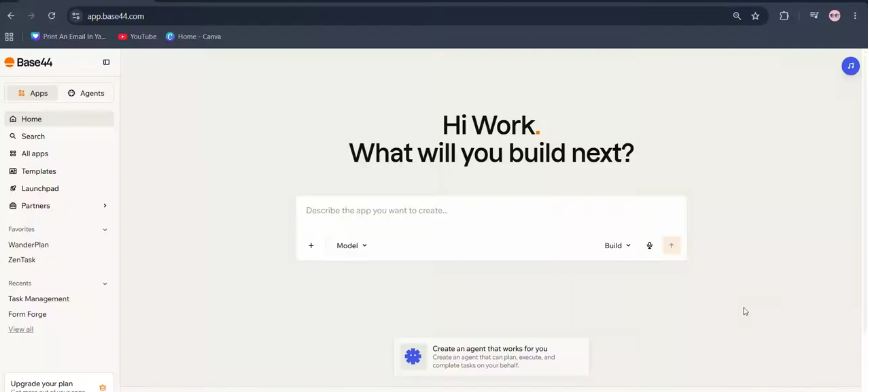
The Base44 dashboard — this is where most “not working” moments actually start.
How I Test and Diagnose Base44 Problems
Before I write a “fix it” post, I try to actually break the thing first. For Base44, that meant deliberately triggering a stuck AI chat by sending an overly long first prompt, forcing a white screen by clicking through a half-built page, and letting a session sit idle long enough to time out.
I also cross-checked every fix against Base44’s own developer documentation, so nothing here is guesswork or recycled from a forum thread. A few things surprised me — the “dict object has no attribute ‘lower'” error, for instance, is a genuine documented bug tied to how the chat parses input, not something users are causing themselves.
Base44 Error Types at a Glance
Before you start clicking around randomly, match your symptom to a category. It saves you from clearing your cache when the real issue is a broken data field, or reverting a prompt when the real issue is a five-minute platform blip.
| Symptom | Likely Cause | Fastest Fix |
|---|---|---|
| Editor stuck loading / spinner forever | Cached browser assets, extension conflict | Hard refresh, then incognito window |
| White/blank screen after clicking a button | Bug in generated code from last prompt | Revert last prompt or Version History |
| “500 Internal Server Error” | Backend problem, usually Base44-side | Refresh, then check status page |
| AI chat stuck on “Thinking…” | Prompt too long/complex, or network hiccup | Hit Stop, revert, split the prompt |
| Published changes don’t show live | Caching or a missed Publish click | Re-publish, clear device cache |
| Backend function returns 404 | Missing Deno.serve() entrypoint, routing bug | Redeploy, check function file structure |
My 4-Step Fix Order for a Broken Base44 Session
If Base44 suddenly stops working, refuses to load, or some buttons and pages appear stuck, I’ve found the problem is usually easier to fix than it first seems. Before assuming there’s something seriously wrong with the platform, I work through these four fixes in order. They cover the most common browser and platform-related problems I keep running into.
1. Hard Refresh Base44
The first thing I try when Base44 isn’t loading properly is a hard refresh.
A normal refresh can still pull from files the browser already has stored. A hard refresh forces the browser to re-download the page from scratch, which fixes a surprising number of stuck buttons, frozen previews, and pages that simply won’t render.
On Windows or Linux, press Ctrl + Shift + R. On Mac, press Command + Shift + R.
Give the editor a moment after the shortcut, then check whether the problem is gone. This alone resolves most of the “editor won’t load” and “it’s just spinning” reports I see.

Base44 pulling a fresh copy of the editor after a hard refresh, instead of reusing stale cached files.
2. Clear Your Cache and Cookies
If the hard refresh doesn’t do it, I move on to clearing the browser’s cached data and cookies entirely.
Old or corrupted local data can quietly interfere with a web app like Base44, especially one that leans this heavily on the browser to hold editor state. Clearing it gives the browser a genuinely clean starting point.
On Windows, press Ctrl + Shift + Delete. On Mac, press Command + Shift + Delete. This opens your browser’s Clear Browsing Data menu.
Make sure Cached images and files and Cookies and other site data are both selected, clear the data, then reopen Base44 and test again. If you’re on a shared or work laptop with browser extensions like ad blockers, turn those off too — Base44’s official documentation specifically flags extensions as a common cause of an editor that won’t load.

Clearing cached files and cookies gives the Base44 editor a clean slate to load from.
3. Revert Your Last Base44 Prompt
If Base44 stopped working right after I entered a prompt or made an edit, I try reverting that most recent action next, before touching anything else in the app.
Look underneath the last message in your AI chat history for the Revert icon and click it to roll the app back to the version right before that prompt ran.
This is especially useful when the problem appeared the moment a specific prompt or modification landed. Reverting that one action restores the project to the state it was in before things broke, without dragging you back further than you need. One thing worth knowing: asking the AI in chat to “undo that” doesn’t reliably work — Base44’s own support docs confirm that only the Revert button or Version History actually roll back a change.

The Revert icon sits directly under each message in the AI chat history.
4. Check the Official Base44 Status Page
If none of the previous fixes work, I don’t immediately assume the problem sits with my browser or my computer. Base44 itself can be dealing with an outage, a slow rollout, or scheduled maintenance.
I check the official Base44 status page to see whether there’s a reported service issue. It breaks availability down by function — Builder chat, Hosting, Login, Data, Application Preview, File Uploads, and Billing all get tracked separately, so you can tell whether it’s a small thing (like image uploads) or something broader.
If the status page shows an active incident, there’s usually nothing you need to change on your end. The right move is to wait for Base44 to restore the affected service and try again.

status.base44.com breaks uptime down by individual function, not just a single “up or down” indicator.
Recent Base44 Uptime by Function
99.93%
App Preview
99.96%
Builder Chat
99.97%
Hosting
99.07%
Platform (overall)
60-day rolling uptime per Base44’s official status page. Platform-wide is lower than any single service because it aggregates every dependency.
When Those Four Steps Don’t Fix It: Deeper Base44 Issues
Most “not working” reports resolve with the four steps above. But a few problems are specific enough that they need their own fix. These are the ones I get asked about most, and they’re all documented behaviors, not mystery bugs.
White Screen When Clicking Something in the Editor
If the screen goes white the moment you click into a specific part of your app, that’s usually a technical problem in the generated code, not a browser issue. Click the Revert icon on the chat message that introduced the change, or open Version History (the clock icon in the AI chat) and roll back further to a version where that click didn’t break anything. If reverting doesn’t resolve it, describe the exact trigger to the AI chat — where, when, how — rather than a vague “fix it,” since Base44’s support docs note this speeds up diagnosis considerably.
“500 Internal Server Error” on Load or Save
A 500 error means something failed on Base44’s servers, not in your app’s logic. It can show up while loading a page, saving data, or using a dashboard feature, and it can affect published apps as much as ones still in development. You can’t fix a 500 from your end — refresh, check the status page, and if it keeps happening, contact support with your app name, when it happens, and any console errors you can screenshot.
AI Chat Stuck on “Thinking…” or Won’t Respond
Long or overly complex first prompts are the most common trigger here. Click Revert on the stuck message, or hit Stop if it’s frozen mid-“applying changes.” If the request was genuinely large, break it into two or three smaller, sequential prompts instead of one giant one — this is the same advice I’ve given for Cursor AI’s context limit issue, and it holds true across most AI coding tools, not just Base44. If the chat has been stuck for more than 10 minutes with no update, stop it and contact support with the exact prompt and how long it sat frozen.
The Error: “‘dict’ object has no attribute ‘lower'”
This one looks alarming because it reads like a Python traceback leaking into your browser. It usually happens when the chat backend receives an object where it expected plain text — a temporary glitch, not something you caused. Revert your last message, do a full hard refresh, and try clearing the chat and starting a fresh prompt. If it keeps recurring on the same project, that’s worth flagging to support with the prompt text attached.
Everything Is Broken and Revert Isn’t Fixing It
If the app is genuinely broken across multiple pages, go to Version History instead of clicking Revert repeatedly on isolated chat messages. Version History lets you jump back to any earlier saved state of the whole app, not just undo the most recent prompt. If your app is stuck in an infinite loading state after a large edit or after running low on credits, mention that specifically in your support message — Base44’s team treats it as a distinct symptom.
Backend Function Returns 404 or ISOLATE_INTERNAL_FAILURE
This is a developer-side issue, not an editor glitch. Base44 runs backend functions on Deno, and every file in your /functions folder needs a Deno.serve() entrypoint. A stray utility file, an empty file, or an import of a Node.js-only module (like fs or path) inside that folder will throw ISOLATE_INTERNAL_FAILURE. Move helper files out of /functions, confirm your plan supports backend functions (Builder tier or higher), and redeploy. A 404 on a function URL you’re calling directly in the browser isn’t necessarily broken either — test it properly using the dashboard’s Test Function tool first.
Row-Level Security (RLS) Blocking or Exposing Data
If users can see data they shouldn’t, or the reverse — legitimate users are locked out — that’s an RLS misconfiguration, not a bug. Go to your app dashboard, click Security, then Start Security Check. Base44 scans for missing or misconfigured rules and lets you apply safe defaults automatically or adjust rules entity by entity. Test with different user roles afterward to confirm the fix actually held.
Custom Domain Not Connecting or SSL Errors
Domain issues almost always trace back to a DNS record mismatch. Remove any AAAA (IPv6) records — Base44 only supports IPv4, and a leftover AAAA record is one of the most common causes of a domain that connects but won’t resolve. If you’re routing through Cloudflare, set Base44’s records to DNS-only (grey cloud, not proxied); leaving them proxied causes newly added pages to 404 on the custom domain even after everything else looks correct. DNS changes can take up to 72 hours to fully propagate, so don’t panic if it’s not instant.
The Credit-Draining Mistake That Looks Like a Bug
Here’s something I didn’t expect to find, but it explains a chunk of the “Base44 stopped working mid-build” complaints I’ve seen: people run out of credits and interpret it as a platform failure, when it’s actually a mode problem.
Base44’s AI chat has two modes. Build mode triggers real code generation and spends full credits every time you send a message. Discuss mode, by contrast, is for planning and back-and-forth — it costs roughly 0.3 credits per request. If you’re brainstorming a feature in Build mode instead of Discuss mode, you’re burning your monthly allowance on conversation, not construction.
Discuss vs. Build: Relative Credit Cost
Discuss mode message
Build mode — small edit
Build mode — full feature generation
Relative scale based on Base44’s documented ~0.3 credit cost for Discuss mode versus full-cost Build mode actions.
My honest take: this is one of the more confusing parts of the product for new users, and Base44 doesn’t make the distinction loud enough inside the interface. If you’re routinely running dry mid-build, check your mode before you check for bugs. It’s a much cheaper fix than upgrading your plan.
Step-by-Step: My Full Troubleshooting Sequence
Putting it all together, here’s the exact sequence I run through, start to finish, whenever Base44 acts up.
Hard refresh — Ctrl/Cmd + Shift + R, then wait ten seconds before judging the result.
Try an incognito window or a different browser — isolates extension conflicts instantly.
Clear cache and cookies fully — not just for Base44, but for the browser generally if step 1 and 2 fail.
Revert your last prompt if the timing lines up with a recent edit, rather than trying to prompt your way out of it.
Check Version History if a single revert isn’t enough and the app is broken across more than one page.
Check status.base44.com — rule out a platform-wide incident before you keep debugging locally.
Contact Base44 support with your app name, exact error text, browser/OS, and a screenshot if none of the above worked.
Where Base44’s Self-Recovery Tools Actually Stand
Having now broken and fixed Base44 apps deliberately for this piece, my honest opinion is that its recovery tooling is genuinely better than most AI app builders I’ve tested, but the interface doesn’t do a great job of surfacing it when you’re panicking over a broken build.
✓ What Works Well
✓ Per-message Revert, not just a single global undo
✓ Version History for multi-step rollback
✓ Function-level status page, not one generic indicator
✓ Built-in RLS security scanner with one-click fixes
✗ Where It Falls Short
✗ Discuss vs. Build mode distinction is easy to miss
✗ “Ask AI to undo” doesn’t actually undo anything
✗ Vague AI-generated errors leak Python internals to users
✗ No in-editor warning when you’re about to burn credits fast
If you’re weighing Base44 against other AI app builders, it’s worth comparing notes — I found similar strengths and weak points when I tested another AI app builder, Macaly, and the pattern seems to hold across the category: strong generation, weaker guardrails around credits and error transparency.
When to Stop Troubleshooting and Contact Support
I set myself a rule after wasting an afternoon chasing a phantom bug: if the same error survives a hard refresh, a cache clear, a revert, and a status page check, stop repeating those steps. At that point you’re not troubleshooting anymore, you’re just re-running the same experiment and hoping for a different result.
Reach out to Base44 support directly with your app name or link, a description of exactly what you see, when it started, your browser and operating system, and a screenshot of any console errors. The Base44 team also runs an active Discord community where builders report outages in real time, often faster than the status page updates.
This same discipline applies well beyond Base44. I gave nearly identical advice when covering SaaS authentication failures, when I walked through fixing broken Zapier loops, and when a reader’s platform migration stalled out and I documented the fix in Solid Central migration failed errors — know when the fix is on your end, and know when it isn’t.
FAQ
Why is Base44 not loading at all?
Start with a hard refresh (Ctrl/Cmd + Shift + R). If that doesn’t work, clear your browser’s cache and cookies, disable ad blockers or privacy extensions, and try an incognito window. If it still won’t load, check status.base44.com for a platform-wide issue.
Is Base44 down right now?
Check the live status at status.base44.com. It reports uptime separately for Builder Chat, Hosting, Login, Data, Application Preview, and Billing, so you can see exactly which function, if any, is affected rather than a single blanket status.
Why does my Base44 app show a white or blank screen?
A white screen after clicking something almost always points to a bug in the code your last prompt generated. Click Revert on that chat message, or roll back further using Version History if the problem predates your most recent edit.
How do I fix a 500 error in Base44?
A 500 error is server-side, so you can’t code your way out of it. Refresh the page, check the status page for a known incident, and if it persists, contact Base44 support with your app name, when it happens, and any console errors.
Why is my Base44 AI chat stuck on “Thinking…”?
This is usually a prompt that’s too long or complex for one pass. Revert the message, or click Stop and break your request into two or three smaller, sequential prompts. If it sits frozen for more than 10 minutes, stop it and report it to support with the details.
Why am I burning through Base44 credits so fast?
Check whether you’re in Build mode instead of Discuss mode. Build mode triggers full code generation and spends full credits per message; Discuss mode is meant for planning and costs roughly 0.3 credits per request. Switch to Discuss for brainstorming, and only use Build when you’re ready to generate.
Can I undo a Base44 prompt by just asking the AI in chat?
No. Asking the AI to “undo” or “revert” in a chat message does not actually roll back code changes. Only the Revert button on a specific message or the Version History tool will genuinely restore an earlier state.
Final Thoughts
Base44 not working is rarely the dramatic, project-ending event it feels like in the moment. In my testing, the overwhelming majority of cases trace back to browser cache, a single bad prompt, or a temporary platform hiccup — all of which have a clear, documented fix.
My honest opinion after putting it through deliberate stress tests: Base44’s recovery tools (Revert, Version History, the function-level status page, the RLS scanner) are genuinely solid, better than several competing AI app builders I’ve reviewed on this site. The platform’s weak spot isn’t reliability, it’s communication — it doesn’t do enough to warn you before you burn credits in the wrong mode, and some of its error messages are far too technical for the non-technical builders it’s marketed to.
Work through the four-step order — hard refresh, clear cache, revert, check status — before you assume the worst. It’ll save you time on nine out of ten “Base44 is broken” moments. And if you’re weighing whether AI-generated builders like this one are ready to carry real production weight, I dug into that question directly in my piece on whether AI can reliably generate full-stack SaaS apps yet.
Related reading on Websites2Know:
- How to Fix Notion AI Not Working
- How to Fix “Claude Taking Longer Than Usual”
- How to Fix SaaS Authentication Failed Errors
- How to Fix Broken Zapier Loops & Errors
- Fixing Cursor AI’s Context Limit Issue
- Elementor AI History Panel Not Loading Fix
- Can AI Generate Full-Stack SaaS Apps Yet?
- My Honest Macaly Review
- How to Know If a New AI Tool Is Safe
- Fixing Solid Central Migration Failed Errors


