

Thiings.co Review: I Downloaded 40+ Icons to Find Out Where the Free Plan Actually Ends
10,000+ free AI-generated 3D icons, an email wall you’ll hit fast, and a $49 license question every designer asks. Here’s what actually happens when you use it.
By Oyekale Olawale | Updated July 2026 | 11 min read
Quick Answer
Thiings.co is genuinely free to browse and download for personal use — no account needed for your first downloads. But it’s not the “free forever, no strings attached” tool older reviews describe. Personal downloads require visible attribution, free downloads are rate-limited (you’ll need to hand over your email to keep going), and if you want to use icons commercially without crediting Thiings, you’re buying the Indie license at $49 one-time (businesses under $200k/year) or $199 for the Business tier. The library itself has grown to over 10,000 icons across 27 categories, and the quality is still excellent.
What Is Thiings.co?
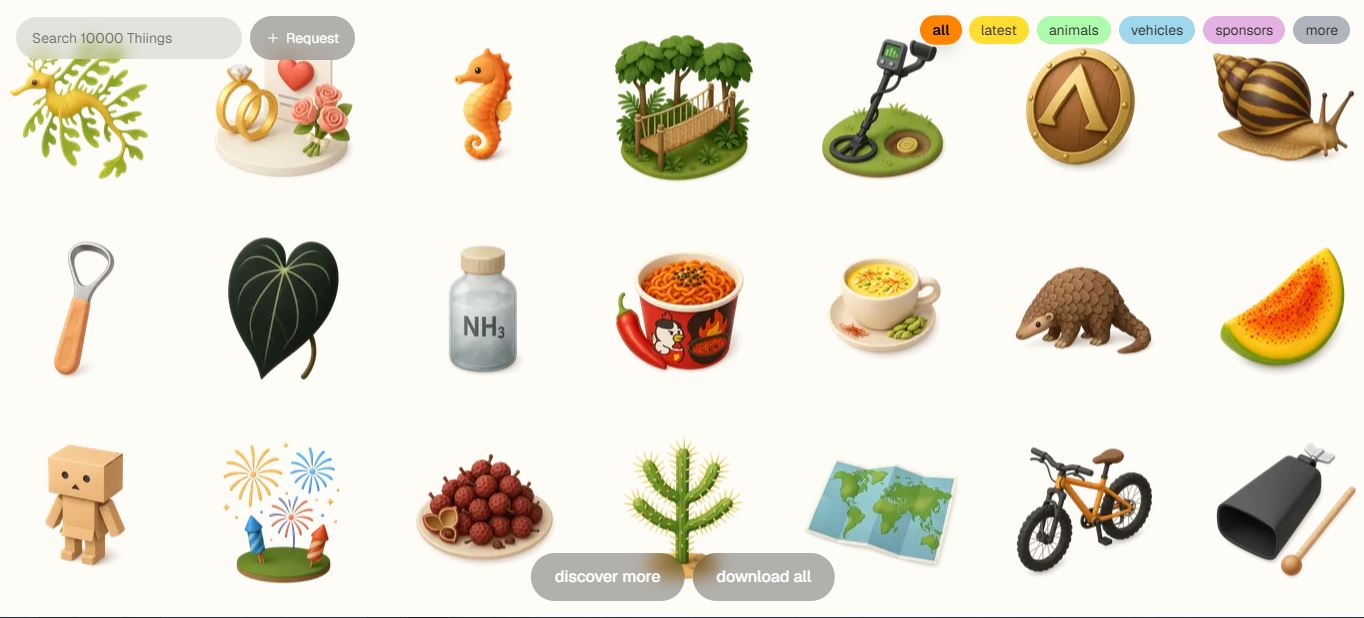
Thiings.co is a browsable library of AI-generated 3D icons — the soft, claymation-style objects you’ve probably already seen on a SaaS landing page or two without knowing where they came from. It was built by Charlie Clark (also behind Liinks.co), and it works exactly the way a good asset library should: no sign-up wall on arrival, no dashboard tour, no “book a demo” button hiding the actual product. You land on the grid, you scroll, you click, you download.
That simplicity is the whole pitch. I’ve used enough 3D mockup generator tools and stock-asset sites that require an account before you can see a single preview at full resolution — Thiings skips all of that. What’s changed since the last time this site covered it is the scale: the collection has grown from roughly 1,900 icons to more than 10,000, and the monetization model has matured from “free with optional donations” into an actual tiered licensing structure. That’s the part most existing reviews, including our old one, never caught up with.
Free vs. Paid: The Matrix Nobody Else Published
This is the table I wish I’d had before I started clicking download on random dog icons. It’s the single most important thing to understand before you build a client deck or a shipped product around these assets.
| Plan | Price | Who It’s For | Attribution? | Commercial Use? |
|---|---|---|---|---|
| Personal (Free) | $0 | Hobby projects, personal sites, learning | Required, visible | ✗ No |
| Indie | $49 one-time | Businesses under $200k/yr revenue | Not required | ✓ Full collection + future updates |
| Business | $199 one-time | Businesses over $200k/yr revenue | Not required | ✓ Full collection + future updates |
| Enterprise | Custom | Companies over $2M/yr or 50+ employees | Not required | ✓ Negotiated terms |
One detail that trips people up in Thiings’ own terms page: license purchases are described as lifetime and non-refundable, and payments run through Stripe. If you bought a legacy lifetime license before this tiered system existed, Thiings confirms those are treated as equivalent to the current Indie tier — so you’re not locked out of anything, but you also won’t get Business-tier perks unless you upgrade.
How I Tested Thiings.co
My process for any icon or asset library is the same: open the site cold, no account, and try to complete a real task — in this case, finding an icon I’d actually use in a client mockup. No pre-reading the docs, no checking the pricing page first. I wanted to see what a first-time visitor sees.
Thiings is a goldmine for designers, and that’s not an exaggeration. The variety across the collection is huge, the categories are easy to browse, and the render quality feels polished enough for both personal projects and client-facing work. Whether you’re prototyping an app, dressing up a landing page, or just adding some visual flair to a deck, Thiings makes it effortless to find something usable — and you don’t need to sign up just to look. Open the site, browse or search, click the icon that fits, and download.
I searched “dog” as my test query, and the results page turned into an endless scroll of dog-themed 3D icons — different breeds, poses, and styles, all rendered in that consistent soft-shaded aesthetic Thiings is known for. No pagination, no “load more” button to click ten times. Just keep scrolling.

I clicked into one icon and hit download. This is where I hit the pricing wall the older reviews don’t mention. The free plan is personal-use only, with visible attribution required, and it’s capped — after a handful of downloads, Thiings asks you to submit your email (or create an account) if you want to keep pulling icons for free. If you need the icon for a business or commercial project, that’s the moment the $49 Indie license shows up as your option.

None of this is a dealbreaker — it’s a reasonable model, and honestly more sustainable than “unlimited free forever,” which is what let a lot of similar tools quietly shut down or start injecting ads. But if you’re planning a workflow around Thiings for client work, budget for the email gate and the $49 license upfront rather than discovering it mid-project.
Browsing by Category
If you don’t have a specific search term in mind, Thiings organizes its entire collection into 27 browsable categories, which is a genuinely useful way to explore when you’re looking for inspiration rather than a specific icon:
- Everyday Life
- Events
- Animals
- Sports
- Countries
- Professions
- Hobbies
- Nature & Outdoors
- Nature & Plants
- Places & Structures
- Technology & Media
- Vehicles & Transport
- Entertainment & Leisure
- Food & Drink
- Work & Industry
- Space & Science
- Interface & Symbols
- Health & Wellness
- Fashion & Style
- History & Culture
- Fantasy & Imagination
- Flags
- Historical Figures
- Smileys & Emotions
- People & Body
- Objects
- Sponsors
The breadth here is genuinely one of Thiings’ strongest points against competitors like Freepik, where 3D-style assets tend to live in a much smaller, less organized corner of a massive general-purpose stock library.
Pricing Plans Explained
Here’s the pricing page as it currently stands, screenshotted directly from the site rather than pulled from an old cache. This is the part that’s changed the most since Thiings first launched.

Beyond the license tiers, Thiings also runs a credits system for a separate feature: generating brand-new icons that don’t exist in the library yet, on a pay-as-you-go basis. That’s a different purchase path from the download license, so don’t confuse “I want to license the existing 10,000 icons” with “I want to generate something custom” — they’re billed separately.
A quirk worth flagging for anyone reading the fine print: Thiings’ terms explicitly prohibit reselling icons as standalone downloadable packs or competing asset libraries, and redistribution outside your own project is off-limits regardless of which tier you’re on. That’s standard for the industry, but it’s easy to miss if you’re skimming.
Pros and Cons
✅ What Works
- 10,000+ icons, no account needed to start browsing
- 27 well-organized categories plus fast keyword search
- Consistent, polished 3D render style across the whole set
- One-time $49 license instead of a recurring subscription
- PNG downloads with transparent backgrounds, ready to layer
❌ What Doesn’t
- Free downloads are rate-limited — email required to continue
- Attribution is mandatory on the free tier, easy to forget on client work
- No SVG or vector export, PNG raster only
- License purchases are non-refundable, no trial-before-you-buy on the paid tier
- Highly niche or industry-specific icons can still be missing
Thiings.co vs. Alternatives
| Tool | Best For | Where It Loses to Thiings |
|---|---|---|
| IconScout / Icons8 | Massive vector + SVG libraries | Most 3D-style packs sit behind subscriptions, not a one-time fee |
| Freepik | General stock assets at scale | 3D icons are a small slice of a huge, less curated library |
| Noun Project | Simple monochrome vector icons | Barely any 3D-style coverage at all |
If your workflow already leans on AI image generation for other assets, it’s worth pairing Thiings with something like Nano Banana 2 for custom hero graphics, or a template tool like Templated.io when you need to drop those icons into a repeatable design system.
Real-World Use Cases
Landing page feature sections are the obvious one — swap a generic Bootstrap icon for a Thiings 3D render and the page instantly feels less templated. I’ve also used the library for app prototypes in Figma, where the visual weight of a 3D icon reads better in a mockup than flat vector lines. Presentation decks benefit too: dropping a themed 3D icon next to a bullet point does more work than another stock photo. And if you’re building out an AI website builder project, these icons slot in cleanly as section dividers without needing a designer on retainer.
FAQ
Is Thiings.co really free?
Yes, for personal, non-commercial use — with visible attribution to Thiings.co required, and download volume rate-limited unless you submit your email.
Can I use Thiings icons in a client project without paying?
No. Commercial use requires the $49 Indie license (or $199 Business tier if your revenue is over $200k/year). The free tier is personal-use only.
Does the $49 license cover future icons too?
Yes. The Indie and Business licenses are lifetime purchases that include the full existing collection and all future updates, not just a snapshot of today’s library.
Are the icons available as SVG?
Not currently. Downloads are PNG with transparent backgrounds. If your project needs true vector scalability, pair Thiings with a vector-first library for those specific assets.
Can I resell icons downloaded from Thiings?
No. Thiings’ terms prohibit reselling icons as standalone assets or redistributing them as a competing icon pack, regardless of your license tier.
Bottom Line
Thiings.co is still one of the best free starting points for 3D-style icons, and the collection has only gotten deeper since it launched. But go in knowing it’s not the no-strings-attached freebie some older write-ups suggest — attribution is required on the free tier, downloads are gated behind an email at some point, and any commercial use means budgeting $49 for the Indie license. For personal projects, portfolios, and prototyping, it’s an easy bookmark. For client work, treat that $49 as a rounding error next to what a custom icon set would cost you elsewhere, and buy the license before you build your deck around it.
If you’re stacking up your AI design toolkit, it’s also worth a look at what’s inside our Free AI Tools Hub and our roundup of 10 amazing websites you probably didn’t know existed — both cover free-tier resources in the same spirit as Thiings.