
3CX Review 2026: What Actually Happens After You Deploy It for Real Clients
Plans start around $320/year per system, not per user. I’ve rolled 3CX out across several client organizations on Azure, on bare Linux VMs, and self-hosted — here’s the pricing, the setup gotchas, and the parts nobody mentions until you’ve already signed the contract.
Quick Answer
3CX is a business phone system (PBX) you license per simultaneous call, not per user, starting around $320–$395/year for an 8-SC license (Basic to PRO edition), plus separate hosting ($250–$1,995/year if you don’t self-host) and optional paid support tickets. After running it for several client organizations on Azure and Linux VMs, my honest take: it’s genuinely cheap and stable once it’s live, Active Directory and mobile/desktop apps are excellent, but budget real time for regional number-porting rules, hardware compatibility checks, and the fact that desk-phone-to-cell-phone handoff still isn’t perfectly seamless. If you have basic IT capability, it’s one of the better value PBX platforms available in 2026.
I’ve deployed 3CX for several client organizations at this point, not just spun up a trial for a weekend and written down first impressions. Some installs sit on client-owned hardware, some run on Azure where 3CX’s own setup script provisions the VM and the PBX software in one pass, and one has quietly chugged along on a Linux VM for years without drama. That range of deployments is exactly why most “3CX review” posts online feel thin: they either come from someone who spent an afternoon in a demo, or from a comparison site that’s never actually pointed a SIP trunk at production traffic. This one comes from the maintenance calls, the upgrade windows, and the one time a client’s sales team complained about their desk phone not following them to their cell.
What is 3CX?
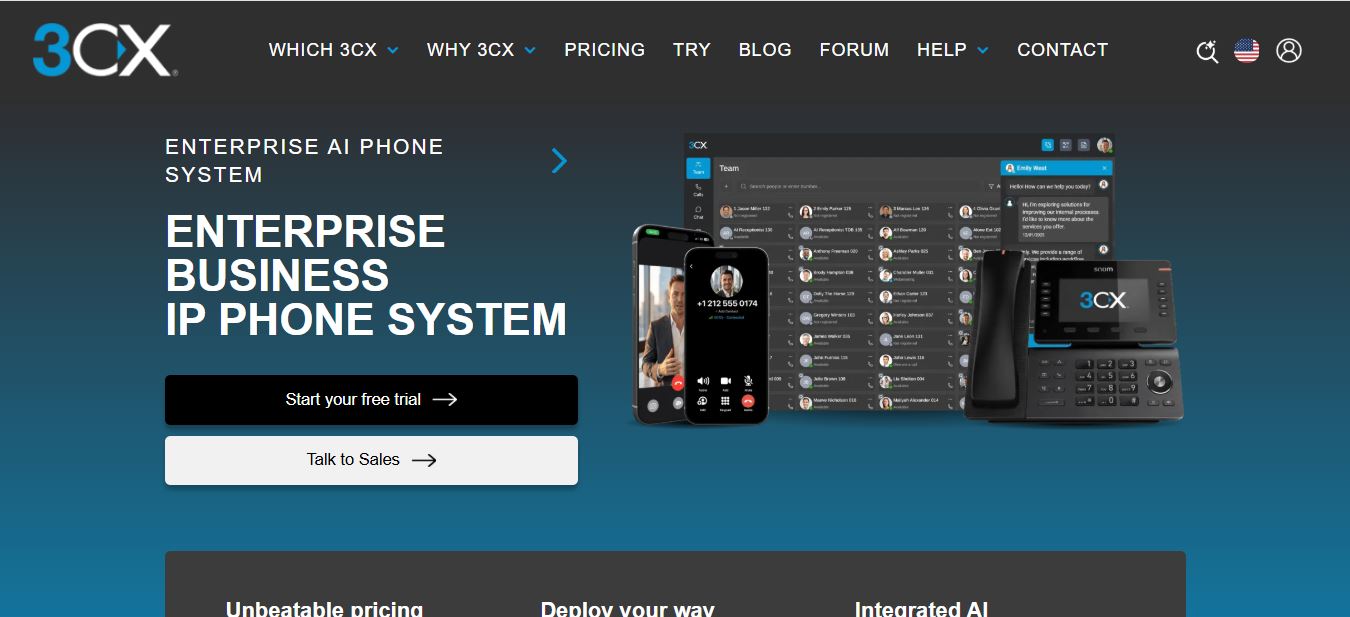
3CX is a software-based PBX — a business phone system that handles voice calling, call queues, video meetings, live chat, and basic contact-center functions from a single console. Nick Galea founded the company in 2005, and 3CX has spent the two decades since building out what’s now a fairly complete unified-communications platform rather than “just” a phone switch. You can run it self-hosted on your own Windows or Linux box, on a VPS at Amazon, DigitalOcean, Azure, or Google, or let 3CX host and manage it for you.
The thing that separates 3CX from most cloud phone competitors is the billing model. Instead of charging per user per month, 3CX licenses are priced around Simultaneous Calls (SC) — the number of internal and external calls that can be active at the same time across your whole system. A company with 60 employees where only 8 people are ever on the phone at once can license for 8 SC, regardless of headcount. That’s a meaningfully different cost structure than the per-seat pricing you’ll see from most hosted VoIP providers, and it’s the single biggest reason 3CX keeps showing up on shortlists for cost-conscious IT teams.
Who Is 3CX Actually Built For?
Every client I’ve set 3CX up for shares a common trait: someone on their team, or a managed IT partner, is comfortable with basic server administration. That’s not a knock — 3CX is not trying to be the “sign up and forget it” hosted phone system that some competitors are. It’s built for small and mid-sized businesses, IT resellers running white-labeled deployments for multiple customers, and internal IT teams who want to own their telephony stack rather than rent it.
If your team already manages Active Directory, firewalls, and internal servers, 3CX slots in naturally — setting up users manually or syncing straight from AD is genuinely one of the easiest parts of the whole process. If you have zero internal IT capacity and want something that “just works” with a support line you can call the moment something breaks, a fully managed cloud PBX with per-seat pricing might suit you better, even at a higher long-term cost.
Core Features: What You Actually Get
3CX bundles a genuinely long feature list into every edition above the entry tier. Here’s what matters most in day-to-day use, in the order clients actually end up using them.
Call Queues
Incoming calls route to available agents based on skill, availability, or simple round-robin logic. For a small support desk or sales line, this is the feature that actually cuts hold times — and it’s configurable enough that you’re not stuck with one routing style for the whole business.

Call Reporting and Analytics
Call volumes, agent performance, and service-level reports live in the same console. I lean on these reports constantly during troubleshooting — the logs are verbose enough to actually diagnose a dropped-call complaint instead of guessing, which matters more than any dashboard aesthetic once something goes wrong at 4pm on a Friday.

Live Chat and Web Calls
Visitors can message or call your team straight from your website without installing anything, and it lands in the same client that handles your phone calls. This is one of the more underrated pieces of the platform — it quietly folds a second support channel into infrastructure you’re already paying for.

Real-Time Wallboard
A live dashboard shows agent status, queue length, and call metrics as they happen. For any client running even a small call queue, this is what a supervisor pulls up on a second monitor to catch a staffing problem before it becomes a wave of missed calls.

IVR, Call Recording, and the Rest
Interactive Voice Response menus guide callers to the right department without a human touching the call first, and built-in call recording covers compliance and quality-assurance needs out of the box. Neither is flashy, but both are the kind of feature you only notice when a competitor charges extra for them and 3CX doesn’t.
Setting It Up: What Actually Happens on Deployment Day
3CX is genuinely easy to stand up, whether that’s on your own hardware or on their supported cloud options. On Azure specifically, 3CX’s automated setup script provisions the resources and installs the PBX software in one pass — it’s one of the smoother “click a link, wait ten minutes, log in” experiences I’ve had with any self-managed telephony platform. On a bare Linux VM, the installer is nearly as painless: it creates the database, launches the management console, and walks you through the first-time wizard for domain and firewall/NAT rules.
Two things trip people up before they go live, and neither is well documented on 3CX’s own marketing pages.
Regional number restrictions. Depending on where you operate, linking an existing landline number to your 3CX account may have to go through your local telco rather than 3CX directly. In the country where I do most of my client work, this is a hard requirement, not an edge case — so read up on the porting and number-linking rules for your specific region before you assume you can bring your existing numbers over on day one.
User provisioning. The good news here: setting up users manually or connecting straight to Active Directory is genuinely a breeze. For any client already running AD, syncing extensions to existing accounts took a fraction of the time I budgeted for it, and it means IT doesn’t have to maintain a second identity system just for phones.
Once it’s live, stability has been consistently good. One of my client instances runs on a Linux VM and has, in the client’s own words, “just chugged along” with minimal intervention required outside of scheduled updates.
Admin Dashboard, Mobile App, and Desktop App
The admin dashboard is not complicated, and it’s noticeably improved over the past several years — call flow editors, extension management, and reporting all live in a console that doesn’t require a manual to navigate for day-to-day tasks. It packs a lot of low-level telephony controls in, which is a feature if you want granular control and mildly overwhelming if you want something completely hands-off.
The mobile app and desktop app are where 3CX quietly outperforms a lot of its reputation. Call quality and reliability have been excellent across client deployments — at least 95% of the time, calls connect cleanly and audio stays clear on both platforms, even switching networks mid-call. The one consistent friction point: moving a call from a desk phone to a cell phone isn’t 100% seamless yet. It works, but it’s not the instant, invisible handoff that a couple of sales teams I support keep asking for. That’s a known limitation we’re actively working around rather than a dealbreaker, but it’s worth setting expectations before a sales team goes live expecting iPhone-style call continuity.
Integrations: WhatsApp, Microsoft Teams, Slack, and CRMs
3CX has a long integration list, and in practice it holds up: WhatsApp, Microsoft Teams, Slack, Salesforce, Zendesk, HubSpot, Zoho CRM, Bitrix24, Google Workspace, and Microsoft 365 are all supported, alongside an open API for anything custom. For teams already living in Teams or Slack for internal chat, being able to answer a call or check presence without switching apps removes one more context switch from an already busy day. If you’re layering marketing or lead workflows on top of your phone system, it’s also worth checking how those platforms handle AI-assisted small business marketing before you commit to a specific CRM integration path.
3CX Pricing 2026: Full Breakdown

3CX licenses are billed annually, per system, based on your Simultaneous Call (SC) tier — not per user, not per month. Extensions can run into the hundreds on a given tier without moving the price, as long as your peak concurrent-call number stays within the license. Note that as of early 2026, 3CX retired its free entry tier and introduced a Fair Use Policy for usage spikes, so budget for a paid tier from the start rather than assuming a free plan will cover a production rollout.
| Simultaneous Calls | Max Extensions | Basic /yr | PRO /yr | AI Edition /yr |
|---|---|---|---|---|
| 8 SC | ~40 | ~$320 | ~$350–$395 | ~$575 |
| 16 SC | ~80 | ~$640 | ~$750–$795 | ~$1,095 |
| 32 SC | ~192 | ~$1,050 | ~$1,395 | ~$1,995 |
| 64 SC | ~384 | ~$2,175 | ~$2,895 | ~$4,250 |
| 128 SC | ~896 | ~$4,500 | ~$5,995 | ~$8,495 |
Figures compiled from third-party pricing trackers and reseller quotes current as of mid-2026; prices exclude VAT/tax and fluctuate with FX rates and active promotions. Always confirm current numbers on 3CX’s official pricing page before budgeting.
The license fee is rarely the whole story, and this is where a lot of “3CX is basically free” comparisons fall apart. If you don’t self-host, hosting through 3CX runs roughly $250–$1,995/year depending on your SC tier. Paid support tickets are billed separately in some plans — around $75 per ticket if you need direct vendor assistance rather than relying on community forums and documentation. And if you’re hosting on your own VPS instead of on-premise hardware, that’s a separate line item too. None of this makes 3CX expensive relative to per-seat competitors at any real scale, but it does mean the headline SC price is a starting point, not the total cost of ownership.
Pros and Cons — From Actually Running It
What I liked
- Cost — concurrent-call licensing is genuinely cheap at SMB scale
- Ease of use for admins, once it’s configured
- Ease of use for end users, especially on mobile/desktop
- Rock-solid stability on a Linux VM over years of uptime
- AD integration and manual user setup, both painless
- Deep integration options: WhatsApp, Teams, Slack, CRMs
What I didn’t
- Desk-phone-to-cell handoff isn’t fully seamless yet
- Occasional upgrade “gotchas” across major version jumps
- Hardware compatibility has exceptions — always verify first
- Support quality can vary noticeably by region/reseller
- Number-linking rules vary by country and can slow launch
- 2023 supply-chain security incident still worth understanding
Worth expanding on the hardware point specifically: 3CX supports a wide range of SIP phones and gateways, but there are exceptions, and I’ve had a client show up with a device that technically wasn’t on the supported list. It still worked in most respects, but double-check your exact hardware model against 3CX’s current compatibility list before you buy in bulk — that’s a cheap five-minute check that saves a much more expensive return process later.
Security: The 2023 Incident and What It Means Today
Any serious evaluation of 3CX has to address this directly. In March–April 2023, 3CX disclosed a supply-chain security incident affecting its desktop client, which independent investigators — including Mandiant — traced to a sophisticated, state-linked actor. 3CX brought in external incident responders, published updates through the process, and it became one of the more widely studied supply-chain compromises in recent cybersecurity history.
Years on, this is a fact about 3CX’s history, not a live risk you should assume applies today — but it’s exactly the kind of thing you verify rather than take on faith. Before any production deployment, check 3CX’s current security advisories, ask about code-signing verification for endpoint clients, and enforce strict patching discipline on desktop softphone installs. None of this is unique to 3CX; it’s simply good practice for any vendor whose software touches your network at the endpoint level, and it costs nothing but a few minutes of due diligence.
3CX vs. Alternatives
| Platform | Pricing model | Best for |
|---|---|---|
| 3CX | Per simultaneous call, annual | Teams that want to own the stack and control cost at scale |
| RingCentral | Per user, monthly | Fully managed hosted PBX with minimal admin overhead |
| GoTo Connect | Per user, monthly | Simplicity-first teams already in the GoTo ecosystem |
| 8×8 | Per user, monthly | Global compliance and contact-center-heavy operations |
| Aircall | Per user, monthly | Sales-heavy teams wanting deep CRM click-to-dial workflows |
If your headcount is large but your simultaneous call volume is low — a law office, a professional services firm, a school — 3CX’s concurrent-call model usually wins on price by a wide margin. If you’d rather not think about SIP trunks, firewall rules, or hardware compatibility lists at all, a fully managed per-seat competitor may be worth the premium for the reduced admin overhead. For teams weighing video-first collaboration on top of voice, it’s also worth comparing dedicated mobile video conferencing platforms against 3CX’s built-in meeting tools before deciding which handles the heavier lifting.
Real-World Use Cases
A regional professional-services firm with a handful of receptionists and a bench of attorneys who are rarely all on the phone at once is the textbook case for 3CX’s concurrent-call pricing — you license for peak usage, not headcount. A mid-sized remote support team benefits from the combination of queues, reporting, and web meetings in one place, particularly if compliance requirements push them toward self-hosting. And IT resellers can white-label or manage multiple 3CX instances as a recurring service line, which is exactly the kind of arrangement several of my client relationships grew out of.
Thinking About Moving Off Legacy Phone Hardware?
3CX’s free trial gives you a real production-grade system to stress-test before you commit to a license tier.
How I Test the Platforms I Review
Every review on this site comes from hands-on testing and, where possible, real production use — not a rewritten press release. For 3CX, that means multiple full client deployments across self-hosted Linux VMs and Azure’s automated setup path, plus extensive use of the free plans and trial licenses to explore extension provisioning, call queues, Active Directory sync, mobile and desktop apps, reporting, and third-party integrations over an extended period rather than a single sitting. I take notes during setup and during ongoing maintenance, then combine those with what I can verify against 3CX’s own documentation and pricing pages. This review reflects my personal experience and opinion — it isn’t professional, financial, legal, or technical advice, and if you need authoritative answers about a specific feature, security requirement, or region-specific number-porting rule, contact 3CX or your reseller directly.
Verdict — Is 3CX Worth It in 2026?
Yes, with a caveat. If you have any internal IT capability — or a reseller who does — and you value predictable, concurrent-call-based pricing over the simplicity of a fully managed per-seat service, 3CX remains one of the strongest value plays in business telephony. The mobile and desktop apps are good enough that end users rarely complain, the admin console has matured into something genuinely manageable, and the integration list covers what most modern teams actually need. Budget real time for regional number-porting rules and hardware compatibility checks before go-live, keep your desktop clients patched, and set expectations that desk-to-cell handoff still needs a workaround rather than treating it as solved. Handle those three things up front, and 3CX earns its reputation as one of the more dependable, cost-effective PBX platforms a small or mid-sized business can run in 2026.
See Current 3CX Pricing for Your Team Size
Estimate your peak simultaneous calls, then get an instant quote directly from 3CX’s official pricing calculator.
Get an Instant Quote →Frequently Asked Questions
How much does 3CX cost in 2026?
Licenses start around $320/year for an 8-simultaneous-call Basic license, or $350–$395/year for the equivalent PRO license, scaling up based on concurrent call volume rather than user count. Hosting, if you don’t self-host, adds roughly $250–$1,995/year, and paid support tickets run around $75 each.
Is 3CX free?
3CX discontinued its free tier in early 2026 in favor of a time-limited free trial. Every production deployment now requires a paid annual license.
Can I self-host 3CX?
Yes. 3CX runs on Windows or Linux, on your own hardware or on a VPS at Amazon, DigitalOcean, Azure, or Google Cloud. Azure’s automated setup script is one of the smoothest self-hosting paths available.
Is 3CX safe to use after the 2023 security incident?
The March–April 2023 supply-chain compromise was thoroughly investigated by third parties including Mandiant, and 3CX has since published updates and hardening guidance. It’s a piece of company history worth understanding, but not a reason on its own to avoid the platform in 2026 — verify current advisories and enforce strict client-patching discipline as you would with any vendor.
Does 3CX integrate with Microsoft Teams and Slack?
Yes. 3CX supports Microsoft Teams, Slack, WhatsApp, Microsoft 365, Google Workspace, and CRMs including Salesforce, HubSpot, Zoho, and Bitrix24, alongside an open API for custom integrations.
Can I keep my existing phone numbers and hardware?
Usually, but number-porting rules vary significantly by country — in some regions, linking an existing landline number has to go through your local telco rather than 3CX directly. 3CX supports a wide range of SIP hardware, but always check your specific device against the current compatibility list before buying in bulk.
Related Reading You Might Find Useful
- Top Mobile Video Conferencing Software — comparing Zoom, Teams, Webex and more
- Best Linux Hosting Providers — for self-hosting your own PBX or server stack
- Hostinger Review — VPS and cloud hosting options compared
- 45 Key Remote Work Statistics — why flexible communication tools matter
- How to Use ChatGPT for Small Business Marketing
- Best Church Management Software of 2026 — for organizations needing phone and admin tools together
- Post Affiliate Pro Review — tracking and CRM-adjacent tooling for sales teams
- The Best Employee Training Software — for onboarding new agents and admins


