

By Oyekale Olawale · Hands-On Tested
ChatGPT 5.6 Review: My Hands-On Experience Building Websites With Sol AI
I spent real hours inside GPT-5.6 Sol building a landing page, redesigning an existing site, reimagining Reddit, and shipping a portfolio. Here’s exactly what worked, what broke, and whether it’s worth switching from your current AI design tool.
July 9, 2026
Release Date
$0 – $200/mo
Pricing Range
Sol · Terra · Luna
Model Family
8.2 / 10
My Rating
Quick Answer
ChatGPT 5.6, powered by the new GPT-5.6 Sol model, is a genuine step up for AI-assisted web design — cleaner layouts, better typography, subtle 3D effects, and a built-in way to publish sites straight from the chat window through ChatGPT Sites. It’s free to try in a limited form, but Sol itself needs a paid plan (Plus starts at $20/month). After testing it on four real projects, my take is simple: it’s excellent for fast, polished first drafts, but a dedicated AI design tool like Fable still wins on visual richness and animation depth for anything client-facing.
I’ll be upfront: I didn’t go into this test expecting much. Every “ChatGPT can build websites now” headline over the past two years has led to the same disappointing place — a generic Bootstrap-looking template with a hero section, three feature cards, and a footer nobody asked for. So when GPT-5.6 Sol rolled out publicly on July 9, 2026, alongside a new publishing feature called ChatGPT Sites, I gave myself one weekend to actually try to build things with it instead of just reading the release notes.
What follows is that weekend, written up honestly — the wins, the moments where I had to fight the model, and where it still falls short of tools built specifically for design work.
What Is GPT-5.6 Sol?
GPT-5.6 Sol is the flagship model in OpenAI’s new GPT-5.6 family, which also includes two smaller tiers, Terra and Luna. OpenAI’s own naming convention ties the number (5.6) to the model’s generation, while Sol, Terra, and Luna are meant to be durable capability tiers that can each get upgraded independently going forward — similar in spirit to how Anthropic separates its own model tiers.
Sol is the reasoning-heavy, do-the-hardest-work model. Terra sits in the middle, delivering performance close to the outgoing GPT-5.5 at roughly half the API cost. Luna is the fast, cheap option built for high-volume, low-latency tasks. In plain terms: Sol is the one you want for anything that requires planning, multi-step execution, or genuine design judgment — which is exactly why I used it for every project in this review.
Sol actually had a strange path to launch. OpenAI first previewed it to a small group of government-vetted partners on June 26, 2026, while a voluntary U.S. review process played out. It didn’t reach the public until July 9. That two-week gap generated a surprising amount of hype on X, with some early testers calling it the best model they’d used and others — including a few well-known AI investors — saying it was strong but still a notch behind Anthropic’s Claude Fable 5 on the hardest tasks. My own experience landed somewhere in between, and I’ll get into exactly where later in this review.
Is ChatGPT 5.6 Free?
Partially. The free tier of ChatGPT still runs on GPT-5.5 Instant, not Sol, so if you’re on the $0 plan, you won’t see the flagship model in your chat window at all. To actually use GPT-5.6 Sol for design work — the version I tested everything with in this review — you need at minimum a ChatGPT Plus subscription at $20/month, which unlocks Sol through the Medium and higher reasoning settings.
| Plan | Price | GPT-5.6 Access | Sites Access |
|---|---|---|---|
| Free | $0/mo | None (GPT-5.5 Instant only) | Not available |
| Go | $8/mo | Terra, in Work/Codex only | Not available |
| Plus | $20/mo | Sol (Medium–Extra High) | Public beta, rolling out |
| Pro | $100–$200/mo | Sol + Sol Pro | Full access, first rollout |
| Business / Enterprise | From ~$25/seat | Sol, Terra, Luna (admin-controlled) | Full access, public publishing off by default |
In the API, developers pay per token rather than a flat subscription: Sol runs $5 per million input tokens and $30 per million output tokens, Terra is $2.50/$15, and Luna is $1/$6. If your only goal is casual web-design experimentation, Plus at $20/month is the realistic entry point — it’s also the tier most working professionals I know settled on after comparing the two Pro tiers, which mostly buy you volume rather than extra design capability.
How I Test the Platforms I Review
Before I get into the results, here’s how I actually approach every review on this site, including this one. I don’t summarize marketing pages or rewrite press releases — I test hands-on. That means creating a personal account, working through the free plan or trial where one exists, and then upgrading to whatever paid tier is required to test the feature I’m covering. I take notes during testing rather than trying to remember details afterward, and I combine those notes with screenshots of the actual output before writing anything up.
Everything in this review reflects my personal opinion and hands-on experience with ChatGPT 5.6 and Sol during the week of its public launch. It is not professional, financial, legal, or technical advice, and results can vary depending on your prompts, your plan, and how OpenAI continues to adjust the rollout. If you need authoritative guidance on features, limits, or billing, contact OpenAI directly or check their official help documentation.
First Impressions: Opening Sol for the First Time
The first thing I noticed switching from GPT-5.5 to Sol wasn’t a UI difference — it was pacing. Sol takes noticeably longer to respond on Extra High reasoning, but the extra time buys real thinking: multi-step layout planning, component naming that actually makes sense, and CSS that doesn’t fight itself when you ask for a follow-up change. On Medium reasoning, response times felt close to GPT-5.5 Instant, just with better output.
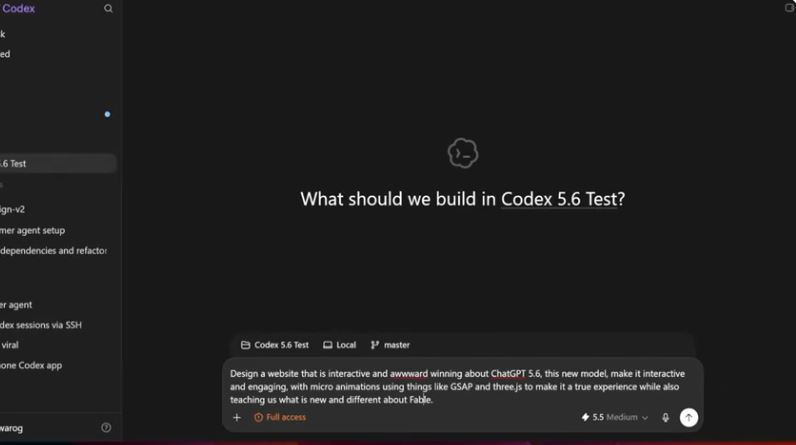
The workspace itself has changed too. OpenAI launched a new mode called ChatGPT Work alongside GPT-5.6, and it’s where most of my testing happened. Work is meant for longer, multi-step tasks — it can pull from connected apps, work across files, and hand results off as a finished document, deck, or hosted website. Regular chat still exists for quick questions, but Work is clearly where OpenAI wants serious building to happen now.
Test 1: Building a Landing Page From Scratch
For the first test, I gave Sol almost nothing to work with — a single sentence describing a fictional productivity app and a request for a landing page. On earlier GPT-5 versions, this kind of vague prompt reliably produced the same tired layout: full-width hero, three feature cards, testimonial carousel, done. Sol didn’t do that. It asked one clarifying question about tone before generating anything, then came back with a layout that used a Bento Grid arrangement, actual whitespace discipline, and a typography scale that didn’t look like a default Tailwind config.
Where it got genuinely interesting was when I fed it a real design reference — a screenshot of a Bento Grid layout I liked from a different product. Sol’s output jumped noticeably in quality once it had something concrete to anchor to. Subtle 3D depth on the cards, soft shadow layering, and smoother hover transitions all showed up that weren’t there in the blind first attempt. That’s a meaningful shift: previous GPT-5 versions could copy a reference but rarely improved on it stylistically. Sol seemed to actually understand why the reference worked.

Test 2: Redesigning an Existing Website
Next, I pointed Sol at an existing (dated) site and asked for a full visual redesign while keeping the same content structure. This is usually where AI tools fall apart, because “redesign this” is a vague instruction that forces the model to make dozens of small aesthetic decisions without much guidance.
Sol handled it better than I expected. It preserved the information hierarchy of the original page — same sections, same order — while modernizing the type pairing, tightening the spacing system, and adding restrained motion on scroll. The one issue I ran into: on the first pass, it over-corrected and made every heading enormous, presumably trying to signal “modern” through scale alone. A single follow-up prompt asking it to dial back heading sizes fixed it in one shot, which tells me the underlying layout logic was solid; it just needed direction on restraint.

Test 3: Refreshing Reddit’s Interface
This one was mostly for fun, but it turned out to be the most revealing test of the four. I asked Sol to reimagine Reddit’s homepage with a cleaner, more modern visual language while keeping the core feed-and-sidebar structure recognizable. Reddit’s actual layout is deceptively hard to redesign well — dense information, a lot of competing UI elements, and a comment-thread structure that breaks easily if spacing logic isn’t consistent.
Sol’s version cleaned up the visual noise considerably: better contrast between post cards, a calmer color palette, and vote/comment icons that didn’t compete for attention the way the real site’s do. It wasn’t perfect — nested comment indentation started to visually collapse past four or five reply levels, a classic deep-nesting UI problem that even human designers argue about. But as a stylistic exercise, it was one of the strongest single outputs across all four tests.

Test 4: Building a Personal Portfolio
The last test was the most practical: a personal portfolio site with a project grid, an about section, and a contact form. This is the kind of project most solo freelancers and small businesses actually need, so I paid close attention to how usable the output was without extra cleanup.
Sol produced a clean, professional-looking result on the first try — good contrast, sensible grid spacing, and a contact form that was actually wired up correctly rather than a static placeholder. The animations on project cards (a subtle scale-and-shadow effect on hover) were tasteful rather than gimmicky, which hasn’t always been true of AI-generated micro-interactions in my experience.

ChatGPT Sites: Publishing Directly From the Chat Window
The feature that impressed me the most wasn’t the design quality — it was ChatGPT Sites, the new publishing layer OpenAI launched alongside GPT-5.6. Instead of copying generated code into a separate hosting tool, you can describe a site, preview it inside ChatGPT, and publish it live to a shareable URL without ever leaving the conversation. You can trigger it explicitly by typing @Sites in your prompt, or just ask ChatGPT to “build me a website” and it detects the intent.
Published sites live at a {name}.openai.chatgpt.site subdomain by default, though custom domains are supported if you already own one and can update its DNS records — OpenAI doesn’t register a domain for you. There are three sharing modes: invitation-only, workspace-limited, or link-shareable with anyone on the internet, and workspace admins can restrict public sharing entirely for Enterprise accounts.
It’s still a public beta with real limits worth knowing before you rely on it. It’s not yet available in the EEA, Switzerland, or the UK. Terms explicitly block payment-card data, protected health information, and sites aimed at users under 13. And usage caps apply across your whole account, so if you hit a limit, you can’t spin up new Sites or add storage until it resets — though you can still edit what’s already live. If you’re building something for a client with real user data, this is a beta feature to hold off on, not a permanent hosting solution.
MCP Integrations Through Zapier: Safer Automation Than I Expected
I also spent time exploring ChatGPT’s MCP-style integrations through Zapier, mostly because I wanted to see how much control I actually had over what the AI could touch. Rather than granting ChatGPT blanket access to every connected app, Zapier lets you choose specific actions — for example, allowing it to read emails or draft a reply while explicitly blocking anything that sends or deletes messages.
That permission-based model made the whole setup feel far more trustworthy for everyday automation than the all-or-nothing access I’ve seen with some other agentic tools. If you’re weighing automation platforms more broadly, our breakdown of Make.com’s workflow builder is a useful comparison point for how granular permissioning is (or isn’t) handled elsewhere.
ChatGPT 5.6 Sol vs. Claude Fable 5: How They Actually Compare
Since Sol is the model most directly positioned against Anthropic’s Claude Fable 5, a side-by-side is worth laying out plainly rather than picking a winner for marketing’s sake. On OpenAI’s own published benchmarks, Sol set a new high on Agents’ Last Exam, a test of long-running professional workflows, beating Fable 5 by a wide margin at a fraction of the estimated cost. On the broader Artificial Analysis Intelligence Index, Sol came within a single point of Fable 5 while finishing tasks in significantly less time.
But raw benchmark scores don’t always track with subjective design quality, and that’s exactly what I found. For pure visual polish — richer animation, more considered micro-interactions, tighter attention to detail on things like shadow depth and easing curves — Fable 5 still edged Sol in my side-by-side comparisons. Sol’s strength is speed and agentic reliability: it plans, executes, and self-corrects on multi-step design tasks faster and more cheaply than Fable does. If you’re weighing hallucination risk as part of your decision too, our Claude vs. ChatGPT hallucination rate comparison is worth a look before you commit budget to either ecosystem.
| Category | GPT-5.6 Sol | Claude Fable 5 |
|---|---|---|
| API input / output (per 1M tokens) | $5 / $30 | Comparable tier pricing, varies by plan |
| Agentic / long-horizon tasks | State of the art on published benchmarks | Strong, slightly behind on Agents’ Last Exam |
| Visual polish / animation depth | Very good, improves sharply with references | Slightly richer out of the box, in my testing |
| Built-in publishing | Yes, via ChatGPT Sites (beta) | Yes, via shareable Artifacts |
| Speed at similar reasoning depth | Faster, per OpenAI’s own reported figures | Slower on max reasoning settings |
If you want a deeper dive into how the two ecosystems handle really large prompts and context windows specifically, I’d point you to our guide on Claude Fable 5’s long-context prompting behavior, and our head-to-head on Claude Fable 5 vs. ChatGPT 5.5, which still holds up as useful context for how OpenAI closed the gap with 5.6.
What ChatGPT 5.6 Reddit Threads Are Actually Saying
Reddit’s reaction to ChatGPT 5.6 in the days after launch has been noticeably more measured than the hype on X. Across r/OpenAI and r/ChatGPT, the recurring themes are pricing frustration (Plus users pointing out that Sol only shows up at Medium reasoning and higher, not as the default), genuine praise for computer-use and agentic tasks, and a fair amount of skepticism toward OpenAI’s own benchmark claims given the government-review delay that preceded launch. A smaller but vocal group of users have reported the free tier still feeling identical to before, which tracks with what I found — Free stayed on GPT-5.5 Instant rather than getting any GPT-5.6 access at all. If you’re active on Reddit yourself, searching “GPT-5.6 Sol” within r/OpenAI is the fastest way to see real-time sentiment rather than relying on any single review, including this one.
Pros and Cons
Pros
- Noticeably cleaner layouts and typography than GPT-5.5
- Publishes and hosts sites directly with ChatGPT Sites
- Improves dramatically when given a real design reference
- Fast, reliable agentic execution on multi-step tasks
- Zapier-based MCP integrations offer granular permission control
Cons
- Sol isn’t included on the Free or Go plans
- ChatGPT Sites is still a beta with real usage caps
- Not yet available in the EEA, Switzerland, or the UK
- Still behind Fable 5 on out-of-the-box animation richness
- Deep UI nesting (like comment threads) can visually break
Who Should Actually Use ChatGPT 5.6 Sol for Web Design?
Sol makes the most sense for solo founders, freelancers, and small businesses who need a professional-looking site fast and don’t have a designer on retainer. It’s also genuinely strong for internal tools — dashboards, trackers, and portals that don’t need to look like a polished consumer product. If you’re doing e-commerce or handling sensitive user data, hold off: Sites explicitly doesn’t support payment data yet, and there’s no documented checkout flow in the beta.
If you’re a professional designer or agency producing client-facing work where visual richness is the whole product, I’d still keep a dedicated AI design tool in your stack alongside Sol rather than replacing it entirely. For a broader look at how the AI website-building space has evolved, our roundup of the best AI website builders for fast web design covers several alternatives worth comparing directly against Sol’s output.
Step-by-Step: How to Build and Publish a Site With ChatGPT Sites
- Confirm your plan has access. You’ll need Plus, Pro, Business, or Enterprise. Free and Go don’t include Sol or Sites.
- Open ChatGPT Work. Sites only runs inside Work on the web, or Work/Codex in the desktop app — it won’t trigger from a standard chat window.
- Describe the site or use @Sites. Be specific: business name, purpose, sections you want, and any content you already have. Vague prompts produce more placeholder text.
- Add real content and references. Upload files, paste copy, or link a design you like. Sol’s output quality jumps substantially with a concrete reference to work from.
- Review the private preview. Nothing is public yet at this stage — only you and workspace admins can see it.
- Iterate with follow-up prompts. Ask for specific changes rather than a full regeneration — Sol handles targeted edits well.
- Choose a sharing mode. Pick invitation-only, workspace-limited, or anyone with the link, depending on your audience.
- Publish. Every deployment creates a live production URL at a {name}.openai.chatgpt.site address by default.
- Connect a custom domain (optional). If you already own a domain, add the DNS records ChatGPT provides under the Site’s settings.
Frequently Asked Questions
What is GPT-5.6 Sol?
GPT-5.6 Sol is the flagship model in OpenAI’s GPT-5.6 family, released publicly on July 9, 2026. It’s designed for the hardest work — complex coding, agentic multi-step tasks, research, and design — and sits above the two smaller tiers in the same family, Terra and Luna. Sol powers the Medium, High, and Extra High reasoning settings in ChatGPT on eligible paid plans.
Is ChatGPT 5.6 free?
Not fully. The Free plan stays on GPT-5.5 Instant and doesn’t include any GPT-5.6 model. You need at least ChatGPT Plus ($20/month) to access GPT-5.6 Sol in standard chat, and Sites publishing requires a paid plan as well.
What are people saying about ChatGPT 5.6 on Reddit?
Reaction on r/OpenAI and r/ChatGPT has been mixed-to-positive: praise for agentic and computer-use performance, frustration that Sol isn’t the default model even on paid plans, and skepticism toward some of OpenAI’s benchmark comparisons given the model’s delayed public rollout.
Can I use a custom domain with ChatGPT Sites?
Yes, where the feature is available. You need to already own the domain and be able to update its DNS records yourself — ChatGPT doesn’t register domains for you, and custom domains aren’t available yet in Enterprise workspaces.
Does GPT-5.6 replace Codex for developers?
No — Codex still exists as its own dedicated mode, now merged into the redesigned ChatGPT desktop app alongside Chat and Work. GPT-5.6 Sol powers Codex’s reasoning under the hood, but Codex remains the surface built specifically for repository-level software development.
Final Verdict
ChatGPT 5.6 Sol earned my respect over the course of testing it, mostly by not embarrassing itself the way earlier GPT-5 versions sometimes did on design tasks. The combination of genuinely improved layout judgment and a built-in way to publish and host what you build is a meaningful shift in how OpenAI wants ChatGPT to be used — less “chatbot that writes code,” more “one tool that plans, builds, and ships.” It hasn’t closed the visual-polish gap with dedicated AI design tools entirely, and Sites is still rough around the edges as a beta product. But for anyone who needs a professional-looking site fast, without hiring a designer or juggling a separate hosting bill, GPT-5.6 Sol is the closest OpenAI has come to making that a one-conversation process.
If you’re deciding between ecosystems for coding work specifically rather than pure design, it’s worth reading our companion pieces on whether ChatGPT is good for coding and how Claude AI compares for the same use case — the picture looks a little different once you’re outside the design-specific tasks covered in this review.


