
I Tested Dia TTS’s Paid Dialogue Generator So You Don’t Have To (Dia-TTS.com Review 2026)
I paid for credits, generated real dialogue with laughter and emotion tags, and shared the results publicly. Here’s exactly what dia-tts.com gets right, what it gets wrong, and whether it’s worth your money in 2026.
By Oyekale Olawale
Quick Answer
Dia-tts.com is a paid, credit-based front-end that runs the open-source Dia 1.6B model from Nari Labs. Plans start at $7.9/month (billed yearly) for 1,000 credits, up to $29.9/month for 4,500 credits. I generated a two-speaker dialogue with laughter, curiosity, and surprise tags, and the emotional range genuinely surprised me — but my free trial only gave me 16 credits when the same script needed 70. If you want expressive, multi-speaker dialogue without touching Python or a GPU, it’s worth the Basic plan. If you’re comfortable self-hosting, the same model is free on GitHub.
What Is Dia TTS?
Dia is a 1.6-billion-parameter open-source text-to-speech model built by Nari Labs, a two-person team, and released free under the Apache 2.0 license. It’s designed for one thing above all else: realistic dialogue, not flat narration. Feed it a script with speaker tags like [S1] and [S2], and it generates a full back-and-forth conversation in one pass — laughter, coughs, sighs, and all, not text stand-ins like “haha.”
dia-tts.com is not Nari Labs’ official website. The site’s own footer discloses it as an independent, fan-made project that is not affiliated with or endorsed by Nari Labs. What it offers is a hosted, browser-based front end — you buy credits, paste your script, and it generates audio using the Dia model without you needing a GPU or any Python setup. That’s the entire value proposition, and it’s an important distinction from the free, self-hosted version of the same model.
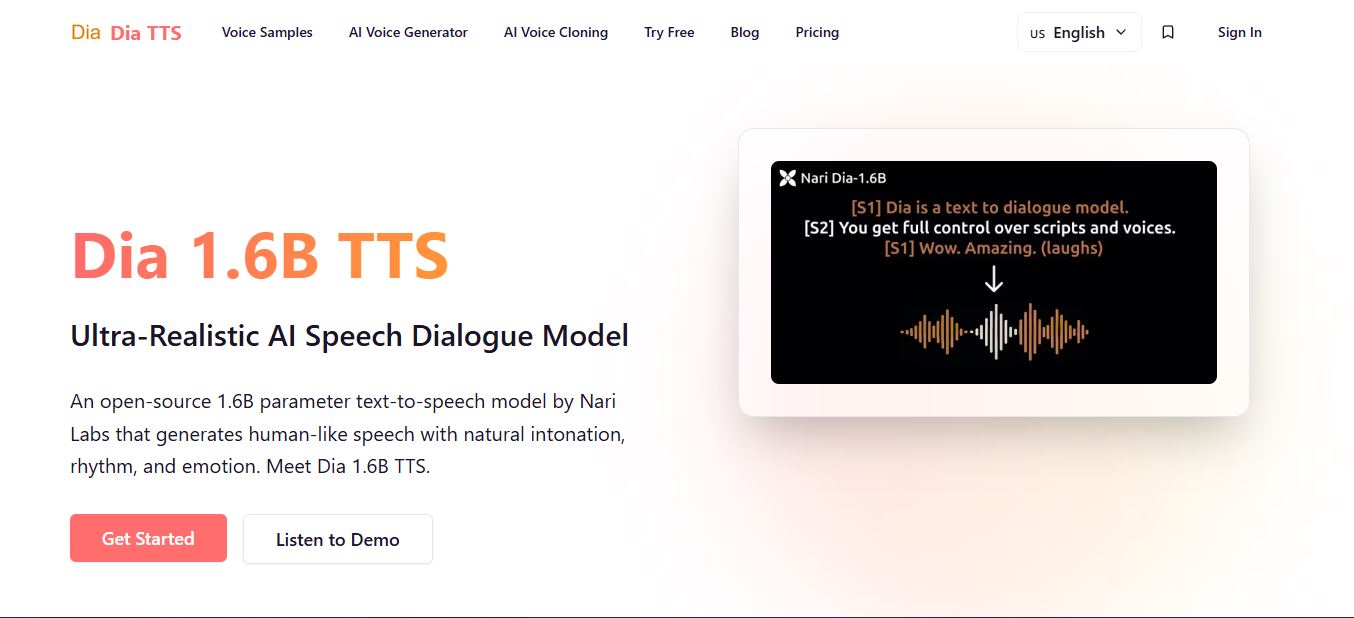
What makes Dia’s story worth knowing before you even hear a sample: it was built by Toby Kim and one other undergraduate, with no external funding, and it still generated enough buzz to be described by tech press as a real challenger to commercial names like ElevenLabs and OpenAI. That context matters for expectations — this is a scrappy, fast-moving open-source project, and dia-tts.com is a small independent operation built on top of it, not a funded enterprise platform.
How It Works: From Script to Audio
You don’t need to know anything about the model architecture to use dia-tts.com. The workflow is straightforward, and it’s exactly what I followed during testing:
- Sign up and land on the dashboard. No installation, no API key required for basic use.
- Write your script with speaker tags. Use [S1] and [S2] before each line to assign a voice, and drop nonverbal cues like (laughs) or (sighs) wherever you want an emotional beat.
- Optionally attach an audio prompt. A short 5–15 second clip plus its transcript lets you steer the output toward a specific voice or emotional tone.
- Generate. The model processes your whole script in a single pass, which is why speaker transitions and pacing feel continuous rather than stitched together.
- Listen, download, and iterate. If a line’s timing feels off, tweak the tag placement and regenerate — this cost me a few extra credits during testing when a laugh landed at the wrong moment.
Dia (Free, Self-Hosted) vs Dia-TTS.com vs Paid Alternatives
Before you pull out your card, it helps to see where dia-tts.com actually sits against the model’s other access routes and the wider TTS market.
| Access Route | Cost | Setup Needed | Best For |
|---|---|---|---|
| Self-hosted Dia (GitHub) | Free (GPU cost only) | ~10GB VRAM GPU, Python, PyTorch | Developers, high-volume use |
| HuggingFace Space demo | Free, limited | None | Quick evaluation only |
| Dia-tts.com (this review) | From $7.9/mo (yearly) | None — sign up and go | Non-technical creators |
| fal.ai serverless API | ~$0.04/1K characters | API key, dev integration | App builders |
| ElevenLabs Flash | Roughly $60/1M chars | Account sign-up | Polished single-speaker VO |
The tradeoff is simple: you’re paying dia-tts.com for convenience, not for the model itself. If you already own a capable GPU, self-hosting the same underlying model costs nothing beyond electricity. If you don’t want to touch a terminal, dia-tts.com removes that barrier entirely.
How I Tested It: My Actual Experience
I don’t review tools from the outside. I created an account on dia-tts.com and wrote a two-speaker script — a conversation between “Alex” and “Ben” about discovering websites2know.com, tagged with emotion cues like (curious), (laughs), (excited), and (skeptical). Nothing fancy, just a natural back-and-forth with tone shifts baked into the script.

Here’s the first thing that caught me off guard: generating that dialogue cost 70 credits. My free account had only handed me 16 credits to start. That’s not nearly enough to test a real multi-speaker script with emotional tags, and it’s the single biggest friction point in the entire experience — you can’t really evaluate whether the voice quality suits your project before you’re already reaching for your card.
Because I wanted to know whether the sample audios on the site were genuinely representative — and not just cherry-picked demos — I upgraded to the Basic plan and got 1,000 credits to work with. That gave me real room to run several trials, and I ended up sharing a couple of the outputs on my Facebook page to get outside reactions before writing this.
What actually impressed me was how the model shifted tone, not just pacing. When “Ben” was written as skeptical and then flipped to impressed, the voice genuinely changed character — a slightly different energy in the delivery, not just a change in words. The (laughs) tag produced real, breathy laughter rather than a flat “ha ha” readout, and (excited) came through as a noticeably faster, brighter delivery. For a tool built around dialogue rather than narration, this is exactly the feature it should be judged on, and it delivered.
My one real complaint: the free trial credit allowance is too stingy to properly test a multi-speaker script before you pay. A generation that needs 70 credits shouldn’t be gated behind a 16-credit free tier — I’d like to see dia-tts.com bump the free allowance so people can actually evaluate the tone-shifting before committing.
Once I was on the Basic plan with the full 1,000 credits, I ran a handful of shorter trials to see how consistent the output was across takes — not just one polished sample, but repeat generations of similar scripts. The tone-shifting held up across most of them, though I did notice the occasional inconsistency Nari Labs itself has flagged as a known quirk: a (laughs) tag that comes out a little more subdued in one take than another. It’s not a dealbreaker, but if you need a specific take to land exactly right for a final cut, budget one or two extra regenerations into your credit math.
I also tested how the dashboard handled a script with back-to-back emotional whiplash — a line written as (skeptical) immediately followed by one written as (impressed). This is exactly the kind of rapid tone change that trips up flatter TTS engines, and it’s where Dia’s dialogue-first design showed its strength: the transition between the two lines felt like two different reactions from the same person, not two disconnected audio clips glued together.
⚙️ Technical Specs (Underlying Model)
Parameters: 1.6 billion | License: Apache 2.0 | Self-host VRAM requirement: ~10GB | Output cap per generation: ~2 minutes of audio | Language support: English only | Speed on A4000 GPU (self-hosted): ~40 tokens/second
None of those hardware numbers matter directly if you’re using dia-tts.com’s hosted dashboard — that’s the whole point of paying for the convenience — but they explain why the free tier is limited and why generation isn’t instant on heavier scripts: real GPU compute is running behind every credit you spend.
Core Features
- Multi-speaker dialogue in one pass — use [S1] and [S2] tags to switch voices mid-script; no separate generations to stitch together.
- Nonverbal emotion tags — (laughs), (coughs), (sighs), (clears throat) render as real vocal sounds, not text substitutes.
- Voice cloning via audio prompting — upload a 5–15 second reference clip plus its transcript to condition the output toward a specific voice.
- Credit-based generation — no local install; everything runs through the browser dashboard.
- Multiple output formats — download generated audio directly from the dashboard once a job completes.
Dia TTS Pricing (Verified)
Pricing is credit-based, with a noticeably better rate if you commit to annual billing. Here’s what’s live on the site as of this writing:

| Plan | Monthly Price | Annual Price (per mo) | Credits |
|---|---|---|---|
| Basic | $9.90 | $7.90 ($94.80/yr) | 1,000/month (12,000/yr) |
| Pro (Most Popular) | $19.90 | $15.90 ($190.80/yr) | 2,200/month (26,400/yr) |
| Ultra | $36.90 | $29.90 ($358.80/yr) | 4,500/month (54,000/yr) |

Doing the math on my own test: that 70-credit dialogue would eat roughly 7% of a full month’s Basic-plan allowance in one generation. If you’re planning regular multi-speaker content — a podcast intro, recurring character dialogue, a run of social clips — budget accordingly and lean toward Pro or Ultra rather than Basic. For a full plan-by-plan cost breakdown and credit-usage math, I’ve put together a dedicated Dia TTS pricing guide.
Pros and Cons
✅ Pros
- No GPU or install needed — works entirely in the browser
- Genuinely expressive tone shifts (laughter, excitement, surprise)
- Multi-speaker dialogue generated in a single pass
- Yearly billing knocks 20% off every tier
- Voice cloning via short audio prompts
❌ Cons
- Free trial credits (16) are too low to test a real script
- Not affiliated with Nari Labs — you’re paying for convenience, not exclusivity
- English only, same limitation as the underlying model
- Same model is free if you self-host with a 10GB VRAM GPU
- No published SLA — it’s a small, independent operation
How Dia Stacks Up Against Other Voice AI
Dia vs ElevenLabs: ElevenLabs still wins on polish for single-speaker narration and offers far more voices and languages. But for conversational dialogue with real emotional shifts, Dia’s laughter and tone changes sound noticeably more human — ElevenLabs tends to render the same emotion tags in a flatter, more uniform way.
Dia vs OpenAI TTS: OpenAI’s TTS API is simpler to integrate and more consistent for single-voice reading, but it can’t generate multi-speaker dialogue in one pass and doesn’t support nonverbal cues at all. Dia wins on features here; OpenAI wins on predictability.
Dia vs Chatterbox: Chatterbox is another free, open-source option, but it’s built for single-speaker narration with strong voice cloning — not conversational back-and-forth. If your project is one voice reading a script, Chatterbox is the better fit. If it’s two characters talking, Dia (and by extension dia-tts.com) is the stronger choice.
Dia vs Gemini Flash: Gemini Flash also supports multi-speaker generation and covers dozens of languages, which Dia simply doesn’t. If multilingual reach matters more than raw emotional nuance in English dialogue, Gemini Flash is worth a look. For English-only conversational realism, I’d still reach for Dia first.
Dia vs self-hosting the same model: If you have the GPU and the patience for a Python environment, self-hosting costs nothing ongoing. Dia-tts.com exists purely to remove that technical barrier — you’re trading a monthly fee for zero setup time.
Real-World Use Cases
Beyond my own test dialogue, here’s where dia-tts.com’s specific strengths — no setup, expressive multi-speaker output — actually translate into practical work:
- Podcast-style intros and audio articles: turn a written Q&A or blog excerpt into a two-host conversation without recording anything yourself.
- Short-form social skits: the kind of back-and-forth exchange I tested translates well to Reels, TikTok voiceovers, or YouTube Shorts where tone carries the joke.
- Indie game NPC dialogue: prototype character banter with distinct emotional beats before committing to voice actors.
- Chatbot and voice-agent demos: give a text-based assistant a natural-sounding voice for a proof-of-concept without engineering a TTS pipeline.
- E-learning dialogue scenarios: simulate a teacher-student or customer-service exchange for training content.
Who Should Use Dia-TTS.com
Good fit: podcast creators writing scripted dialogue, indie game developers who need NPC banter, social content creators making comedic skits, anyone who wants expressive two-voice conversations without touching a terminal.
Not a fit: non-English content, anyone needing enterprise SLA guarantees, long-form audiobook narration (the underlying model caps at roughly two minutes per generation), or developers who’d rather self-host for free.
What Other Users Are Saying
My own test wasn’t run in a vacuum — I shared a couple of the generated clips on my Facebook page to see how they’d land with people who had no context on the tool. The reaction was consistent with what I found in dashboard testing: people picked up on the emotional shifts without being told to listen for them, which is a good sign the tone-changing isn’t just something I was primed to notice as a reviewer.
That lines up with the broader pattern across the open-source Dia community: developers and hobbyists consistently single out the multi-speaker realism and nonverbal cues as the standout feature, while the most common complaints are about GPU requirements for self-hosting and occasional inconsistency in how strongly a (laughs) or (sighs) tag comes through between takes. Since dia-tts.com runs the same model, those same strengths and quirks carry over to the hosted version — you’re just trading the GPU complaint for a credit-cost complaint instead.
FAQ
Is dia-tts.com the official Nari Labs website?
No. It’s an independent, fan-made site that hosts the open-source Dia model for paid, no-setup generation — it isn’t affiliated with or endorsed by Nari Labs.
How many credits does the free trial give you?
In my testing, the free trial provided 16 credits. A two-speaker dialogue with emotion tags used 70 credits, so the free tier is really only enough for a short single-line test.
Can I clone my own voice on dia-tts.com?
Yes — upload a 5 to 15 second reference clip along with its accurate transcript, and the model conditions its output toward that voice.
Which plan should I start with?
Basic ($7.90/mo billed yearly) is enough for occasional dialogue clips. If you’re generating multi-speaker scripts regularly, Pro’s 2,200 monthly credits will stretch much further.
Does it support languages other than English?
No. The underlying Dia model is English-only, and that limitation carries over to dia-tts.com.
Is Dia TTS free anywhere?
The underlying model is free under Apache 2.0 if you self-host it on your own GPU, and there’s a limited free HuggingFace Space demo. Dia-tts.com’s paid credits are for the no-setup, browser-based version.
Is there a limit on how long a single generation can be?
Yes, the Dia model caps each generation at roughly two minutes of audio. For longer content like full podcast episodes, you’ll need to generate in segments and stitch them together afterward.
The Bottom Line
Dia-tts.com does exactly one job well: it makes an otherwise GPU-hungry, terminal-only open-source model usable by anyone with a browser and a card. My own test dialogue proved the tone-shifting is real — laughter, excitement, and skepticism all came through distinctly, not as a gimmick. The credit economics need work, especially the free trial, but at $7.90–$29.90/month depending on volume, it’s a fair price for dialogue quality that’s hard to get elsewhere without hosting the model yourself. Just go in knowing you’re paying an independent third party for convenience, not Nari Labs directly.
If pricing is your main concern before signing up, check out my full Dia TTS pricing breakdown for a deeper look at credit consumption per generation type.
Related reading on Websites2Know: If you’re exploring the wider AI voice and creator-tool space, you might also like our reviews of WisprFlow for voice dictation, SplitMySong for AI stem separation, Perso AI for AI dubbing and avatars, our Perso AI pricing breakdown, AssemblyAI for speech-to-text, our guide on how to use AssemblyAI, Humanize AI for making written content sound more natural, and Kineto for AI-assisted creator workflows.


