
Perso AI Review 2026: Pricing, Dubbing, LiveDub & Studio Tested
An independent, feature-by-feature breakdown of Perso AI’s dubbing, lip sync, LiveDub, and Studio tools — with real 2026 pricing and an honest verdict on whether it beats HeyGen and Synthesia.
By Oyekale Olawale · Updated August 2026
Quick Answer
Perso AI now starts at $6.99/month (Starter) and scales to $99/month (PRO), a much lower entry point than the $29/month floor most reviews still quote. You get AI dubbing in 99+ languages, lip sync, voice cloning, and — new this year — Studio Perso for AI avatar video and LiveDub for real-time meeting translation. It’s built for creators and businesses localizing existing footage, not for generating fully synthetic avatars from a blank page. For that, HeyGen still has the edge.
Most “Perso AI review” articles floating around right now are quoting pricing from late 2025 or citing features the platform has since expanded on.
I went straight to Perso’s live product pages — dubbing, pricing, Studio, Interactive, LiveDub, and Live Translator — to see what’s actually shipping today, then weighed it against how the platform is positioned versus other AI avatar platforms on the market.
What Is Perso AI, Exactly?
Perso AI is a video localization and AI-human platform built by ESTsoft, a South Korean software company that’s been operating since 1993.
It’s not a single tool — it’s a suite of five connected products, each solving a different piece of the “make my content work in another language, or with a digital presenter” problem:
- Perso Dubbing — uploads existing video and returns a dubbed, lip-synced version in 99+ detected languages
- Studio Perso — turns scripts or PowerPoint decks into AI-avatar videos, with a specific focus on Korean AI avatars
- Perso Interactive — deployable conversational AI avatars for kiosks, tablets, and websites
- Perso LiveDub — real-time voice and face dubbing inside Zoom or Google Meet
- Perso Live Translator — a two-way, face-to-face interpreter screen for in-person conversations
That’s a meaningfully bigger footprint than the dubbing-only tool most 2025-era reviews describe. If you’ve read an older Perso AI writeup and came away thinking “it’s just a dubbing app,” that’s outdated — the platform has grown into something closer to an AI localization and presence suite.
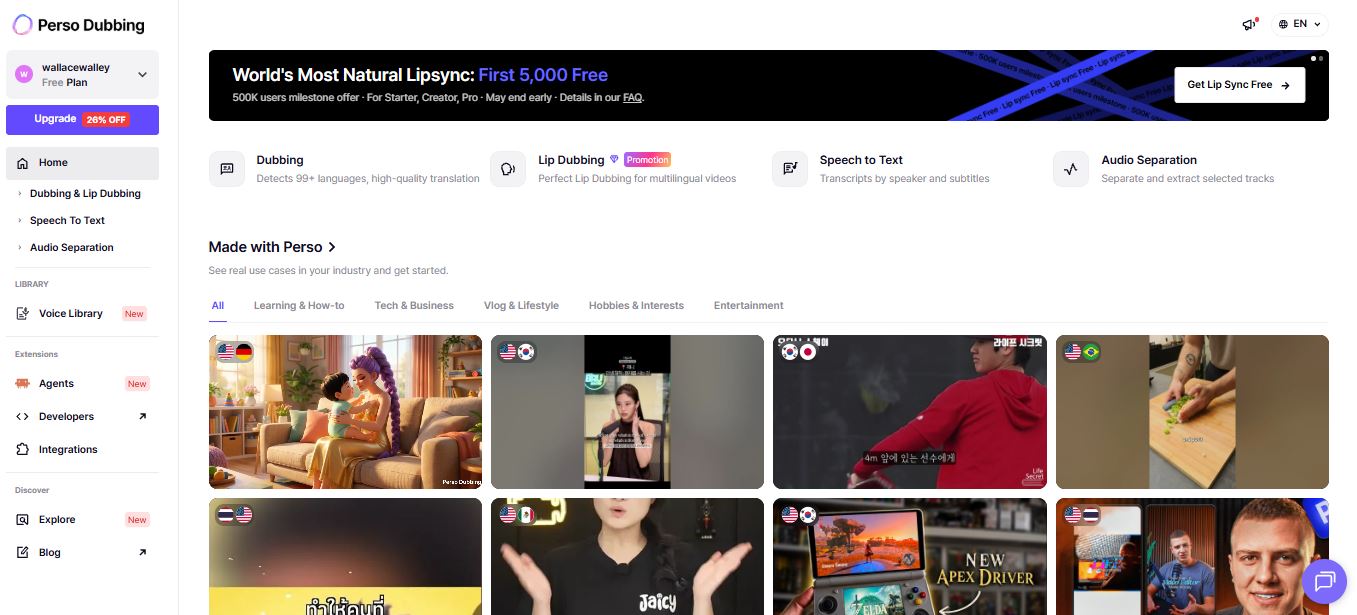
ESTsoft backs this with real numbers, not just marketing copy: Perso Dubbing reports 500,000+ users across 180+ countries, 80M+ cumulative video views, and a 5-star average across G2, Capterra, and Software Advice at the time of writing. That’s a stronger public reputation trail than most AI dubbing tools can point to.
Perso AI Pricing Breakdown (2026)
This is where a lot of older Perso AI content gets it wrong. One well-circulated review — last updated in September 2025 — still lists the Creator plan at $39/month and a Team plan at $49/month.
Neither of those tiers exist on Perso’s live pricing page anymore. Here’s what’s actually billed as of this writing:

| Plan | Price/mo | Dub Minutes | Max Video | Export |
|---|---|---|---|---|
| Free | $0 | 1 free generation | — | 720p |
| Starter | $6.99 | ~7 min/mo | 3 min | 1080p HD |
| Creator | $29 | ~40 min/mo | 15 min | 1080p |
| PRO | $99 | ~180 min/mo | 30 min | 4K |
| Enterprise | Custom | Custom | 60 min | 4K |
A few pricing details worth knowing before you commit to a tier:
- Perso is currently running a new-subscriber promo dropping Starter to $3.49 for the first month, plus a separate “first 5,000 users” free lip sync offer — both are time-limited, so check the live pricing page before assuming they still apply.
- Credits are the real currency here, not “minutes.” Dubbing and Lip Dubbing draw from separate monthly minute pools even on the same plan — Starter gives you roughly 7 dubbing minutes but only 2 lip-dub minutes, which catches people off guard.
- Overage pricing steps down as you upgrade: roughly $1/min extra on Starter, dropping to $0.73/min on Creator and $0.55/min on PRO.
- Watermark removal, unlimited regenerations, and script editing are gated behind Starter — the free tier is genuinely just a trial run, not a usable free plan for real projects.
Before you pick a tier, run the math on your actual monthly video volume against the credit pools above. It’s the single most common reason people end up paying for overage minutes they didn’t expect, especially once Lip Dubbing’s separate, smaller pool comes into play. For a full line-by-line breakdown of what each credit actually buys you, see our Perso AI Pricing Plans Explained guide.
Perso Dubbing: The Core Feature
Dubbing is what Perso built its reputation on, and it’s still the strongest part of the platform. The workflow is genuinely three steps: upload video or audio (or paste a link), select a target language, and let the engine handle translation, voice cloning, and lip sync in one pass.

What separates Perso from a basic text-to-speech dubbing tool is that it isn’t just translating words — it’s cloning the original speaker’s vocal identity and re-timing lip movement frame by frame to match the new language’s syllable count and rhythm.
Perso publishes a 98.5% voice-match figure for this, and the underlying mechanic matters: languages don’t take the same number of syllables to say the same sentence, so a naive dub either rushes the audio or leaves dead air.
Perso’s script editor lets you manually adjust timing and phrasing on individual lines when the AI’s first pass gets a technical term or idiom wrong — the detail that separates a “good enough” dubbing tool from one you’d actually publish with.
Export options are also more complete than most competitors bother with: source and translated subtitles in SRT, source and translated scripts in XLSX, WAV audio by speaker track, and — on paid tiers — a separate BGM export so background music isn’t baked permanently into the dub.
If you’re producing content for platforms where viewers toggle audio tracks (YouTube’s multi-language audio feature is the obvious example), that per-track export flexibility genuinely matters and isn’t something every AI video generation tool offers, and it pairs well if you’re also repurposing footage into shorts with a short-form clipping tool afterward.
Where the dubbing engine still shows its limits
Lip sync accuracy depends heavily on source footage quality — clean, front-facing single-speaker video gets the cleanest results, while multi-speaker clips, heavy background noise, or occluded faces (hands, masks, side angles) push more of the correction burden onto you via the script editor.
That’s consistent with how most neural lip-sync models behave; it isn’t unique to Perso, but it’s worth setting expectations correctly before you upload a messy interview clip and expect a flawless first pass.
Studio Perso: AI Avatar Video From a Script or Slide Deck
Studio Perso is the part of the suite most competitor reviews skip entirely, probably because it barely existed in its current form a year ago. It’s positioned specifically as the platform with the deepest bench of Korean AI avatars anywhere — a genuinely narrow niche, but one that matters a lot if your audience or content is Korean-market-facing.

Beyond the Korean-avatar specialization, Studio Perso is built around three things: a library of 100+ AI avatars paired with 6,000+ voice options, over 100 pre-built templates in both landscape and vertical formats, and — the feature that actually saves the most time — direct PowerPoint upload, where each slide is auto-converted into a scene.
You can also run two AI avatars in the same scene facing each other, which is a genuinely useful shortcut for interview-style or debate-format content that would otherwise require two separate recording sessions.
A “partial render preview” feature lets you generate just one scene before committing credits to the full video — a small but practical cost-control detail that a lot of competing avatar tools skip, forcing you to burn a full render just to check if a script line landed correctly.
Perso Interactive: Kiosks, Stations & Real-Time Avatars
Perso Interactive is squarely a B2B product, and it’s the piece of the suite with the most real-world deployment proof. It ships in three forms: Station (a standing physical kiosk), Touch (tablet-based conversational avatars), and a developer Platform/SDK for embedding avatars into your own website or app.

This isn’t a hypothetical feature — Perso publicly documents case studies with named enterprise deployments, including a retail chain improving the shopping experience for foreign customers and a CES exhibition installation for a major electronics brand.
Basic SDK integration is typically a 1–3 day job using JavaScript or REST APIs, with custom persona and knowledge-base setup adding another 1–2 weeks — a reasonable enterprise integration timeline, not the “instant” promise some competitors overstate.
Perso LiveDub: Real-Time Dubbing Inside Zoom & Google Meet
LiveDub is arguably the most technically ambitious thing in the Perso lineup, and it’s also the newest. It installs as a virtual microphone and virtual camera on your system — you speak your own language, and the person on the other end of the call hears and sees you speaking theirs, lip movement included, in real time.

The technical pitch is worth understanding: it’s not translating sentence-by-sentence with a pause between each — it’s a streaming pipeline that begins processing before you finish speaking, which is what keeps a live conversation feeling like a conversation instead of a walkie-talkie exchange.
Because it runs as a system-level virtual device, the other meeting participant doesn’t need to install anything on their end, which lowers the friction for cross-border sales calls, global onboarding sessions, and international webinars — the exact use cases where video conferencing tools usually hit a language wall.
On the privacy side, Perso states that voice and video captured for LiveDub are processed and then discarded rather than stored — worth confirming directly if your meetings involve sensitive material, since that’s a policy detail rather than something independently auditable from the outside.
Perso Live Translator: Face-to-Face Interpretation on a Screen
Live Translator solves a different problem than LiveDub. Instead of two people on a video call, this is built for two people sitting across a physical table — a tablet, kiosk, or display sits between them, and speech is interpreted both ways automatically, with no button presses and no picking a language up front.

It supports 32 languages, auto-detects who’s speaking and in what language, and is specifically engineered for noisy real-world settings — retail floors, exhibition halls, taxi cabs — rather than the quiet studio conditions most speech-recognition demos are filmed in.
It’s a narrower product than the other four, but for retail, hospitality, and consular or immigration-adjacent use cases, it’s solving a real friction point that most AI dubbing companies don’t even attempt to touch.
Perso AI Pros & Cons
✓ Pros
- Real entry price of $6.99/mo, far cheaper than most reviews still report
- Five connected products cover dubbing, avatars, kiosks, and live translation
- 98.5% published voice-match score with granular script editing
- Only major platform with dedicated Korean AI avatar depth
- Per-speaker audio, subtitle, and script exports built in on paid tiers
- Publicly documented enterprise case studies, not just testimonials
✗ Cons
- Dubbing and Lip Dubbing draw from separate, smaller credit pools
- Free plan is a trial, not a usable ongoing tier — no watermark removal
- Voice cloning for a fully custom avatar is Enterprise-only
- Not built for generating avatars entirely from scratch, unlike HeyGen
- Max video length caps (3–30 min) force splitting longer content
Perso AI vs HeyGen vs Synthesia
These three tools get lumped together constantly, but they’re solving different core problems, and the choice usually comes down to one question: are you starting from real footage, or from nothing?
| Factor | Perso AI | HeyGen | Synthesia |
|---|---|---|---|
| Core strength | Dubbing real footage | Synthetic avatars | Corporate training video |
| Entry price | $6.99/mo | Free tier + paid from ~$24/mo* | From ~$18–29/mo* |
| Lip sync on real video | Strongest of the three | Good | Limited |
| Avatar-from-scratch | Via Studio Perso | Strongest of the three | Strong |
| Live/real-time use | Yes — LiveDub & Live Translator | No | No |
*Competitor pricing shown is approximate and subject to change — verify current tiers directly on each provider’s pricing page before purchasing.
My honest take: if you already have footage — a YouTube channel, a course library, an existing product demo — and just need it to exist in more languages, Perso AI is the more purpose-built tool of the three.
If you’re starting from a blank script and need a synthetic presenter with the widest avatar customization, HeyGen still wins that specific fight. For teams evaluating AI video generation alternatives broadly, it’s worth testing more than one before committing to an annual plan.
Who Should Actually Use Perso AI
- YouTubers and course creators who already have a content library and want to expand into new-language markets without re-recording
- Global sales and support teams who need LiveDub for cross-border calls or Live Translator for in-person kiosks
- Corporate L&D teams converting PowerPoint decks into avatar-narrated training videos through Studio Perso
- Brands entering the Korean market specifically, given Studio Perso’s Korean avatar specialization
- Agencies managing multilingual campaigns for several clients who need per-speaker exports and script control
It’s a weaker fit if you need a fully synthetic avatar generated from nothing, or if your workflow depends on UGC-style faceless video creation — for that, tools built specifically around UGC ad generation or AI video agents designed for social-first content will likely serve you better out of the box.
Teams still comparing options broadly may also want to check a few wava.ai alternatives or short-form video generators like Syllaby before locking in a subscription.
Security & Trust
Perso publishes SOC 2 compliance and states that data in transit and at rest is encrypted to industry standard. For LiveDub specifically, the company states audio and video are discarded immediately after processing rather than stored long-term.
If you’re evaluating this for a regulated industry (healthcare, finance, legal), request Perso’s current SOC 2 report and data processing terms directly through their enterprise contact rather than relying on marketing-page language alone — that’s standard due diligence for any SaaS handling voice and video data, not a Perso-specific concern.
FAQ
How much does Perso AI actually cost in 2026?
Paid plans run from $6.99/month (Starter) to $99/month (PRO), with a custom-priced Enterprise tier above that. A limited-time promo currently drops the first month of Starter to $3.49.
Is there a genuinely free Perso AI plan?
There’s a free tier, but it’s limited to one free generation on signup with a 720p cap and no watermark removal — treat it as a trial rather than a plan you can build ongoing content on.
Does Perso AI work for real-time video calls?
Yes — that’s specifically what Perso LiveDub is for. It runs as a virtual mic and camera inside Zoom, Google Meet, or FaceTime, dubbing your voice and lip movement in real time for the other participant.
Is Perso AI better than HeyGen or Synthesia?
It depends on your starting point. For dubbing and lip-syncing existing real footage, Perso is the stronger, more purpose-built option. For generating a synthetic avatar from a blank script, HeyGen and Synthesia have deeper avatar libraries and more creation flexibility.
Can I upgrade, downgrade, or cancel a Perso AI subscription anytime?
Perso’s pricing page confirms plans can be changed or canceled at any time. As with any SaaS subscription, review the current terms of service on Perso’s site before committing, since refund conditions can depend on your billing cycle.
Conclusion
Perso AI has quietly outgrown its “just a dubbing tool” reputation. What started as a lip-sync and voice-cloning engine is now a five-product suite covering pre-recorded dubbing, avatar video production, kiosk deployment, and — the genuinely differentiated piece — real-time live dubbing and interpretation.
The pricing has also moved in the right direction for buyers: a $6.99 entry point is a real shift from the $29 floor still quoted in older reviews, even if the credit system takes a minute to understand.
My honest verdict: it’s not the tool to reach for if you want to build a synthetic presenter from nothing — HeyGen and Synthesia are more mature there.
But if your problem is “I have real video and it needs to speak other languages convincingly,” or “I need my team talking to people in real time across a language barrier,” Perso AI is currently one of the more complete, better-priced answers on the market.


