
Perso AI Pricing Explained: Every Plan, Credit Cost & Hidden Fee (2026)
Perso AI just swapped its old “speed tier” pricing for a credit system — and the Pro plan jumped from $59 to $99 a month. Here’s exactly what changed, what it costs today, and where the real gotchas are.
By Oyekale Olawale
Quick Answer
Perso AI now runs on a credit-based pricing model with five tiers: Free ($0), Starter ($6.99/mo, 420 credits ≈ 7 dub minutes), Creator ($29/mo, 2,400 credits ≈ 40 dub minutes), Pro ($99/mo, 10,800 credits ≈ 180 dub minutes, 4K export), and Enterprise (custom). Annual billing saves up to 26%. The Pro plan alone has climbed from $59/mo to $99/mo since our last review, so if you’re still budgeting off the old numbers, you’re underestimating your cost.
I’ve been tracking Perso AI’s pricing page since it first showed up on my radar as a lip-sync dubbing tool worth watching. I put together my full Perso AI review earlier this year, and honestly, the pricing structure I documented back then barely resembles what’s live today.
That’s not a small footnote. It’s the whole story.
Perso AI Switched From Speed Tiers to a Credit System
Under the old model, every plan gave you a bucket of “Fast Speed” minutes and unlimited “Low Speed” dubbing. Simple enough.
That model is gone.
Perso now allocates a fixed monthly credit pool per plan, and different features draw from it at different rates. Dubbing, Lip Dubbing, Speech to Text, and Audio Separation are billed separately within the same pool, each with its own minutes-per-month cap. A 7-minute Dub allowance on Starter, for example, is a completely different number from the 2-minute Lip Dubbing allowance on that same plan.
If you only read the homepage price tag, you’ll miss this entirely. And it changes how you should budget, especially if lip-sync is the feature you actually came for.
Perso AI Pricing Plans at a Glance
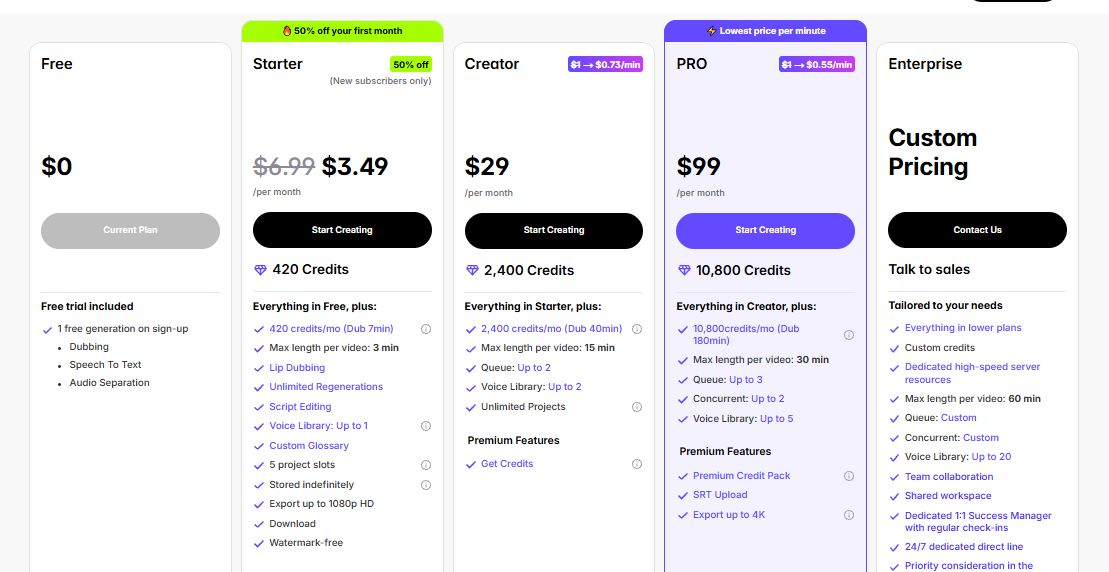
Here’s the full breakdown, pulled directly from Perso’s live pricing page as of late August 2026, with monthly billing shown (yearly billing saves up to 26% on every paid tier).
| Plan | Price / mo | Credits | Dub Minutes | Lip Dub Minutes | Max Video Length | Max Export |
|---|---|---|---|---|---|---|
| Free | $0 | 1 generation on sign-up | — | — | — | 720p |
| Starter | $6.99 | 420/mo | 7 min | 2 min | 3 min | 1080p |
| Creator | $29 | 2,400/mo | 40 min | 13 min | 15 min | 1080p |
| Pro | $99 | 10,800/mo | 180 min | 60 min | 30 min | 4K |
| Enterprise | Custom | Custom | Custom | Custom | 60 min | 4K |
Figures pulled from perso.ai/pricing, monthly billing, as of August 2026. Perso updates promos frequently — always confirm live numbers before you subscribe.
What Each Plan Actually Gets You
Free: A Real Sandbox, Not a Trap
The Free tier gives you exactly one generation on sign-up, plus access to Dubbing, Speech to Text, and Audio Separation to poke around with. It’s capped at 720p and stored for 30 days.
I wouldn’t call this generous by 2026 standards — most competing dubbing tools give you a few free minutes per month, not a single one-time generation. Treat it as a “can this AI actually clone my voice convincingly” test, not a workflow.
Starter ($6.99/mo): Fine for Shorts, Tight on Everything Else
Starter gets you 420 credits a month, which nets out to roughly 7 minutes of standard dubbing or 2 minutes of lip-sync dubbing. Max video length is 3 minutes. That’s a real drop from the 5-minute cap Perso used to offer at this price point.
In practice, this is a Reels-and-TikTok-clips plan. If your content lives on YouTube Shorts, it works. If you’re trying to dub a 10-minute explainer, it won’t, and you’ll hit a wall before the month is out. You do get watermark-free 1080p downloads and unlimited regenerations, which is a nice touch at this price.
Perso is currently running a first-month promo dropping Starter to $3.49, plus a separate “first 5,000 users” lip-sync credit offer. Promos like these move fast, so don’t build your annual budget around a rate you saw on a landing page.
Creator ($29/mo): The Plan Most Working YouTubers Land On
Creator jumps to 2,400 credits, which is about 40 minutes of dubbing or 13 minutes of lip-sync per month, and the video length cap rises to 15 minutes. That’s long enough for a standard tutorial, a podcast clip, or a short-form educational series.
This tier also unlocks unlimited projects, a 2-slot voice library, and a queue depth of 2, meaning you can line up a second render while the first is processing. If you’re a solo creator localizing content into two or three languages a month, this is where the math starts to make sense.
Pro ($99/mo): The Plan That Changed the Most
Pro now costs $99 a month. When I first documented Perso’s pricing, this same tier sat at $59. That’s a 68% increase, and it’s the single biggest thing prospective subscribers need to know before they budget around this tool.
In exchange, you get a genuinely larger allowance: 10,800 credits, 180 dub minutes, 60 lip-sync minutes, a 30-minute max video length, 4K export, concurrent processing on two videos at once, and SRT upload support for teams that already work from finished scripts. If you’re localizing a real content library every month, this is where the tool starts to feel built for volume rather than hobbyists.
But at $99/mo, Pro now sits closer to enterprise-adjacent pricing than a “prosumer” tier, and that’s worth sitting with before you commit.
Enterprise: Built for Teams, Not Individuals
Enterprise is a custom quote, and Perso reserves its heaviest infrastructure for it: a 60-minute max video length, a voice library that scales up to 20 voices, dedicated high-speed servers, shared workspaces, and a 1:1 success manager with a 24/7 direct line.
This tier is aimed at agencies and localization teams processing large volumes monthly, not solo creators. If you’re managing multiple editors on one account, this is the tier where permissions and shared assets actually get manageable — something I flagged as a pain point on the lower tiers in my full Perso AI review.
Cost Per Dubbed Minute, Side by Side
Once you strip away the credit jargon, what actually matters is what you’re paying per minute of finished video. Perso publishes this itself on the pricing page, and it lines up with the plan math above.
Effective cost per dub minute at standard credit pricing, before promos. Source: perso.ai/pricing.
The pattern is the one you’d expect from any credit system: the more you commit to monthly, the cheaper each minute gets. Starter is nearly double the per-minute cost of Pro. If your volume genuinely justifies Creator or Pro, the unit economics favor going up a tier rather than buying extra credit packs on a lower one.
Where the Gotchas Actually Are
As an independent reviewer, this is the part I care about most, because it’s the part vendors don’t put on the pricing page.
First, the pricing itself isn’t stable. A verified G2 reviewer flagged this directly: Perso’s pricing policy “seems to change periodically,” which makes it genuinely hard to plan a content calendar around. Our own before-and-after comparison in this article — Pro going from $59 to $99 — backs that up. If you’re budgeting for a client or a team, build in a buffer for this.
Second, watch the gap between marketing copy and the actual plan limits. Perso’s own product demos advertise cloning up to 10 voices in a single project for multi-speaker dubbing. The current pricing page, though, caps the Voice Library at 5 slots on Pro and 20 on Enterprise. If a multi-speaker workflow with a large cast is the whole reason you’re subscribing, confirm the real number with sales before you commit a budget to it.
Third, the same G2 review mentioned losing access to fast-speed processing for two days despite having over an hour of minutes remaining, and having to split a video into 5-minute chunks to get it through. Queue depth and rendering priority are shared infrastructure, not something a plan tier fully guarantees, even on paid accounts.
Fourth, the Dubbing minute allowance and the Lip Dubbing minute allowance are separate pools within the same plan. Creator’s 40 dub minutes and 13 lip-sync minutes are not interchangeable. If lip-sync is the feature that sold you, plan around the smaller number, not the headline one.
Pros and Cons of Perso AI’s Current Pricing
✓ What Works
- Lip-sync included from the cheapest paid tier, not gated behind Enterprise
- Clear per-minute pricing published by Perso itself
- Multi-speaker support even on Starter
- Annual billing genuinely saves up to 26%
- Unlimited regenerations on every paid plan
✗ What to Watch
- Pro rose 68% since our last pricing review
- Starter’s 3-minute video cap is tighter than before
- Dub minutes and Lip Dub minutes are separate, smaller pools
- Pricing changes periodically, per verified user reviews
- Promotional rates (like the $3.49 first month) are temporary
Which Plan Should You Actually Pick?
If you’re testing whether Perso’s voice cloning even sounds right for your accent, start with Free. It’s one generation, but it’s enough to judge quality.
If you’re posting short-form content under 3 minutes, Starter covers you, especially while the first-month promo is live.
If you’re a working UGC or YouTube creator localizing content monthly, Creator is the realistic sweet spot: enough runway, unlimited projects, and a 15-minute cap that fits most formats.
If you’re running a genuine content pipeline — multiple long-form videos a month, 4K delivery, or client work — Pro’s $99 is defensible, but only if you’re actually going to use the 180-minute allowance. Otherwise you’re paying enterprise-adjacent money for hobbyist volume.
If you’re managing a team or an agency, skip straight to Enterprise and negotiate. The shared workspace and dedicated infrastructure alone are worth the conversation with sales.
For context on how Perso stacks up against other AI video and avatar tools on price and capability, it’s worth browsing our roundups on AI avatar platforms with human support and AI video agents before you lock in a subscription.
Ready to Try Perso AI?
Start With the Free Plan →FAQ
How much does Perso AI cost per month?
Perso AI’s paid plans start at $6.99/mo for Starter, $29/mo for Creator, and $99/mo for Pro, all billed monthly. Enterprise pricing is custom. Annual billing cuts the cost by up to 26%.
Does Perso AI have a free plan?
Yes. The Free plan includes one generation on sign-up, plus limited access to Dubbing, Speech to Text, and Audio Separation at 720p resolution.
What’s the cheapest Perso AI plan with lip sync?
Starter, at $6.99/mo, is the cheapest tier that includes AI Lip Dubbing, though it’s capped at 2 minutes of lip-sync output per month.
How do Perso AI credits work?
Each plan includes a monthly credit pool. Different features — Dubbing, Lip Dubbing, Speech to Text, Audio Separation — draw from that pool at different rates, so your actual usable minutes vary by feature, not just by plan price.
Is Perso AI’s annual plan worth it?
If you’re confident you’ll stay on a paid tier for a full year, yes — the annual discount runs up to 26% off, which is a meaningful saving on Pro specifically. If you’re still testing the tool, stick to monthly until your workflow settles.
Can I cancel or downgrade my Perso AI plan anytime?
Perso AI plans are self-serve and can be changed from your account billing settings. As with most SaaS tools, downgrading mid-cycle typically takes effect at your next renewal rather than immediately, so confirm the exact terms in your account before switching.
Conclusion
Perso AI’s pricing isn’t bad. It’s just moved. The tool still undercuts most lip-sync-capable dubbing platforms at the entry level, and the per-minute cost genuinely drops the more you commit. But the Pro tier’s jump from $59 to $99 is real, the credit system splits your allowance across features in ways the pricing page doesn’t spell out clearly, and the gap between marketing claims and plan limits (that 10-voice demo versus the 5-voice Pro cap) is worth double-checking before you swipe your card.
My honest read: run the Free plan first, be deliberate about which plan matches your actual monthly minutes rather than your aspirational ones, and reconfirm pricing on Perso’s live page before you commit to annual billing — this is a company that revises its numbers more often than most.
For a deeper look at the platform itself, features, quirks and all, read my complete Perso AI review. And if you’re comparing localization and dubbing tools more broadly, our guides on Sora AI alternatives, Wava AI alternatives, Syllaby, MakeUGC, Vid.ai, and ShortsPilot alternatives are all worth a read before you settle on a stack.


