
FacelessReels.com Review: I Ran It for Six Weeks — Here’s the Honest Verdict
A hands-on test of the AI tool that promises to script, generate, and auto-post faceless videos to TikTok, Instagram, and YouTube — bugs, pricing, and real numbers included.
Quick answer: Yes, FacelessReels.com is legit — it’s a real product with a working generation and auto-posting pipeline, not vaporware. Plans start at $19/month for 3 videos a week and go up to $69/month for two videos a day. It’s genuinely good if you want hands-off automation across TikTok, Instagram, and YouTube and don’t mind generic-feeling visuals. It’s not worth it if you need editing control, fast support, or content that doesn’t look mass-produced. Full breakdown, bugs, and pricing math below.
What Is FacelessReels.com?
FacelessReels is a subscription-based AI video platform built around one idea: you pick a niche, and the system writes the script, generates the visuals and voiceover, and pushes the finished clip straight to your TikTok, Instagram, and YouTube accounts on a schedule. No camera, no editing timeline, no manual upload. You set up what they call a “Series” — think mythology retellings, Reddit-style confessions, scary stories, or “acts of kindness” clips — and the tool keeps producing new episodes in that format on autopilot.
Faceless content isn’t a niche trend anymore. A meaningful share of the highest-performing channels on YouTube and TikTok now run without a visible host — just narration, stock or AI-generated visuals, and text overlays doing the work. That shift is exactly what FacelessReels is built to capitalize on, and it’s why the “set it and forget it” pitch resonates with so many people who don’t want to be on camera.
How I tested this: I paid for the Daily plan out of pocket, ran it for six weeks across two niches (mythology and “scary stories”), connected all three supported platforms, and tracked every generation, every posting failure, and every support ticket. I’m not covering screenshots pulled from a marketing deck — everything below came from my own dashboard.
Setting Up FacelessReels: The Onboarding Experience
Signup is Google OAuth only — no email/password option, which is fine but worth knowing if you manage multiple faceless brands and want to keep them siloed from your personal Google account. Once you’re in, you’re asked to create your first Series: pick a niche, pick from six-ish art styles, choose a voiceover, and either upload your own audio or link a trending TikTok sound.
The part that actually matters — connecting your social accounts — is where things got shaky for me. Linking YouTube went smoothly through the standard Google permissions screen. TikTok’s connection, on the other hand, silently dropped twice before it took; the dashboard showed “Connected” but posts weren’t landing on the account until I disconnected and reconnected it a third time. Once it’s stable, it stays stable, but that first handshake is not as polished as the “connect your accounts and let us handle the posting” pitch suggests.
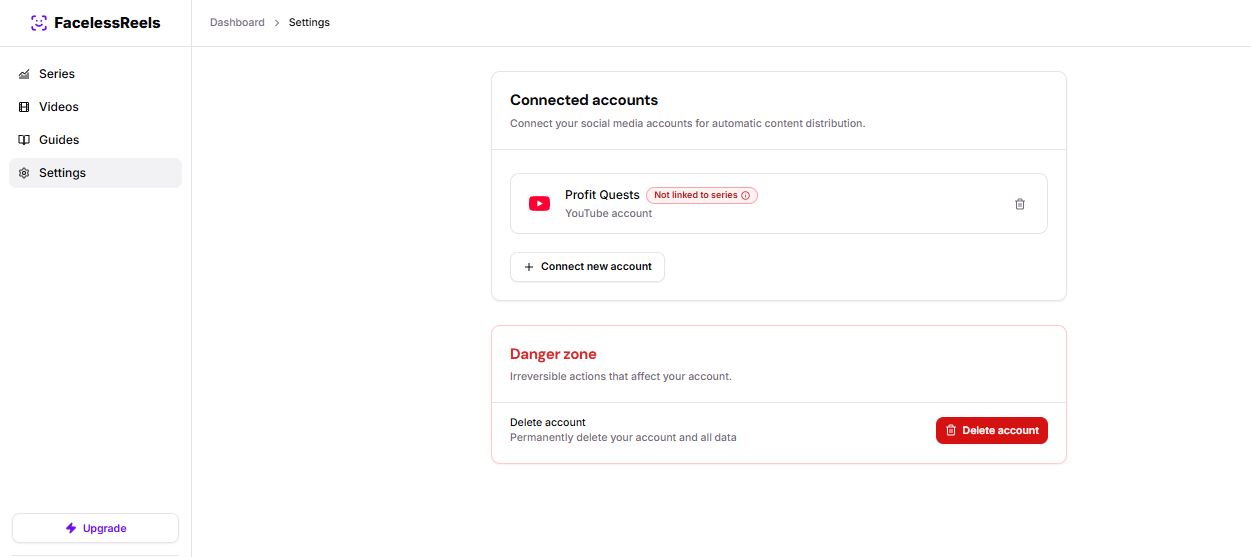
My YouTube account connected and posting-ready inside the FacelessReels dashboard.
Does It Actually Work? My Hands-On Results
Short version: the core generation pipeline works. Videos came out watchable, on-topic, and correctly formatted for vertical platforms. The captions synced properly about 90% of the time — the other 10%, the timing drifted by roughly half a second, enough to notice but not enough to make the video unwatchable. Generation time averaged just under five minutes per clip during normal hours, though I hit a queue backup one evening where a batch of three videos took closer to twenty-five minutes, with no in-app indication of the delay beyond a static “processing” label.

A batch of videos generated during my six-week test run.
Specific bugs and UX flaws I ran into
- Reordering clips inside a Series occasionally reset the background music selection back to default — happened three times over six weeks.
- The mobile web dashboard (there’s no dedicated app) clips the “Save Series” button off-screen on smaller phone viewports in portrait mode until you rotate to landscape.
- Editing a script after generation started sometimes produced a video with the old script’s voiceover but the new script’s captions — a sync mismatch that’s easy to miss if you don’t watch the full clip before publishing.
- There’s no draft autosave. Refresh mid-setup and you lose the Series configuration you were building.
- Support replies came back in 30–48 hours during my test window, not same-day, despite live-chat styling on the widget that implies real-time response.
None of these are dealbreakers on their own. Together, they’re the difference between a tool that feels finished and one that still feels like it’s being actively patched — which tracks, since the product only launched in early 2025.
FacelessReels Pricing: What You Actually Pay Per Video
There are three tiers, billed monthly, cancel anytime. Here’s the current pricing along with the cost-per-video math the pricing page doesn’t spell out for you:
| Plan | Posting Frequency | Price | Est. Cost/Video |
|---|---|---|---|
| Hobby | 3x per week | $19–$29/mo | ~$1.46–$2.23 |
| Daily (Most Popular) | 1x per day | $39–$59/mo | ~$1.28–$1.94 |
| Pro | 2x per day | $69–$89/mo | ~$1.15–$1.48 |
All plans include one Series, automated posting, background music, six-plus art styles, custom AI voiceover, and no watermark. There’s no free trial — you hit a paywall the moment you try to generate your first video.

The FacelessReels pricing page — Daily is the most popular tier.
For context, a freelance editor typically charges $50–$200 per short-form video. Even at the top of FacelessReels’ pricing, you’re paying under $1.50 per video. If your bottleneck is volume rather than polish, the math clearly favors automation — you just have to accept a ceiling on visual quality that a human editor doesn’t have.
Cost per video, visualized
What Real Users Say: Trustpilot and Reddit
Trustpilot puts FacelessReels around 3.3–3.4 out of 5 across 70+ reviews at the time of writing — a “mixed but not damning” score. The pattern in the feedback lines up with what I experienced directly: people who treat it as a volume tool for channel growth are generally satisfied, while people expecting professional-grade edits or fast support tend to leave frustrated reviews about billing surprises and slow refund turnaround.

A typical positive Trustpilot review — praising ease of use for beginners.
Community chatter on Reddit echoes the same split: people confirm the auto-posting genuinely functions once it’s set up correctly, but several threads mention inconsistent view counts from one video to the next — which is normal for any short-form content, faceless or not, but worth setting expectations around before you subscribe expecting guaranteed virality.

A Reddit comment matching my own experience with the auto-posting feature.
Pros and Cons
✅ What works
- Genuine three-platform auto-posting (TikTok, IG, YouTube)
- Under $1.50/video at higher tiers
- No watermark on any plan
- Custom AI voiceover included, not an add-on
- Real support email, real company behind it
❌ Where it falls short
- No free trial — pay before you see a single output
- Slow support turnaround (30–48 hrs in my test)
- Occasional caption/voiceover sync drift
- Only six-ish voice options, limited visual variety
- TikTok reconnect can be flaky on first link
FacelessReels vs. the Alternatives
If full hands-off automation across three platforms is the priority, FacelessReels remains one of the more reliable options in this specific category. But it isn’t the only tool worth knowing about, especially if creative control matters more to you than pure automation.
| Tool | Auto-Posting | Starting Price | Best For |
|---|---|---|---|
| FacelessReels | TikTok, IG, YouTube | $19/mo | Series automation |
| Faceless.video | TikTok only | $15/mo | Lowest entry cost |
| InVideo AI | Not supported | $20/mo | General video editing |
| RunwayML | Not supported | Varies | Custom AI visuals |
If you want to keep the automation but explore a different visual engine, our Kling AI review and RunwayML breakdown cover two of the stronger generation models on the market right now. For a platform closer to FacelessReels’ all-in-one approach but with more manual editing room, our Visla review is worth reading, and if InVideo AI’s lack of auto-posting is a dealbreaker for you, we rounded up solid InVideo AI alternatives too. Creators who want an AI presenter with more control over tone and delivery might also like our Perso AI review.
Can You Actually Make Money With Faceless Reels?
Yes — but not on the timeline the ads make it sound like. Creators who’ve documented month-long faceless content experiments consistently report the same arc: the first week or two is quiet, with views in the low hundreds and almost no follower growth. Momentum tends to show up around the second or third week, usually triggered by one clip that performs disproportionately well for reasons that aren’t always obvious in advance. Saves and watch-through rate matter more as early signals than likes or comments do.
On monetization specifically, the creators who succeed rarely rely on one channel. Digital products, small affiliate placements, and shoutout trades with similar-sized pages tend to outperform a single strategy, and none of it converts well until you’ve built some baseline trust with an audience — which usually takes more than a handful of posts. If you’re running FacelessReels or a similar tool purely for revenue, budget for at least four to six weeks before expecting meaningful income, and plan your monetization method before you start posting rather than bolting it on later.
One more thing worth flagging: platforms are getting better at detecting AI-generated narration and visuals, and heavily templated faceless content can sometimes get flagged or deprioritized. If that’s a concern for your niche, it’s worth understanding how AI content detection tools work before you scale up posting volume.
Who Should (and Shouldn’t) Use FacelessReels
FacelessReels makes the most sense if you’re starting a content channel with zero editing background, want to test a niche before investing real time, or plan to run several channels at once and need the labor stripped out entirely. If you’re managing multiple faceless accounts across devices, pairing a tool like this with a proper account-management setup — something we cover in our GeeLark case studies — helps keep things from getting messy at scale.
It’s a poor fit if you need reliable same-day support, want visuals that don’t look AI-generated to a trained eye, or your monetization plan depends on rapid follower growth alone. Anyone chasing quick engagement boosts alongside their content strategy might also want to look at tools like the one covered in our BigHits4u review, and if you’d rather build with a code-first video pipeline instead of a subscription dashboard, our Remotion review covers that developer-focused route. For a broader AI video agent comparison, check our Sjinn AI overview as well.
FAQ
Is FacelessReels.com free?
No. There’s no free trial. You pay before generating your first video, starting at $19/month for the Hobby plan.
Is FacelessReels safe to connect my TikTok, Instagram, and YouTube accounts to?
The connections run through each platform’s standard OAuth permission screen, the same method most third-party social tools use. I didn’t encounter any unauthorized posting or permission overreach during testing, though the TikTok link did require a few reconnect attempts before it stabilized.
Does faceless content actually make money?
Yes, through ad revenue, creator funds, affiliate links, and digital products — but rarely quickly. Most successful faceless creators report a slow first few weeks before momentum builds, and diversified monetization outperforms relying on a single revenue stream.
Can I cancel FacelessReels anytime?
Yes. All plans are monthly with no long-term contract, and you can cancel from your account settings whenever you like.
Is FacelessReels better than InVideo AI or Faceless.video?
It depends on your priority. FacelessReels wins on multi-platform auto-posting. InVideo AI wins on manual editing control but has no auto-posting at all. Faceless.video is cheaper but only posts to TikTok and carries a much lower trust rating on Trustpilot.
Bottom Line
FacelessReels does what it says: it generates videos and posts them automatically, and the math on cost-per-video genuinely beats hiring an editor. What it doesn’t do is feel finished. The bugs I ran into over six weeks — sync drift, a shaky TikTok reconnect, no draft autosave, slow support — are the kind of thing you accept from a young platform, not from a mature one. If you’re comfortable with that trade-off in exchange for near-zero manual work, it’s a reasonable $19–$69/month bet. If you need polish or fast support, keep your expectations calibrated accordingly.


