

Sjinn AI Review: I Spent My Own Credits Testing the Video Agent
What actually happens when you hand Sjinn a one-line prompt and let it write, storyboard, and render the video itself — plus the real credit math, the trust-score red flags, and whether it’s worth your money in 2026.
Quick Answer
Sjinn AI is a credit-based “AI creative director” that turns a single text prompt into a scripted, storyboarded, fully rendered video by automatically routing your request to the right model — Kling, Seedance, Sora2, Veo3, ElevenLabs, and more — instead of making you juggle five separate apps. Plans run from $12/month for 20,000 credits (Standard) up to $720/month for 1.2 million credits (Enterprise), and there’s currently no permanent free tier. The creative output is genuinely good and the workflow is a real time-saver, but automated trust checkers flag the domain as young and identity-hidden, so it’s worth reading the safety section below before you upload anything sensitive.
What Is Sjinn AI?
Sjinn AI is a web-based content creation platform that markets itself less as a tool and more as an agent. You type what you want in plain English — a YouTube trailer, an Instagram Reel, a product ad — and Sjinn writes the script, plans the scenes, generates the visuals, and stitches together a finished video, all inside one workspace at sjinn.ai.
The part that separates it from a single text-to-video generator is the routing layer underneath. Sjinn doesn’t rely on one in-house model. It sits on top of a stack that includes Nano-Banana, Seedance 2.0, Kling, Sora2, Veo3, GPT-Image, Flux Kontext, and ElevenLabs for voice, and it picks whichever one fits the task you described. That’s the “creative director” framing — it’s directing traffic between specialist models rather than trying to do everything itself with one general-purpose engine.
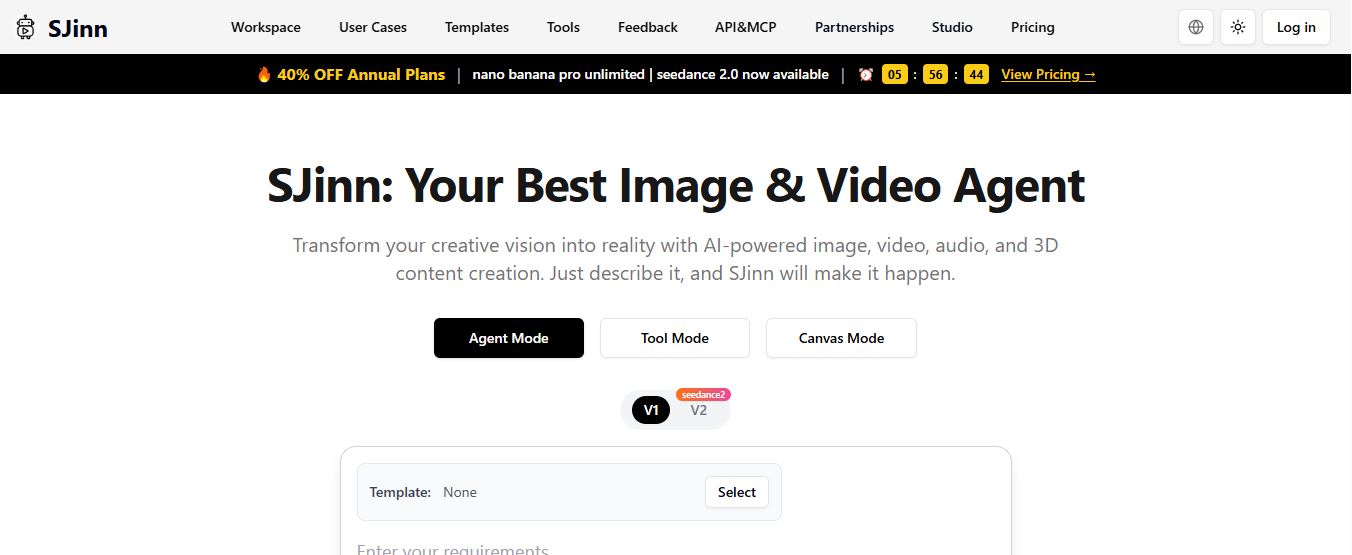
Signing up doesn’t require anything unusual — I logged in with Google and was dropped straight into the workspace with Agent Mode, Tool Mode, and Canvas Mode sitting side by side in the top bar. There’s no separate onboarding tour, which is either refreshing or disorienting depending on how much you like being shown around before you start clicking.
Who Sjinn AI Is Actually For
I’ve tested a lot of all-in-one AI video platforms, and the honest answer is that Sjinn earns its keep for people who want to stop switching between four or five tabs to finish one piece of content. Specifically:
- Solo creators and YouTubers who want channel trailers, intros, or narrated shorts without a filming setup.
- Small brands and marketers who need consistent characters or mascots across a run of ads.
- Agencies producing quick concept videos for client pitches before committing to full production.
- Storytellers and hobbyists experimenting with animated shorts or children’s story content.
If your work depends on frame-accurate editing, multitrack audio mixing, or matching an existing brand’s exact motion-graphics style, Sjinn’s output will need a pass through a real editor afterward. It’s a first-draft-to-final-cut machine, not a replacement for a hands-on editing suite like Runway.
AI Capabilities and Performance
The headline capability is narrative planning, not just clip generation. When you hand Sjinn a high-level idea, the agent doesn’t just render one scene — it can break the idea into a script, plan a sequence of shots, generate each visual, and layer in voice-over or music before handing back a finished file. That’s a meaningfully different job than what a single text-to-video model does.
Character consistency is where the multi-model routing actually pays off. Generate a reference image once, then reference that same character across new scenes and prompts, and Sjinn holds the likeness together far better than asking a single model to redescribe the character from scratch each time. That’s the same trick professional AI storyboard artists use manually, just automated.
Quality does vary by model tier. Nano-Banana and Seedream outputs on the cheaper end are solid for concept work and social content. Bump up to Veo3 or Sora2-class rendering and detail, motion coherence, and lighting jump noticeably — at a proportionally higher credit cost. Voiceovers were the one spot that occasionally needed a second pass; timbre and pacing weren’t always consistent scene to scene, so I’d budget time to review audio before publishing anything client-facing.
How I Actually Used Sjinn
Getting started is genuinely simple. After creating an account, I went into the workspace and typed my ideas straight into the prompt box in plain English. There’s no template you’re forced to fill out first — you can just describe the video and hit generate.
Two of the prompts I ran during testing:
- “Create a cinematic YouTube channel trailer for a space exploration channel featuring an astronaut discovering an ancient alien city.”
- “Make a funny Instagram Reel about a mischievous raccoon running its own coffee shop with cheerful background music.”
In both cases, Sjinn built the script, planned the individual scenes, generated the visuals, and assembled the final clip without asking me to intervene between steps. That end-to-end handoff is the entire pitch of the platform, and in my testing it held up — the output wasn’t flawless, but it was a usable first cut in a fraction of the time a manual multi-tool workflow would take.

When I only needed a still image, I switched to the image generator on its own. A prompt like “generate a fantasy mountain kingdom floating above the clouds during sunset with glowing waterfalls” typically ran around 50 credits per image on the Nano-Banana model, which made it cheap enough to try three or four variations before settling on one.
The image-to-video tool is where things get more interesting. Upload an existing image, describe the motion you want, and Sjinn animates it. I tried “animate this character sailing across a moonlit ocean while magical lights shimmer around the boat,” and depending on the model and settings selected, that kind of clip pulled anywhere from 300 to nearly 2,800 credits — a wide enough range that it’s worth checking the model picker before you generate, not after.
Prompting Tips That Actually Moved the Needle
Being vague with Sjinn wastes credits. Being specific about lighting, camera movement, mood, and music style consistently produced better first-pass results in my tests. Instead of “a video of a fox performing,” something like “a 20-second video of a golden fox performing on a glowing stage surrounded by floating lanterns and energetic orchestral music” gave the model far more to work with.
I also found it worth tailoring prompt length to the platform. Short, punchy concepts work better for TikTok and Reels. Longer, story-driven prompts suit YouTube. And if you’re building a series or brand campaign, reusing the same character or art-style description across prompts is what keeps the output looking consistent — this is genuinely one of Sjinn’s stronger points compared to generic single-shot generators.
What You Can Actually Build With It
Across my testing period, the realistic output categories were:
- Brand campaign videos with a consistent logo and visual identity.
- YouTube intros featuring custom characters and settings.
- Animated children’s story clips with matching illustration styles.
- Social ads built around a recurring brand mascot.
- Short-form vertical video for TikTok, Reels, and Shorts.
The advantage isn’t that any single output is better than what a specialist tool like Kling AI or a still-image generator like Vheer could produce alone — it’s that you don’t leave the platform to get from idea to finished file.
Real-World Use Cases
Zooming out from my own testing, here’s where I’d actually point different types of users:
- A solo YouTuber can generate animated shorts, intros, or story-driven videos without filming equipment or a human editor.
- A small business can put together promotional ads or product videos without hiring an agency.
- Marketers can produce a series of ads with consistent branding and characters for a social campaign.
- Artists and storytellers can experiment with animated stories, cartoons, or concept visuals at low cost per attempt.
- Social media creators can turn around Reels or Shorts quickly with minimal technical skill but real creative flexibility.
Sjinn AI Pricing and Plans
Sjinn runs on a straight credit system: every subscription tier hands you a monthly credit pool, and every generation — image, video, voice, upscale — deducts a set number of credits based on the model you used. Here’s what’s listed on the official pricing page as of this writing.

| Plan | Monthly Price | Credits | Notable Perks |
|---|---|---|---|
| Lite | $6 | 8,000 | Entry-level tier I was on during testing; lowest-cost way to try the platform |
| Standard | $12 | 20,000 | Watermark removal, unlimited Nano-Banana, Seedance 2.0 access |
| Pro (Most popular) | $30 | 60,000 | Unlimited Nano-Banana Pro (2K), Seedream v4/4.5, Flux 2 Pro, GPT-Image 2 |
| Ultra | $60 | 120,000 | Same unlimited model access as Pro, larger monthly pool |
| Enterprise | $720 | 1,200,000 | Custom agent, team management, all Ultra features |
A quick accuracy note: the Lite plan is what I was actually subscribed to during testing, but it isn’t showing on Sjinn’s live pricing page as of this writing — only Standard, Pro, Ultra, and Enterprise are currently listed there, alongside a 40% annual-plan discount. Entry-level tiers on credit-based AI platforms shift often, so treat the Lite row as accurate to my testing period and confirm the current lineup on the pricing page before you subscribe.
Beyond the plan tiers, the per-action credit costs matter just as much, since they’re what actually drain your pool:
| Model / Action | Credit Cost |
|---|---|
| Nano-Banana image | 50 credits |
| Sjinn Image-to-Video | 150 credits |
| Kling 2.1 video | 300 credits |
| Seedance video | 60 / second |
| Sora2 Image/Text-to-Video | 80 / second |
| Veo3 (fast) | 420 credits |
| Veo3 (standard) | 2,100 credits |
| ElevenLabs voice | 100 / 150 characters |
Do the math on the Standard plan and 20,000 credits covers roughly a dozen Veo3-fast clips, or well over a hundred Nano-Banana images, or a mix of both. It adds up quickly once you start generating full videos rather than stills, which is exactly why picking the right plan up front matters more here than on flat-fee tools.
Try Sjinn AI With Your Own Prompt
See what the agent does with a single idea — no separate script, storyboard, or editing tool required.
Start on Sjinn AI →Sjinn AI vs. the Alternatives
Sjinn isn’t competing directly with single-purpose generators — it’s competing with the whole idea of a multi-tool workflow. Here’s how it stacks up against the tools people usually reach for instead.
| Platform | Best For | End-to-End Automation |
|---|---|---|
| Sjinn AI | Script-to-video from one prompt | Full |
| Runway ML | Hands-on editing and effects | Partial |
| Kling AI | High-fidelity single clips | None |
| Visla | Template-driven business video | Partial |
If you want granular, frame-by-frame control, Runway still wins. If you want the single highest-quality clip from one specific model, a dedicated tool like Kling or a template-based option such as Visla may serve you better. Sjinn’s edge is speed from concept to finished asset, not per-shot precision.
Pros and Cons
✅ Pros
- Script, storyboard, visuals, and edit all happen in one workspace
- No coding, design, or editing background needed to get usable output
- Strong character and brand-style consistency across scenes
- Access to 20+ leading models without separate subscriptions
- Cheap enough per image to iterate on ideas before committing credits to video
❌ Cons
- No permanent free plan as of this writing
- Premium models like Veo3 (standard) drain credits fast on longer clips
- Output still needs a strong, specific prompt or quality suffers
- Domain flagged by automated scam checkers due to hidden ownership and young registration
- Not built for frame-by-frame manual editing
Reputation, Safety & Community Feedback
This is the part I don’t think a review can skip, so here’s what I found when I ran sjinn.ai through independent trust checkers rather than just taking the platform at its word. ScamAdviser currently gives sjinn.ai a trust score of 0 out of 100, labeling it “Likely Unsafe.” The negative signals behind that score: the domain owner uses a WHOIS privacy service to hide their identity, the site is hosted on a server alongside other flagged websites, the domain is roughly a year old, and it’s been reported for spam activity by a third-party abuse-scanning service. On the positive side, the site does hold a valid SSL certificate and loads through Cloudflare infrastructure.
It’s worth putting that score in context. Automated trust scanners weight domain age and hidden WHOIS data heavily, and plenty of legitimate, fast-moving AI startups score low for the exact same reasons — a brand-new domain and a founder who hasn’t published their identity yet isn’t automatically evidence of fraud, but it is a real reason to be cautious with anything sensitive.
User feedback is mixed rather than uniformly bad. Some Trustpilot reviewers describe Sjinn as responsive on Discord, quick to ship new model integrations like Seedance 2.0, and competitively priced compared to accessing those same models elsewhere. Other reviewers describe frustration with unclear pricing and credits that feel like they disappear faster than expected — a complaint that lines up with what I found in my own testing: premium models can burn through a plan quickly if you’re not watching the model picker.
My practical take: I wouldn’t call Sjinn a scam based on my own testing — I was able to generate content, the payment processed normally, and support responded on Discord. But I also wouldn’t upload deeply personal or sensitive images, and I’d use a card or payment method you’re comfortable monitoring closely for the first billing cycle or two.
Bonus Tips for Using Sjinn Safely
- Use a dedicated or secondary email for sign-up rather than your primary personal or work address.
- Avoid uploading highly sensitive personal photos until you’re comfortable with how the platform handles data.
- Treat early generations as drafts — review every video and voice-over for accuracy before publishing, especially for client or brand work.
- Watch your credit balance in real time during video generation, since premium models can consume it fast.
- Keep a traditional editor or a trusted tool like Freepik or Bazaar.it on hand for final polish or as a fallback if you need more control.
How I Test the Platforms I Review
My reviews are based on hands-on testing. I personally create an account and use the platform the way a real user would — leaning on free plans and trials extensively to explore the features, usability, performance, and general user experience before I write anything down. I take notes throughout the process and combine those findings into the review you’re reading.
These reviews reflect my personal opinion and experience with the platform, and they are not professional, financial, legal, or technical advice. For official guidance on any tool mentioned here, please contact the company directly.
Frequently Asked Questions
Is Sjinn AI free?
Not permanently. Sjinn previously offered around 1,000 free credits for new sign-ups, but that free allocation was pulled during my testing. The cheapest way in was the Lite plan I tested with — $6/month for 8,000 credits — though that tier isn’t showing on the live pricing page as I write this, so Standard at $12/month may currently be the actual entry point. Either way, there’s no ongoing free tier you can use indefinitely — you’re paying from close to the start.
Is Sjinn AI worth it?
For most content creators, marketers, and small brands producing regular short-form or ad content, yes. The value isn’t in any single generation beating a specialist tool — it’s in collapsing script, storyboard, visuals, and editing into one prompt-driven workflow, which genuinely saves time compared to bouncing between separate apps. If your work depends on frame-precise editing, a very specific proprietary visual style, or you’re not comfortable with a young, identity-hidden domain handling your uploads, budget for a traditional editor alongside it rather than expecting Sjinn to fully replace one.
Is Sjinn AI safe and legit?
The platform functioned normally in my testing — payment, generation, and support all worked as expected. That said, automated scam checkers rate it poorly mainly due to hidden domain ownership and a young registration date, and user reviews are mixed on pricing clarity. It’s not something I’d flag as an outright scam based on my experience, but it’s also not a platform I’d treat as fully vetted. Use a secondary email, avoid uploading sensitive material, and monitor your billing closely for the first month.
Does Sjinn AI support commercial use?
Paid plans are built for professional use and generally allow you to use generated videos and images for ads, products, and marketing. Always check the current terms of service on the pricing page for the specific plan you’re on, since commercial terms can differ by tier.
What happens if I run out of credits mid-project?
You can purchase additional credits directly from your account without upgrading your entire plan, or wait for your monthly pool to refresh. Because video generation eats credits far faster than images, it’s worth watching your balance before starting a longer render.
Ready to Test Sjinn Yourself?
Compare the plans, pick a tier that matches how many videos you’ll actually generate, and start with a small credit purchase before scaling up.
See Sjinn AI Pricing →Final Verdict
Sjinn AI does what it claims to do more often than not: it takes a written idea and turns it into a finished video without forcing you to learn separate tools for scripting, visuals, and editing. The credit system takes some getting used to, and premium models can burn through a plan faster than you’d expect if you’re not paying attention to which model you’re selecting. But for creators who want to move fast from concept to publish-ready content, it’s one of the more genuinely useful “agent” platforms I’ve tested this year.
My two real complaints: the free plan disappeared, and the domain’s low trust-checker score means cautious users will want to keep uploads light until the platform builds a longer track record. Bringing back even a small no-cost tier — and publishing clearer company ownership details — would make this a much easier recommendation.


