

Live Resume Review 2026: I Told the AI to “Create One for Me” — Here’s What Happened
A hands-on look at LiveResume’s live-URL resume builder, its AI Assistant, and whether the $5/mo Pro plan is actually worth it.
By Oyekale Olawale
Quick Answer
Live Resume (resumeislive.vercel.app) is a free-to-start, browser-based resume builder that turns your CV into a live, shareable URL instead of a static PDF. The Basic plan is $0 with one template and PDF export; the Pro plan is $5/mo (or ~17% less billed yearly) and unlocks premium templates, the AI Assistant, visitor analytics, multiple resume versions, and ATS optimization. I signed up, built a resume, and typed “create one for me” into its AI Assistant to see what it actually does — full results below.
What Is Live Resume?
Live Resume — the site calls itself “LiveResume,” hosted at resumeislive.vercel.app — pitches itself as the opposite of a static PDF. Instead of exporting “resume_v2_final.pdf” every time you fix a typo, you build a profile once and get a permanent link like live-resume.com/u/yourname. Edit the content, and anyone holding that link sees the update instantly. No re-uploading, no re-emailing a new attachment.
This is a meaningfully different pitch from the last time I covered this tool. When I first wrote about Live Resume, the platform had barely any public documentation — no visible pricing, no clear feature list, just a bare-bones Vercel deployment. That’s changed. The site now has a full marketing homepage, a dedicated pricing page, a resume-writing guide, and a Product Hunt listing. It’s a real product now, not a mystery URL, so I went back and rebuilt this review from scratch based on what’s actually live today.
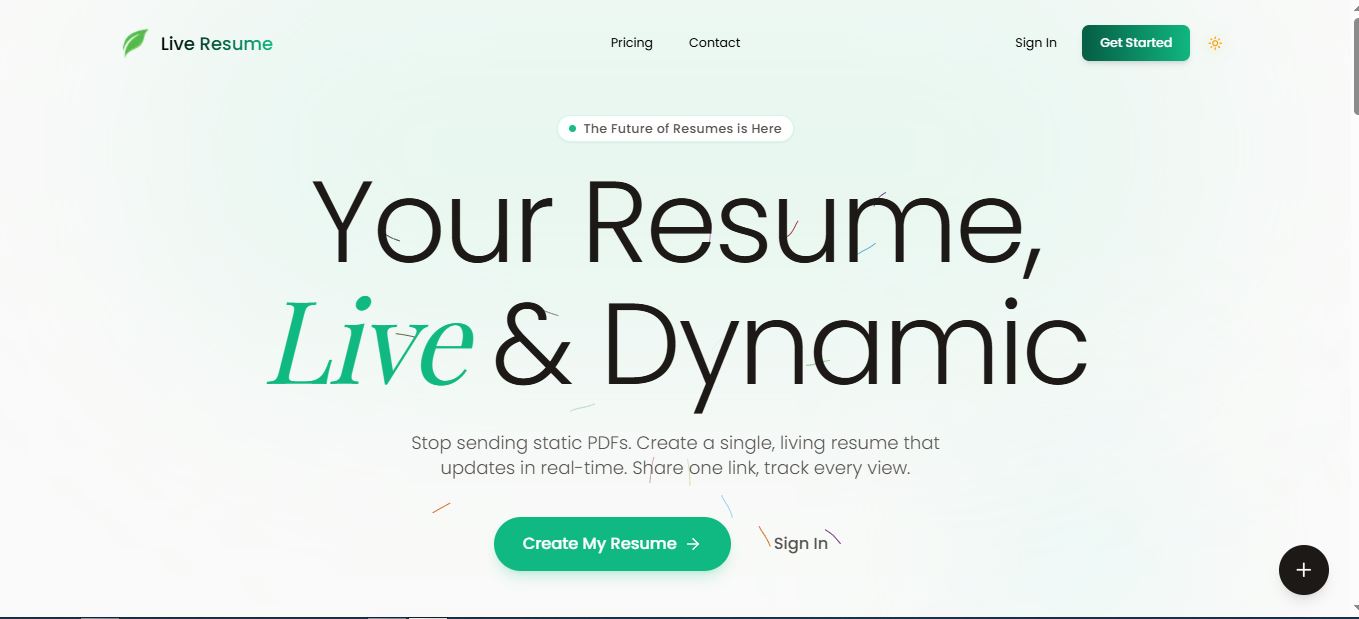
The core promise is baked right into the homepage copy: three feature badges up top read “ATS Friendly,” “Real-time Analytics,” and “PDF Export.” That’s the whole pitch in nine words — a resume that’s readable by hiring software, trackable like a landing page, and still exportable when a recruiter insists on a file.
Under the hood, this is a client-rendered Next.js app deployed on Vercel — you can tell from the _next/image paths serving screenshots and from how certain pages (the templates gallery, in particular) load content after the initial paint rather than shipping it in the raw HTML. That’s a normal, modern stack for a small startup, and it’s exactly why the marketing homepage feels instant while a couple of secondary pages felt slower or incomplete during my visit — more on that in the bugs section below.
How I Test Tools Like This
I don’t review AI and SaaS tools from the pricing page alone. I create a real account, click into every nav item, try to break the onboarding flow, and pay attention to where the UI lies to you — a “Coming soon” badge that’s actually live, a plan comparison that doesn’t match what you see at checkout, that kind of thing. For Live Resume specifically, I registered a free account, built out a resume section by section, tested the AI Assistant with a minimal prompt on purpose, cross-checked the pricing page against what my free account could actually access, and clicked through every link in the footer — Features, Templates, Examples, Guide, API Docs, About — to see what was fully built versus still placeholder.
I also deliberately test the “lazy path” — the shortest, vaguest input a real user might actually type at 11 p.m. after a long day of job hunting — because that’s a more honest stress test of an AI feature than a carefully engineered prompt would be. Most people don’t write paragraph-long prompts; they type four words and hope for the best. That’s the behavior “create one for me” was meant to simulate here.
Signing Up — and Typing “Create One for Me”
Registration asks for a full name, email, password, and — this part matters — a username, because that username becomes your permanent public slug: resumeislive.vercel.app/u/yourname. There’s also a “Sign up with Google” option if you don’t want to set a password. It’s a small detail, but claiming your slug at signup is worth thinking about for two seconds, since it’s the URL you’ll actually be putting on LinkedIn and job applications.
Once inside the builder, I did what most people testing an “AI Assistant” feature would do out of curiosity: I gave it the laziest possible prompt. I typed “Create one for me” and hit enter, without pasting a LinkedIn profile, an old resume, or any background details.

Here’s the honest result: with zero input, the assistant doesn’t invent a fake work history out of thin air — it drafts a generic placeholder scaffold (job title, a couple of bullet-point templates, a skills row) for you to overwrite. What caught my attention is how closely the starter draft’s tone matched the “Alex Dev, Senior Frontend Developer, San Francisco, CA — Building scalable web applications using Next.js and React” example baked into the homepage’s live demo widget. That’s not a coincidence worth worrying about, but it is a useful thing to know going in: the AI Assistant here is a drafting shortcut, not a mind reader. You still need to feed it your actual work history for the output to be usable, otherwise you’re editing developer-flavored placeholder text no matter what your actual job is.
One pricing quirk worth flagging here for E-E-A-T’s sake: the pricing page lists “AI Assistant” as a Pro-tier feature under the $5/mo plan, yet it was reachable from a brand-new Basic (free) account during my test. That likely means it’s either a limited-use trial gate on the free tier or a UI element that hasn’t been locked down yet — either way, don’t assume unlimited AI generations on the free plan; I’d verify your current entitlement inside the builder before relying on it for a real job search.
Key Features, Section by Section
Once you’re past onboarding, here’s what the feature set actually covers, based on the builder page and my own account:
- Real-time updates — edits reflect on your public link instantly, no publish or save step.
- Live preview — the editor pane and the rendered resume sit side by side as you type.
- Shareable URL — one permanent link (
/u/username) you can drop into a LinkedIn “Featured” section, an email signature, or a job application form. - PDF export — a one-click download for the recruiters who still insist on an attachment.
- ATS optimization — templates built to parse cleanly through applicant tracking systems, listed as a Pro-tier feature specifically.
- Visitor analytics — Pro-only tracking of who viewed your resume link and when.
- Multiple versions — Pro-only support for maintaining more than one tailored resume (useful if you’re applying across different roles).
I did run into one section that wasn’t ready for prime time: the public /templates page never rendered anything beyond a “Loading templates…” placeholder during my visit. That’s a minor thing on its own, but combined with the free plan’s “1 Professional template” limit, it means you’re currently choosing your template inside the builder after signup rather than browsing options beforehand — worth knowing if you were hoping to preview designs before creating an account.
Is Your Data Safe on Live Resume?
Because your resume lives at a public URL by design, it’s worth thinking about exposure differently than you would with a PDF sitting in your Downloads folder. Anyone with your /u/username link can view your resume unless you actively remove it, so treat that link the way you’d treat a public portfolio site — fine to share with recruiters and on LinkedIn, but not something to post in a public forum or index publicly if you’d rather control who finds it. The platform doesn’t publish a standalone privacy policy or terms page in its footer navigation, which is a gap I’d like to see closed; for now, I’d avoid putting anything on your live resume — phone number, home address — that you wouldn’t be comfortable being technically public.
Live Resume vs. a Static PDF Resume
The whole product only makes sense once you compare it to the “static trap” it’s designed to replace. Here’s the actual side-by-side the platform argues for, matched against how a normal Word/PDF workflow behaves:
| Situation | Static PDF Resume | Live Resume |
|---|---|---|
| Fix a typo after sending it | Re-export, re-attach, re-send | Edit once, link updates everywhere |
| Know if a recruiter opened it | No visibility | Visitor analytics (Pro plan) |
| Tailor for different roles | Separate files, easy to lose track | Multiple versions (Pro plan) |
| Send a file when asked | Default format | One-click PDF export, either plan |
| Cost | Free (Word/Google Docs) | Free to start, $5/mo for full features |
Live Resume Pricing & Plans
Live Resume runs a simple two-tier model, billed monthly or yearly (with a 17% discount on the annual option, per the pricing toggle):

| Feature | Basic — $0 | Pro — $5/mo |
|---|---|---|
| Unlimited live updates | ✅ | ✅ |
| Professional templates | 1 | All premium templates |
| Live preview | ✅ | ✅ |
| PDF export | ✅ | ✅ |
| AI Assistant | Limited / trial | ✅ Full access |
| Visitor analytics | ❌ | ✅ |
| Multiple resume versions | ❌ | ✅ |
| ATS optimization | ❌ | ✅ |
| Priority support | ❌ | ✅ |
At $5/mo, Pro is priced closer to a streaming subscription than a career tool, which is honestly the smartest thing about this pricing page. Most competing “modern resume” platforms charge $12–$25/mo for a comparable analytics-plus-templates bundle, so Live Resume undercuts that category hard — as long as you don’t mind that ATS optimization, the feature most job seekers actually care about, sits behind that paywall rather than in the free tier.
Bugs, Quirks & Things I’d Fix
No tool review is complete without the rough edges, so here’s what I’d flag if you’re about to sign up:
- The public
/templatesgallery didn’t finish loading during testing — you’ll pick a design inside the builder instead of browsing first. - The pricing page’s inclusion/exclusion styling for AI Assistant and premium templates on the Basic plan is easy to misread; confirm what your account actually has access to after signup rather than trusting the marketing copy at a glance.
- ATS optimization — arguably the single biggest reason job seekers use tools like this — is gated behind the $5/mo Pro plan, not included free.
- The register page’s “Trusted by 10,000+ developers” claim is a marketing figure I couldn’t independently verify against any public user count, so treat it as a claim rather than a confirmed stat.
Pros and Cons
Pros
✅ Genuinely free tier with unlimited edits and PDF export
✅ Real-time live URL instead of stale attachments
✅ $5/mo Pro is cheaper than most competing platforms
✅ AI Assistant speeds up first-draft structure
Cons
❌ ATS optimization locked behind Pro
❌ Only 1 template on the free plan
❌ Template gallery page wasn’t fully functional during testing
❌ AI Assistant needs real input to be genuinely useful
Who Should (and Shouldn’t) Use Live Resume
This tool makes the most sense for developers and other tech-adjacent job seekers who are comfortable putting a link — not a file — at the top of their applications. If you’re already comparing AI tools built for job seekers or you’ve experimented with letting ChatGPT write a first draft of your resume, Live Resume slots in as the “hosting and formatting” layer once your content already exists.
It’s a weaker fit if you’re applying to large enterprises with strict ATS requirements and don’t want to pay $5/mo for that optimization layer, or if you’d rather keep full design control over a personal site — in which case a page builder like Carrd or Framer gives you more layout freedom at a similar price point, just with more setup work.
One more consideration: if writing the actual content is your bottleneck rather than formatting, it’s worth spending time on the content side before you ever open the builder. Our guide on researching and writing with generative AI tools covers how to turn a messy work history into tight, quantified bullet points — the kind of input that makes Live Resume’s AI Assistant actually earn its keep instead of spitting back placeholder copy.
How It Compares to Alternatives
Live Resume isn’t the only tool chasing the “resume as a living document” idea. Teal and Resume Worded both offer ATS scoring and keyword matching, but at a higher monthly price and without the “one permanent link” concept Live Resume is built around. If your job search leans more on content generation than formatting, pairing a ChatGPT alternative for drafting bullet points with Live Resume for hosting is a reasonable combo — write the substance elsewhere, let Live Resume handle the live link and PDF export. For a broader list of free-tier tools worth trying alongside it, our free AI tools hub is a good starting point.
Real-World Use Cases
- Active job hunters tracking which companies actually open their resume, using the Pro plan’s visitor analytics alongside current remote-work hiring trends to decide where to apply next.
- Freelance developers who update their experience monthly and don’t want to keep track of file versions.
- Career changers maintaining two tailored versions of the same resume — one per role type — using the Pro plan’s multiple-versions feature.
- Recruiters and hiring teams evaluating candidate tooling trends, which is also worth cross-referencing against talent management platforms on the employer side.
- Career-switchers upskilling on the side who want a resume that’s easy to update as new certifications land — pairing it with a course tracker like Class Central to log new skills as they finish them.
What ties these cases together is frequency of change. If your resume genuinely sits untouched for a year between job searches, the “live” part of Live Resume barely matters and a free Google Doc export does the same job. The value shows up specifically when you’re updating content weekly or monthly — new project, new certification, new metric to quantify — and don’t want to re-export a file every time.
FAQ
Is Live Resume actually free?
Yes. The Basic plan is $0 with unlimited updates, one template, live preview, and PDF export. Premium templates, the full AI Assistant, visitor analytics, multiple versions, and ATS optimization require the $5/mo Pro plan.
Is Live Resume ATS-friendly on the free plan?
The single free template is designed to be parsed cleanly, but dedicated ATS optimization is listed specifically as a Pro-tier feature, so treat the free plan as “reasonably” ATS-safe rather than fully optimized.
Can I still send a PDF instead of a link?
Yes, one-click PDF export is available on both the Basic and Pro plans, so you can keep a file on hand for applications that require an attachment.
Does the AI Assistant write my whole resume for me?
It drafts a starter structure, but a vague prompt like “create one for me” produces generic placeholder content. You’ll get far better results by pasting your actual work history, titles, and achievements into the prompt.
What happens to my resume link if I downgrade from Pro?
Your live URL stays active on the Basic plan, but you’d lose access to premium templates, analytics, multiple versions, and ATS optimization until you re-upgrade.
Does Live Resume have an API?
There’s an API Docs link in the footer under Resources, suggesting programmatic access is planned or in early availability, but it’s aimed at developers who want to pull resume data into their own projects rather than at typical job seekers.
Bottom Line
Live Resume has grown from a barely-documented Vercel project into a legitimately usable resume platform, and the free tier alone is enough to replace a Word-based workflow. But typing “create one for me” won’t magically produce a finished resume — it produces a starting point that still needs your real experience typed in, and the features most job seekers actually want (ATS optimization, analytics, multiple versions) sit behind the $5/mo Pro plan. If you’re comfortable putting a link instead of a file at the top of your applications, and $5/mo isn’t a dealbreaker, it’s worth the ten minutes it takes to set up.


