

Updated August 2026
Lucidchart Pricing Breakdown: What Every Plan Actually Costs (and Which One I’d Buy)
I ran Lucidchart through its Free, Individual, Team, and Enterprise tiers to find out where the real value sits — and where it quietly nickel-and-dimes you.
By Oyekale Olawale · Independent SaaS Reviewer, Websites2Know
Quick Answer
Lucidchart runs four tiers: Free (3 editable documents), Individual at $9/month billed annually, Team at $10/user/month with a 3-user minimum (so $30/month, minimum), and Enterprise, which is custom-quoted. If you’re solo, Individual is the plan worth paying for. If you’re buying for a team of three or fewer, the Team tier’s 3-seat floor will sting — I’ll show you the workaround below.
I’ve been recommending diagramming tools to clients for years, and Lucidchart is the one I get asked about most — usually with some version of “why does it feel more expensive than I expected?” So I went through every plan tier myself: signed up free, pushed the Individual plan past its limits, and dug through the admin-side documentation that Team and Enterprise buyers actually have to read before they commit a budget line. This is what I found.
What Is Lucidchart, Exactly?
Lucidchart is Lucid Software’s browser-based diagramming tool — flowcharts, org charts, ERDs, UML, network diagrams, wireframes, the works. It’s the product people usually mean when they say “make me a Visio-style diagram, but in the browser and shareable with a link.” It sits alongside Lucidspark (a whiteboard) and Lucidscale (cloud architecture visualization) under the broader Lucid Visual Collaboration Suite, but Lucidchart is sold and priced as its own subscription.
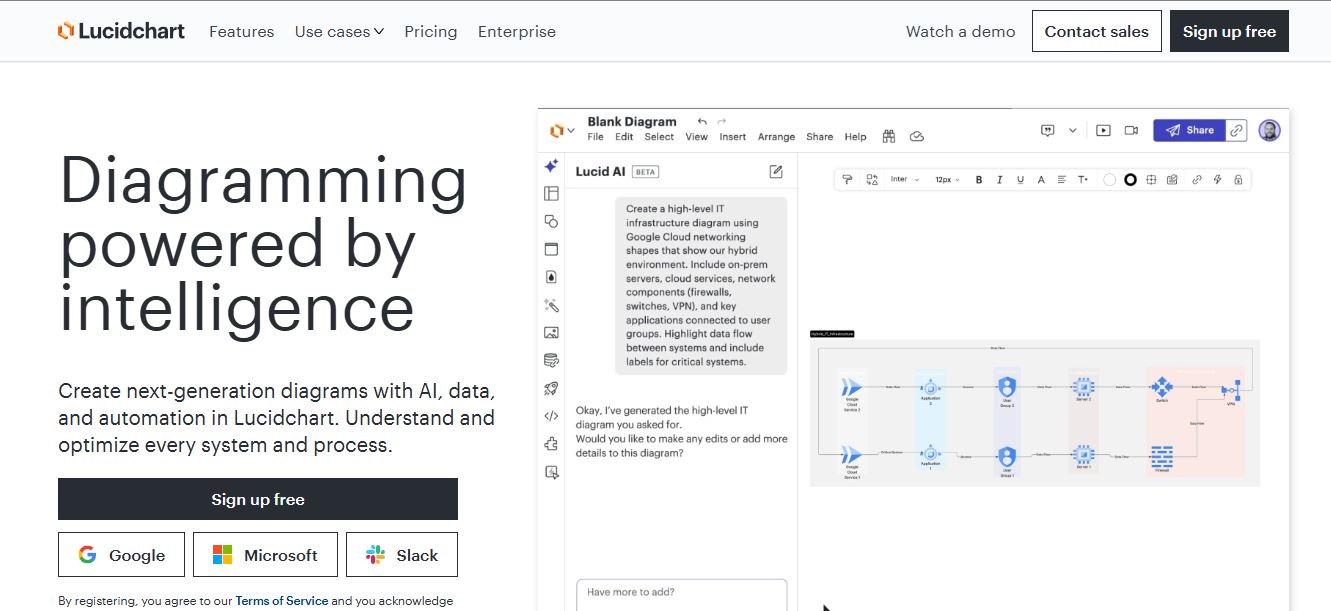
Here’s the thing I’ll say plainly, because I don’t think enough reviews do: Lucidchart isn’t cheap once you’re past the free tier, and it isn’t trying to be. It’s priced against Visio and enterprise diagramming budgets, not against a $0 tool like draw.io. Whether that’s worth it depends entirely on what you’re diagramming and who needs to see it.
How I Tested It
I created a free account, built out a handful of real diagrams (an ERD, a network topology, an org chart), and hit the free plan’s object ceiling within about fifteen minutes of actual work — not padding, just a normal ERD with a dozen tables. From there I traced every plan’s published feature matrix against Lucid’s own help-center documentation, cross-checked pricing against multiple current listings (Capterra, Lucid’s own community forum, and third-party pricing trackers), and flagged anywhere the numbers didn’t agree. I also read through Lucid’s billing and plan-upgrade help articles line by line, because that’s usually where the real mechanics of a subscription — auto-renewal, seat minimums, downgrade rules — actually live, not on the flashy marketing pricing page. I’ll call out the spots where sources disagreed as we go, because a few do, and I’d rather tell you that than pretend the pricing page is more stable than it is.
Lucidchart Pricing at a Glance

| Plan | Price | Best For | Document Limit |
|---|---|---|---|
| Free | $0 | Trying it out, single quick diagrams | 3 editable documents |
| Individual | $9/month, billed annually | Freelancers, solo consultants | Unlimited |
| Team | $10/user/month, 3-user minimum | Small-to-mid teams needing shared libraries | Unlimited |
| Enterprise | Custom quote | Regulated orgs, SSO/SAML, large deployments | Unlimited |
A transparency note, because I said I would flag this: a few older pricing trackers still list Individual at $7.95/month and Team at $6.67–$9/user. That was accurate at an earlier point, but every current listing I checked in August 2026 — Capterra’s live comparison page included — shows $9/month Individual and $10/user/month Team. Lucid also doesn’t publish monthly-billing (non-annual) rates clearly, so if you skip the annual commitment, expect a noticeably higher per-month number. Always cross-check against Lucid’s own pricing page before you buy, since these numbers do move.
Free Plan: Fine for a Test Drive, Not for Real Work
The Free plan caps you at 3 editable documents at a time, with a shape count ceiling per document that most published trackers put around 60 objects (Lucid doesn’t state this number loudly, and it’s shifted before, so treat it as approximate). You get the core editor, AI diagram generation, presentation mode, and sharing — Lucid doesn’t cripple the actual drawing experience on Free, which I respect. What it caps is volume.
In practice: I built one ERD with about a dozen tables and their relationships, and I was already flirting with the object ceiling before I’d added a single annotation. If you diagram occasionally — one org chart a quarter, say — Free might genuinely be enough. If you’re doing any regular work, you’ll hit the wall inside your first real project.
Individual Plan ($9/Month): Who Actually Needs This
Individual unlocks unlimited documents and unlimited objects per document — the two limits that actually matter — plus premium templates, premium shape libraries, Visio import and export, custom shape libraries, and 1 GB of document storage. That last figure matters more than it sounds: Free tops out at just 25 MB, which is genuinely tight if you’re storing anything beyond a handful of lightweight diagrams.
This is the plan I’d point a freelance consultant or solo product manager toward. You don’t get revision history with versioning (that’s Team-and-up only, which I think is a genuine gap for anyone iterating on client-facing diagrams), and you don’t get the “invite others to follow you” collaboration feature. But for someone working alone, those aren’t dealbreakers.
Team Plan ($10/User/Month): The 3-Seat Floor Is the Catch
Here’s my honest opinion on Team, and it’s the part of Lucidchart’s pricing I’d push back on hardest: the 3-user minimum means the real floor for Team is roughly $30/month, not $10. If there are two of you, you’re still paying for three seats. I’ve watched small teams get quietly nudged toward buying a seat they don’t need just to unlock features like custom templates, revision history, or the “invite to follow” collaboration tools — none of which are available on Individual at any price. That’s a deliberate pricing shape, and it works exactly the way it’s designed to: it makes almost every serious buyer a Team buyer.
What you get for it is real, though. Team adds custom templates and document attributes, revision history with full versioning, the ability to compare two documents side by side, external and internal embeds, shape libraries and data-syncing for developers, and integrations with Jira Cloud, Confluence, and Zapier that simply don’t exist on lower tiers. If your team lives in Atlassian tools, Team is close to mandatory rather than optional.
Enterprise: Built for Governance, Priced for It Too
Enterprise is quote-only — you talk to Lucid’s sales team, full stop, there’s no self-serve checkout. What you’re actually buying at this tier isn’t more diagramming power (Team already gives you the core creative toolset); you’re buying governance: SAML-based SSO, SCIM provisioning and deprovisioning, domain control, centralized billing across the org, granular usage-data reporting, custom document statuses with content locking, and 5 GB of per-user storage instead of Team’s 1 GB. Some third-party pricing calculators estimate Enterprise landing somewhere between $12 and $20 per user per month depending on volume and add-ons, but that’s an estimate from aggregated contract data, not a published Lucid number — treat it as a ballpark for budgeting conversations, not a quote.
Feature Access by Plan: The Comparison That Actually Matters
Pricing pages love to bury the feature that actually forces your upgrade decision. I pulled the features that most affect a real buying choice into one table, straight from Lucid’s own plan documentation.
| Feature | Free | Individual | Team | Enterprise |
|---|---|---|---|---|
| Unlimited editable documents | ✗ | ✓ | ✓ | ✓ |
| Document storage | 25 MB | 1 GB | 1 GB/user | 5 GB/user |
| Visio import / export | Import only | ✓ | ✓ | ✓ |
| Revision history / versioning | ✗ | ✗ | ✓ | ✓ |
| Custom templates | ✗ | ✗ | ✓ | ✓ |
| Jira / Confluence integration | ✗ | ✗ | ✓ | ✓ |
| SSO (Google / Microsoft 365) | ✓ | ✓ | ✓ | ✓ |
| SAML SSO + SCIM provisioning | ✗ | ✗ | ✗ | ✓ |
| Centralized billing & admin panel | ✗ | ✗ | ✗ | ✓ |
Data linking against CSV, Excel, and Google Sheets is one-time on Free, Individual, and Team — only Enterprise gets ongoing refresh and overlay. If your diagrams are meant to stay live-synced to a spreadsheet rather than snapshotted once, that’s an Enterprise-only capability worth knowing about before you commit to Team.
Annual vs. Monthly Billing: The Detail Most Pricing Pages Skip
Every headline number in this article — the $9 Individual price, the $10 Team price — assumes you’re paying annually, upfront, for the year. That’s how Lucid structures its self-serve pricing, and it’s worth being deliberate about, because the monthly-billing rate (no annual commitment) runs meaningfully higher per month, even though Lucid doesn’t spotlight the exact monthly figure on its main pricing page. If you’re testing whether Lucidchart sticks with your workflow before committing a year of budget to it, expect to pay a premium for that flexibility during your first month or two, then decide whether switching to annual billing makes sense once you’re confident it’s a keeper.
One more billing wrinkle worth knowing before you commit a card: both monthly and annual licenses auto-renew unless you cancel manually. Lucid’s own billing documentation is explicit about this, and I’ve seen more than one small team get surprised by a renewal charge because nobody flagged the calendar date internally. If you’re buying Team or Enterprise on behalf of an organization, put the renewal date somewhere your admin will actually see it — not just in an inbox that someone might miss during a busy quarter.
Hidden Costs Worth Budgeting For
The sticker price rarely tells the whole story with a seat-based SaaS tool, and Lucidchart is no exception. A few line items I’d flag before you finalize a budget for it:
- The forced third seat on Team. I’ve mentioned it twice now because it’s the single most common budget surprise I hear about from small teams — two people pay for three seats whether that third license gets used or not.
- Storage overages on media-heavy diagrams. 1 GB on Individual sounds generous until you’re embedding screenshots, exported images, or large shape libraries directly into documents. It adds up faster than plain vector diagrams would suggest.
- Premium partner integrations. Tools like BambooHR imports and Zapier data-syncing are Enterprise-gated, so if a mid-size team assumes Team unlocks everything, that assumption gets discovered mid-project, usually at an inconvenient moment.
- Implementation and training for Enterprise. Tailored training, onboarding, and consulting services are available “with purchase” on Enterprise — meaning they’re not bundled by default and show up as a separate negotiated line item on top of the per-seat cost.
What Lucidchart Costs vs. Miro and Draw.io
People rarely evaluate Lucidchart in isolation, so here’s how it stacks up against the two tools I see it cross-shopped against most: Miro (the whiteboard-first collaboration tool) and draw.io (the free, open-source diagramming alternative). I’ve used all three on client work.
Draw.io
$0
forever, self-hosted or browser
Lucidchart Individual
$9/mo
billed annually
Miro Starter
$10/mo
per member, billed annually
My honest read: if you only need clean, structural diagrams — ERDs, network maps, BPMN — and you’re comfortable with a rougher interface, draw.io’s zero cost is very hard to argue against, especially since it exports to formats you fully control. Where Lucidchart earns its $9–$10 is polish, template quality, and the fact that non-technical stakeholders can open a shared link and actually understand what they’re looking at without training. Miro is a different tool wearing similar clothes — it’s a whiteboard that happens to do diagrams, not a diagramming tool first. If your work is genuinely structured (org charts, ERDs, process maps), Lucidchart’s diagram-specific tooling beats Miro’s freeform canvas every time I’ve tested it side by side.
How to Choose the Right Plan: A Step-by-Step Walkthrough
- Start on Free and actually build something real. Don’t test with a throwaway diagram — build the kind of ERD or process map you’d use at work. You’ll hit the object ceiling honestly instead of guessing.
- Count your active documents, not your total library. If you regularly need more than 3 documents open and editable at once, Free is out and you’re choosing between Individual and Team.
- Check whether you need Jira, Confluence, or revision history. These are Team-and-up exclusives. If any of them are non-negotiable for your workflow, Individual won’t cut it regardless of team size.
- If you’re a team of one or two, do the seat math first. Team’s 3-seat minimum means two people pay for three. Compare that real cost against two Individual seats before assuming Team is the “team” answer.
- If you need SSO with SAML, SCIM, or centralized domain control, skip straight to an Enterprise conversation. No self-serve tier gets you there, so requesting a quote early avoids a wasted Team trial.
Pros and Cons of Lucidchart’s Pricing Structure
✓ What Works
- Individual at $9/month is genuinely fair for solo, serious diagramming work
- Free plan isn’t crippled — you get the real editor, just fewer documents
- Visio import/export removes real switching friction for enterprise teams
- Feature access is predictable and clearly tiered, no surprise paywalls mid-workflow
✗ What Doesn’t
- Team’s 3-seat minimum inflates the real cost for small teams
- Revision history is locked out of Individual, which stings for solo iterative work
- Enterprise pricing opacity makes budgeting hard without a sales call
- Published third-party pricing is inconsistent — expect to verify before purchase
FAQ
Is Lucidchart free to use?
Yes — Lucidchart has an indefinite free plan with no credit card required. It’s capped at 3 editable documents at a time with a modest per-document object limit, but the core diagramming editor is fully usable.
How much does Lucidchart cost per month?
The Individual plan runs $9/month billed annually, and Team runs $10/user/month billed annually with a 3-user minimum, meaning the real Team floor is about $30/month. Monthly (non-annual) billing is typically higher per month.
Does Lucidchart charge per user?
Individual is priced per single user and can’t be split across a team. Team and Enterprise are both per-user, per-month licenses, with Team requiring a minimum of three seats.
What’s the cheapest way to get Lucidchart for a small team?
If you’re a team of two and don’t need Team-exclusive features like Jira integration or revision history, two Individual accounts (about $18/month combined) can undercut Team’s enforced 3-seat minimum (about $30/month) — you just lose shared team libraries and admin controls.
Does Lucidchart offer a free trial of paid plans?
Yes, Lucid offers self-serve trials for both Individual and Team subscriptions. Enterprise trials require going through the sales team directly rather than a self-serve signup.
Can I downgrade or cancel a Lucidchart subscription anytime?
You can cancel from your account settings if you’re on Free or Individual, or if you hold billing permissions on a Team or Enterprise account. Cancellation stops the next renewal, but per Lucid’s own billing policy it doesn’t refund the current billing period. If you subscribe to more than one Lucid product (Lucidchart and Lucidspark, for example), each has to be canceled separately.
Is Lucidchart worth it compared to free alternatives like draw.io?
It depends on your priorities. Draw.io is genuinely free forever with no paywalled features, and if you’re comfortable with a plainer interface, it’s very hard to beat on pure cost. Lucidchart earns its price through polish, template quality, easier stakeholder sharing, and native Visio compatibility — worth it if those things save you real time, less so if you’re diagramming occasionally and don’t need the extras.
Closing
Lucidchart’s pricing isn’t trying to compete with free tools, and once you accept that, it’s actually fair for what it is. Individual at $9/month is an easy yes for anyone diagramming regularly on their own — unlimited documents, Visio compatibility, and premium templates for less than most people spend on coffee in a week. Team is where I’d slow down: the 3-seat minimum is a deliberate nudge, and I’d want a real headcount of three or more before I’d sign up for it rather than stacking Individual seats. Enterprise is fine if you actually need SAML and centralized governance — just don’t expect a published number, and budget time for a sales conversation.
If I had to put my own money down today: solo professionals go Individual, small teams under three people stay on stacked Individual accounts until they actually need the 3rd seat, and anyone doing compliance-heavy diagramming for a regulated org should start the Enterprise conversation early rather than outgrowing Team mid-project.
For a deeper look at the platform itself — interface, template quality, and where it stumbles day-to-day — see my full Lucidchart review. And if you’re weighing this purchase against other software line items in your stack, I’ve also broken down QuickBooks alternatives for small businesses and a full all-in-one SEO software comparison if budget-season research is on your plate right now.
Related Reading From Websites2Know
- Lucidchart Review: Is It Still Worth It?
- Semrush Review: What You Actually Get at Each Tier
- Bonsai Review: Freelance Business Management Tested
- Carrd Review: Is This $9 One-Page Website Builder Worth It?
- Popular AI Tools for Designers & Creatives
- How to Classify Software Applications & Components
- SearchAtlas Review: The AI SEO Agent Tested
- Geekflare Review: Full Toolkit Breakdown
About the Author
Oyekale Olawale runs Websites2Know, an independent platform reviewing AI tools and SaaS software. He tests each tool across real workflows — not demos — and publishes reviews based on hands-on evaluation. Reviews are written independently; no vendors pay for favorable coverage.