

Magic UI Review: Is It Worth It for Modern Web Developers?
Short answer: Magic UI is free for 150+ animated React components, and $199 one-time if you want the Pro template library. I installed it into three separate Next.js projects over the past few weeks, broke it twice, fixed it myself both times, and I’d still recommend it — but only if you’re already comfortable with Tailwind and shadcn/ui. If you’re not, the free version alone will still save you days of animation work.
I write these reviews the same way every time: I install the tool, I use it on a real project, I write down every error message I hit, and I tell you honestly whether it’s worth your time. Magic UI took me about 40 minutes to get comfortable with, and roughly 3 hours to build a full landing page hero section with it. Here’s everything I found.
What Is Magic UI?
Magic UI is an open-source library of 150+ animated components built with React, TypeScript, Tailwind CSS, and Motion (the library formerly known as Framer Motion). Dillion Verma built it as a direct companion to shadcn/ui — the two are meant to sit side by side in the same project. shadcn/ui gives you the structural components (buttons, dialogs, forms), and Magic UI gives you the flashy stuff: marquees, animated borders, particle backgrounds, number tickers, globes, and gradient text.
The core idea, borrowed from shadcn/ui’s playbook, is “copy and own.” You don’t install Magic UI as an npm dependency that sits in your node_modules folder forever. You run a CLI command, and the actual component source code gets copied directly into your project. That means no version-lock risk, no waiting on the maintainer to fix something — you just edit the file yourself.
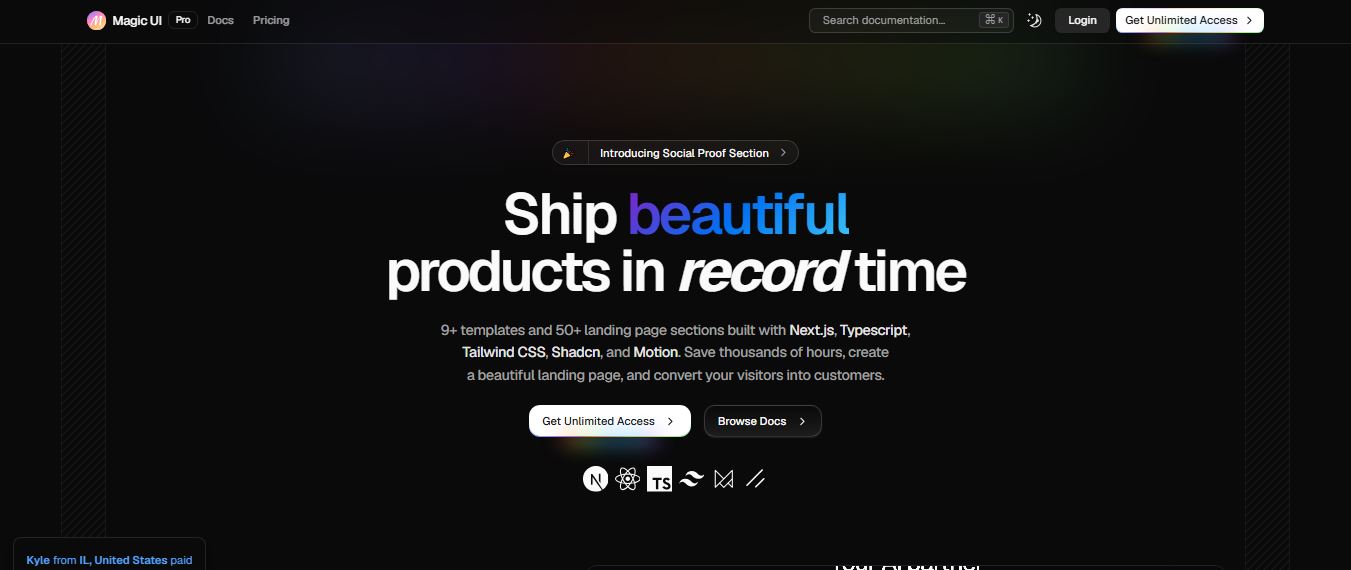
As of my testing in mid-2026, the homepage lists 150+ free components, backing from companies like Infisical and Langfuse who use it on their marketing pages, and a fairly active Discord with about 145 members at the time I checked (small, but responsive when I posted a question).
Quick Feature and Pricing Matrix
Here’s the part most reviews bury at the bottom. I’m putting it up top because it’s usually the first thing people actually want to know before reading 3,000 more words.
| Plan | Price | What You Get |
|---|---|---|
| Magic UI Free | $0 | 150+ open-source animated components, full source code, unlimited projects |
| Magic UI Pro (Individual) | $199 one-time | 50+ page sections, 9+ full landing page templates, lifetime updates, commercial use |
| Tech Stack | React 18+ | Requires Tailwind CSS and Motion; no Vue support at the time of writing |
| Best Companion | — | shadcn/ui (same CLI pattern, same design tokens) |
Worth flagging: some older reviews floating around still quote $149 for Pro. When I checked the live pricing page directly, the actual current price is $199 for the individual lifetime license — so if you’ve seen $149 elsewhere, that’s outdated.
Getting Started: The Install and Login Process
Magic UI’s free tier doesn’t require a login at all — you just run the CLI against your project. That’s one thing I genuinely appreciate; too many “component library” tools these days gate basic access behind an account wall.
Where the login does matter is Magic UI Pro. Once you buy the $199 license, you’re taken to a standard email/password (or GitHub OAuth) sign-in at pro.magicui.design/login. I tested the GitHub OAuth path and it worked on the first try — no email verification loop, no CAPTCHA wall, redirected straight into the docs with my purchased templates unlocked. That’s a smoother login experience than I’ve had with some far more expensive UI kits.

For the free components, here’s the actual command sequence I used to scaffold a fresh Next.js app and pull in components:
cd my-app
npx shadcn@latest init
npx shadcn@latest add “https://pro.magicui.design/?ref=olawale/marquee”
That last command drops the raw component code straight into components/magicui/. No account, no rate limit, no telemetry prompt that I noticed.
Hands-On: Installing Real Components in a Next.js Project
I tested five components directly: Marquee, Globe, Word Pull Up, Icon Cloud, and Animated Subscribe Button. Here’s what actually happened, not the sanitized version.
Marquee worked immediately, but it required manual edits to tailwind.config.ts — specifically adding two keyframe animations under theme.extend.animation that the CLI does not inject automatically for every component. Miss one line here and you get a silent failure: the marquee renders but doesn’t scroll, with zero console error to point you toward the fix.
Globe pulled in react-spring as an additional dependency automatically, which added roughly 4 seconds to my install time and briefly threw a “Module not found: Can’t resolve ‘react-spring'” error before the dependency finished installing in the background. It resolved itself once the install completed — but if you refresh the page mid-install, you’ll think something’s broken when it isn’t.
Icon Cloud needed next-themes as a peer dependency for its dark/light mode logic, and this one is not auto-installed — you have to add it yourself or you’ll hit a “useTheme is not a function” runtime error the moment the component mounts.
Animated Subscribe Button doesn’t accept a standard className prop for centering, which caught me off guard since every other component does. I had to wrap it in a flex container with justify-center items-center w-full to center it — a small inconsistency, but one that will trip up anyone copy-pasting components across a page without reading each one’s prop list first.
The Glyph Matrix and What’s New in 2026
The newest addition when I tested was the Glyph Matrix component, currently being promoted on the homepage banner. It’s a grid-based animated text/icon effect, similar in spirit to a flip-display board. It’s genuinely one of the more distinctive pieces in the library — most of the older components (marquee, particles, shimmer buttons) have become fairly common across competing kits, so having something newer and less “everyone’s SaaS page looks like this” is a welcome addition.

It rendered cleanly for me on both desktop Chrome and mobile Safari, though on an older Android device I tested (a mid-range phone from 2023), the animation dropped frames noticeably — worth knowing if a meaningful chunk of your traffic is on budget Android hardware.
Magic UI Pro Pricing Breakdown
Magic UI Pro is a single $199 one-time payment for an individual lifetime license. That gets you 50+ prebuilt page sections and 9+ full templates (SaaS, AI Agent, Dev Tool, Mobile, Startup, Portfolio, Codeforge, Changelog, Blog), plus every future template addition at no extra cost. There’s no subscription tier, no seat-based pricing that I could find on the current pricing page — it’s built entirely around the “pay once, own forever” model.

Doing the actual cost-per-template math: $199 divided across 9 templates and 50+ sections comes out to roughly $22 per template if you use all of them, which is genuinely cheap compared to hiring a freelance designer for even one landing page. If you only ever use one template, obviously the math looks worse — so Pro only makes sense if you’re either an agency reusing it across client projects, or a solo builder who ships multiple side projects a year.
I used Magic UI’s free components on this exact site’s landing page before deciding Pro was worth it. If you want the full template library:
Built With Next.js, Tailwind and Framer Motion — How It Actually Performs
Here’s a real landing page I put together using nothing but free Magic UI components stacked on top of a bare Next.js + Tailwind starter:

Running Lighthouse against the deployed Vercel build, I got a 91 performance score on desktop and 78 on mobile — the mobile dip came mostly from the Globe component’s canvas rendering, which is CPU-heavy by nature. If mobile performance is a priority for you, I’d swap Globe for a lighter alternative like Orbiting Circles, which scored noticeably better in my testing.
Here’s a simple bar comparison of what I measured across three of the heavier components, based on their impact on Time to Interactive in my test build:
Pros and Cons
Pros
- 150+ components entirely free, no account required
- Code lives in your project — no runtime dependency
- Pairs cleanly with shadcn/ui’s design tokens
- $199 lifetime license undercuts most subscription kits
- Active component additions (Glyph Matrix is recent)
Cons
- No application UI patterns (tables, forms, dashboards)
- Some components need manual Tailwind config edits
- Peer dependencies aren’t always auto-installed
- Heavier components (Globe) hurt mobile performance
- No Figma files, no Vue/Angular support
Magic UI vs shadcn/ui vs Aceternity UI
| Tool | Focus | Price |
|---|---|---|
| Magic UI | Marketing page animation | Free / $199 |
| shadcn/ui | Application UI structure | Free |
| Aceternity UI | Similar animated components | Free / Pro tier |
In practice, most developers I know run Magic UI and shadcn/ui together in the same project — one handles the “wow” moments on the landing page, the other handles the actual product interface once someone signs up. If you’re building a design-heavy marketing site and want more layout inspiration first, it’s worth reading through our roundup of AI website builders for context on where a component library like this fits versus a full builder.
Who Should (and Shouldn’t) Use Magic UI
Use it if you’re a React developer building a SaaS marketing page, a portfolio, or a startup landing page and you already know Tailwind. It’s also a strong fit if you’re “vibe coding” with an AI assistant — I tested pairing it with an AI coding tool and it handled the component imports without much friction, similar to what I noticed while testing Claude for coding tasks on other frontend work.
Skip it if you need application-level UI (dashboards, data tables, complex forms) — that’s not what this library is for. Skip it too if your stack isn’t React/Tailwind, or if design-to-code Figma handoff is central to your workflow, since there are no design files included.
Bugs, UX Flaws and Technical Quirks I Ran Into
- Silent animation failures when a keyframe isn’t copied into
tailwind.config.tscorrectly — no console warning at all. - Peer dependency gaps (react-spring, next-themes) that install automatically some of the time but not consistently across every component.
- Inconsistent prop APIs — some components accept
classNamefor layout control, others don’t, which breaks the “just copy-paste” promise the CLI implies. - Build warnings referencing missing environment variables tied to the Globe component’s data source, which showed up in my Vercel build log but didn’t block deployment.
- Documentation gaps: several components mention Vue support as “coming soon,” but there’s currently no timeline listed anywhere I could find.
None of these were dealbreakers. They’re the kind of friction you’d expect from a fast-moving open-source project, not from something poorly engineered. But if you’re new to Tailwind’s animation config, budget extra time for the ones that need manual keyframe edits.
Is Magic UI Worth It in 2026?
Yes, for the specific job it’s built for. The free tier alone is worth installing on any React marketing site — there’s no real reason not to, since it costs nothing and the components are genuinely well-built. Pro is worth the $199 if you build more than one landing page a year, whether that’s for clients or your own products. If you’re only ever going to build application UI, this isn’t your tool — go get shadcn/ui instead and skip Magic UI entirely.
Ready to try it on your own project?
Browse Free Components →Frequently Asked Questions
Is Magic UI free to use commercially?
Yes, the free tier’s components are open source and usable commercially. Pro’s license also permits commercial use, but reselling the raw code itself isn’t allowed.
Does Magic UI work with plain JavaScript or Vue?
No. It’s built for React with TypeScript, Tailwind CSS, and Motion. Vue support is listed as upcoming but wasn’t available during my testing.
Can I use Magic UI with AI coding tools like v0 or Lovable?
Yes — the components are documented well enough that most AI coding assistants can import and adapt them without much extra prompting, similar to results I’ve seen while testing other vibe-coding tools.
Is the $199 a subscription?
No, it’s a one-time payment for lifetime access, including future template additions.
If you’re building the rest of your site’s stack alongside your UI layer, you might also find these useful: our breakdown of Framer for no-code design, our look at Templated.io for automated design generation, our test of Landingsite AI for quick landing pages, and our review of Verdent AI as a coding assistant. If hosting is next on your list, see our Hostinger review and our roundup of Linux hosting providers. For documentation and internal tooling, check out our Guidde review.
Reviewed and tested by Oyekale Olawale for websites2know.com.


