
OnlineSim Review: My Honest Experience With Virtual Phone Numbers
Tested on onlinesim.io — activations, rentals, free numbers, and the dashboard, first-hand.
Short version: OnlineSim works, but not evenly. Activations start at $0.01 and rentals from roughly $1–$3/day, and for low-friction platforms the code lands in under a minute. For platforms that actively fingerprint VOIP-style ranges (Telegram and WhatsApp gave me the most trouble), expect some misses — though a failed number gets refunded to your balance once you cancel it, so you’re not out real money.
Best for: people who need a second number for testing, marketplace signups, or 2FA on accounts that don’t matter if they get flagged. Not ideal for: anything you’ll rely on long-term for account recovery, since operators can recycle numbers.
I put $15 into an OnlineSim balance over three separate sessions to write this — one round of activations, one 7-day rental, and a stretch just poking at the free public numbers to see what breaks. Here’s what actually happened, screenshots included, quirks and all.
What Is OnlineSim?
OnlineSim (onlinesim.io) is a virtual number platform that’s been operating since 2013 — long enough that it predates most of the SMS-verification services currently advertising on Reddit. It gives you access to real SIM-backed numbers from a claimed pool of 90+ countries, which you can use to receive one-off verification codes or rent for extended periods.
There’s no single “product” here — it’s really three overlapping services stitched into one dashboard: one-time activations, short/long-term rentals, and a free public number board. That structure is the whole reason the pricing page looks confusing on a first visit, and it’s also the first thing I’ll untangle below.
| Founded | 2013 |
| Country coverage | 90+ (activations); fewer for rentals |
| Starting price | From $0.01 per activation |
| Rental pricing | Roughly $1–$3/day depending on country |
| Free numbers | Public board, refreshed periodically |
| Payment methods | Card, crypto, Perfect Money, regional options |
| App | Android app available; no iOS app at time of testing |
| Support | Live chat + a dedicated Telegram channel |
What is a virtual number?
A virtual number is a phone number that isn’t tied to a physical SIM in your pocket. It lives on the provider’s infrastructure — real hardware sitting in a data center, connected to actual mobile networks — and you access it through a web dashboard instead of a phone. When a service texts that number, the message shows up on your screen, not on a device you own.
People reach for these numbers for a handful of very practical reasons:
- Verifying accounts on apps that demand SMS confirmation, without handing over a personal line
- Running secondary accounts for testing, freelancing, or separating business from personal use
- Avoiding the marketing-text flood that follows almost every signup form
- Registering on marketplaces or forums where you don’t want your real number searchable later
The catch — and this applies to every provider in this space, not just OnlineSim — is that a virtual number is not permanent in the way your carrier SIM is. It can get reassigned, blocked by a platform, or shared with other users if you’re on a free tier. More on that shortly.
How to get Started with OnlineSim
Signing up doesn’t ask for much. I created an account with just an email, skipped phone verification entirely (a little ironic, given what the site does), and landed straight on the dashboard. No credit card required just to look around, which I appreciated — a lot of competitors force a top-up before you can even see live number availability.
Once you’re in, the dashboard splits into a country selector on the left, a service dropdown (Telegram, WhatsApp, Gmail, and roughly 300 others), and a running list of your active numbers with incoming messages on the right. It’s not a beautiful interface — the typography looks like it hasn’t been touched since 2018 — but it’s functional, and I never had to hunt for a button.
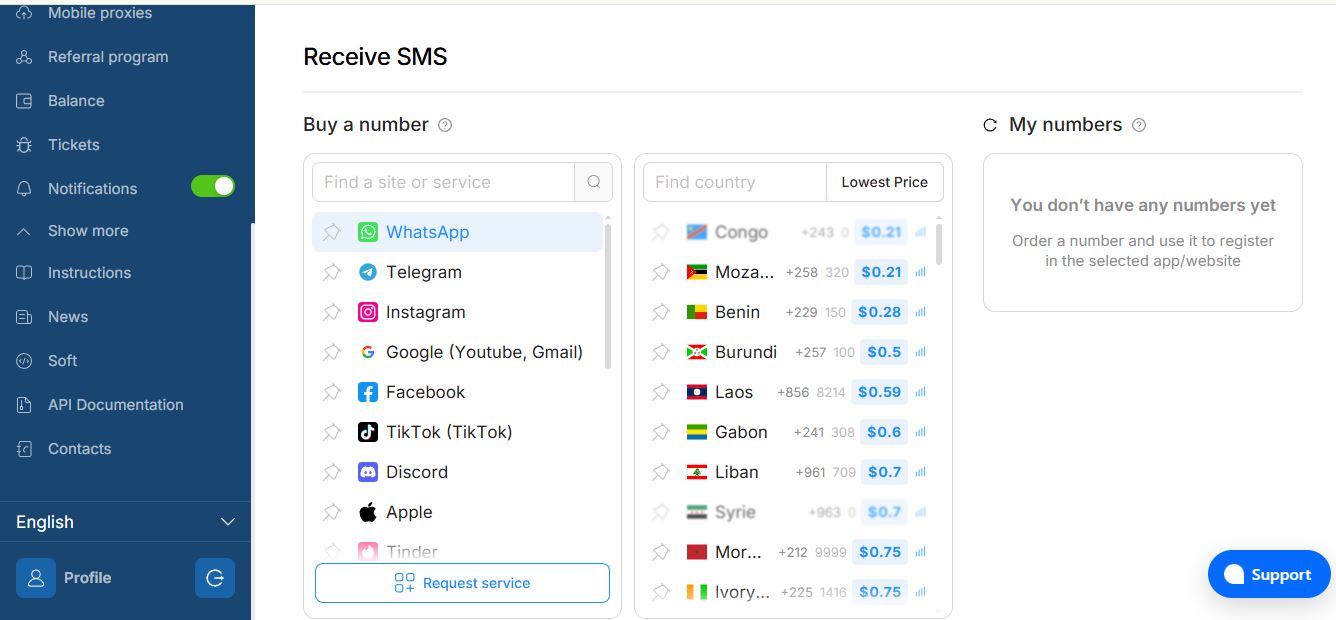
My OnlineSim dashboard mid-testing — country picker on the left, live numbers on the right.
The actual flow, once you’re set up, is four steps: pick a country, pick a service, buy the number (or grab a free one), and watch the message panel. Codes for lightweight platforms — Discord, most e-commerce logins — showed up in under 30 seconds in my tests. Telegram took closer to two minutes on the first attempt and failed outright on the second, which I’ll get into in the bugs section.
Want to see live number availability for your target service before committing?
Check Number Availability on OnlineSim →OnlineSim Pricing Breakdown
This is where most reviews get vague, so here’s exactly what I saw during checkout across a few different countries and services.
| Plan Type | Duration | Starting Price | Best For |
|---|---|---|---|
| One-time activation | Single SMS, ~10–20 min window | From $0.01 | Quick, disposable verifications |
| Short-term rental | 10 minutes – 1 hour | From $0.10 | Multiple messages, one service |
| Daily rental | 24 hours | From ~$1.00 | A day of flexible, multi-service use |
| Weekly / monthly rental | 7 / 14 / 30 days | Varies by country | Persistent number for ongoing accounts |
| Free public numbers | Rotates periodically | $0 | Testing whether a number even works for your target site |

The tariff breakdown as it appeared during my checkout — prices shift by country in real time.
The one-cent headline price is real, but it’s also the exception rather than the rule. It applies to a handful of low-demand countries. Pull up a US or UK number for something like Amazon or Netflix and you’re closer to $0.30–$0.80 per activation, which is still cheap but worth knowing before you assume every number costs a penny.
I did notice one pricing quirk worth flagging: the price shown on the country list sometimes changed by a few cents once I actually selected the service, which the site doesn’t explain anywhere. It’s not a scam — it’s just live inventory pricing — but it caught me off guard the first time and I’d rather warn you now than have you think something’s broken.
How to get a free virtual phone number online?
OnlineSim keeps a free numbers board on its homepage, no account required to view it. You pick a country, copy the number, and send (or wait to receive) an SMS to see if it goes through. I tested this with a throwaway Gmail signup and a Telegram attempt.
Gmail worked. Telegram didn’t — the number had clearly already been used for a Telegram account, because the app immediately flagged it as “already registered.” That’s the core trade-off with free numbers: they’re genuinely free, but they’re also public. Every message that lands on one is visible to anyone else looking at that same number, and popular platforms burn through the pool fast enough that by the time you try, the good ones are gone.
Quirk I ran into: the free number board doesn’t show a countdown for when numbers refresh, so I genuinely couldn’t tell if a stale-looking number was about to rotate out or just permanently dead. I ended up refreshing the page manually every few minutes, which isn’t a great use of anyone’s afternoon.
My honest take: use free numbers to sanity-check whether OnlineSim’s number pool even works for the platform you care about, before you spend a cent. Don’t rely on them for anything where privacy matters, since the messages are public by design.
How do I receive an SMS on a virtual number?
Mechanically, this part is simple. Once you’ve bought (or grabbed) a number, you paste it into the target platform’s phone field like you would any real number. The platform sends its verification text, and OnlineSim’s dashboard shows the message in a live-updating panel — no page refresh needed, which I didn’t expect from an interface this dated.
Delivery speed varied a lot depending on the destination service:
Approximate delivery times from my own test runs, one attempt per service — not an average across large sample sizes.
The main technical wrinkle: when a code doesn’t arrive within the activation window, the system doesn’t always cancel automatically. Twice, I had to manually hit “cancel” on a stalled activation to trigger the refund back to my balance — it didn’t happen on its own until I forced it. If you’re not watching the clock, it’s easy to assume you’ve lost the money when you actually just need to click cancel.
Platforms that use aggressive device-and-number fingerprinting — Telegram and WhatsApp specifically — are the ones most likely to reject a virtual number outright, sometimes instantly, sometimes after the code arrives but before verification finishes. That’s not unique to OnlineSim; it’s the same fight every SMS-verification provider has with those two apps.
How can I get a disposable phone number?
If what you actually want is a number for a single verification and nothing more, the one-time activation is the mode built for that. You select the country and the specific service, pay the listed price (as low as a cent, more typically a few dimes for mainstream US/UK services), and the number is yours for a fixed window — usually 10 to 20 minutes depending on region.
Once the window closes or you’ve received your code, the number goes back into the pool for someone else. You can’t reuse it, and OnlineSim is upfront that operators may reassign the underlying line to a new customer anywhere from a week to several months after it goes inactive — which is exactly why you shouldn’t attach a disposable number to anything requiring long-term account recovery, like a bank or your primary email’s 2FA backup.
For anything you’ll need to log back into more than once — a business listing, a recurring 2FA prompt — the rental tiers are the better fit, since the number stays yours (and private) for the full rental period instead of vanishing after one code.
Ready to grab a disposable number for your next signup?
Get a One-Time Number on OnlineSim →Payment Methods Accepted by OnlineSim
Topping up your balance is where OnlineSim is noticeably more flexible than most competitors I’ve tested for this site. Card payments worked without a hitch, and crypto is supported for anyone who’d rather not attach a card to the account at all. Perfect Money and a handful of regional options round things out.

The payment options I saw at checkout — card, crypto, and Perfect Money among them.
My only note here: the minimum top-up amount varies by payment method, and card top-ups had a slightly higher minimum than crypto in my testing. Nothing dramatic, but budget for it if you’re planning to spend exactly a few dollars.
OnlineSim vs. the Alternatives
I’ve now tested a handful of tools in this general privacy/anonymity space for this site, and it’s worth seeing where OnlineSim actually sits rather than taking any one provider’s marketing at face value.
| Factor | OnlineSim | Typical Paid-Only Competitor |
|---|---|---|
| Entry price | From $0.01 | Usually $0.15–$0.50 minimum |
| Free tier | Yes, public numbers | Rare |
| Rental option | 1/7/14/30 days | Often one-time only |
| Payment flexibility | Card, crypto, Perfect Money | Often crypto-only |
| API for developers | Documented, available | Varies widely |
| Message privacy (free tier) | Public | N/A (no free tier) |
If your priority is the lowest possible cost of entry and payment flexibility, OnlineSim’s mix is genuinely hard to beat. If you need guaranteed private numbers on every tier with zero shared-pool risk, a paid-only, dedicated-number service will feel more predictable — you’re trading a lower price ceiling for more consistency.
Pros and Cons
What Worked For Me
- Genuinely cheap entry point for low-stakes verifications
- Free numbers let you test before spending anything
- Rental option most one-time-only competitors don’t offer
- Multiple payment methods, including crypto
- Fast delivery on non-restrictive platforms
- Refund path for failed activations (once cancelled)
Where I Ran Into Friction
- Telegram and WhatsApp success rates were inconsistent
- Refunds sometimes needed a manual cancel to trigger
- Free number board gives no refresh timing
- Interface feels dated, though it’s functional
- No iOS app at time of testing
- Numbers can be recycled by the underlying carrier over time
Bugs, Quirks & Honest Caveats
A few specifics worth documenting, since vague “it’s mostly fine” reviews don’t help anyone actually deciding whether to spend money:
Stalled activation timer: on two of my test activations, the countdown reached zero without auto-cancelling or refunding. I had to manually hit cancel to get the balance back — worth watching for if you’re topping up in small amounts.
Price drift at checkout: the listed price on the country list occasionally differed by a few cents from the price at final confirmation. Not a big deal financially, but confusing if you’re budgeting precisely.
Telegram/WhatsApp rejection: one of my two Telegram attempts failed with an “already registered” message before any code arrived — a sign the number had prior history on the platform. This is an industry-wide issue with these two apps specifically, not something unique to OnlineSim’s infrastructure.
None of these are dealbreakers on their own, but they’re exactly the kind of friction a first-time user should expect going in, rather than discovering mid-signup.
Who Should (and Shouldn’t) Use OnlineSim
Good fit: developers testing SMS flows, marketers running multiple accounts on non-restrictive platforms, anyone who just wants their real number off a random signup form, and casual users who don’t mind an occasional failed attempt in exchange for rock-bottom pricing.
Skip it for: anything tied to long-term account recovery, banking 2FA, or platforms you know aggressively block virtual numbers unless you’re prepared for some trial and error.
FAQ
Is OnlineSim safe to use?
It doesn’t require personal information to browse the free tier, and paid numbers keep your messages private. The main risk isn’t the platform itself — it’s that free-tier messages are public, and any recycled number could theoretically be reassigned later, so don’t attach anything sensitive to it long-term.
Does OnlineSim work for WhatsApp and Telegram?
Sometimes. Both platforms actively detect and block virtual numbers more aggressively than most services, so expect a higher failure rate there than on platforms like Discord, Gmail, or e-commerce sites.
What happens if my code never arrives?
In my testing, the balance wasn’t always refunded automatically — I had to cancel the activation manually to get the credit back. Keep an eye on the timer rather than assuming it resolves itself.
How long can I keep a rented number?
Rentals run 1, 7, 14, or 30 days depending on what you select at purchase, and the number stays private to you for that entire window, unlike free public numbers.
Can I use OnlineSim numbers for 2FA on important accounts?
I’d avoid it. Numbers can be recycled by the underlying carrier after a period of inactivity, which makes them a poor long-term anchor for account recovery.
Overall, OnlineSim did what it advertised for the majority of my tests, with the expected soft spots around platforms that fight virtual numbers hardest. For a couple of dollars of balance, it’s a reasonable tool to keep around for the next time a site demands a phone number you’d rather not hand over.


