
10 Popular AI Tools for Students 2026: Tested, Ranked & Reviewed by a Real User
I spent weeks running these tools through real academic workflows — research papers, lecture notes, math problem sets, and dissertation drafts. Here’s what actually helped, and what’s just hype.
By Oyekale Olawale · Updated August 2026
⚡ Quick Answer
The best all-around AI tools for students in 2026 are Perplexity AI (cited research), NotebookLM (upload-and-quiz your own notes), Claude AI (long documents and essays), Grammarly (writing quality), and Photomath (STEM problem-solving). Most have a genuinely useful free tier. If you only pick two, make it Perplexity + NotebookLM — they solve the two biggest student headaches: finding reliable sources and actually studying the material you’ve gathered.
Student life in 2026 looks very different from even two years ago. The tools that used to take hours — finding credible papers, transcribing lectures, solving calculus step-by-step — now take minutes with the right AI. But the options are overwhelming, and not everything that’s marketed as “AI for students” is actually worth your time.
I tested each of these platforms with real student tasks: uploading lecture slides, running research queries, solving integration problems, transcribing recorded seminars, and writing and editing 2,000-word essays. Below is what I found — the good, the annoying, and the genuinely impressive.
🔬 How I Tested These Tools
Each tool was tested across at least three student use-cases: a research task (finding or summarizing academic sources), a writing or editing task (improving a draft essay paragraph), and a task specific to the platform’s core promise (transcription, math-solving, note generation, etc.). I used the free plan wherever available before upgrading, since most students are working with limited budgets. Specific quirks, bugs, and friction points I noticed are noted inline.
At a Glance: All 10 Tools Compared
| Tool | Best For | Free Plan? | Paid Price | My Rating |
|---|---|---|---|---|
| Perplexity AI | Cited research | ✔ Yes | $20/mo (Pro) | 9.2 / 10 |
| NotebookLM | Studying own notes/PDFs | ✔ Yes (free) | $20/mo (Plus) | 9.4 / 10 |
| ChatGPT | General tutoring & coding | ✔ Yes | $20/mo (Plus) | 8.8 / 10 |
| Grammarly | Writing & academic tone | ✔ Yes | ~$12/mo (Premium) | 8.7 / 10 |
| Claude AI | Long essays & analysis | ✔ Yes | $20/mo (Pro) | 9.1 / 10 |
| Quizlet | Flashcards & memorization | ✔ Yes | $35.99/yr (Plus) | 8.3 / 10 |
| Notion AI | All-in-one organization | ✔ Yes | $10/mo (AI add-on) | 8.5 / 10 |
| Otter.ai | Lecture transcription | ✔ Yes (300 min/mo) | $16.99/mo (Pro) | 8.6 / 10 |
| ResearchRabbit | Literature mapping | ✔ Fully free | Free | 9.0 / 10 |
| Photomath | STEM step-by-step solutions | ✔ Yes | $9.99/mo (Plus) | 8.9 / 10 |
Which Tool Covers Which Student Need?
ResearchRabbit
Claude AI
Otter.ai
Notion AI
Claude AI
ChatGPT
ChatGPT
Claude AI
NotebookLM
ChatGPT
Full Reviews: 10 Popular AI Tools for Students 2026
1. Perplexity AI — Best for Verified Research
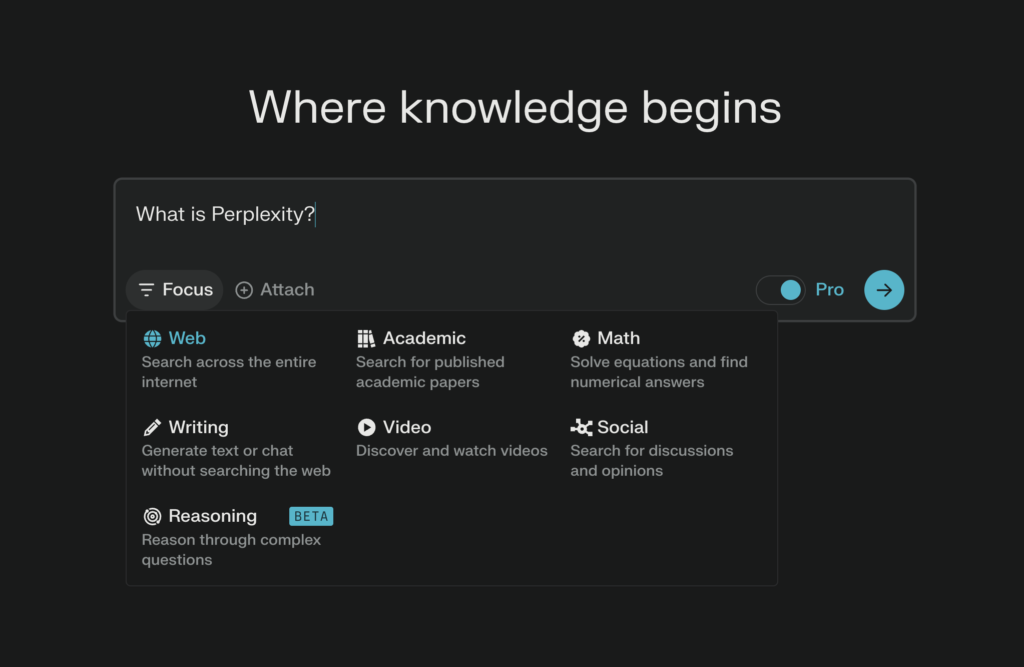
Perplexity AI has become my first stop for academic research — and for good reason. Unlike a standard chatbot, it pulls live sources and shows you exactly which website or paper each fact comes from. That citation layer is the whole game-changer for students who need to trace their claims back to a credible source without spending 20 minutes on Google Scholar.
The “Deep Research” mode in Pro is genuinely impressive — it runs a multi-step research process, synthesizing 20+ sources into a structured report in minutes. I used it to pull together background on a climate policy essay and it found peer-reviewed sources I’d have missed manually.
One thing I noticed: the free tier throttles Pro searches aggressively after a few queries a day. You hit a “Try Pro” wall quickly on heavy research days. It also doesn’t always surface the most recent journal articles — it tends to surface popular news coverage when the query is broad. Narrow your prompt to get better academic results.
If you’re a student heavily into academic research, check out the Perplexity Pro student discount — it can cut costs significantly.
- Inline citations with clickable sources
- Real-time web search — never outdated
- Deep Research mode compiles multi-source reports
- Clean, focused UI with no distractions
- Free Pro searches run out fast on heavy days
- Broad queries pull news over academic papers
- No document upload on free plan
Pricing: Free (limited Pro queries) · $20/month (Pro) · Student pricing available
2. ResearchRabbit — Best for Literature Mapping

ResearchRabbit is completely free and, for anyone writing a literature review, it’s genuinely mind-blowing the first time you use it. You paste in one paper you already know is relevant, and it maps out every related paper — predecessors, subsequent citations, parallel works — in an interactive visual graph.
I used it for a graduate-level research overview and found three landmark papers I’d completely overlooked in my initial search — including one from 2023 that was directly relevant to my argument. It would have taken me days of manual Google Scholar chaining to find those.
The UI can feel dense at first — lots of nodes and edges if your starting paper has many citations. The recommended approach is to start with a narrow, specific paper and expand outward rather than trying to map a broad topic from scratch.
For related tools focused on the wider academic writing workflow, see our roundup of best AI tools for academia and research.
- Completely free — no paid plan needed
- Visual citation network is genuinely unique
- Syncs with Zotero for seamless reference management
- Finds related papers you’d never think to search
- Dense UI — steep learning curve initially
- No AI summarization of papers (just mapping)
- Works best with academic papers, not general web sources
Pricing: 100% Free
3. NotebookLM — Best for Studying Your Own Material

NotebookLM has become my personal favourite on this list, and I say that having tested a lot of AI study tools. The core concept is simple but powerful: you upload your own course materials — lecture slides, reading PDFs, your own notes — and the AI becomes an expert only on that content. It won’t hallucinate outside information because it’s strictly grounded in what you’ve given it.
The “Audio Overview” feature generates a two-host podcast-style conversation about your uploaded material. It sounds gimmicky until you actually use it while commuting. Listening to two AI hosts debate the nuances of your assigned reading is genuinely a better way to retain information than re-reading for the fifth time.
One limitation I found: there’s a 50-source limit per notebook. For a PhD student with hundreds of papers in a literature review, that cap becomes a real constraint. You’ll need to split across multiple notebooks, which adds friction. Also, the Audio Overview doesn’t always handle highly technical content well — dense mathematical derivations tend to get glossed over.
- Strictly grounded — won’t hallucinate outside material
- Audio Overview turns notes into podcast format
- Generates study guides, FAQs, and timelines from uploads
- Google Docs integration is seamless
- 50-source cap per notebook
- Audio Overviews struggle with dense technical content
- No real-time web search — it only knows what you upload
Pricing: Free (Google account required) · NotebookLM Plus: $20/month (via Google One AI Premium)
4. Otter.ai — Best for Lecture Transcription

Otter.ai is the one tool on this list that physically frees your hands during a lecture. You open the app, hit record, and it produces a live transcript of everything being said — speaker-labelled, timestamped, and searchable after class.
The “OtterPilot” feature can even join your Zoom or Google Meet automatically, taking notes while you focus on the conversation. That’s a lifesaver for online seminars where you’re expected to participate but also need to capture information accurately.
The limitation I ran into is accuracy with technical jargon. In a biochemistry lecture full of enzyme names and Latin terminology, accuracy dropped noticeably compared to a standard English lecture. It also misattributed speaker labels when two speakers had similar voices. For general humanities and social science lectures though, it’s remarkably accurate.
The free plan gives you 300 transcription minutes per month — enough for most students taking three or four classes.
- Live transcription with speaker labels
- OtterPilot joins Zoom/Meet autonomously
- Searchable, shareable transcripts
- 300 free minutes per month
- Accuracy drops with technical/domain-specific vocabulary
- Speaker detection can confuse similar voices
- Export to PDF is basic — formatting could be better
Pricing: Free (300 min/mo) · Pro: $16.99/month · Business: $30/user/month
5. Grammarly — Best for Writing Quality & Academic Tone
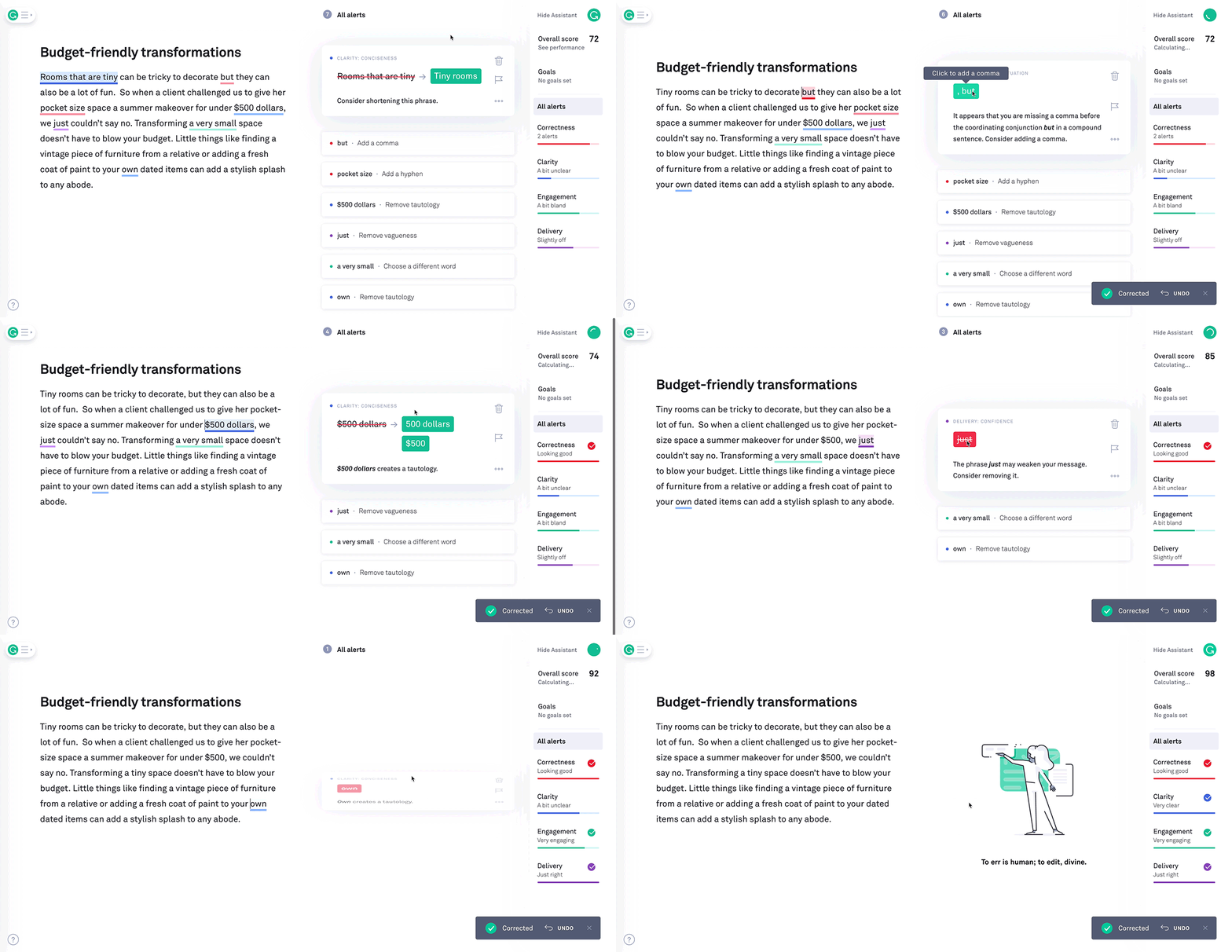
Grammarly in 2026 is not the tool you remember from 2020. It’s evolved into a full AI writing assistant with tone detection, sentence-level rewrites, and an academic style guide built in. For non-native English speakers submitting dissertations, this is genuinely an essential subscription.
I ran a 2,500-word draft essay through Grammarly Premium and came out the other side with 47 suggestions — ranging from comma placement to passive voice overuse to a sentence that was technically grammatical but flagged as potentially plagiaristic in structure. That last catch surprised me.
One gripe: the “Rewrite” feature sometimes strips out intentional stylistic choices. When I was deliberately using short, punchy sentences for effect, Grammarly kept suggesting I combine them. The suggestions are good, but they lean toward a standardized academic voice that doesn’t always match what you’re going for. Learn to be selective with which suggestions you accept.
If you’re exploring alternatives to Grammarly or want to humanize AI-assisted drafts, our comparison of AI humanizing tools and alternatives is worth a read.
- Integrates directly into Google Docs and Word
- Tone detector helps match academic register
- Plagiarism checker included in Premium
- Free plan catches the most critical errors
- Rewrites can flatten intentional stylistic choices
- Premium is pricier than many alternatives
- Occasionally over-corrects informal or creative writing
Pricing: Free (basic grammar) · Premium: ~$12/month (billed annually) · Student discounts available
6. Claude AI — Best for Long Essays & Deep Analysis

Claude AI is the one I personally reach for when I have a genuinely complex intellectual task — a long essay requiring nuanced argument development, a philosophical analysis, or a long piece of code that needs logic checks alongside prose explanation.
Its context window is the headline feature. Where some models start to “forget” the beginning of a long conversation by the time you’re deep into an essay, Claude holds a much larger body of text in memory at once. I uploaded a 40-page dissertation draft and asked it to identify structural inconsistencies between the methodology chapter and the conclusion — it found three real problems in under a minute.
The writing quality is noticeably different from ChatGPT. Claude tends to produce more varied sentence structure and fewer of those repetitive opening phrases that make AI-generated text so recognizable. It still needs human editing to feel truly authentic, but it starts from a better baseline.
If you’re weighing Claude against ChatGPT, read our analysis of Claude vs ChatGPT hallucination rates — it’s highly relevant for students who need accurate information in their essays. You may also want to compare Claude Projects vs ChatGPT GPTs for organizing your ongoing academic work.
- Large context window handles full-length essays and documents
- More natural, less formulaic writing style than most models
- Strong at logical argument analysis and critique
- Coding assistance alongside academic writing
- No live web search (in free plan) — knowledge has a cutoff
- Free tier has daily usage limits
- Doesn’t generate charts or images natively
Pricing: Free · Claude Pro: $20/month (higher limits, priority access)
7. Photomath — Best for STEM & Step-by-Step Problem Solving

Photomath is one of the few tools on this list designed specifically for school-level problems — and it’s genuinely excellent at what it does. Point your phone camera at any printed or handwritten math problem, and it produces a step-by-step solution with the reasoning behind each move.
What sets Photomath apart from “just giving you the answer” is the depth of the explanation. In 2026, the app provides multiple solution methods for most problems — for example, solving a quadratic equation by both factoring and by the quadratic formula, letting you see which approach makes more sense for your exam context.
I tested it on a few integration-by-parts problems from a calculus set, and it nailed the steps every time. However, I found it stumbles with problems where the handwriting is messy or where the problem involves custom notation not in standard textbooks. For those cases, typing the equation directly gave more reliable results.
It’s worth noting: Photomath is a learning aid, not a homework-submission tool. The steps are where the real value is. If you’re just copying answers without reading the logic, you’re wasting what makes it useful.
- Camera-based problem scanning is fast and accurate
- Multiple solution methods per problem
- Covers arithmetic through advanced calculus and statistics
- Offline mode works without internet
- Struggles with messy handwriting or unusual notation
- Full step-by-step explanations locked behind Plus plan
- Not suited for physics or chemistry word problems
Pricing: Free (basic steps) · Photomath Plus: $9.99/month or $69.99/year
8. Quizlet — Best for Flashcards & Active Recall

Quizlet has been around for over a decade, but its AI upgrade — Q-Chat — made it genuinely feel modern again. Instead of passively reviewing flashcards, Q-Chat acts as a Socratic tutor. It prompts you with questions, gives you hints when you’re stuck, and adapts the difficulty based on your performance.
The spaced repetition algorithm has also matured significantly. It tracks not just whether you got a card right, but how quickly you answered, and schedules review intervals accordingly. For language learners or medical students memorizing hundreds of terms, this kind of adaptive scheduling genuinely accelerates retention.
Where Quizlet loses points is on AI-generated set quality. I tried the “Auto-generate flashcards from text” feature with a 10-page reading, and about 20% of the cards had imprecise or incomplete definitions. Always review auto-generated sets before relying on them for exam prep.
- Q-Chat Socratic AI tutor is genuinely engaging
- Adaptive spaced repetition scheduling
- Huge library of existing study sets across subjects
- Mobile app works reliably offline
- Auto-generated flashcards need manual review
- Best features (Q-Chat, Learn mode) require Plus
- Free plan shows ads during study sessions
Pricing: Free (with ads) · Quizlet Plus: $35.99/year · Quizlet Teacher from $35.99/year
9. Notion AI — Best for Organization & Second-Brain Workflow

Notion AI is the most ambitious tool on this list, and also the one with the steepest setup cost. If you invest time in building a proper Notion workspace — databases for assignments, deadlines, reading lists — the AI add-on becomes incredibly powerful. It can search across your entire workspace, summarize a page, turn bullet notes into a polished paragraph, or generate an action plan from a vague goal.
I’ve seen students use Notion as a genuine “second brain” — one master workspace containing their semester schedule, reading notes, essay drafts, and research sources, all searchable with AI. For organized learners, it’s the most holistic tool on this list.
The honest caveat: Notion AI is only as good as what’s already in your Notion workspace. If you’re starting from scratch or haven’t built proper databases, the AI feels underwhelming. And occasionally it just stops working mid-session — if you’ve hit this, our guide on fixing Notion AI not working has solutions for the most common causes.
- AI searches across your entire workspace
- Turns messy notes into structured content
- One app for notes, tasks, calendar, and writing
- Free student plan available
- Significant setup time before AI is useful
- AI add-on costs extra on top of base plan
- Can be slow to load large databases
Pricing: Free plan · Plus: $10/month · AI add-on: $10/member/month
10. ChatGPT — Best All-Rounder for General Student Assistance

ChatGPT is still the most-used AI tool among students globally in 2026, and that’s not surprising. It’s the Swiss Army knife of the group — it can explain a difficult concept in simple terms, help debug Python code, brainstorm an essay outline, and role-play as a debate opponent to test your arguments. There’s almost no task a student might need where ChatGPT is the completely wrong tool.
The latest models now include voice-to-voice tutoring, which is surprisingly useful for practice-explaining concepts out loud — a well-documented study technique. You can literally talk to it like a study partner who never gets impatient.
The key weakness is still citation reliability. ChatGPT can and does produce plausible-sounding but fabricated references. I ran a test asking it to cite three papers on cognitive load theory — it produced two real papers and one completely invented one with a real author’s name attached. Never use ChatGPT citations without independently verifying them in Google Scholar or Semantic Scholar.
If you’ve experimented with using ChatGPT for extended writing workflows, our 30-day ChatGPT writing experiment documents exactly where it performs well and where it loses reliability over time.
- Handles the widest range of student tasks of any tool
- Voice tutoring mode for conversational learning
- Custom GPTs for subject-specific assistance
- Data analysis and coding support built in
- Can hallucinate citations — always verify
- Free tier doesn’t include GPT-4-class models consistently
- Quality of responses is highly dependent on prompt quality
Pricing: Free · ChatGPT Plus: $20/month · ChatGPT Pro: $200/month
My Overall Ratings at a Glance
How to Choose the Right Tool for Your Situation
The most common mistake students make is trying to use every tool at once and burning out managing five different platforms. Pick two or three based on your actual academic pain points:
| If you struggle with… | Use this tool |
|---|---|
| Finding credible academic sources quickly | Perplexity AI + ResearchRabbit |
| Actually studying and retaining your readings | NotebookLM |
| Keeping up with fast-paced lectures | Otter.ai |
| Writing essays in a clear, academic tone | Grammarly + Claude AI |
| Solving math and STEM problems step by step | Photomath |
| Memorizing terms, formulas, or vocabulary | Quizlet |
| Managing your entire academic life in one place | Notion AI |
| Everything else (tutoring, brainstorming, coding) | ChatGPT |
⚠️ A Note on Academic Integrity
Every university has its own AI policy, and they vary widely. Using AI to research, outline, and improve your writing is widely accepted at most institutions. Submitting AI-generated text as your own work — without disclosure — is still considered academic misconduct at nearly every institution. When in doubt, check your university’s specific AI use policy, and always disclose if required. Using these tools ethically makes your work better; using them dishonestly puts your degree at risk.
Frequently Asked Questions
Which AI tool is best for writing a research paper?
For research papers, use Perplexity AI to find and verify sources, ResearchRabbit to map the broader academic conversation, NotebookLM to study and synthesize your collected readings, and Claude AI to help draft and structure the actual argument. Each covers a different phase of the research paper workflow.
Are there any completely free AI tools for students?
Yes — ResearchRabbit is 100% free with no paid tier. NotebookLM is free with a Google account. Photomath, Quizlet, ChatGPT, Claude AI, Grammarly, and Perplexity all have genuinely usable free plans. The main limitations are daily usage caps and some locked advanced features. You can run an effective student AI workflow at zero cost by combining ResearchRabbit + NotebookLM + ChatGPT free tiers.
Is using AI for studying considered cheating?
Using AI to understand material, quiz yourself, transcribe lectures, or improve the clarity of your writing is not considered cheating at most institutions. Submitting AI-generated content as your own original work, without disclosure, is considered academic misconduct at most universities. Always check your institution’s specific AI policy — they vary significantly, and the rules are evolving rapidly in 2026.
Can ChatGPT be trusted for academic references?
No — ChatGPT frequently generates plausible-sounding but fabricated citations, including invented paper titles assigned to real authors’ names. This is a well-documented limitation called “hallucination.” Never cite a source in your academic work that you found via ChatGPT without first verifying it independently in Google Scholar, Semantic Scholar, or your university library database. Use Perplexity AI instead if you need cited, live-sourced information.
What is the best free AI note-taking tool for students?
NotebookLM is the best free AI note-taking tool for students in 2026. It’s free with a Google account, accepts uploaded PDFs and documents, and generates study guides, FAQs, and audio overviews grounded exclusively in your uploaded material. Otter.ai is the better choice specifically for live lecture transcription, with 300 free minutes per month.
Which AI is best for STEM students?
Photomath is the strongest choice for step-by-step math problem solving across arithmetic, algebra, calculus, and statistics. For broader STEM learning — understanding concepts, working through code, or checking reasoning — Claude AI and ChatGPT are both strong, with Claude holding an edge in accuracy for nuanced technical explanations. See our related article on AI vs human content writing for a broader look at where AI reasoning excels and where human judgment still wins.
Start with the Best Free Combo
Perplexity AI (research) + NotebookLM (study) — both free, both genuinely powerful.
Conclusion
The landscape of AI tools for students has matured significantly in 2026. We’re past the hype phase — these tools now have real, demonstrable benefits for specific academic tasks when used thoughtfully and honestly.
My personal recommendation: start with NotebookLM and Perplexity AI on their free plans. They solve the two most universal student problems — finding reliable information and actually absorbing what you’ve gathered. Add Grammarly for writing polish and Photomath if you’re in a STEM field. That four-tool stack costs you nothing and covers the majority of everyday academic work.
For heavier research workloads — particularly graduate students doing literature reviews — add ResearchRabbit for citation network mapping and consider upgrading Claude AI or ChatGPT Plus for larger document handling and deeper tutoring.
The goal isn’t to have AI do your studying for you. The goal is to remove the friction between you and actual understanding. These tools, used well, are excellent at exactly that. For a deeper look at how AI intersects with academic writing standards and rewriting, check out our roundup of NoteGPT and our guide on AI tools for rewriting academic papers.


