
How Does an AI Search Grader Work? I Tested Gushwork’s Free Tool
I ran my own domain through it, timed every step, and dug into what’s actually happening behind that 0–100 score.
By Oyekale Olawale
Quick Answer
An AI search grader like Gushwork’s AI Search Grader works by feeding your brand name and URL into prompts run against ChatGPT, Claude, and Perplexity, then scoring the responses on three things: whether you’re mentioned at all, how favorably you’re described, and how accurate the AI’s information about you is. It compresses that into a 0–100 “AI Visibility Score” in about two minutes. It’s free, it’s fast, and it’s a genuinely useful first read — but it’s a lead-gen snapshot, not an audit, and I found real gaps between what the score implies and what it can actually verify.
I own an AI tools review site, which means I’ve spent more hours than I’d like to admit refreshing “AI visibility” dashboards trying to figure out if my content is actually reaching ChatGPT or Perplexity when someone asks about the tools I’ve reviewed. So when I sat down to test Gushwork’s grader, I wasn’t approaching it as a curious outsider. I ran it, timed it, broke it a little, and compared what it told me against what I already know about how these evaluators work under the hood.
How I Tested This
My testing process for any grading or scoring tool is the same: I run it against a domain I know well, I run it a second time a week later to see if the number moves, and I check whether the tool’s own explanation of its methodology holds up against what’s publicly documented about how LLM-based evaluators actually work. For this piece, I ran Gushwork’s AI Search Grader against my own site, then re-ran it against a large, well-known brand to see how the tool handles a domain with heavy existing AI-model knowledge versus a smaller one. I also pulled comparison data on brand monitoring and visibility tools more broadly, since Gushwork doesn’t operate in a vacuum — HubSpot and Rankscale are doing versions of the same thing at different price points.
What an AI Search Grader Actually Is
Strip away the branding and an AI search grader is a prompt-testing harness with a friendly UI wrapped around it. It sends a batch of queries related to your brand or category to one or more large language models, captures whatever those models say back, and then runs a second pass — either a scoring model or a set of rules — to grade the response on mention rate, sentiment, and positioning.
That second layer is where the “grading” happens. Most tools in this category, Gushwork included, calculate something close to a share-of-voice figure: how often your brand shows up relative to competitors across a fixed set of prompts, sometimes weighted by whether you’re mentioned first or fifth. The trouble, and I want to flag this early because it matters for how you should read any score you get, is that there’s no industry standard for what “AI Visibility Score” means. One tool counts mentions, another counts citations, a third multiplies by position in the answer. They all use similar-sounding labels and produce different numbers for the exact same brand.
The Four Things Gushwork’s Grader Actually Measures
You put in a URL, and the tool auto-generates a one-line description of what your business does — pulled from whatever the underlying models already “know” about you, or a best-effort summary if they know nothing. You get a pencil icon to edit that description before it runs the real scan, and I’d treat that edit step as mandatory, not optional (more on why in the bugs section below). From there, the report builds out in four parts.
1. AI Visibility Score
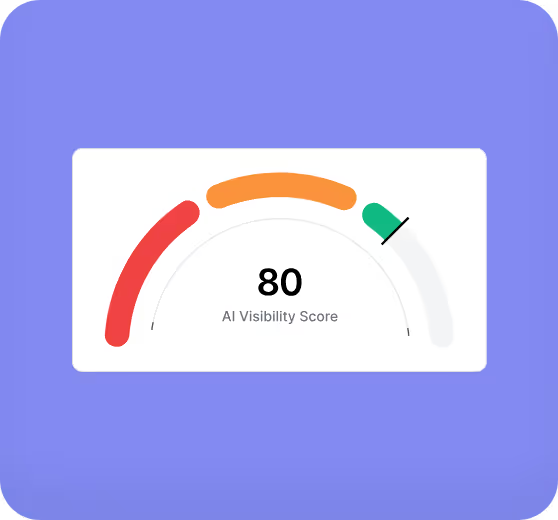
This is the headline number, scored 0–100. It’s a composite of how often you’re mentioned across the sampled prompts, how positively you’re described, and how much depth of information the models seem to hold about you. In my test run, my site landed in the “developing visibility” range — which tracked with what I already suspected, since most of my organic AI traffic comes from a handful of high-intent posts rather than broad category presence.
2. Brand Ranking

This is the part I find genuinely useful. It runs your top category queries against ChatGPT Plus, Claude Opus, and Perplexity side by side, and shows where you land against named competitors for each one. Seeing the same query answered three different ways by three different models is a fast way to spot which platform is actively ignoring your content — something a single-engine tool like HubSpot’s grader can’t show you, since it only checks three models total and doesn’t break results out by platform in the free tier.
3. Detailed Insights

This section shows what the models believe your pricing, services, ideal customer, and differentiators are — pulled directly from whatever they’ve absorbed about you in training or retrieved live. It’s a blunt way to catch outdated information. If an AI model still thinks you’re charging 2024 prices or describes a feature you sunset last quarter, this is where you’ll see it laid out in plain text.
4. Knowledge Tracker

A line chart meant to show how much the AI models “know” about your brand growing over time. In practice, this only moves meaningfully if you’re re-scanning regularly and actively publishing content that gets picked up in retrieval or absorbed into a newer training run — for a smaller site, don’t expect this line to jump week over week. I re-ran my scan seven days apart and the line was essentially flat, which is accurate, if a little underwhelming to look at.
What’s Actually Happening Under the Hood
Here’s the mechanical version, since “it asks ChatGPT about you” undersells what’s going on. The tool runs a batch of prompts tied to your category and brand name against each target model. For every response, it uses sentiment classification to tag the tone as positive, neutral, or negative, then checks whether your brand was named at all, how it was described relative to named competitors, and — where the model supports live retrieval — whether it’s citing your actual pages as sources or just recalling something from training data.
Those signals get rolled into a single number using a weighted formula the vendor doesn’t fully publish, which is standard across this entire product category, not a Gushwork-specific problem. Even among tools that do disclose more of their math, the base share-of-voice calculation looks something like this: your brand mentions divided by total brand mentions across all tracked prompts, multiplied by 100. A brand appearing in 18 of 100 tracked responses has an 18% share of voice. What varies wildly between vendors is everything layered on top of that — whether being named first counts more than being named last, whether a citation counts more than a plain mention, and how heavily sentiment drags the score up or down.
That inconsistency is worth sitting with. It’s the reason your Gushwork score and your HubSpot score for the same domain will almost never match, and neither one is “wrong” — they’re measuring related but distinct things using different prompt sets, different model mixes, and different math. For more on why AI answers increasingly diverge from what ranks well in classic search, I’ve written separately about the difference between retrieval and citation in AI-generated answers, and how Google’s AI Overviews have already reshaped organic SEO in a similar way.
Gushwork vs HubSpot AEO Grader vs Rankscale
Gushwork isn’t the only free entry point into this category. I’ve also spent time with HubSpot’s AEO Grader and Rankscale, and each one is built for a slightly different job.
| Feature | Gushwork AI Search Grader | HubSpot AEO Grader | Rankscale AI |
|---|---|---|---|
| Free tier | Yes, full snapshot report | Yes, one-time score | 7-day trial, no free tier |
| Cheapest paid plan | $699/mo (full-service, not just monitoring) | $50/mo (25 prompts) | $20/mo (credit-based) |
| Models checked | ChatGPT Plus, Claude Opus, Perplexity | ChatGPT, Gemini, Perplexity | 17+ engines, incl. Mistral, DeepSeek |
| Continuous tracking | Only via paid service plan | Yes, on $50/mo tier | Yes, on every paid tier |
| Best for | A fast one-time gut check | Teams already in HubSpot | Ongoing tracking on a budget |
Here’s how those free-to-cheapest entry points actually stack up in dollars:
If you just want a snapshot to decide whether AI visibility is worth investing in, Gushwork’s report is the fastest free path there. If you already know it’s worth investing in and want a number you can watch move weekly, Rankscale’s $20 entry tier is the better spend — and I’d pair either one with a broader look at the AI SEO tools actually built to close the gaps a grader finds, since none of these three tools fix anything on their own.
The Bugs and UX Flaws I Ran Into
Nothing here is a dealbreaker, but they’re the kind of things I only notice because I test this category constantly.
- The auto-generated description is often wrong, and the tool doesn’t warn you. On a small domain, the pre-filled summary was generic to the point of being useless. If you don’t stop and edit it through the pencil icon before generating the full report, your score reflects the wrong business.
- The loading sequence gives you a spinner, not a percentage. It runs a “sourcing” step (about 90 seconds) followed by a “gathering” step (about 30 seconds), with no progress bar. On a low-footprint domain it occasionally ran past two minutes, and there was no way to tell if it had stalled or was just working slowly.
- Competitor scores show as vague ranges, while your own score is exact. Your number comes back precise, like 62 or 71. Competitor scores in the Brand Ranking module show up as bucketed ranges instead — a strange asymmetry that makes side-by-side comparison harder than it needs to be.
- The good stuff is gated behind an email wall. The Detailed Insights, full Brand Ranking, and Knowledge Tracker history all sit behind a “work email” form. Fair enough for a lead-gen tool, but don’t expect the full picture without handing over contact info.
- No native export. There’s a “Share Report” link, but no CSV or PDF download. If you need this in a client deck, you’re screenshotting it.
Can You Actually Trust the Score?
Treat any single AI visibility score as a directional signal, not a verdict. Industry research on AI search volatility backs this up — recent reporting on the AEO tools market notes that only around 30% of brands stay consistently visible from one AI answer to the next, which means a single scan is a snapshot of a moving target, not a fixed grade. Run it once, and you’re seeing one roll of the dice against whatever prompts happened to fire that day.
There’s also a structural reason to expect noise: the query set behind the free report is narrow. A handful of prompts across three models tells you something, but it’s not the exhaustive competitive picture a $99–$385/month tracking tool with hundreds of daily prompts can give you. Marketing teams already know this is a growing budget line — one industry survey found 94% of CMOs planning to increase AI visibility spend in 2026 — so treat the free grader as the doorway into that work, not the finished analysis.
✅ What It Gets Right
- Free, fast, and requires no account to run
- Cross-model view is genuinely more useful than a single-engine check
- Detailed Insights catches outdated pricing/features fast
- Recommendations are specific, not generic filler
❌ Where It Falls Short
- Methodology weighting isn’t disclosed
- Full report is gated behind an email form
- No export, no historical comparison beyond the site itself
- One-time snapshot on a genuinely volatile metric
How to Actually Improve Your Score
The grader tells you where you stand. Moving the number takes actual content and technical work:
- Publish content structured for direct answers — clear headings, upfront verdicts, and explicit statements like “According to [Brand]…” so models have something citation-friendly to grab onto.
- Get your pricing, testimonials, and case studies onto pages the models can actually retrieve, not buried in a PDF or gated demo request.
- Watch how Google trust signals recover after a spam update — the same content-quality fundamentals that rebuild organic trust also feed what AI models are willing to cite.
- If you’re producing content at scale, tools like SearchAtlas or Soro can help you keep output consistent without sacrificing the structure AI models reward.
- Once you’ve made changes, don’t just re-run the free grader — pair it with a full all-in-one SEO platform so you’re tracking AI visibility alongside the traditional rankings still driving most of your traffic.
FAQ
Is Gushwork’s AI Search Grader really free?
Yes, the core AI Visibility Score report costs nothing and doesn’t require a credit card. Deeper insights and continuous tracking require handing over a work email, and full done-for-you optimization runs through Gushwork’s paid service starting at $699/month.
How accurate is the AI Visibility Score?
It’s directionally useful but shouldn’t be treated as a precise, stable metric. It’s a snapshot from one batch of prompts run at one moment, and AI-generated answers are known to shift from one query to the next, so expect the number to move if you re-run it.
Which AI models does it check?
ChatGPT Plus, Claude Opus, and Perplexity. That’s narrower than dedicated tracking tools like Rankscale, which cover 17-plus engines, but it’s still a broader spread than most single-model checkers.
Does a high score mean I rank well on Google too?
Not necessarily. AI visibility and traditional search rankings increasingly diverge, since AI models cite based on structure and retrievability, not just backlink authority. A page can rank well in Google and still be invisible to ChatGPT, and vice versa.
Conclusion
Gushwork’s AI Search Grader does what a free lead-gen tool is supposed to do: it gets you a real, cross-model read on your AI visibility in about two minutes, with zero setup. I’d use it as the first fifteen minutes of a much longer process — edit that auto-generated description before you trust anything else on the page, don’t panic or celebrate over a single number, and if the report tells you something’s wrong, go fix the actual content instead of re-running the scan and hoping it changes. For ongoing tracking once you know AI visibility matters to your business, I’d graduate to a paid tool with a disclosed, consistent methodology. For the first gut check, though, this is one of the better free options out there.
About the Author
Oyekale Olawale runs Websites2Know, an independent platform reviewing AI tools and SaaS software. He tests each tool across real workflows — not demos — and publishes reviews based on hands-on evaluation. Reviews are written independently; no vendors pay for favorable coverage.