
Raphael AI Review 2026: I Tested Free vs. Pro (Speed, Models, Real Results)
A hands-on look at Raphael AI’s image and video generator — what the free tier actually gives you, what changes when you sign in, and whether Pro is worth $10/month.
By Oyekale Olawale · Updated 2026
Quick Answer
Raphael AI is a free, no-registration AI image and video generator at raphael.app with access to GPT Image 2, Nano Banana 2, Seedream 5.0, and more. You don’t need an account to generate, but if you’re not signed in, images aren’t saved to your history, you’re capped at 2 prompts a day, and generations take 30–60 seconds. Sign in (still free) and you get faster ~5–10 second generations, saved history, and 10 daily credits. Pro is $10/month for 2,000 monthly credits, no watermark, and priority queue — Ultimate is $20/month for 5,000 credits and top priority.
I’ve put a fair number of AI image generators through their paces over the last year — the kind of testing where you’re not just glancing at a homepage, you’re actually running the same prompt three times to see if the output holds up. Raphael AI stood out for one reason: it’s one of the few tools that genuinely lets you go from prompt to finished image (or video) without a signup wall, a plan-selection screen, or a “verify your email first” detour.
That said, “no signup required” and “you should sign up anyway” aren’t contradictory — and that’s exactly what I found once I started testing. Here’s what actually happens when you use it both ways.
What Is Raphael AI?
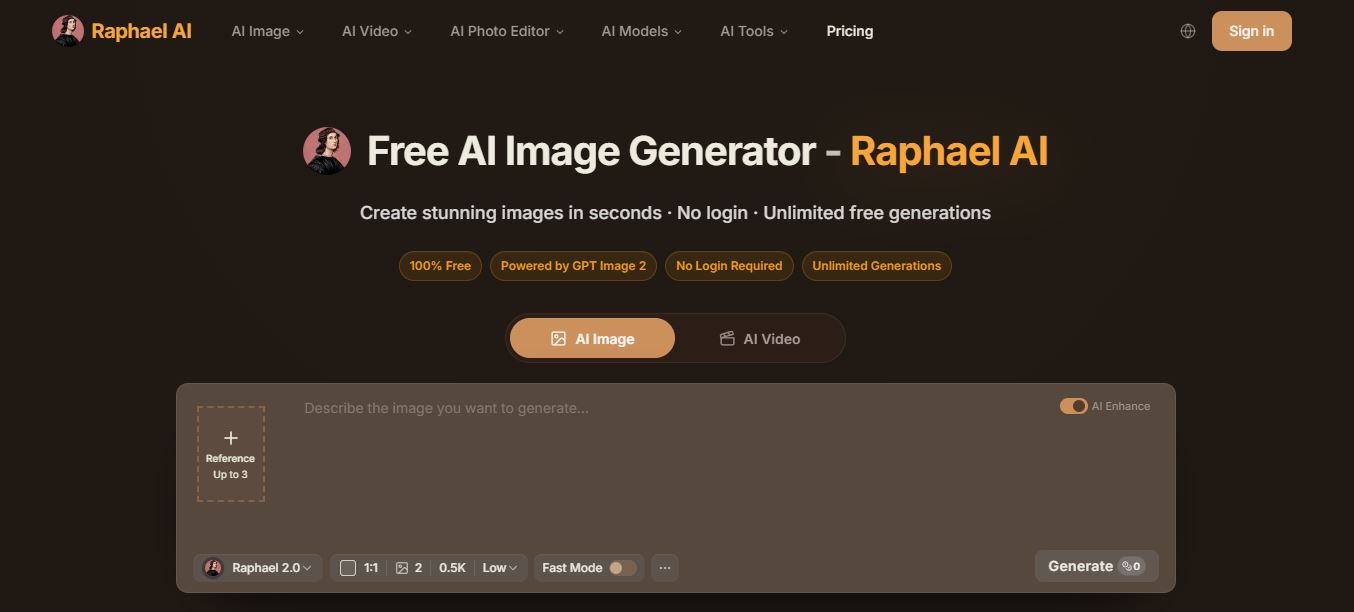
Raphael AI is a browser-based text-to-image and text-to-video generator at raphael.app. Instead of running one house model, it works as a router: you type a prompt, pick (or let it auto-select) a model, and it routes the request to whichever engine fits — anything from its own in-house Raphael 2.0 to third-party frontier models like GPT Image 2 or Google’s Veo. That multi-model setup is the biggest thing that’s changed since I last reviewed the platform, and it’s the part that actually matters for output quality.
If you’re comparing it to other free-entry AI tools I’ve tested — like the workflow-focused Kraa AI or the video-generation angle in Hera.video — Raphael’s differentiator is breadth. It’s not trying to be one thing done perfectly; it’s trying to be the front door to a dozen different models.
How I Tested It
I run every image tool the same way: same handful of prompts across different complexity levels, timed generations, and a deliberate side-by-side of the signed-out experience versus the signed-in one, since that’s where most “free” AI tools quietly change the deal on you. For Raphael, I generated without an account first, then created a free account and reran the same prompts to see what actually changed.
The first thing I noticed: guest generations aren’t saved anywhere. Close the tab and that image is gone unless you download it. Sign in — still free, no card required — and every generation gets saved to your history. That alone is worth doing before you generate anything you might want to revisit.
My Test Prompts and What Came Out
“It’s good” isn’t a useful data point on its own, so here are the exact prompts I ran, verbatim, and what Raphael handed back.
Prompt #1 — Product Photography
“a futuristic product photo of a matte black wireless speaker on white studio background, soft shadow, high detail, sharp focus”

This was the cleanest run of the whole test. The speaker looked crisp and studio-real, the lighting stayed consistent, and the background never drifted gray or textured the way some generators do. It was also the fastest of the three prompts to render — short, unambiguous prompts like this one seem to be exactly what the routing system handles best.
Prompt #2 — Cinematic Portrait (9:16)
“photorealistic portrait of a woman in a red trench coat walking through light rain, cinematic lighting, 50mm lens look, shallow depth of field” — set to 9:16 output

The mood landed well — the rain texture and cinematic lighting were believable, and the 9:16 crop composed properly instead of just cropping a square result. But I noticed something worth flagging: the longer and more descriptive the prompt gets, the more likely you are to lose a bit of facial consistency between generations. After this run, I started keeping my portrait prompts tighter, and the results got more predictable.
Prompt #3 — Anime / Illustration
“anime illustration of a futuristic street market at night, neon signs, detailed clothing, dynamic perspective, vibrant colors, clean line art”

This handled “style plus scene” better than I expected going in. The neon vibe came through strong, the line art stayed clean instead of muddying at the edges, and the perspective read clearly even with multiple background elements competing for attention. Of the three, this was the prompt where the model choice (I let auto-routing pick) mattered most — a weaker model would have flattened the neon lighting into mush.
Does Prompt Complexity Change the Results?
Yes, and it’s consistent enough to plan around. Shorter prompts with fewer constraints gave me more predictable, repeatable output. Once I stacked multiple subjects, several lighting keywords, and very specific style notes into one prompt, Raphael still produced usable images — it just got looser on “exactness.” That’s a pattern I’ve seen across most free-tier generators, not something unique to Raphael, but it’s worth knowing before you write a 60-word prompt expecting pixel-perfect control.
The Models Behind Raphael AI
This is the part that’s changed most since my last look at the platform. Raphael isn’t running one proprietary model anymore — it’s a router sitting in front of several of the industry’s current top image and video models, alongside its own in-house Raphael line.
| Image Models | Best Known For |
|---|---|
| GPT Image 2 | Precise prompts, clean text rendering, product shots |
| Nano Banana 2 | Faster multi-reference edits and style control |
| Nano Banana Pro | 4K renders, advanced professional-grade editing |
| Nano Banana | Lightweight, fast general-purpose generation |
| Seedream 5.0 | Cinematic realism, dramatic lighting |
| Seedream 4.5 | 2K/4K generation with reference editing |
| Raphael 2.0 Pro | Consistent portraits, brand-safe visuals |
| Video Models | Best Known For |
|---|---|
| Seedance 2.0 | Smooth motion, natural choreography |
| Veo 3.1 | Native audio, 4K output, cinematic realism |
| Kling 3.0 | Fast action, bold camera movement |
| Raphael Video Pro | Stable shots, commercial-use control |
If you’ve followed the AI video space at all, seeing Kling 3.0 and Google’s Veo bundled into one free-entry tool is notable — those are usually locked behind their own separate paid platforms. Raphael’s pitch is that you get one interface instead of five subscriptions.
Raphael AI Pricing: Free vs. Pro vs. Ultimate

| Plan | Price | Credits | Watermark | Commercial Use |
|---|---|---|---|---|
| Free | $0 | 10/day, unlimited Raphael 2.0 (slow queue) | Yes | Personal only |
| Pro | $10/mo (billed annually, $120/yr) | 2,000/month | No | Yes |
| Ultimate | $20/mo (billed annually, $240/yr) | 5,000/month | No | Yes |
A few things I’d flag before you pick a tier: on the Free plan, only the base Raphael 2.0 model is available without spending credits — every other model (Nano Banana, Seedream, GPT Image, Seedance, Kling, Veo) requires credits, which is why the Pro and Ultimate tiers exist. Free-plan images also carry a watermark, and commercial use is restricted to paid subscribers under Raphael’s terms of use. If you only need occasional images for personal projects or mockups, Free genuinely holds up. If you’re generating anything client-facing or need to skip the watermark, Pro pays for itself fast.
I’m covering the full breakdown — including credit-per-image math and which plan makes sense for different use cases — in a dedicated Raphael AI pricing guide, if you want the deeper dive before you subscribe.
Pros and Cons
✓ Pros
- No account needed to start generating
- Access to seven image models and four video models in one place
- Signed-in generations are fast (5–10 seconds typical)
- Free tier’s Raphael 2.0 model has no generation cap
- Signed-in users get commercial-use rights on paid plans
✗ Cons
- Guest mode caps you at 2 prompts a day and drops nothing to history
- Guest generations take 30–60 seconds versus 5–10 signed-in
- Long, heavily-constrained prompts lose facial/detail consistency
- Free-plan images carry a watermark
- No public API yet, per Raphael’s own FAQ
Who Should (and Shouldn’t) Use Raphael AI
It’s a strong fit if you’re a blogger or social creator who needs quick concept art without juggling five subscriptions, a hobbyist experimenting with different AI art styles, or someone who wants access to models like Nano Banana Pro and Veo without paying for each one separately. It’s a weaker fit if you need a public API for a product integration (not available yet), or if you’re doing high-volume commercial work where the Free tier’s watermark and Fast Mode caps would slow you down — in that case, budget for Pro from day one.
FAQ
Do I need to sign up to use Raphael AI?
No — you can generate images immediately without an account. But guest mode limits you to 2 prompts a day, generations run slower (30–60 seconds), and nothing gets saved to a history you can revisit.
Are images saved if I’m not signed in?
No. Only signed-in users get their generations saved to history. If you’re not logged in, download anything you want to keep before you close the tab.
What’s the difference between Pro and Ultimate?
Pro is $10/month for 2,000 monthly credits and priority queue access. Ultimate is $20/month for 5,000 credits, the highest priority queue, and extras like the Advanced Refine feature and early access to new models.
Can I use Raphael AI images commercially?
Paid subscribers can use generated images commercially under Raphael’s Terms of Use. Free-plan users are limited to personal, non-commercial use.
Does Raphael AI have an API?
Not yet. Raphael’s own FAQ confirms there’s no public API at the moment, though the team says one is planned.
Final Word
Raphael AI earns its “free” label better than most tools that use that word loosely. You can generate without an account, and the free signed-in tier is genuinely usable for casual work. But the real product here is the model access — having GPT Image 2, Nano Banana 2, Seedream, Kling, and Veo behind one prompt box is hard to match at this price. If you’re testing ideas or making occasional social content, sign in and stay on Free. If watermarks or commercial rights matter, Pro at $10/month is the tier that actually removes the friction.
Related reading: what Nano Banana 2 actually improves, my breakdown of Kling AI’s video generator, a look at RunwayML for comparison, my Vheer AI review, the Hera.video motion tool, Meshy AI for 3D generation, imgAK AI for photo restoration, LogoAI for brand assets, and Freepik as a stock-plus-AI alternative.


