

Emergent.sh Review: My Honest Experience Building AI Apps
Is it worth using in 2026? I spent a full week inside Emergent.sh building real apps, burning real credits, and fighting real cold starts — here’s what actually happened.
By Oyekale Olawale · Updated July 2026
Quick Answer
Emergent.sh is genuinely fast at turning a prompt into a working full-stack app — but after a week of daily use, credits evaporated on trivial actions, cold starts ate more time than actual building, and restart errors were common. It’s worth trying on the $1 first-month Standard plan for a spike or MVP test, but I wouldn’t recommend it yet for daily production work. If you need reliability, pair it with a local CLI agent like Claude Code and only reach for Emergent.sh when you need a hosted scaffold fast.
I’ve tested a lot of “vibe-coding” platforms for this site — Base44, Macaly, a handful of others in my roundup of vibe coding tools — and Emergent.sh is one of the more interesting ones on paper. Y Combinator-backed, multi-agent architecture, claims to hand you a full-stack app (frontend, backend, auth, database, hosting) from a single prompt. So I gave it a real week: not a five-minute demo, an actual working week where I tried to ship something.
What Is Emergent.sh?
Emergent.sh is an AI app-building platform that takes a plain-language prompt and generates a full-stack web or mobile application: React frontend, FastAPI backend, database, authentication, and one-click hosting, all wired together by a team of coordinated AI agents rather than a single model working alone. Instead of dragging and dropping components the way you would in a traditional website builder, you describe what you want, answer a few clarifying questions the agent asks, and watch it write files, install dependencies, run tests, and spin up a live preview in real time.
The platform runs on a credit system rather than flat feature limits. Every prompt, every fix, every test, and every deploy pulls from your credit balance, which is the part of Emergent.sh that generates the most discussion (and, as you’ll see below, most of the complaints). Under the hood, Emergent.sh defaults to a React frontend paired with a FastAPI backend, and during my build it let me choose between Claude 4.0 Sonnet and GPT-5 (Beta) as the underlying model, along with an optional “deeper reasoning” mode that costs more credits per run. It’s backed by Y Combinator and has picked up SOC 2 Type II and ISO 27001 certification in 2026, which matters if you’re evaluating it for anything involving regulated or sensitive data.
Key Features
- Natural-language to full-stack code: describe the app, get a working frontend and backend, not just a static mockup.
- Backend included by default: authentication, database provisioning, and API routes are generated automatically — no separate server setup.
- Browser-based VS Code environment: you can open the generated project in a full online IDE, read every file, and edit directly rather than relying only on chat-based tweaks.
- GitHub export and code ownership: push the entire codebase to your own repo at any point and self-host elsewhere if you outgrow the platform.
- Built-in integrations: Stripe for payments (in test mode by default), plus connections to Google Sheets, Airtable, and Slack.
- Automated testing: the agent runs backend and frontend tests against the flows it just built and reports pass/fail before you ship.
- Mobile app support: React Native/Expo builds are available on the Standard plan and up, not just web apps.
Who Emergent.sh Is Actually For
Based on a week of hands-on use, Emergent.sh makes the most sense for:
- Non-technical founders who need a clickable MVP to test an idea or pitch investors, not a production system.
- Freelancers and small agencies who want to spin up a client demo or internal tool in an afternoon.
- Developers who want a scaffold, not a finished product — export to GitHub, then finish the job locally.
It’s a weaker fit if you need predictable uptime, tight cost control, or an app you can leave running unattended — the credit burn and the platform’s sleep/wake behavior make that harder than it should be.
How I Tested It: My Honest Week With Emergent.sh
My testing process for every AI tool I review is the same: I use it for real, day-to-day work for at least a week, I track what breaks, and I don’t touch the copy until I’ve hit the same bug twice to confirm it’s not a one-off. With Emergent.sh, I signed up, connected GitHub, and pointed it at a real project idea rather than a throwaway “clone this app” prompt.
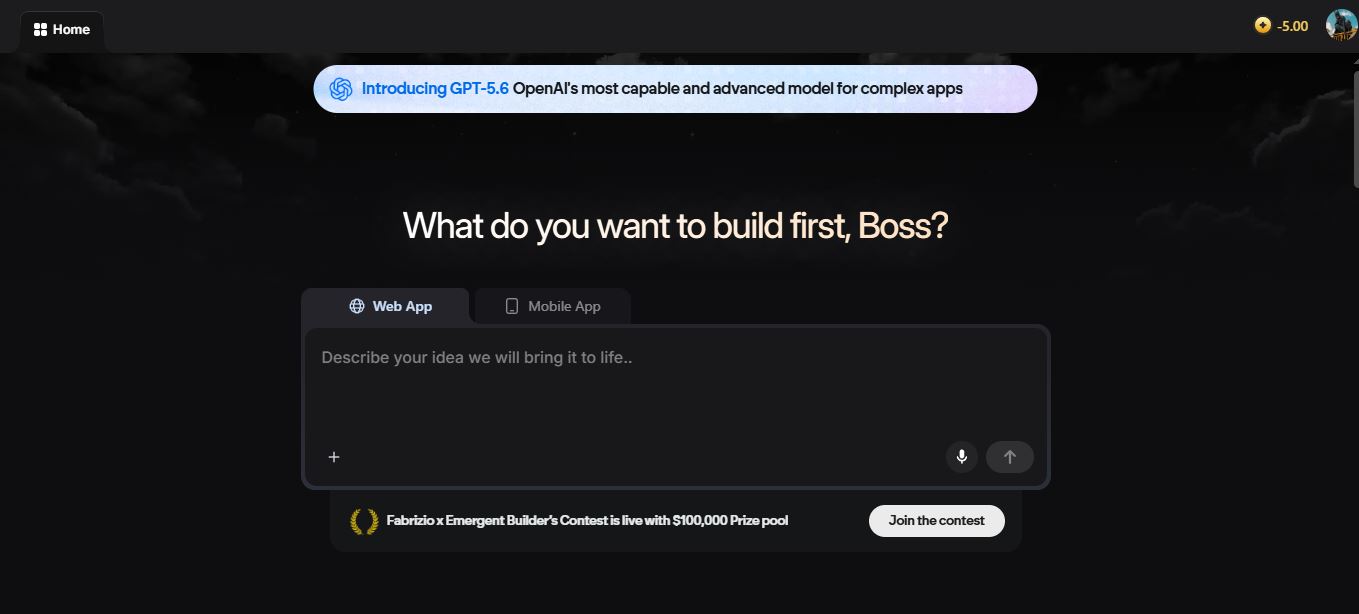
My actual Emergent.sh dashboard mid-build, credit balance visible top corner.
The prompt-to-preview experience is where Emergent.sh genuinely earns its reputation. I typed out a detailed spec — user roles, a specific tech stack, the integrations I wanted — and the agent expanded it into something close to a real product brief before it wrote a single line of code.

The prompt I pasted in — the more specific you are here, the fewer credits you burn later fixing misunderstandings.
Here’s where the honeymoon ended. Three things ate my week:
- Credits evaporate on trivial actions. A one-line CSS tweak could cost roughly the same as a small feature if the agent looped or “thought” too long before responding. I watched my balance drop for actions that should have been near-free.
- Cold starts and sleep cycles kill the flow. Step away for a bit and come back to a sleeping environment. I’d estimate close to half my active time that week went into waking the agent back up rather than shipping anything new.
- Restart errors were frequent. The backend would occasionally fail to come back cleanly after a restart, throwing connection errors in the live preview. Support was polite and responsive, but the underlying instability wasn’t resolved during my test window — the same class of error showed up more than once.
To be fair to the platform, the actual output — when it worked — was solid. Clean React components, sensible FastAPI route structure, working authentication out of the box. This isn’t a tool that generates garbage code. It’s a tool where the infrastructure around the code generation is the weak point, not the code itself.

One of the working apps Emergent.sh generated for me during testing.
What Actually Helped Stabilize It
After the first few rough days, three adjustments made the experience noticeably more workable:
- Hard-capping task scope. Instead of one big feature request, I broke everything into smaller, single-purpose prompts. Fewer credits burned per loop when something went wrong.
- Disabling auto-retry. When the agent got stuck, I stepped in manually rather than letting it retry itself, which is where I’d seen the worst credit burn.
- Moving repetitive work off-platform. I started running the same tasks locally with a CLI agent — cheaper, more control over context — and reserved Emergent.sh for quick spike work and scaffolding I wanted deployed fast.
If you’re still deciding between tools, it’s worth comparing Emergent.sh against something like Cursor paired with local models, or Claude Code running in the browser, for your day-to-day development — and reserving hosted agents like Emergent.sh specifically for long-running scaffolds you don’t want to manage yourself. If anyone has found a timeout or environment-size configuration that actually stabilizes Emergent’s wake/restart cycle, I’d genuinely like to hear about it — I haven’t found the sweet spot yet.
Where Emergent.sh Fits Best
A few scenarios where the platform’s speed genuinely pays off, based on what I tested and what other users report:
- Investor demos. A founder with a marketplace idea can go from a rough concept to a clickable prototype with real signup and listing flows in an afternoon, which is a very different pitch than a static Figma mockup.
- Client-facing internal tools. Freelancers and small agencies can spin up a portal or dashboard fast enough to impress a client during a first meeting.
- Weekend MVP validation. If you just need to know whether an idea holds together before you invest real development time, the $1 first month makes this close to free to test.
Where it fits less well: anything you plan to leave running unattended, anything with a hard uptime requirement, or a workflow where an unpredictable credit bill would actually hurt. Support is available through a documentation-first help center, an active Discord community, and a ticket-based email system — there’s no phone line or live chat, and during my test, ticket responses were courteous but slower than I’d want if something broke mid-deadline.
Emergent.sh vs. the Alternatives
If speed-to-prototype is your only priority, Emergent.sh is hard to beat. But it’s worth weighing it against a few other paths, including tools I’ve covered in more depth like Verdent AI and the broader field of AI coding assistants.
| Tool | Best For | Cost Model | Weak Point |
|---|---|---|---|
| Emergent.sh | Fast full-stack prototypes | Credit-based, $20–$200/mo | Credit burn, cold starts, restart errors |
| Claude Code (browser) | Day-to-day coding, more control | Usage-based API pricing | No built-in hosting/deploy |
| Cursor + local models | Cheap, high-control iteration | Mostly free/local, low API cost | You manage your own infra |
| Base44 | Mobile-first app builds | Credit-based | Less flexible backend customization |
I’ve also spent time with Atlas.new and Same.new as part of my broader coverage of this space, and the pattern holds across most of these hosted agent-builders: the demo experience is consistently impressive, and the reliability at sustained, daily use is where they start to differ from each other.
Emergent.sh Pricing (2026)

| Plan | Price | Credits | Key Features |
|---|---|---|---|
| Standard | $1 first month, then $20/mo | 100 monthly credits | Mobile app dev, private hosting, GitHub integration, fork tasks, buy extra credits |
| Pro | $200/mo | 750 monthly credits | E-3 Agent, free deployment, free custom domain, analytics dashboard, full project memory, Beast Thinking, custom agents |
On paper, 100 credits on the Standard plan sounds like plenty for small projects. In practice, if you let the agent loop on a stuck build or retry a failed test repeatedly, that balance can drain in a single session. Deployment and hosting also pull from the same pool, so a live app you keep running is a recurring draw on your monthly credits, not a one-time cost.
Roughly how far 100 monthly credits stretched for me:
Pros and Cons
✅ Pros
- Genuinely fast prompt-to-preview for standard flows
- Clean, readable generated code (React + FastAPI)
- Full code ownership via GitHub export
- Backend, auth, database, hosting bundled by default
❌ Cons
- Credits burn fast on loops, retries, and trivial fixes
- Cold starts and sleep cycles disrupt real workflows
- Restart errors happen more than once per week of use
- Support is polite but doesn’t always fix root causes
What Other Users Are Saying
My experience isn’t an outlier. Trustpilot reviews from mid-2026 skew genuinely mixed rather than uniformly bad: several users describe turning a rough idea into a shippable product faster than expected, and one reviewer specifically flagged wanting clearer visibility into how credits get consumed, despite otherwise having no complaints about the platform. On the other end, other reviewers describe the agent getting stuck in repeated loops that burned through credits without fixing the underlying problem, and at least one detailed complaint involved over a thousand credits spent chasing a bug that support’s own suggested fixes never resolved.
Third-party pricing breakdowns echo the same pattern I saw firsthand: one user reported that 110 paid credits didn’t last a full day, and a recurring theme across community discussion is that fixing the AI’s own mistakes burns additional credits on top of the original task — so a single misunderstood prompt can compound into a much bigger bill than expected.
Is Emergent.sh Worth It? My Verdict
Yes, conditionally. If you want to test whether an idea holds together — a clickable demo for investors, a client mockup, a weekend prototype — the $1 first month makes Emergent.sh close to a no-risk way to find out. The speed from prompt to working preview is real, and the code you walk away with is clean enough to hand off to a developer.
Where I’d pump the brakes: don’t plan to run daily production work through it yet, and don’t assume your credit balance will behave predictably. Scope your tasks small, disable auto-retry, and keep a local fallback (Cursor, Claude Code, whatever you already know) for the work you can’t afford to lose credits on.
If you do decide to sign up, a few things will save you credits based on what I learned the hard way: write your first prompt as if it were a full spec, not a one-liner — include your preferred tech stack, user roles, and must-have integrations up front, since every clarifying round the agent has to run costs you. Turn off auto-retry from day one rather than after you’ve already burned through a chunk of your balance. And treat the free tier as a sandbox to learn the interface, not as a real test of whether the tool fits your workflow — five credits won’t get you far enough to judge it fairly.
My overall take after the week: Emergent.sh is a genuinely capable prototyping tool wrapped around an infrastructure layer that still needs work. The AI itself isn’t the problem — the code it writes is clean and the multi-agent workflow is impressive to watch. The problem is everything around the AI: the credit accounting, the sleep cycles, the restart stability. If Emergent Labs tightens that up, this becomes an easy recommendation. Right now, it’s a recommendation with an asterisk.
FAQ
Why does Emergent.sh burn through credits so fast?
Credits are consumed by every action the AI performs, including thinking time and failed attempts. If the agent loops on a stuck task or misinterprets a vague prompt, you pay for the mistake and pay again for the fix. Scoping tasks narrowly and disabling auto-retry are the two biggest levers for controlling this.
Is the Standard plan’s $1 first month worth trying?
Yes, for testing purposes. It’s low enough risk to validate whether the platform fits your workflow before committing to the full $20/month rate.
Do I own the code Emergent.sh generates?
Yes. You can export the full codebase to GitHub at any point and self-host it elsewhere, so you’re not locked into the platform long term.
What’s the biggest reliability issue to expect?
Cold starts and restart errors. Environments go to sleep between sessions, and waking them back up sometimes surfaces connection errors that require a manual fix rather than resolving themselves.
Should I use Emergent.sh instead of Claude Code or Cursor?
Not instead of — alongside. Emergent.sh is strongest for fast, hosted scaffolds and MVP demos. For daily development where you need more control and predictable cost, a local CLI agent like Claude Code or Cursor with local models is the more stable choice.
Can Emergent.sh handle mobile apps, or just web apps?
Both. Web apps are supported on every paid tier, and mobile app development (React Native/Expo) is included starting on the Standard plan. If mobile is your primary target, it’s worth also comparing it against Base44, which several reviewers position as the stronger mobile-first option.
Is Emergent.sh safe to use for a real business?
The platform is SOC 2 Type II and ISO 27001 certified as of 2026, which is a reasonable baseline for security compliance. That said, I’d still treat any AI-generated backend as something to review before handling sensitive customer data, and I wouldn’t put mission-critical infrastructure on it without a manual security pass first.
Conclusion
Emergent.sh delivers on the core promise — text prompt to working full-stack app, fast — but the week-to-week reliability isn’t there yet for anything you need to run unattended. Try it for what it’s good at: rapid validation and hosted scaffolding. Keep something more predictable, like an alternative AI website builder or a local coding setup, in your back pocket for the work that actually needs to stay up.


