

GoHighLevel Review 2026: What Actually Happens When You Replace Six Tools With One
An independent, hands-on look at pricing, features, AI tools, and the trade-offs nobody puts in the headline.
By Oyekale Olawale · Websites2Know
Quick Answer
GoHighLevel is worth it if you’re currently paying for three or more separate tools (CRM, email, calendar, funnels, automation) and you’re willing to spend two to three weeks learning the system. It costs $97/month (Starter), $297/month (Unlimited), or $497/month (SaaS Pro), plus usage fees for SMS, calls, and AI. I’ve run it for over a year after it replaced a stack that was costing me more than $1,000/month in Zapier alone. It’s not the best tool in any single category, but it’s the only one that gets most categories to actually talk to each other.
I run Websites2Know, and before that, I ran an online business the way most solo operators do: one tool for email, another for the calendar, a third for the CRM, a fourth for the website, and Zapier stitching all of it together.
That worked, until it didn’t.
At one point I was paying more than $1,000 a month just for Zapier automations, and whenever a Zap silently broke, I’d lose hours tracing which platform dropped the ball. That’s the exact problem GoHighLevel exists to solve. I’ve now used it for more than a year, and this review is my honest account of where it delivers and where it genuinely falls short.
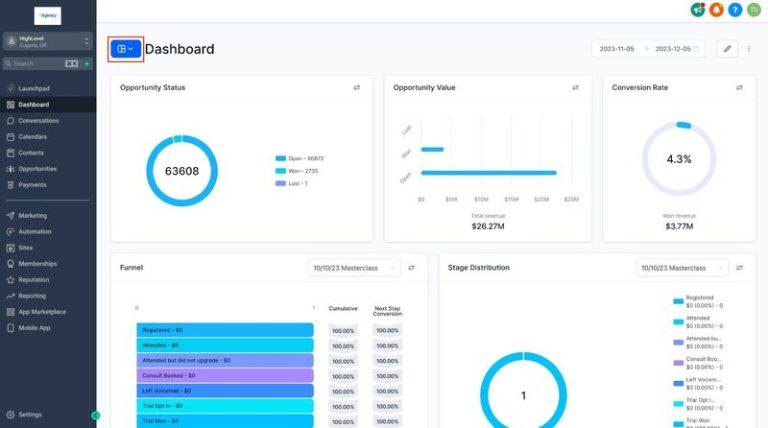
What Is GoHighLevel, Exactly?
GoHighLevel (officially “HighLevel,” though almost nobody calls it that) is an all-in-one sales and marketing operating system built for agencies, consultants, coaches, and local service businesses. Under one login, it bundles a CRM, website and funnel builder, email and SMS marketing, appointment scheduling, workflow automation, reputation management, course hosting, and AI-driven conversation and voice tools.
The company was founded in 2018 and is headquartered in Dallas, Texas. It’s grown fast: the platform now reports well over 600,000 active users, and third-party review sites put its aggregate rating somewhere in the 4.2 to 4.6 out of 5 range across G2, Capterra, and Trustpilot, depending on which listing you check. That’s a solid track record for a tool this complex, though I’d take the very top-end Trustpilot numbers with a grain of salt — a lot of those reviews get solicited right after a support interaction, which skews things upward.
GoHighLevel Pricing: What You Actually Pay in 2026
GoHighLevel has three plans, and the sticker price is only half the story. Every plan includes unlimited contacts and unlimited users — there’s no per-contact tax like you’d get with ActiveCampaign or Mailchimp. What differs between tiers is sub-account capacity and whether you can white-label and resell the platform.
| Plan | Price | Sub-Accounts | Best For |
|---|---|---|---|
| Starter | $97/mo ($81/mo annual) | 3 | Solo operators, one-location businesses |
| Unlimited | $297/mo ($248/mo annual) | Unlimited | Growing agencies with multiple clients |
| SaaS Pro | $497/mo ($414/mo annual) | Unlimited | Agencies reselling GHL as their own branded software |
Here’s the part most pricing pages gloss over: SMS, voice calls, email sending, and AI features are billed separately through GoHighLevel’s own LC Phone and LC Email infrastructure. For most single-business users, this adds somewhere between $20 and $150 a month depending on volume. It’s not hidden — it’s clearly documented — but it’s easy to miss if you only glance at the $97 headline number.
AI is its own line item too. The AI Employee bundle (Conversation AI, Voice AI, Reviews AI) runs about $97/month per sub-account for unlimited use, or you can pay as you go. GoHighLevel restructured its Voice AI pricing in May 2026, unbundling it into a voice-engine charge, a text-to-speech charge, and language-model token cost — so if you see a single flat per-minute rate quoted somewhere, check the date on that article, because the model changed mid-year.
The Math That Actually Sold Me
Before switching, my monthly stack looked roughly like this: a CRM, an email platform, a calendar tool, a funnel builder, and over $1,000 in Zapier alone to keep them talking. Here’s how that compares to a single GoHighLevel Unlimited subscription.
That’s an illustrative comparison based on my own prior stack, not a universal guarantee — your numbers will depend on what you’re replacing. But the pattern holds for most agencies I’ve talked to: consolidation savings of $200 to $700 a month are common once you actually cancel the tools GoHighLevel replaces.
GoHighLevel vs. the Alternatives
People usually land on GoHighLevel while comparing it against a specialized tool for one job. Here’s how it stacks up on the features that actually decide the purchase.
| Capability | GoHighLevel | HubSpot | ClickFunnels | ActiveCampaign |
|---|---|---|---|---|
| Entry price | $97/mo | Free–$800+/mo | $97/mo ($81/mo annual) | ~$15–19/mo (scales with contacts) |
| Per-contact pricing | No | Yes | No | Yes |
| White-label / resell | Yes (SaaS Pro) | No | No | No |
| Funnel builder depth | Strong | Weak | Best-in-class | None |
| Native SMS + calling | Yes | Add-on | No | Limited |
| Reporting depth | Basic-to-moderate | Excellent | Moderate | Strong |
My honest read: HubSpot wins on reporting and enterprise polish, ClickFunnels wins on pure funnel-building creativity, ActiveCampaign wins on email deliverability out of the box. GoHighLevel wins on doing 80% of all four jobs at once, under one login, for less than the cost of any two of them combined.
1. Website and Funnel Builder
One of the first things I liked about GoHighLevel is that I can build a full website — home, about, services, contact, blog, and landing pages — without leaving the platform.

The real advantage isn’t the builder itself. It’s that the website is already wired into the rest of the platform. When someone fills out a form, books a call, or enters a funnel, that data flows straight into the CRM and triggers automations — no Zapier middleman, no webhook to babysit.

There are 500+ funnel and page templates, an A/B testing option, and countdown-timer and e-commerce elements baked in. The drag-and-drop editor is genuinely beginner-friendly, and pages render responsively on mobile without a separate setup pass.
Here’s where I’ll push back on the marketing copy, though. This builder is not a WordPress or Webflow replacement for anyone who wants a heavily customized, deeply branded site. The design flexibility has a ceiling, and the on-page SEO controls are noticeably thinner than what a mature WordPress + Yoast or Rank Math setup gives you.
For a small business that mainly needs to explain its services, capture leads, and host landing pages, it’s more than capable. For a content-heavy publisher chasing competitive SERPs, I’d still put my money on WordPress.
2. CRM and Sales Pipelines
The CRM functions as my digital notebook for every lead and customer. It tracks who contacted me, filled out a form, or booked a call, so I’m not hunting across four apps to reconstruct what happened with one lead.

The visual pipeline view is what I use most. I can see exactly where every lead sits in my sales process at a glance, which matters more for agencies juggling several client accounts than most reviews give it credit for.

GoHighLevel’s sub-account architecture is a genuine differentiator here. Each client (or, if you’re a single business, each brand) gets an isolated workspace — its own pipelines, contacts, and automations — with no data bleed between them. Agencies can clone a working sub-account as a template and spin up a new client in minutes.
The honest downside: the CRM feels overwhelming the first time you open it. There are custom fields, tags, smart lists, and settings everywhere, and you’ll spend real time organizing it before it feels like “yours.” The native reporting is also noticeably thinner than what HubSpot ships out of the box — if deep attribution analytics are a hard requirement, keep that in mind.
For a typical service business or agency, though, it does the job the CRM is actually supposed to do: keep every conversation and deal in one place.
3. Email and SMS Marketing
This is one area where I think GoHighLevel genuinely stands out. I build email campaigns, send SMS, and schedule follow-up sequences without leaving the platform, and every send can trigger — or be triggered by — a workflow.

A typical example: someone signs up, gets an immediate email, a follow-up email two days later, and an SMS reminder if they haven’t booked a call by day five. All three channels, one automation, zero third-party tools.

Now the part every honest review needs to say clearly: email deliverability is GoHighLevel’s most commonly cited weakness, and it’s a recurring theme across G2 reviews and the GHL Facebook community. GoHighLevel sends email through its own provider, branded as LC Email (built on Mailgun infrastructure). Users migrating from ActiveCampaign or Mailchimp frequently report a deliverability dip until they properly configure and warm up their sending domain — SPF, DKIM, DMARC, the works. This isn’t unique to GoHighLevel, but it’s not optional homework either.
The email builder itself is also less visually flexible than a dedicated tool like Klaviyo, and if you’re running serious e-commerce email flows, I’d point you toward a specialized platform instead. One more line-item to budget for: SMS messages bill separately based on usage, and U.S. texting requires A2P 10DLC registration before you can send at volume — a compliance step that trips up a lot of new users.
For service businesses, coaches, agencies, and consultants, though, GoHighLevel’s combined email and SMS capability is more than enough to run a real nurture sequence without paying for a second platform.
4. AI Tools and Automated Conversations

GoHighLevel’s Conversation AI and Voice AI can respond to leads across SMS, web chat, Instagram DM, and WhatsApp, and route them into a booking or a human handoff automatically. What sold me on it isn’t that the AI is flawless — it’s that I didn’t have to chain together three separate tools just to get these channels talking to each other. It’s already sitting inside the same ecosystem as my CRM and calendar.
The catch, and it’s a real one: every AI feature is billed on top of your subscription. The AI Employee bundle (unlimited Conversation AI, Voice AI, and Reviews AI) runs about $97/month per sub-account, or you can pay per use. GoHighLevel restructured Voice AI billing in May 2026 into separate voice-engine, text-to-speech, and language-model-token charges, so budget for this as a genuine line item, not a footnote. If you’re currently paying a virtual assistant just to answer inquiries and schedule calls, the math on this can work in your favor fast — but run the numbers for your own volume before you flip it on for every sub-account.
One honest caveat from testing: Voice AI call quality and natural-language handling are good, not flawless — I’ve had it mishear appointment times on noisy calls, so I still spot-check transcripts weekly rather than trusting it fully unattended.
5. Automation Workflows
The Workflows builder is probably the single most powerful part of GoHighLevel, and it’s where the platform’s real value lives. Think of it as a virtual assistant that never clocks out: form submission → send email → tag contact → wait 48 hours → send SMS → notify sales rep, all running unattended once it’s built correctly.
Triggers include form submissions, tag changes, pipeline-stage movement, appointment status changes, and inbound webhooks — and the conditional logic gives you real branching power, not just linear if-this-then-that sequences.
There’s a learning curve, and it’s steeper than the marketing suggests. It’s surprisingly easy to build a workflow that technically runs but doesn’t do what you intended — a missing delay, an untagged branch, a trigger that fires twice. The more complex the automation, the more you need to actually understand how triggers, filters, and actions interact before you trust it with live leads. Even with that curve, I find it far more reliable than maintaining a stack of third-party integrations that can quietly break at 2 a.m. with no alert.
6. Calendar and Appointment Booking

Instead of a back-and-forth email chain trying to land on a time, I send a booking link and let the other person pick an open slot. It syncs with Google Calendar to prevent double-bookings, and because it’s connected to Workflows, confirmations, reminders, and no-show follow-ups all fire automatically.
For coaches, consultants, sales teams, and local service businesses, this alone can save several hours a week. The downside is real, though: initial setup is more confusing than it needs to be, the interface feels dated next to a dedicated tool like Calendly, and time-zone settings are worth double-checking manually before you send your first booking link to a client in another region.
7. Memberships, Courses, and Client Portals

GoHighLevel also functions as a lightweight course and membership platform. I can upload videos, organize training material into modules, and gate access behind a purchase — then connect that purchase directly to a funnel and an upsell, so someone can buy an offer and get instant access without leaving the funnel flow.
Dedicated platforms like Kajabi or Teachable are more polished here, and GoHighLevel’s course analytics are genuinely basic by comparison — you won’t get detailed completion-rate breakdowns or cohort tracking. For straightforward course delivery bundled with the rest of your marketing stack, it gets the job done. For a sophisticated learning platform as your core product, I’d look elsewhere.
8. SaaS Mode and White-Label Reselling

This is probably the single most interesting feature for agencies, and it’s genuinely unique at this price point. On the $497/month SaaS Pro plan, you can rebrand GoHighLevel entirely — your logo, your domain, your pricing — and resell it to clients as your own branded software. Clients log into your platform; GoHighLevel is never mentioned.
You connect Stripe, deploy pre-built “Snapshots” to onboard new clients fast, and clients can self-sign-up and pay without you touching a spreadsheet. The math is straightforward: at even 10 clients paying $197/month for your branded platform, that’s $1,970/month in recurring revenue against your $497/month cost — a real path from selling services to selling software.
The trade-off nobody advertises: once you white-label a sub-account to a client, you become their software provider. That means you’re now responsible for their onboarding, their workflow training, and their support tickets — even for bugs that are technically GoHighLevel’s, not yours. It’s a real business model shift, not a passive upgrade.
How I Actually Tested This
This isn’t a first-impressions review written off a demo call. I’ve run GoHighLevel on a paid Unlimited subscription for more than a year across my own funnels, email sequences, and booking flows, migrated an existing sub-account’s domain to test the website builder’s SEO settings, and deliberately broke a few automations to see how the platform surfaces errors (it logs them clearly in the workflow execution history, for what it’s worth — better than most tools in this price range).
I also cross-checked every pricing and rating figure in this article against GoHighLevel’s own pricing page and current third-party review aggregators at the time of publishing, because plan pricing and AI billing structures both changed materially in 2026.
Pros and Cons
✅ What Works
✔ Genuinely replaces 5–8 separate tools
✔ No per-contact pricing on any plan
✔ Sub-account architecture is ideal for agencies
✔ Native AI, SMS, and voice — no third-party glue
✔ Real SaaS-reselling path via white-label mode
❌ Where It Falls Short
✘ Email deliverability needs manual domain setup
✘ Steep learning curve in the first 2–3 weeks
✘ SMS, calls, and AI cost extra on top of the plan
✘ Native reporting is basic vs. HubSpot
✘ Website builder has a design ceiling vs. WordPress
Who Should (and Shouldn’t) Use GoHighLevel
GoHighLevel makes the most sense for marketing agencies, consultants, coaches, and local service businesses that are currently juggling three or more separate subscriptions and are willing to invest real setup time upfront. If you’re managing two or more client accounts, the sub-account model alone can justify the switch.
It’s a weaker fit if you’re running a large e-commerce operation (specialized tools like Klaviyo or Shopify’s own stack will serve you better), if you need a heavily customized, design-forward website (stick with WordPress or Webflow), or if deep, HubSpot-grade analytics are non-negotiable for your reporting needs. If your current stack is stable and nothing is actually broken, that’s also a reasonable reason not to migrate.
FAQ
Is GoHighLevel worth it in 2026?
Yes, for agencies and businesses replacing three or more separate tools with real, sustained usage. It’s not worth it if you only need one specific tool done exceptionally well, since specialized platforms will outperform GoHighLevel in their single category.
How much does GoHighLevel actually cost per month?
The base plans are $97 (Starter), $297 (Unlimited), and $497 (SaaS Pro). Add $20–$150/month in typical usage fees for SMS, calling, and email, plus AI Employee at roughly $97/month per sub-account if you enable it.
Can GoHighLevel really replace Zapier?
For workflows entirely inside GoHighLevel’s own tools (CRM, calendar, email, SMS, funnels), yes — its native Workflows automation eliminates the need for Zapier between those specific tools. If you still rely on external apps outside the platform, you may keep a lighter Zapier or webhook connection for those.
Is GoHighLevel beginner-friendly?
Not immediately. The drag-and-drop builders are approachable, but the CRM, workflow logic, and settings menus have real depth. Budget two to three weeks to get comfortable before you trust it with live client work.
Does GoHighLevel charge extra for SMS and calls?
Yes. SMS, voice minutes, and email sending run on a usage-based wallet on top of every plan, billed through GoHighLevel’s LC Phone and LC Email infrastructure. U.S. SMS also requires A2P 10DLC registration before high-volume sending.
What is GoHighLevel SaaS Mode?
SaaS Mode, available on the $497/month SaaS Pro plan, lets you fully white-label GoHighLevel and resell it to clients under your own brand and pricing, with automated billing through Stripe.
Is there a free trial?
Yes, GoHighLevel offers a 14-day free trial with no long-term contract required on any plan.
Is GoHighLevel good for solo freelancers, not just agencies?
Yes, the $97 Starter plan is built for exactly this: one business, unlimited contacts, full core feature access, just capped at three sub-accounts, which most solo operators never need to exceed.
Conclusion
After more than a year on the platform, I don’t think GoHighLevel wins because any single feature is the best in its category. HubSpot beats it on reporting. ClickFunnels beats it on funnel creativity. A dedicated email platform beats it on deliverability out of the box.
What GoHighLevel wins on is consolidation that actually works. Instead of one tool for the website, another for the CRM, another for email, another for SMS, another for the calendar, and Zapier trying to hold it all together, I run most of my business logic through one platform where the data already talks to itself.
Compared to the version of my business that was bleeding over $1,000 a month into broken Zaps, that’s not a marginal upgrade. It’s a different way of operating entirely. If you’re managing multiple clients, tired of tool-switching, and willing to put in the setup time, I’d tell you to start the trial and actually build one real funnel in it before you decide. That’s the only test that matters.
Disclosure: This review is based on my own paid, hands-on use of GoHighLevel. The link above is my affiliate link — if you sign up through it, I may earn a commission at no extra cost to you. This did not influence the pros, cons, or verdict above.
Related Reading on Websites2Know
If Zapier reliability is part of why you’re evaluating GoHighLevel, I’ve also written about how to fix broken Zapier loops and errors, which walks through the exact failure patterns that pushed me toward consolidation in the first place. If you’re comparing GoHighLevel’s pricing model against other subscription software, my breakdown of AnyDesk’s pricing tiers is a useful contrast in how usage-based add-ons get structured.
For agencies weighing GoHighLevel against a dedicated business-phone system, I tested a comparable all-in-one communications platform in my 3CX review. And if you’re running into authentication or login issues while setting up any SaaS platform, including GoHighLevel sub-accounts, my guide on fixing SaaS authentication failed errors covers the most common causes.
GoHighLevel’s SMS features rely on the same compliance groundwork as any texting platform, which is why I also cover top SMS verification providers for anyone setting up business texting from scratch. If you’re specifically evaluating GoHighLevel for its procurement or vendor-management angle inside an agency, my piece on what procurement software is actually used for is worth a read alongside this one.
Healthcare and wellness businesses considering GoHighLevel for client intake should also check my overview of healthcare Software-as-a-Service platforms, since compliance requirements differ from a standard agency setup. And before trusting any AI feature — including GoHighLevel’s Conversation AI and Voice AI — with client-facing work, it’s worth reading my guide on how to know if a new AI tool is actually safe.
If you’re building out GoHighLevel’s website and SEO settings, my roundup of AI SEO tools pairs well with the platform’s built-in page settings. And for a look at how another SaaS company handles pricing transparency and AI-tier upsells — a pattern GoHighLevel itself follows closely — see my Abacus AI review.


