

My Talo AI Review: I Ran It on Real Calls for 3 Weeks (2026)
A hands-on test of Talo’s real-time call translator — the bugs I hit, the actual 2026 pricing after the Palabra AI acquisition, and whether it’s still worth your $33-$100 a month.
By Oyekale Olawale · Updated 2026 · 11 min read
Quick Answer
Yes, Talo AI is worth it if you regularly run multilingual video calls and can live with occasional stutters on technical jargon. Plans now run $33/month (Starter, 120 min) up to $100/month (Pro, 400 min) billed monthly, or as low as $80/month on the annual Pro plan. Talo is now owned by Palabra AI, which changes more about the product than most reviews mention — including which plan actually gets SOC 2 coverage. I break the real per-minute math down further in my dedicated Talo AI pricing guide.
I run a crypto content channel with contributors scattered across four continents, and language has always been the one bottleneck no editing app or scheduling tool ever fixed. I first tested Talo AI back in December 2025, before Palabra AI acquired the company. I’ve since gone back in for three more weeks in 2026 to see what actually changed under new ownership — because a lot changed, and most reviews still online haven’t caught up.
Short version: the core translation experience is still genuinely good. But the pricing tiers shifted, the product now spans far more than video calls, and one compliance detail buried in the pricing table surprised me enough that I want to flag it before you sign up for a plan expecting it.
Who Am I and How I Tested Talo AI?
I’m Oyekale Olawale, and I write hands-on AI and software reviews for Websites2Know. My testing process is always the same: sign up on the plan a normal reader would actually buy, use the tool for real work (not staged demos), and write down every glitch the moment it happens rather than reconstructing it from memory later.
For this round of testing, I ran Talo across nine real video calls over three weeks: five Zoom calls with Spanish- and Portuguese-speaking collaborators, two Google Meet syncs with a German-speaking developer, and two Microsoft Teams calls with a mixed English/French/Portuguese group. I tested both the free trial and a paid Pro seat, toggled between voice output and subtitle-only mode, and deliberately threw crypto jargon, overlapping speech, and fast talkers at it — the exact conditions where translation tools usually fall apart.
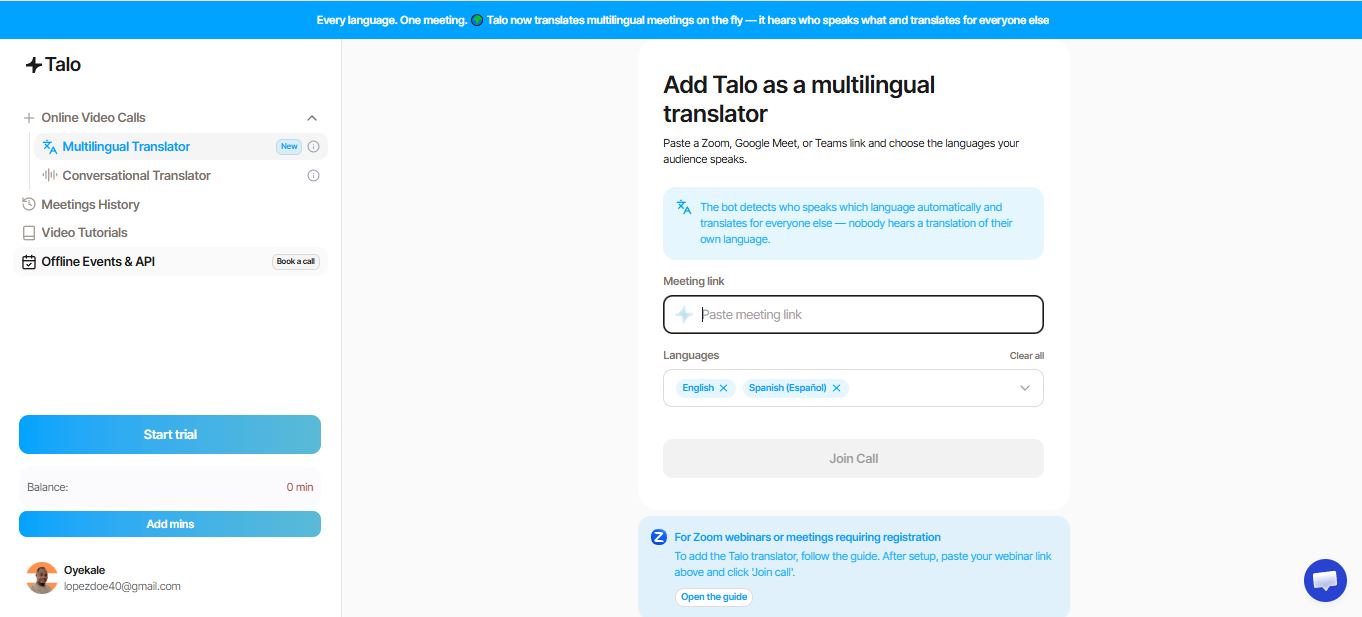
The dashboard itself is unchanged from what I tested in December — you paste a Zoom, Meet, or Teams link, pick source and target languages, and the bot joins as a participant within seconds. What has changed is everything happening around that dashboard.
What Exactly Is Talo AI?

Talo AI is a real-time, AI-powered voice translation tool that drops an AI “translator bot” into your Zoom, Google Meet, or Microsoft Teams call. The bot listens to every participant, translates what’s being said, and pushes the result back out as spoken voice, live captions, or both — with sub-second-to-low-second latency, according to Talo’s published claims.
Founded in 2024 by Anton Selikhov and Michael Dansey, Talo grew to more than 10,000 users before catching the attention of Palabra AI — a speech-translation company backed by Seven Seven Six, Creator Ventures, and angel investors from DeepMind, Instacart, and Andreessen Horowitz. Palabra acquired Talo in November 2025, and Selikhov now serves as Palabra’s Chief Product Officer. The Talo brand is being kept alive for existing users while its technology folds into Palabra’s broader translation ecosystem.
That acquisition matters more than a footnote. Talo is no longer just a “join my Zoom call” bot. Under Palabra, the product line now spans five formats: video calls, webinars (where every attendee gets a personal translation stream), live streams and broadcasts (with OBS/RTMP-style integration through the wider Palabra suite), in-person events, and a developer API. If you only came here for the meeting bot, that’s still the core of what taloai.com sells today — but the roadmap clearly isn’t stopping there.
Practically, this means two things for anyone evaluating Talo right now. First, the underlying translation engine has almost certainly improved since the original December 2025 launch, because it’s now built on Palabra’s dedicated speech-translation infrastructure rather than a standalone system. Second, the taloai.com site itself is being kept intentionally simple — a calls-focused entry point — while the heavier lifting for webinars, streams, and API access increasingly happens through Palabra’s own platform. If you outgrow the meeting-bot use case, don’t be surprised to find yourself pointed toward Palabra directly.
Who Is Talo AI Actually For?
- Global sales and RevOps teams running demos with international prospects without limiting themselves to English-only calls
- Customer success and support teams that need to deliver help in a client’s native language on the fly — the same instinct behind tools like Intercom for support workflows generally
- Content creators and webinar hosts who want a non-English-speaking audience to follow along in real time
- Recruiters and HR teams interviewing global candidates in the language they’re most comfortable in
- Distributed engineering teams running stand-ups and syncs across language lines — Talo’s own case studies highlight exactly this kind of English↔Russian product sync
- Product researchers conducting user interviews with participants who don’t speak the researcher’s language
How Talo AI Actually Works, Step by Step
Before I get into the feature table, it’s worth walking through the actual workflow, because this is where Talo either wins or loses people in the first two minutes.
You start by signing up for the trial at taloai.com. Once you’re in, you copy the meeting link for your upcoming Zoom, Google Meet, or Teams call and paste it into Talo’s dashboard. From there you choose the source and target languages for the conversation, and decide whether output should be voice, subtitles, or both. Hit start, and the bot joins the call as a named participant, just like any human would.
From that point, the bot listens continuously, transcribes what it hears, runs it through Talo’s translation layer (now built on Palabra’s speech-translation engine), and pushes the output back into the call. If you’ve enabled voice output, other participants hear a synthesized voice speaking the translation almost on top of the original speaker. If you’ve enabled captions only, translated subtitles appear on-screen instead. You can toggle between the two mid-call, though as I noted earlier, doing so isn’t always instant.
After the call ends, Talo says it doesn’t retain the audio or transcript by default — a meaningful detail if you’re translating anything sensitive, like a compensation discussion or a legal intake call. There’s no separate export step to worry about because there’s supposedly nothing left stored to export.
AI Translation Accuracy: Where It’s Strong and Where It Breaks
Underneath the interface, Talo is now running on Palabra’s speech-translation stack, which combines speech recognition, neural machine translation, and voice synthesis in one real-time pipeline. That’s a genuinely hard engineering problem, and in my testing it mostly held up.
For everyday conversation — introductions, project updates, casual back-and-forth — accuracy was consistently high. I ran a simple test on the Portuguese↔English call: I asked my collaborator to describe her weekend in detail, and the translated subtitles captured the gist with almost no distortion, including a couple of casual asides that a stiffer translation engine might have flattened.
Where it weakens is specialized vocabulary. Crypto terminology, legal phrasing, and industry-specific jargon all got simplified or mistranslated at some point during my three weeks of testing. The three-way multilingual call was the clearest example of both strengths and limits at once: the bot correctly identified which language each speaker was using without any manual switching, but conversational overlap between the German and Portuguese speakers produced a couple of dropped clauses that changed the meaning of what was said.
On voice output specifically, the synthesized voice is clear and easy to understand, but it reads as mechanical rather than human — there’s little of the emotional inflection or natural pausing a human interpreter brings to a tense or nuanced conversation. For routine business calls, that’s a non-issue. For sensitive negotiations, it’s worth pairing Talo with a human reviewer afterward rather than treating the AI output as final.
Talo AI Key Features at a Glance
| Feature | Details |
|---|---|
| Language coverage | 60+ languages, translated as voice, captions, or both simultaneously |
| Platform integration | Zoom, Google Meet, Microsoft Teams — single bot, no per-language accounts |
| Latency | Advertised as sub-second to a few seconds, powered by Palabra’s speech-translation engine |
| Data retention | Talo states it does not store meeting audio or transcripts by default |
| Beyond video calls | Webinars, live streams/broadcasts, in-person events, and a developer API under the wider Palabra product suite |
| Voice settings | Available from the Pro tier up — lets you adjust output voice and style; not included on Starter |
My Hands-On Test: What Actually Happened on the Calls
Setup is still the strongest part of the product. Paste the meeting link, choose your language pair, and the bot shows up in the participant list within seconds — no plugin, no separate download for the call itself. That part of the workflow hasn’t changed since my first test.
On the Spanish↔English and Portuguese↔English calls, subtitles landed with a delay I’d estimate at two to three seconds — close enough to real conversation that nobody had to stop and wait. Voice output was clear but noticeably synthetic, which is the trade-off you’re making for speed. The three-way test — English, German, and Portuguese on one Teams call — was the most impressive moment: the bot switched context per speaker without anyone manually toggling a language setting.
Now the bugs and rough edges I actually hit, because a review that skips these isn’t a real review:
- During a discussion about staking rewards and gas fees, Talo repeatedly rendered technical crypto terms too literally, stripping out the meaning entirely rather than flagging that it didn’t have a good translation
- When two participants spoke over each other for more than about a second, the bot either dropped a clause entirely or merged both speakers’ words into one garbled sentence
- On one Teams call, switching the output from captions to voice mid-meeting introduced a noticeable few-second stall while the bot re-initialized audio routing
- The bot occasionally mistranslated idioms literally — a Portuguese speaker’s figure of speech came through in English as something technically accurate but conversationally nonsensical
None of these were dealbreakers for casual business conversation. All of them would matter in a legal deposition, a clinical consultation, or any call where a mistranslated clause has real consequences.
Talo AI Pricing and Plans (2026)

The old plan structure (“around $33/month, limited public details”) is out of date. As of my July 2026 check of taloai.com/pricing, here’s exactly what’s live:
| Plan | Monthly Billing | Annual Billing | Minutes Included | Seats |
|---|---|---|---|---|
| Starter | $33/mo (billed annually — no separate monthly rate listed) | $33/mo, $396/yr total | 120/mo (1,140/yr) | 1 |
| Pro | $100/mo | $80/mo, $960/yr total | 400/mo (4,800/yr) | 1 |
| Team | $500/mo (Coming Soon) | $400/mo, $4,800/yr total (Coming Soon) | 400/mo (30,000/yr) | 5 |
| Enterprise | Custom | Custom | Unlimited | Unlimited |
Overage on Pro runs $0.25 per additional minute; on Team it drops to $0.20 per minute. Additional Team seats cost $100 per seat. All plans include the full 60-language library, so language count isn’t what separates the tiers — minutes, seats, and support features are.
Here’s the detail most reviews (including my earlier one) got wrong: the earlier writeup described Talo’s SOC 2 and ISO 27001 posture as a blanket claim covering the whole product. Looking at the actual feature matrix on the pricing page today, SOC 2 is listed specifically under the Enterprise tier — not Starter, Pro, or Team. It’s a tiered gate, not a uniform one, though: Voice Settings unlock as early as the Pro plan, while single sign-on and SOC 2 are held back for Enterprise specifically. If SOC 2 attestation is a compliance requirement for your team, don’t assume it’s covered until you check which tier you’re actually buying.
Minutes Included, Visualized
Monthly minute allowances across Talo’s current plan tiers, based on taloai.com/pricing (July 2026). Enterprise bar is illustrative only, not drawn to scale, since its allowance is uncapped.
120 minutes on Starter is roughly four 30-minute calls a month — fine for occasional use, tight for anyone running weekly international meetings. I go deeper on which plan actually pencils out for different call volumes, plus the annual-vs-monthly break-even math, in my separate Talo AI pricing breakdown.
Pros and Cons of Talo AI
✓ What Works
- Genuinely low-friction setup — paste a link, pick languages, done
- Handles three-way multilingual calls without manual switching
- Full 60-language library included even on the cheapest plan
- Now backed by Palabra’s broader speech-translation infrastructure and funding
- No meeting data stored by default
✗ Where It Falls Short
- Technical jargon and idioms still trip up translation accuracy
- Overlapping speech causes dropped or garbled clauses
- SOC 2 is an Enterprise-only feature, not a blanket guarantee
- Starter’s 120 minutes/month is thin for regular users
- Team plan is still marked “Coming Soon” as of this review
Talo AI vs. Alternatives
A skilled human interpreter still beats Talo on nuance, tone, and handling culturally sensitive conversations — but interpreters cost far more and need to be scheduled in advance. Compared to other AI translation tools, most competitors handle either subtitles-only or after-the-fact translation rather than live voice output inside the call itself. Talo’s real differentiator is combining real-time voice or subtitle output with direct video-platform integration, all through one bot.
If your work leans more toward meeting notes and async follow-up than live translation, it’s worth comparing against tools like AI note-taker apps or Fellow AI, which solve a related but different problem — capturing and summarizing what was said rather than translating it live. And if your team is choosing conferencing software in the first place, my roundup of mobile video conferencing platforms covers which ones play nicest with bots like Talo’s.
Real-World Use Cases
Talo’s own customer stories lean heavily on this: a U.S. founder and a Russian-speaking engineer reviewing product changes with Talo interpreting live inside the call. That maps to how I’d recommend using it — daily stand-ups for distributed teams (a group that keeps growing, based on the trends I cover in my remote work statistics roundup), sales demos for international prospects, structured user-research interviews, and recruiting conversations where you don’t want language to bias the evaluation. If your team is also weighing recruiting or people-ops software alongside a tool like this, my breakdown of the best talent management platforms is a useful companion read.
For teams juggling multiple productivity tools already, it’s also worth knowing how Talo fits alongside the rest of your stack — I cover general workspace and note-taking tooling in my Craft.do review, and voice-to-text specifically in my Wispr Flow review, both of which touch on adjacent problems Talo doesn’t solve.
Bonus Tips Before You Sign Up
A few things I wish I’d known before my first Talo call, based on three weeks of actually using it:
- Run a low-stakes pilot call first — a quick internal sync rather than a client demo — so you can gauge translation quality for your team’s specific vocabulary before it matters
- Ask participants to slow down slightly and avoid talking over each other; this single habit change reduced garbled translations more than any setting I toggled
- For legal, HR, or high-stakes negotiation calls, treat Talo as a first pass and pair it with a human interpreter or a post-call transcript review
- Check which specific plan tier includes the compliance certifications (like SOC 2) your organization actually requires before you commit annually
- If your usage will fluctuate month to month, start on the monthly Pro plan before locking into an annual commitment — the $20/month savings on annual billing isn’t worth it if you end up needing to downgrade
User Reviews and Community Feedback
Sentiment on Product Hunt and independent AI-tool directories remains largely positive, with reviewers consistently praising the speed and naturalness of the translation and calling it a genuine step up from clunkier subtitle-only tools. A few users on Product Hunt specifically asked for a longer free trial window, and some independent write-ups flagged occasional stumbles on niche vocabulary — consistent with what I found in my own testing. On community forums, the general consensus treats Talo as a strong pick for global teams and nonprofits rather than as a replacement for professional interpretation in high-stakes settings.
FAQ
Is Talo AI still owned by the original company?
No. Palabra AI acquired Talo in November 2025. Existing Talo subscriptions continue under the same terms, and the Talo brand remains active for now, but the underlying technology and roadmap now sit under Palabra.
How much does Talo AI cost in 2026?
Starter is $33/month (billed annually, 120 minutes/month). Pro is $100/month billed monthly or $80/month billed annually (400 minutes/month). Team is $400-$500/month depending on billing cycle and is currently marked “Coming Soon.” Enterprise pricing is custom.
Does Talo AI offer a free trial?
Yes, Talo currently offers a 7-day free trial you can cancel anytime, accessible directly from taloai.com.
Does every Talo plan include SOC 2 compliance?
No. Based on Talo’s current pricing page, SOC 2 is listed as an Enterprise-tier feature specifically, not a blanket guarantee across Starter, Pro, or Team. Confirm directly with Talo’s sales team if compliance is a hard requirement for your organization.
What video platforms does Talo AI support?
Zoom, Google Meet, and Microsoft Teams, via a single bot that joins the call as a participant.
Bottom Line: Is Talo AI Worth It?
Talo AI is still one of the smoothest ways to get real-time voice and caption translation directly inside a live video call, and the Palabra AI acquisition has, if anything, strengthened the underlying technology rather than diluted it. Treat it as a serious productivity tool for everyday multilingual meetings, demos, interviews, and stand-ups — not as a replacement for a professional interpreter when the stakes are high or the vocabulary is technical.
If you’re deciding between Starter, Pro, and the still-pending Team tier, run the numbers against your actual monthly call volume first — I’ve laid out the full per-minute math in my Talo AI pricing guide so you’re not guessing.


