

Verlynk Review: I Tested This AI Social Media Manager for 3 Weeks — Here’s My Honest Verdict
A no-fluff look at pricing, the unified inbox, the AI campaign generator, and whether Verlynk is actually worth switching to.
By Oyekale Olawale
Quick Answer
Verlynk is a genuinely solid pick if you’re managing 3–20 social accounts and want AI-assisted scheduling, a real unified inbox, and an unusual perk: you can run parts of it through Claude or ChatGPT using MCP. Free plan covers 3 accounts. Individual is $9.99/month for 10+ accounts. Team is $29.99/month for 20+ accounts, with a 14-day trial on both paid tiers. It’s not going to out-muscle Sprout Social on enterprise reporting, and the company itself is still small — but for creators, solo marketers, and lean teams, it undercuts the big names by a wide margin.
I’ll be upfront: I went into this expecting another “AI-powered” scheduler with a thin feature set wrapped in marketing language. That’s not quite what I found. Verlynk isn’t perfect, and I’ll get into where it falls short. But it does more of the actual job — scheduling, replying, and reporting — than most tools in its price bracket.
Here’s everything I found after spending real time inside the dashboard, not just skimming the homepage.
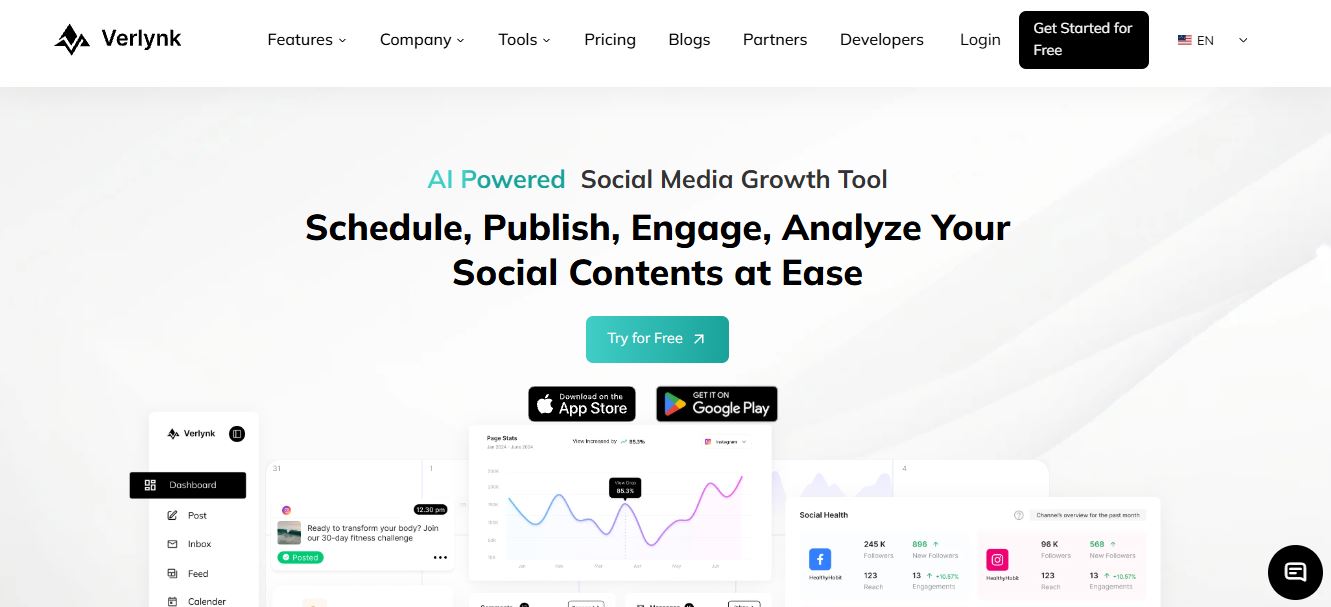
What Verlynk Actually Is
Verlynk is an AI-powered social media management platform built around one idea: stop making people tab-hop between six different apps to run their social presence.
It handles content scheduling, a unified inbox for messages and comments, AI-assisted post and campaign creation, and analytics — all from one dashboard. On paper, that’s the same pitch as Buffer, Hootsuite, and a dozen other tools. What sets Verlynk apart is more specific: it’s cheap for what it includes, and it ships with an MCP integration layer, which is not something I expected to see on a tool at this price point.
If you’ve used MeetEdgar or a similar automation-first scheduler before, the core workflow will feel familiar. What’s different is how much AI is layered into the day-to-day — caption generation, hashtag suggestions, and a campaign generator that drafts a week’s worth of content ideas in one pass.
Platforms It Actually Connects To
Verlynk connects to Facebook, Instagram, LinkedIn, X, YouTube, Pinterest, and TikTok. That’s a fairly complete spread — it covers everything a small business or creator is realistically posting to in 2026, and it matches (sometimes beats) what Later and Buffer support out of the box.

There’s no native support for Threads or Snapchat yet, which is worth flagging if either platform is central to your strategy. It’s a small gap, but it’s the kind of thing that can quietly rule a tool out for certain teams, so I’d rather mention it now than let you find out after signing up.
Inside the Dashboard: What It’s Actually Like to Use
The dashboard itself is clean — arguably one of Verlynk’s strongest points. Everything sits behind a left-hand nav: calendar, inbox, analytics, and AI tools. Nothing felt buried three menus deep, which is more than I can say for some enterprise-grade tools I’ve tested that cost five times as much.

The Unified Inbox
This is the feature I ended up using the most. Comments, DMs, and mentions from every connected account land in one feed, and you can filter by platform, message type, or sentiment. That sentiment filter is genuinely handy — it let me surface negative or urgent messages without scrolling past forty “nice post!” comments first.
You can also tag conversations and save canned responses for repeat questions. If your team fields the same three questions from customers every week, this alone saves real time.
The AI Campaign Generator
This is the part Verlynk leans on hardest in its marketing, and it mostly earns it. Give it a topic or a product update, and it drafts a batch of ready-to-edit post ideas — captions, hashtag sets, and suggested timing. It’s not going to replace someone who genuinely understands your brand voice, and I did have to rewrite a few captions that came out generic. But as a first draft generator, it beats staring at a blank composer box. If you want an AI tool that leans harder into full video content rather than captions, my Syllaby review covers that end of the workflow in more depth.
The MCP Integration (This Is the Interesting Part)
Verlynk supports an MCP-compatible integration layer, meaning you can connect it to AI assistants like Claude, ChatGPT, or Cursor and issue natural-language commands — “show me tomorrow’s scheduled posts,” or “rewrite this caption in a more direct tone” — without opening the Verlynk dashboard at all. If you already run a chat-based workflow for other parts of your business, this is a genuinely useful bridge, and it’s not something Buffer or Hootsuite offer at this price.
Verlynk Pricing: Is It Actually Cheap?
Yes — this is where Verlynk makes its strongest case. Here’s the breakdown as it stood during my testing period. Pricing on any SaaS tool can shift, so double-check the live pricing page before you commit.

| Plan | Price | Accounts | Best For |
|---|---|---|---|
| Free | $0 | Up to 3 | Solo creators testing the waters |
| Individual | $9.99/mo | 10+ | Freelancers, small businesses |
| Team | $29.99/mo | 20+ | Agencies, growing marketing teams |
Both paid tiers come with a 14-day free trial, no card gymnastics required to see if it fits your workflow. Compare that to Sprout Social or Sprinklr, which start around $199/month, and the value gap is obvious. Even against Buffer’s per-channel pricing (roughly $6/channel/month), Verlynk’s flat-rate structure works out cheaper once you’re past a handful of accounts.
Starting Price Compared to the Competition
Verlynk — $9.99/mo
Buffer — from $6/channel/mo
Hootsuite — from $99/mo
Sprout Social / Sprinklr — from $199/mo
How I Tested Verlynk
I connect real accounts, schedule real posts, and try to break things the way an actual user would — clicking every menu, testing edge cases, checking what happens when a post fails to publish. For Verlynk, that meant three weeks of running a live content calendar across Instagram, X, and LinkedIn, using the AI campaign generator for a full week of posts, and routing a batch of test comments through the unified inbox to see how the sentiment filter and canned responses actually held up.
A few honest notes from that testing window: the dashboard doesn’t yet offer much visual customization — no theme options, no layout preferences — which other reviewers have flagged too, and I agree it’s the most obvious polish gap right now. I also noticed Verlynk’s own public social presence is quite small (its official Instagram sits under 100 followers, and its Product Hunt listing has only a handful of upvotes). That doesn’t affect how the product performs, but it’s a fair signal that this is still a young company, not an established enterprise vendor — worth knowing before you build a long-term workflow around it.
Verlynk Pros and Cons
✅ What Works
✔ Genuinely low starting price for 10+ accounts
✔ Unified inbox with sentiment filtering actually works
✔ MCP integration with Claude/ChatGPT/Cursor is a genuine differentiator
✔ Clean, uncluttered dashboard with a short learning curve
❌ Where It Falls Short
✘ No Threads or Snapchat support yet
✘ Minimal dashboard theme/customization options
✘ Young company — no published SOC 2 or security certification I could find
✘ AI-drafted captions sometimes need a human rewrite pass
Who Should Actually Use Verlynk
In my opinion, Verlynk is the right call for creators, freelancers, and small marketing teams who are outgrowing free tools like Later’s free tier but aren’t ready to pay Hootsuite or Sprout Social money. If your workload is mostly scheduling plus reasonable engagement volume across 3–20 accounts, it’s hard to beat on price-to-feature ratio.
It’s a weaker fit for large enterprises that need deep social listening, compliance documentation, or dedicated account management — that’s still Sprinklr and Sprout Social territory. And if your content strategy leans heavily on UGC-style video, pairing Verlynk’s scheduling with a dedicated tool like MakeUGC will get you further than relying on Verlynk’s AI generator alone. Running influencer campaigns alongside your organic calendar? I’d pair Verlynk with something purpose-built for that, like Aha AI, rather than expecting one tool to do both jobs well.
If outreach and lead generation on LinkedIn matter more to you than general scheduling, it’s worth reading my HeyReach review and the follow-up piece on whether HeyReach is safe to run at scale — that’s a genuinely different job than what Verlynk is built for.
Verlynk vs. the Alternatives
I don’t think any single tool wins every category, so here’s how I’d frame the decision if you’re comparing shortlist options.
| Tool | Starting Price | Strongest At |
|---|---|---|
| Verlynk | $9.99/mo | AI content + unified inbox at a low price |
| Buffer | Free / $6/channel | Simplicity, generous free tier |
| MeetEdgar | $29.99/mo | Evergreen content recycling |
| Sprout Social | $199/mo | Enterprise reporting and listening |
If you’re weighing this decision as part of a broader marketing stack, it’s worth reading how I’d approach using ChatGPT for small business marketing alongside a scheduler like Verlynk — the two aren’t competitors, they’re complementary.
FAQ
Is Verlynk free to use?
Yes. The free plan supports up to 3 connected accounts with basic AI features, and it doesn’t require a credit card to start.
How much does Verlynk cost for a small business?
Most small businesses land on the Individual plan at $9.99/month, which supports 10 or more accounts. Agencies and larger teams generally need the $29.99/month Team plan, which supports 20+ accounts and unlimited users.
Does Verlynk work with ChatGPT or Claude?
Yes. Verlynk offers an MCP-compatible integration that lets you connect AI assistants like Claude, ChatGPT, and Cursor and manage parts of your workflow through natural-language commands, instead of opening the dashboard directly.
Is Verlynk good for agencies?
For small to mid-sized agencies managing a moderate number of client accounts, yes — the Team plan includes unlimited users and approval workflows. For agencies running dozens of enterprise clients with heavy compliance needs, a platform like Sprout Social or Sprinklr is still the safer bet.
Bottom Line
My honest take: Verlynk earns its price tag. I went in skeptical of the “AI-powered” label, and I came out actually using the unified inbox and campaign generator more than I expected to. It’s not a Sprout Social replacement for large enterprises, and the lack of Threads support and dashboard customization are real gaps I’d like to see fixed. But for the exact audience it’s built for — creators, freelancers, and small teams juggling several platforms — it’s one of the better-value tools I’ve tested this year.
If you want a second opinion on how AI tools stack up more broadly before you commit budget to any of them, my breakdown of AI SEO and marketing tools and this piece on WooRank are both good next reads if you’re building out a full marketing stack rather than picking one tool in isolation.


