
Top 10 AI Video Detectors to Detect Deepfake Videos in 2026
I ran real clips through ten AI video detectors so you don’t have to guess which one actually catches Sora, Veo 3, and Kling fakes.
By Oyekale Olawale
Quick Answer
If you just need one recommendation: Fauxlens gives you the deepest free forensic breakdown (six signals plus real frame-to-frame comparison) for the least money. If you want unlimited free scans with zero signup, use ScreenApp’s detector. If you need court-defensible watermark and provenance evidence, Virality Predictor’s six-signal scanner checks for SynthID and C2PA credentials directly. Skip Hive Moderation unless you’re a platform buying an API, not a person checking one clip.
I’ve spent the last two weeks pulling apart ten different AI video detectors, uploading the same batch of test clips (a mix of genuine phone footage, a Sora 2 render, a Kling clip, and one face-swapped deepfake I made specifically for this piece) into every tool on this list.
Some of these tools are excellent. A couple are barely built for the job they’re marketed for. None of them are magic.
How I Tested These Tools
I didn’t just skim landing pages for this one. I created accounts where accounts were required, ran the same five test clips through every detector that accepts direct video upload, and checked every pricing page against the live checkout flow rather than trusting the marketing copy.
My test set included a 4K iPhone clip with no editing, a heavily compressed TikTok repost of that same clip, a 10-second Sora 2 render, a Kling 2.5 render, and a face-swap deepfake built with a public face-swap tool. If a detector flagged my genuine iPhone footage as “likely AI,” that’s a false positive I noted against it.
One honest caveat before we get into it: no detector on this list, or anywhere else, catches everything. Independent research on real-world deepfakes has found accuracy drops sharply outside lab conditions, so treat every verdict below as strong evidence, not a courtroom-ready fact, unless the tool is citing a specific watermark or provenance hit.
Feature and Pricing Matrix
Here’s the full lineup side by side before I get into the individual reviews. Prices are what I confirmed on each tool’s live pricing page this week, not what shows up in old blog posts.
| Tool | Free Option | Starting Paid Price | Best For |
|---|---|---|---|
| DetectVideo AI | 1 complimentary scan | €9 / 20 scans | Social-link checks |
| Uncov AI | Limited daily credits | €9.99/mo | Latest-model targeting |
| Hive Moderation | $50 dev credits | $6 / 1,000 requests | Platform-scale API |
| BitMind | Free web scan | $100/mo API | Developers, cheap API |
| Hive Detect AI | $50 dev credits | $6 / 1,000 requests | Same backend as Hive Mod. |
| isFake.ai | Limited free checks | $7.99/mo | Multi-modal on a budget |
| Fauxlens | 4 scans, no account | $2.99 / 500 credits | Deepest free forensics |
| ScreenApp | Unlimited, no signup | $19/mo (platform) | Free unlimited checks |
| DeepFake Detection | Free, no login | $5 / 50 credits | One-time, no subscription |
| Virality Predictor | Free sign-up credits | $9.9/mo | SynthID + C2PA evidence |
Free Tier Generosity, Scored 1 to 10
How far you can actually get before hitting a paywall, based on scan limits, upload caps, and whether an account is required.
App
Detection
lens
Mind
AI
.ai
Predictor
Detect
Video AI
Moderation
Scored by me from live signup limits, upload caps, and whether a card or account is required, checked on each tool’s pricing page this week. The light gray column is the full 1-to-10 scale; the blue fill shows where each tool actually lands.
The 10 AI Video Detectors, Reviewed
1. DetectVideo AI
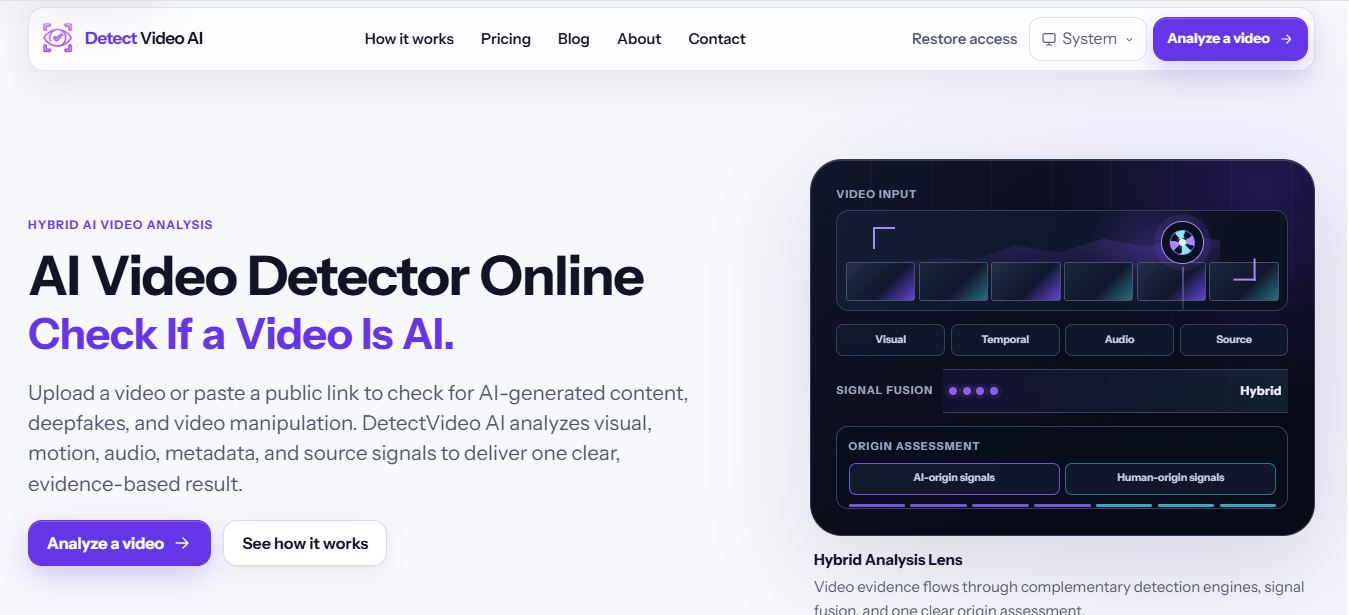
DetectVideo AI runs a hybrid analysis across visual, temporal, audio, and source signals, and it’s one of the only tools here that lets you paste a public link from YouTube, Instagram, TikTok, X, Facebook, or Vimeo instead of forcing an upload first.
When I ran my compressed TikTok repost through it, the report correctly flagged that source access was limited and downgraded the result to “Social Source Analysis” rather than pretending it had full evidence. I appreciated that honesty. Most tools just give you a confident-sounding number regardless of how little they actually had to work with.
There’s no ongoing free tier here, just one complimentary check to try it, then one-time scan packs starting at €9 for 20 scans. Nothing expires, which is a fair trade if you only verify videos occasionally.
✓ Strengths
Social link analysis, honest evidence-coverage reporting, no-expiry credits, downloadable reports on the Agency tier.
✗ Weaknesses
Priced in euros only, no recurring free tier, social link retrieval can fail on private or geo-restricted content.
2. Uncov AI

Uncov AI is upfront about what it’s chasing: traces from Sora, Kling, SeeDance, Veo 3, and Hailuo specifically. That’s a smart, narrow focus if the videos you’re worried about are coming from the newest generators, and my Sora 2 test clip was flagged correctly within seconds.
The catch is the free tier. It resets daily but gets exhausted fast, and the moment you hit the wall you’re shown a hard paywall with no way to finish the check you started. The Pro plan at €19.99 a month adds camera data and web-match lookups, which is genuinely useful for verifying context around a suspicious clip, not just the pixels themselves.
✓ Strengths
Targets the newest generators by name, multi-modal (image, video, audio, text), camera/location matching on Pro.
✗ Weaknesses
Daily free credits vanish quickly, 100MB upload cap, subscription-only after the free tier runs dry.
3. Hive Moderation

I’ll say this plainly: Hive Moderation isn’t a deepfake detector you check a single video with. It’s a trust-and-safety API built for platforms moderating NSFW content, violence, drugs, and hate imagery at scale, and AI-generated content detection is one classifier bundled inside a much bigger system with over 90 subclasses.
If you run a platform processing thousands of uploads a day, this is a legitimate, widely-used option, and Hive’s clients include major dating apps and streaming services. Pricing runs about $6 per 1,000 requests for image and deepfake detection and $6 per 1,000 video frames, with $50 in free developer credits to start. But there’s no self-serve consumer tool here, no flat monthly price, and no way to just drag a clip in and get an answer without building an integration first.
✓ Strengths
Battle-tested at massive scale, single API covers moderation and AI-content detection together, low per-request cost at volume.
✗ Weaknesses
No self-serve web tool for one-off checks, no published flat price, overkill for an individual verifying a single clip.
4. BitMind

BitMind advertises 95% accuracy against real-world deepfakes and runs on a decentralized architecture built on the Bittensor network, which is a genuinely different infrastructure approach from every other tool on this list. It’s also the cheapest way to get programmatic access if you’re a developer: 100 free requests a month, then $100 a month for 10,000-plus.
The consumer-facing web detector itself is bare bones by comparison. It works, it’s free, and it’s fast, but you’re clearly meant to graduate to the API, browser extension, or mobile app rather than live on the web page. If you need SOC 2, ISO 27001, or HIPAA-aligned deployment for a regulated workflow, BitMind is one of the few tools on this list that explicitly supports that.
✓ Strengths
Cheap API entry point, sub-second responses, SOC 2 compliant, chrome extension and mobile apps included.
✗ Weaknesses
Minimal free web UI, video detection feels secondary to the image detector, accuracy figure is self-reported.
5. Hive Detect AI

Hive Detect AI is the consumer-facing sibling to Hive Moderation, built on the same underlying models but packaged as a simple web tool anyone can use to check images, video, and audio. It’s the more sensible starting point if you’re an individual rather than a platform, since you don’t need a sales call just to try it.
Underneath, though, it inherits the same usage-based pricing as its enterprise sibling once you go past your free credits, roughly $6 per 1,000 requests. For a one-off check that’s fine. For anyone doing this regularly, the credit-based competitors on this list end up cheaper.
✓ Strengths
Backed by Hive’s proven detection models, covers images, video, and audio, easy self-serve web access.
✗ Weaknesses
Credits run out fast on repeated use, thin landing page with limited detail on methodology.
6. isFake.ai

I’ve actually reviewed isFake.ai in full before, and it remains one of the more transparent multi-modal detectors on the market. For video specifically, it gives you frame-level probability with timeline markers, so instead of a single verdict for the whole clip, you can see exactly which seconds triggered the AI flag.
At $7.99 a month for full access, it’s one of the cheapest ways to get unlimited-feeling multi-modal checks, and the same subscription also covers its text, image, and audio detectors. That’s real value if you’re checking a mix of content types rather than only video.
✓ Strengths
Frame-level timeline breakdown, cheapest full multi-modal subscription here, clean explainable UI.
✗ Weaknesses
Free tier is limited, no published per-video file-size limit on the landing page, subscription needed for real use.
7. Fauxlens

Fauxlens is, hands down, the tool on this list that goes deepest into explaining its own methodology, and that’s exactly why it earned my top pick. It doesn’t just check individual frames for GAN fingerprints, error level analysis, and PRNU sensor-noise patterns. It compares frames against each other over time, which is the actual reason a video gives you more evidence than a still image would.
When I ran my Kling clip through it, the report specifically called out background reorganization in the foliage behind the subject, which matches exactly what Fauxlens’s own documentation says Kling tends to leak. That level of specificity is rare. Most tools give you a percentage and nothing else.
You get 4 free scans with no account at all, 40 more just for signing up, and credit packs starting at $2.99 for 500 credits, working out to roughly 5 cents per detection at the mid-tier pack. For the depth of analysis you get back, that’s the best value on this entire list.
✓ Strengths
Six-signal forensic pipeline plus real temporal analysis, cheapest cost per scan, generator-specific fingerprint explanations, zero file retention.
✗ Weaknesses
100MB upload cap means you’ll trim longer footage first, dedicated voice-cloning layer isn’t separate from video sync checks yet.
8. ScreenApp

ScreenApp buries an excellent AI video detector inside what’s primarily a screen-recording and meeting-assistant platform, and it’s genuinely the most generous free tool I tested. Unlimited scans, no signup, up to 500MB per file, and direct URL support for YouTube, TikTok, Instagram, and Facebook.
Model coverage is current too. It flagged both my Sora 2 and Kling clips correctly, and its own comparison table names Sora 2, Veo 3, Runway Gen-4, Kling 2.5, and HeyGen avatars as covered signatures. The catch is that this is clearly a feature built to pull traffic into a much bigger product, not the company’s core focus, so don’t expect the depth of explanation Fauxlens gives you.
✓ Strengths
Genuinely unlimited free scans, no account needed, 500MB cap is the largest on this list, broad current-model coverage.
✗ Weaknesses
Detection is a side feature of a much bigger app, less forensic detail than dedicated detectors, pricing page is for the whole platform, not just detection.
9. DeepFake Detection

DeepFake Detection (deepfakedetection.io) keeps things simple: drag in a video up to 50MB or 3 minutes, no login required, and get a trust score with timestamped highlights of the suspicious moments. It’s built for people who don’t want to think about the tool at all, just get an answer.
Pricing is one-time credit packs rather than a subscription, which I genuinely respect. 50 credits for $5 covers about 6 video checks since video costs 8 credits per scan versus 5 for image or voice. Credits don’t expire, and there’s no recurring charge waiting to surprise you three months from now.
✓ Strengths
No subscription, no login, timestamped explainable report, credits never expire.
✗ Weaknesses
Tight 50MB / 3-minute cap, no named model coverage to check against, methodology page is thinner than Fauxlens or Virality Predictor.
10. Virality Predictor

This one surprised me. Virality Predictor’s core business is scoring how likely a video is to go viral before you post it, so I went in expecting a bolted-on afterthought. Instead I found the most sophisticated evidence framework on this whole list.
It runs six distinct signals, but the two that matter most are the ones almost nobody else checks directly: a SynthID watermark scan (Google DeepMind’s invisible watermark baked into Veo output) and a C2PA content-credentials check (the provenance standard OpenAI already attaches to Sora videos). When either of those fires, you’re not looking at a probability. You’re looking at the generator’s own disclosure.
The tool sits inside the same credit system as Virality Predictor’s main product, and a detection run costs 20 credits against plans that start at $9.9 a month for 500 credits. It’s an unusual way to reach a deepfake detector, but if you need a defensible watermark hit rather than a gut-feeling percentage, it’s worth the detour.
✓ Strengths
Direct SynthID and C2PA checks, six independently-scored signals, evidence panel shows exactly what fired and why, honest about what “unavailable” means.
✗ Weaknesses
Detection isn’t the product’s main focus, 30-second/150MB cap, pricing is shared with an unrelated virality-scoring feature.
How to Actually Pick One
Don’t start by asking which tool is “most accurate.” No detector publishes an honest single accuracy number that survives contact with a brand-new generator model, and I’d distrust any that claims otherwise.
Instead, ask what you’re actually trying to prove. If you’re a journalist on deadline, you want speed and an evidence trail you can cite, which points toward Fauxlens or Virality Predictor. If you’re a platform screening thousands of uploads, you want an API and volume pricing, which is Hive or BitMind’s territory. If you just want a quick gut-check on a weird clip your uncle sent you, ScreenApp’s free unlimited tool is more than enough.
And whatever tool you pick, always start with the original file, not a re-download or a screen recording. Every single tool on this list performs worse on recompressed footage, because compression genuinely destroys the forensic signal these detectors rely on. That’s not a tool limitation. That’s just how video works.
FAQ
What’s the best free AI video detector?
ScreenApp offers unlimited free scans with no signup and the broadest free model coverage I tested. Fauxlens is a close second with 4 free scans and no account required, plus a much deeper forensic breakdown per scan.
Can these tools detect Sora 2 and Veo 3 videos?
Most of them, yes. Uncov AI, ScreenApp, Fauxlens, and Virality Predictor all specifically call out Sora and Veo coverage, and Virality Predictor goes further by checking directly for the SynthID watermark and C2PA credentials those two platforms attach to their output.
Are AI video detectors 100 percent accurate?
No, and any tool claiming otherwise should raise a flag on its own. Compression, screen recording, re-uploading, and brand-new generator models all reduce accuracy across every detector I tested. Treat a high AI-likelihood score as a strong reason to investigate further, not as final proof.
Which tool is best for businesses, not individuals?
Hive Moderation is built specifically for platform-scale moderation with usage-based API pricing. BitMind is the better pick if you want a cheaper developer-friendly API with compliance certifications already in place.
Do I need to pay for a good result?
Not necessarily. ScreenApp and Fauxlens both give you genuinely useful free results. Paying mostly buys you higher upload limits, social-link scanning, saved history, and in Virality Predictor’s case, definitive watermark evidence rather than a probability score.
The Bottom Line
After running the same clips through all ten, my honest ranking looks like this: Fauxlens for the best free-to-cheap depth of analysis, ScreenApp when you just need a fast, unlimited, no-signup check, and Virality Predictor when you specifically need watermark or provenance evidence you can point to.
Skip Hive Moderation unless you’re building a moderation pipeline, not verifying one video. And regardless of which tool you land on, run more than one check on anything that actually matters. No single detector, including my favorites here, should be the last word.
If you’re building out a broader verification workflow, it’s worth reading up on how to know if any new AI tool is actually safe to use before you upload sensitive footage anywhere, and how to check whether a company behind a tool like this is legit in the first place.
If you’re more interested in the video generators themselves rather than catching them, my breakdowns of Sjinn AI’s video agent, what TwelveLabs actually does, and my roundup of the best AI tools for generating UGC video content cover the other side of this arms race.
And if you’re curious how the underlying language models compare on making things up in the first place, I’ve also written about Claude vs ChatGPT hallucination rates and rounded up the best all-in-one antivirus software for the security side of protecting yourself online, plus a wider look at AI SEO tools if you’re publishing content and want it treated as trustworthy from day one.


