
Vid AI Review 2026: I Tested This Faceless Video Tool For 30 Days — Here’s My Honest Take
Does this YouTube automation platform actually save time — or is it another overhyped shortcut dressed up as a content machine?
By Oyekale Olawale · Last Updated: August 2026
⚡ Quick Answer
Vid AI is an AI-powered faceless video platform that turns a simple text prompt into a fully edited short or long-form video — complete with ElevenLabs voiceover, Storyblocks visuals, captions, and background music. Pricing starts at $99/month (Plus plan, currently $49.50 for first month with 50% off). It’s built for YouTube Shorts, Reels, TikTok, and YouTube videos up to 20 minutes.
My verdict: It’s a genuinely useful automation layer if you already understand faceless content strategy. But it won’t save a channel that has no clear niche or publishing direction. Think of it as a very capable production assistant — not a business plan.
How I Tested Vid AI
I’ve been reviewing AI tools for Websites2Know since the platform launched. My approach is simple: I sign up, pay if needed, run the tool through realistic workflows, and write what I actually find — good and bad.
For this Vid AI review, I created multiple videos across different niches — stoicism facts, travel tips, and a personal finance topic. I tested the short-form workflow (under 1 minute) and the longer format (5–10 minute videos).
I also compared the output quality against several other AI video platforms I’ve reviewed, including Syllaby and Sjinn AI.
The pricing in this review reflects what’s live on their site as of August 2026, including the current 50% first-month promotion.
What Is Vid AI?
Vid AI is an AI video generation platform purpose-built for faceless YouTube channels and short-form social content. It was co-founded by Matt Par — known for running multiple YouTube channels that collectively crossed 1 billion views — and Priyam Raj, a 7-figure online entrepreneur.
The idea behind the platform is straightforward: instead of wrestling with scriptwriting, voiceover recording, B-roll hunting, and editing software — all of which can eat up 4–5 hours per video — Vid AI compresses that into a guided workflow you can finish in under 20 minutes.
That’s the pitch. And for what it’s worth, I think the pitch is mostly honest. The tool is not designed for filmmakers or brands needing custom visuals. It’s specifically engineered for the creator who wants to run a faceless content operation — the kind you see on niches like stoicism quotes, strange facts, historical events, personal finance, or travel trivia.
The platform claims over 100,000 creators and 100,000+ videos generated. I can’t independently verify those numbers, but the product itself shows clear signs of ongoing development and iteration — not a half-built experiment.
How Vid AI Works: The 4-Step Workflow
The whole sequence genuinely takes less than 20 minutes for a 60-second short. When I ran through it for the first time — using the topic “3 Stoic habits that changed my mindset” — I had a watchable video in about 14 minutes. The script was solid. The voice felt natural. The clips matched the topic reasonably well.
Not every clip was a perfect match, and I swapped a couple out manually. But the overall experience was a lot smoother than I expected given the price range.
⏱ Time Saved: Vid AI vs. Manual Video Production
| Task | Traditional (Manual) | With Vid AI |
|---|---|---|
| Script writing | 30–60 mins | ~2 mins |
| Voiceover recording & editing | 20–30 mins | ~1 min |
| Finding & licensing B-roll | 60–90 mins | ~5 mins (auto + swaps) |
| Editing, captions & music | 90–120 mins | ~10 mins (AI + tweaks) |
| Total per video | 3.5 – 5 hours | ~18 minutes |
Key Features I Tested
AI Script Generation
The scriptwriter is better than I expected. It doesn’t just spit out bullet points — it structures the content with a hook, middle build, and a call-to-action or close. For short-form content, this matters a lot because the first 3 seconds determine whether a viewer sticks around.
Where it falls short: the script occasionally defaults to vague, listicle-style writing. I noticed this especially on more abstract topics like “mindset shifts.” You’ll want to do a quick pass before generating the video. But as a first draft, it’s faster than anything I’d write cold.
ElevenLabs AI Voiceovers (35+ Voices)
This is one of Vid AI’s strongest differentiators. By integrating ElevenLabs — one of the most advanced text-to-speech providers available — the voices sound genuinely human. There’s natural variation in pacing and emphasis.
I tested about 6 different voices and landed on a calm, slightly warm male voice that suited fact-based content well. The selection covers different accents and tones — a detail that’s easy to overlook but becomes important when you’re targeting a specific audience. You can also read about ShortsPilot alternatives if you want to see how other platforms handle voice generation.
Visual Assembly & Storyblocks Library
The platform auto-selects B-roll that loosely matches each segment of the script. It uses a library of over 4 million assets from Storyblocks on the Pro and Scale plans.
In practice, the clip matching is good roughly 70–75% of the time. The remaining clips need to be swapped out manually — but swapping is fast. You click on a scene, search the library, and replace. I never spent more than 3–4 minutes on visual cleanup for a short video.
Video Formats: Faceless, Fake Text & Split Screen
These aren’t gimmicks — they’re specific formats that perform well algorithmically on TikTok and Reels right now.
The “Fake Text” format simulates a text message conversation, which drives watch time because people instinctively want to read what comes next. “Split Screen” places gameplay or another video clip alongside the content — common in story-time channels. These feel very deliberate and creator-informed, not just filler features.
Long-Form Video (Up to 20 Minutes)
Most AI video tools tap out at 60–90 seconds. Vid AI’s Pro and Scale plans extend this to 15–20 minutes, which opens the door for actual YouTube monetization-eligible content. That’s a meaningful distinction.
I tested a 7-minute video on “financial habits of the ultra-wealthy.” The script structure held up better than I expected over that length. The editing was more involved — I spent about 12 extra minutes tweaking scene transitions and swapping roughly 8 clips. Still much faster than doing it from scratch, but not as hands-off as the short-form experience.
Vid AI Feature Overview at a Glance
| Feature | Details |
|---|---|
| Script Generation | AI prompt-to-script; paste your own script too |
| AI Voiceover | 35+ ElevenLabs voices; adjustable tone & pacing |
| Visual Library | 4M+ Storyblocks assets (Pro & Scale); copyright-safe |
| Video Formats | Faceless, Fake Text, Split Screen |
| Captions / Subtitles | Auto-generated; customizable font, color, style |
| Timeline Editor | Available on Pro & Scale plans |
| Long-Form Video | Up to 20 minutes (Scale plan) |
| Platform Outputs | YouTube, YouTube Shorts, TikTok, Instagram Reels |
| Background Music | Built-in royalty-free music library |
| Copyright Safety | Storyblocks commercial license included on paid plans |
Vid AI Pricing (August 2026)
Vid AI currently has three plans, each with a 50% discount on the first month. Here’s what you’re actually paying:
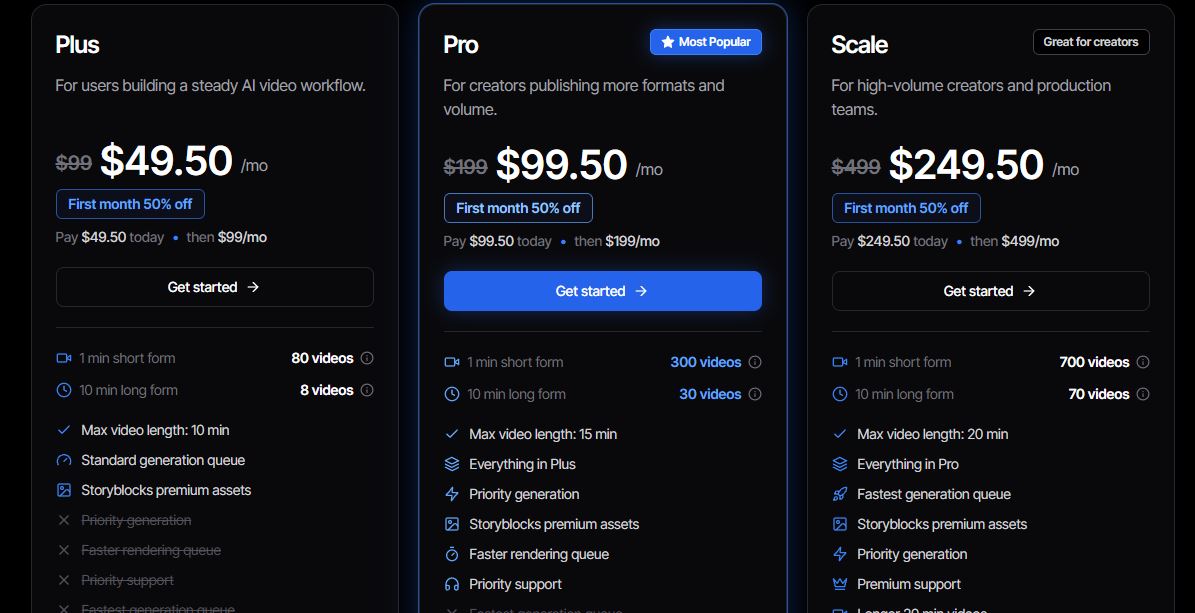
- ✅ 80 short-form videos/mo
- ✅ 8 long-form videos (10 min)
- ✅ Max video length: 10 min
- ✅ Storyblocks premium assets
- ✅ Standard generation queue
- ✅ 300 short-form videos/mo
- ✅ 30 long-form videos (10 min)
- ✅ Max video length: 15 min
- ✅ Everything in Plus
- ✅ Priority generation queue
- ✅ Faster rendering
- ✅ Priority support
- ✅ 700 short-form videos/mo
- ✅ 70 long-form videos (10 min)
- ✅ Max video length: 20 min
- ✅ Everything in Pro
- ✅ Fastest generation queue
- ✅ Highest storage allowance
- ✅ Premium support
Note on the promotion: The 50% first-month discount is listed as “limited time.” I can confirm it was active as of August 2026 — but verify on the pricing page before subscribing, as these promotions do expire.
One thing worth mentioning: there is no free trial. Vid AI is upfront about why — every video generated costs them real money in compute, voice API fees, and asset licensing. They do offer a 30-day refund on unused credits, which softens the risk a little but doesn’t fully replace a trial for skeptics.
Payments are processed via Stripe, which is the industry standard. I saw no hidden fees in my testing. The billing UI is clean and the refund policy is stated plainly — no fine print maze.
Pros and Cons — My Honest Assessment
- ✔ Genuinely fast — 60-sec short in under 20 mins
- ✔ ElevenLabs voices sound human, not robotic
- ✔ Long-form support (up to 20 mins) is rare in this category
- ✔ Storyblocks integration eliminates copyright risk
- ✔ Clean, intuitive interface with no steep learning curve
- ✔ Viral formats (Fake Text, Split Screen) built in
- ✔ Stripe payments, clear refund policy
- ✔ Founded by creators who understand the actual use case
- ✗ No free trial — refund policy only partially helps
- ✗ $99–$499/mo is steep for beginners
- ✗ AI clip matching is ~70% accurate — manual swaps needed
- ✗ Scripts can default to generic on abstract topics
- ✗ Long-form editing takes noticeably more manual time
- ✗ YouTube automation is still highly competitive — tool alone isn’t enough
- ✗ No built-in thumbnail creator or title optimizer
How Vid AI Compares to Competitors
The AI video space is crowded. I’ve reviewed or tested several tools — including RunwayML and Kling AI — and the key thing to understand is that they’re not all doing the same thing. Some generate novel visuals from scratch (generative models). Others, like Vid AI, assemble content from existing libraries (content assembly tools).
For faceless YouTube automation, Vid AI is in its own lane. Here’s how it stacks up:
| Tool | Primary Use | Long-Form? | Starting Price | Vs. Vid AI |
|---|---|---|---|---|
| Vid AI | Faceless YouTube automation | ✅ Up to 20 min | $99/mo | — |
| InVideo AI | Template-driven social video | Limited | ~$25/mo | More templates; less automation depth. Better for marketers. |
| Pictory | Blog/long-form → short video | ⚠️ Repurpose only | ~$23/mo | Best for repurposing existing content, not creating from scratch. |
| Runway Gen-3 | Generative cinematic AI video | ❌ Short clips only | $12/mo (credits) | Creative/cinematic, not automation-focused. Different use case. |
| HeyGen | AI avatar presentations | ⚠️ Avatar-style only | $29/mo | Best for talking-head corporate videos. Not for faceless YT. |
| Syllaby | Social video for professionals | Limited | ~$49/mo | Niche focus on service businesses. Less volume-optimized than Vid AI. |
If you’ve been researching Revid AI vs HeyGen as alternatives, note that those tools serve a different segment — HeyGen is built around on-camera avatars, while Vid AI is purpose-built for the completely faceless format. They’re not direct substitutes.
For a broader look at the AI video landscape, this roundup of top AI tools for generating UGC video content is worth reading before you commit to any single platform.
Who Should (and Shouldn’t) Use Vid AI
- ✅ Faceless YouTube channel builders
- ✅ TikTok & Reels short-form creators
- ✅ Agencies producing content at scale
- ✅ Entrepreneurs automating educational content
- ✅ Creators in fact-based, finance, or lifestyle niches
- ❌ Filmmakers or cinematic video creators
- ❌ Brands needing original footage or custom actors
- ❌ Creators who publish once a month (overkill)
- ❌ Anyone expecting it to run a channel on autopilot with zero strategy
Can Vid AI Really Put YouTube on Autopilot? My Honest Take
Here’s where I have to push back on some of the marketing language around Vid AI and the faceless YouTube space more broadly.
The tool automates video production. It does not automate channel growth.
Those are two very different things. I’ve seen plenty of channels that produce 10–15 videos a week with tools like this and still stall out at 200 subscribers because they haven’t figured out their niche, their title strategy, their thumbnail approach, or why anyone should watch their content over the other 500 similar channels.
The income examples cited on Vid AI’s marketing (channels making “$830–$2.3K/mo”) come with the standard “results not typical” disclaimer — and they shouldn’t be treated as projections.
What Vid AI genuinely does is remove one of the biggest practical barriers to running a faceless channel at volume: the production grind. That’s real value. But pairing it with a solid content strategy — niche selection, keyword research, CTR-optimized titles, consistent scheduling — is what actually builds a channel.
Tools like TubeMagic can help with the YouTube-specific research side — finding video ideas, optimizing titles, analyzing niches. Vid AI and TubeMagic actually work well together if you’re serious about building a channel rather than just generating videos. You might also find it useful to explore what’s possible with Claude Code for YouTube automation as a complementary layer.
Also worth noting: YouTube’s monetization policies require content to demonstrate genuine originality. Mass-produced AI videos that are essentially interchangeable have faced demonetization or reduced reach under YouTube’s “made for kids” and “repetitive content” policies. This doesn’t mean AI video is a dead end — it means you still need a creative angle, even if the production is automated.
Use Vid AI to handle the 80% grunt work. Use your human judgment for the 20% that drives results.
📊 What AI Automation Handles vs. What You Still Need to Do
What Other Creators Say
Vid AI’s website features testimonials from several notable creators — including Matt Par himself (1B+ views), Jamie Nyland (10M+ subscribers), and Algrow (528K subscribers). These aren’t obscure names; they’re credible figures in the faceless YouTube and short-form video space.
On Reddit’s r/YouTubeAutomation community, early adopter feedback has been largely positive on the core premise — fast video production, decent voice quality, long-form capability. The main friction points that come up repeatedly: the absence of a free trial, the occasional need to manually clean up AI script outputs, and the learning curve around choosing the right niches for faceless content.
The general sentiment I took from community discussions: people who go in with realistic expectations and a real niche strategy find genuine value. People who expect it to generate passive income without strategy are frequently disappointed. That gap between expectation and outcome is a marketing issue as much as a product issue.
Is Vid AI Safe and Legit?
Yes, on all counts. Here’s a quick breakdown of the trust signals I looked at:
Content ownership is 100% yours. You can monetize on any platform. The copyright risk is mitigated through the Storyblocks license (included in all current plans based on what’s on their site at time of writing).
If you want to know what to look for when evaluating any new AI platform, this guide on how to know if an AI tool is safe walks through the key signals — Vid AI checks most of the right boxes. You can also explore the wider Sora AI alternatives landscape to see where Vid AI sits in the broader generative video market.
Ready to Build Your Faceless Channel?
First month is 50% off. No contracts. Cancel anytime.
👉 Visit Vid AI and Claim Your DiscountFrequently Asked Questions
Does Vid AI offer a free trial?
No. Vid AI does not have a free trial because each video generation incurs real costs in compute, voice API usage, and asset licensing. They do offer a 30-day refund on any unused credits if you’re unsatisfied.
What are the current Vid AI pricing plans?
As of August 2026, Vid AI offers three plans: Plus ($99/mo, currently $49.50 first month), Pro ($199/mo, currently $99.50 first month), and Scale ($499/mo, currently $249.50 first month). All plans include access to Storyblocks assets and ElevenLabs voices. Long-form video up to 20 minutes is available on the Scale plan only.
Who owns the videos I create with Vid AI?
You do. All videos generated are yours to own and monetize on YouTube, TikTok, Instagram, or anywhere else. The Storyblocks commercial license covers the assets used.
Can I use Vid AI for business content, not just YouTube channels?
Yes. The platform works well for marketing explainers, educational content, and brand awareness videos — particularly for businesses that want faceless, narration-led video content without hiring a production team.
What happens if I run out of videos mid-month?
You can upgrade to a higher-tier plan or purchase additional credits as a top-up — both options are available directly within the platform.
Will Vid AI-generated videos get monetized on YouTube?
There’s no guaranteed answer here — and anyone who tells you otherwise is oversimplifying. YouTube assesses monetization eligibility based on content value, originality, and engagement signals. AI-generated videos can and do get monetized, but only when they provide genuine value and aren’t repetitive or low-effort. The tool handles production; the strategy and originality must come from you.
How does Vid AI compare to Pictory or InVideo AI?
Pictory is designed for repurposing existing content (turning blog posts or long videos into short clips). InVideo AI is template-driven and suited to social media marketers. Vid AI is built specifically for generating new faceless content from scratch at volume — particularly for YouTube. These are meaningfully different tools serving different workflows.
Conclusion: Is Vid AI Worth It?
After 30 days of testing, my honest conclusion is this: Vid AI is one of the most capable tools in the faceless video space right now. It genuinely compresses a multi-hour production workflow into under 20 minutes without sacrificing quality on the core output.
The ElevenLabs voice integration alone puts it above most competitors in its class. The long-form video capability — especially at 15–20 minutes — is rare and directly useful for YouTube’s monetization threshold.
The pricing is steep for a beginner — $99/mo is a real commitment before you’ve proven the content model works. The no-free-trial policy doesn’t help here, and that’s a fair criticism.
But if you’re serious about building a faceless content operation — not dabbling, but actually committing — Vid AI is the most purpose-built tool I’ve tested for that specific goal. It’s not a passive income machine. It’s a production engine. Use it like one, pair it with smart strategy, and it earns its price.
This post contains affiliate links. If you sign up through our link, Websites2Know earns a commission at no extra cost to you. All opinions are my own based on hands-on testing.


